Dynamic Component Loader in Angular 13+
In Angular, there is basically the mechanism that allows you to invoke components on a page either statically through selectors or via…
Dynamic Component Loader in Angular 13+
In Angular, there is basically the mechanism that allows you to invoke components on a page either statically through selectors or via routes. Angular has its API for loading components dynamically.
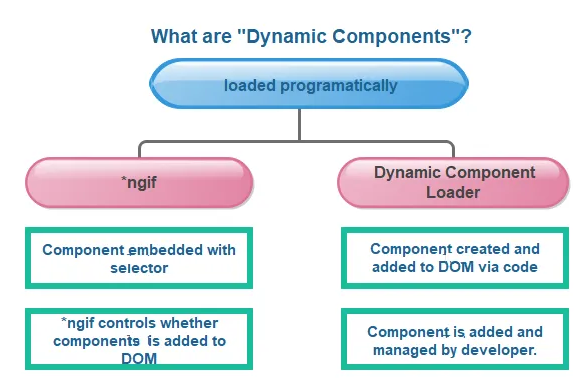
Differences between the two basic approaches (Source-unknown)
However, besides these, there may be a need to dynamically invoke a component at runtime through various events.
In this case, the dynamic component approach can be used. In the following example, directives and services are employed for this approach.
In this example, there are;
- a helper class (RandomGenerator)
- components (DynamicComponent, Dynamic2Component, Dynamic3Component)
- a directive (DynamicDirective)
- a service (LoadComponentService)
1) Helper
The RandomGenerator static class is created in the helper folder to generate random strings. Then, it will be utilized in the components. It is also possible to define it as the IDs of components, but we are not doing that for now.
random-generator.helper.ts
export default class RandomGenerator {

    public static randomString(length: number) {
        var randomChars = 'ABCDEFGHIJKLMNOPQRSTUVWXYZabcdefghijklmnopqrstuvwxyz0123456789';
        var result = '';
        for (var i = 0; i < length; i++) {
            result += randomChars.charAt(Math.floor(Math.random() * randomChars.length));
        }
        return result;

    }
}
2) Components
The three components named DynamicComponent, Dynamic2Component, and Dynamic3Component are created to be loaded dynamically at runtime.
They are sample components used to demonstrate how to run dynamic components. They are not the focal points, so they have similar functionality except for their templates.
dynamic.component.html
<div style="width:400px; height:100px; background-color:rgb(228, 165, 6)">

    <h2>Dynamic 1 component works!</h2>
    <h3>Id: {{val}}</h3>

</div>
dynamic.component.ts
import { Component, OnInit } from '@angular/core';
import RandomGenerator from '../helpers/random-generator.helper';

@Component({
  selector: 'app-dynamic',
  templateUrl: './dynamic.component.html',
  styleUrls: ['./dynamic.component.scss']
})
export class DynamicComponent implements OnInit {

  public val: string = '';

  constructor() { }

  ngOnInit() {
    this.val = RandomGenerator.randomString(5)
  }

}
3) Directive
DynamicDirective is created using the “ng g d dynamic” command.
After that, ViewContainerRef class is injected to gain access to the view container of the element that will host the dynamically added component.
ViewContainerRef will capture the ng-template to be marked with the directive and represent it.
dynamic.directive.ts
import { Directive, ViewContainerRef } from '@angular/core';

@Directive({
  selector: '[dynamicDirective]'
})
export class DynamicDirective {

  constructor(public viewContainerRef: ViewContainerRef) { }

}
4) Service
LoadComponentService is created using the “ng g s load-component” command.
Its constructor has two parameters viewContainerRef and component respectively.
While the viewContainerRef parameter is used to prevent memory leaks by clearing, the component parameter is utilized to specify which component will be created.
import { Injectable, ViewContainerRef } from '@angular/core';

@Injectable({
  providedIn: 'root'
})
export class LoadComponentService {

  constructor() { }

  async load(viewContainerRef: ViewContainerRef, component: any) {

    viewContainerRef.clear();

    return viewContainerRef.createComponent(component);
  }
}
4) Implemantation
Their implementations are performed in AppComponent and its template.
In template-side, the event for loading dynamic components is managed using the click event on the button. In addition, DynamicDirective is defined in the ng-template element to mark here.
app.component.html
<div style="width:500px; height:300px; background-color:yellow">
  <h1>{{title}}</h1>
  <button (click)="loadDynamicComponent($event)">Change Component</button>

  <ng-template dynamicDirective></ng-template>

</div>
In component-side, the three components are assigned to the compArray parameter being array type.
compArray = [DynamicComponent, Dynamic2Component, Dynamic3Component]The dynamicDirective is defined using ViewChild decorator, and the loadComponentService is injected into the component to load the selected component using its load method.
app.component.ts
import { Component, ComponentFactoryResolver, OnInit, ViewChild } from '@angular/core';
import { DynamicDirective } from './dynamic.directive';
import { LoadComponentService } from './load-component.service';
import { DynamicComponent } from './dynamic/dynamic.component';
import { Dynamic2Component } from './dynamic2/dynamic2.component';
import { Dynamic3Component } from './dynamic3/dynamic3.component';

@Component({
  selector: 'app-root',
  templateUrl: './app.component.html',
  styleUrls: ['./app.component.scss']
})
export class AppComponent implements OnInit {

  title = 'AppComponent';
  compArray = [DynamicComponent, Dynamic2Component, Dynamic3Component]

  @ViewChild(DynamicDirective, { static: true }) dynamicDirective!: DynamicDirective;

  constructor(private loadComponentService: LoadComponentService) { }

  ngOnInit(): void { }

  public loadDynamicComponent(event: any) {
    // Get a random component
    const item = this.compArray[Math.floor(Math.random()*this.compArray.length)];

    const containerRef = this.dynamicDirective.viewContainerRef;
    this.loadComponentService.load(containerRef, item);
  }
}
Result
When you click the Change Component button, you will see the dynamic component.

When you click the button, a random component will load.
Dynamic Component Loader in Angular is a powerful feature that allows developers to load and render components dynamically at runtime. This capability is essential for creating flexible and dynamic user interfaces. With Dynamic Component Loader, developers can load components based on user interactions, data, or other conditions, making applications more responsive and adaptable.
I shared codes in my Github repository below
Thanks for reading.
References
https://angular.io/guide/dynamic-component-loader
https://medium.com/angular-in-depth/loading-components-dynamically-in-angular-cd13b9fdb715
https://www.gencayyildiz.com/blog/angularda-dynamic-component-loading
메타데이터
- post_id
- 81e4fc8a0f83
- slug
- dynamic-component-loader-in-angular-13-81e4fc8a0f83
- url
- https://medium.com/@bsozer06/dynamic-component-loader-in-angular-13-81e4fc8a0f83
- canonical_url
- https://medium.com/@bsozer06/dynamic-component-loader-in-angular-13-81e4fc8a0f83
- author_url
- https://medium.com/@bsozer06
- status
- ok
- fetched_at
- 2026-06-17 12:55:42