I Was Burning Cursor Credits Every Single Day — Until I Discovered Rules and Custom Skills
The moment that changed how I use AI coding tools forever happened at 11pm on a Tuesday.
I Was Burning Cursor Credits Every Single Day — Until I Discovered Rules and Custom Skills
The moment that changed how I use AI coding tools forever happened at 11pm on a Tuesday.
I was on my fourth consecutive Cursor session of the day. Fourth. And I was typing, for the fourth time, something like this:
“Use the Repository Pattern. Use async/await. Controllers should be thin. Business logic goes in the Service layer. Use FluentValidation for validation. Use Result<T> for service responses. Follow Clean Architecture…”
I stopped mid-sentence and looked at what I’d written.
I had just spent 200 tokens — before asking my actual question — explaining things I had explained this morning. And yesterday. And the day before.
I wasn’t prompting Cursor. I was onboarding it. Again. Like a contractor who forgets everything every night and needs the same briefing every morning.
That was the moment I realised I was using Cursor completely wrong.
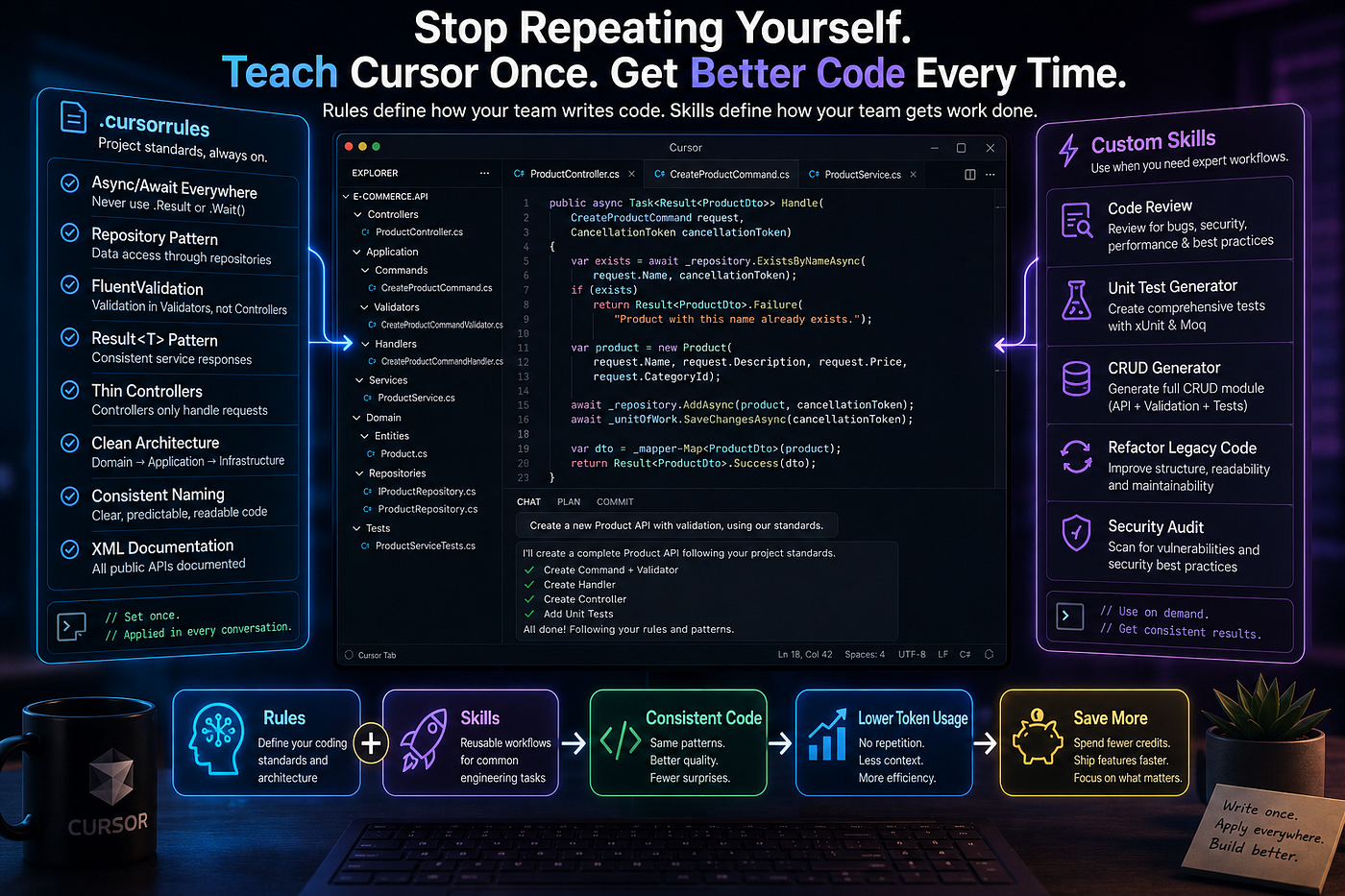
Write the rules once. Reuse the expertise forever.
The Problem Nobody Talks About
Here’s what the marketing materials don’t tell you: Cursor is extraordinary at coding, but it has no memory of your project.
Every conversation starts blank. The model doesn’t know you prefer async/await over Promise chains. It doesn't know your team uses MediatR, or that you've banned any types, or that your controllers should be fifteen lines, not two hundred. It doesn't know any of it.
So it guesses. And its guesses are reasonable, generic, and often not quite right for your codebase.
You correct it. It improves. And then the session ends — and all of that context evaporates.
The next developer on your team opens Cursor and starts from scratch. Different outputs, different patterns, different conventions. Same codebase.
This isn’t an AI problem. This is a context problem. And context problems have a solution.
What Cursor Rules Actually Are (And Why They’re Not Optional)
A .cursorrules file is the closest thing Cursor has to institutional memory.
It sits at the root of your project — same level as your package.json or .sln file — and its contents are automatically prepended to every single conversation Cursor has in that project. Ask Mode, Plan Mode, Agent Mode, inline edits — all of it. Without you typing a word.
Think of it this way: instead of briefing a new contractor every morning, you write the briefing once and pin it to their desk permanently. They read it before every task. You never repeat yourself again.
The difference in daily workflow is not subtle. Within a week of setting this up properly, I stopped thinking about prompting conventions entirely and started thinking exclusively about the actual problem I was trying to solve. That cognitive shift alone is worth the thirty minutes of setup.
What Cursor Custom Skills Are (And Why They’re Different)
Rules are always-on constraints. They govern how code should look in your project.
Skills are something different: they’re reusable expert playbooks that you invoke when you need them.
You create a Skill as a Cursor Notepad — a named set of detailed instructions — and call it with @notepad:skill-name when a specific situation calls for it. Think code review, refactoring a legacy module, generating a full CRUD feature, performing a security audit.
The distinction matters. You don’t want a code review checklist running on every file edit. But when you explicitly want a structured review before a PR, you want the same structured review every time — not a different interpretation depending on how you happened to phrase it that day.
Rules define how your team builds software. Skills define how your team performs specific engineering tasks. Together, they transform Cursor from a generic assistant into something that actually understands your project.
Scenario 1: The .NET API You’re Building Every Week
Let’s make this concrete.
You work on a .NET 8 API. Clean Architecture. MediatR for CQRS. FluentValidation for inputs. Your own Result<T> type for service responses. EF Core with the repository pattern. xUnit for tests.
Every time you start a Cursor session without a rules file, you’re spending the first exchange on setup — not on building. Here’s what that tax looks like across a single week of development:
Without .cursorrules:
"Create a Product API endpoint.
Use MediatR, CQRS pattern, Repository pattern,
FluentValidation for the command validator,
Result<T> for the service response,
async/await throughout, thin controller,
xUnit test for the command handler."
That’s your prompt just to get a starting point. 80 tokens of setup before a single line of logic.
With .cursorrules:
Create a Product API endpoint.
Done.
Cursor already knows the rest — because you told it once, permanently,
in the rules file.
Here’s the .cursorrules file that makes that work:
## Project: E-Commerce Platform API
## Stack: .NET 8 + ASP.NET Core + EF Core + MediatR + FluentValidation

## Architecture (Clean Architecture — non-negotiable)
- Domain → Application → Infrastructure → Presentation layer separation
- Domain layer: zero external dependencies
- Application layer: all business logic via MediatR Commands and Queries
- Infrastructure layer: EF Core, external APIs, email, file storage only
- Controllers: receive request → dispatch MediatR command/query → return result

## CQRS with MediatR
- Every operation is a Command (write) or Query (read) — never mixed
- Commands return Result<T> or Result — never throw for business failures
- Each Command/Query has a paired FluentValidation Validator class
- Handler file naming: CreateProductCommandHandler.cs, GetProductByIdQueryHandler.cs

## Code Standards
- Always use async/await — never .Result, .Wait(), or blocking calls
- No raw SQL unless the ORM cannot express the query (comment explaining why)
- Prefer C# 12: primary constructors, record types for DTOs, collection expressions
- File-scoped namespaces always
- Nullable reference types enabled; treat warnings as errors
- No magic strings — extract to constants or enums

## Error Handling
- Business failures: return Result.Failure("error-code", "message") — never throw
- Infrastructure failures: let them bubble to global exception middleware
- Never expose stack traces or exception details in API responses

## Testing
- xUnit + FluentAssertions + Moq for all unit tests
- Test file: CreateProductCommandHandlerTests.cs alongside handler
- Structure: Arrange → Act → Assert with section comments
- Cover: happy path, validation failure, domain rule violation, not-found

## Response Format
- Success: { data: T, meta?: PaginationMeta }
- Errors handled by global middleware — never construct error responses manually
One file. Committed to your repo. Every developer on your team inherits the same behaviour, automatically, forever.
Scenario 2: The Angular Component Nobody Can Agree On
Frontend teams have a particularly painful version of this problem.
When you have five developers, you often end up with five interpretations of what a “standard Angular component” looks like. One uses ChangeDetectionStrategy.OnPush. Another doesn't. One uses standalone components. Another uses modules. One uses reactive forms properly. Another mixes template-driven and reactive in the same form because that's what Cursor generated that day.
This isn’t a people problem. It’s a context problem.
Here’s a .cursorrules file that solves it:
## Project: Customer Portal
## Stack: Angular 17+ + TypeScript + NgRx + Reactive Forms + Tailwind CSS

## Component Standards
- Standalone components always (no NgModules)
- ChangeDetectionStrategy.OnPush on every component — no exceptions
- One component per file; filename matches selector (user-profile.component.ts)
- Smart (container) vs Dumb (presentational) component separation enforced

## State Management
- NgRx for all server-fetched state — no component-level HTTP calls
- Use createFeature() and createActionGroup() for feature state
- Effects handle all async operations; no HTTP in components or services directly
- Selectors for all state access — no direct store.select() with inline paths

## Forms
- Reactive Forms only — no template-driven forms
- FormBuilder with typed controls: FormControl<string | null>
- Custom validators as pure functions in validators/ directory
- Error messages via a shared ErrorMessageComponent, not inline templates

## Styling
- Tailwind utility classes only — no component-level SCSS unless absolutely necessary
- Responsive: mobile-first, sm/md/lg/xl breakpoints
- No hardcoded colours — use design token classes only

## Accessibility
- All interactive elements: aria-label or aria-labelledby required
- Focus management on modal/drawer open and close
- Keyboard navigation: Tab, Escape, arrow keys for menus and dropdowns

## File Structure (per feature)
feature/
  components/     ← dumb components
  containers/     ← smart components
  store/          ← actions, reducers, effects, selectors
  models/         ← interfaces and types
  services/       ← HTTP services only
Now when any developer asks Cursor to “Create a User Management component,” they get a standalone component with OnPush, reactive forms, NgRx integration, and proper accessibility — without anyone needing to specify any of it.
Scenario 3: The Skill That Pays Back Every Single Sprint
Rules handle the always-on standards. But some tasks are too complex and too specific to live in a rules file — they need their own dedicated playbook.
Code review is the best example.
Every team does code review differently. Different things to check. Different severity levels. Different output formats. A generic “review this file” prompt produces generic feedback that misses the things your team actually cares about.
Here’s a Custom Skill — stored in a Cursor Notepad named review — that you invoke with @notepad:review @file:YourFile.cs:
# Code Review Skill
# Invoke: @notepad:review @file:TargetFile.cs

# Runs a structured review across six categories specific to our standards.

You are acting as the most experienced engineer on this team.
Perform a thorough code review of the referenced file.

For every finding: identify the exact line or function, describe the issue,
assign severity (CRITICAL / HIGH / MEDIUM / LOW), and give a concrete fix —
not advice, an actual code suggestion.

## Category 1 — Architecture Compliance
- Does this file have exactly one responsibility?
- Is any business logic in a Controller or Repository?
- Are dependencies injected, not instantiated?
- Does it follow Clean Architecture layer rules from .cursorrules?

## Category 2 — Error Handling
- Are all async paths covered by try/catch or Result<T>?
- Are any raw Error() throws present (should be Result.Failure)?
- Are empty catch blocks present?
- Does error logging include requestId and userId context?

## Category 3 — Security
- Is all external input validated before use?
- Are authorisation checks present on sensitive operations?
- Are any secrets or connection strings referenced directly (not via config)?

## Category 4 — Performance
- N+1 query risk? (Look for queries inside loops)
- Missing pagination on any list endpoint?
- Synchronous operations that should be async?
- Missing cancellation token propagation?

## Category 5 — Test Coverage
- Does a test file exist for this class?
- Are error paths and null inputs tested?
- Do tests verify behaviour or implementation details?
- Which specific scenarios are missing?

## Category 6 — Readability
- Any names that don't reveal intent?
- Magic strings or numbers that need constants?
- Is any method longer than 30 lines? (Extract if so)
- Missing XML documentation on public members?

## Output Format
Return a table: | Category | Severity | Location | Issue | Fix |
End with: "X findings total (Y critical, Z high, W medium, V low)"
If no issues in a category: "✓ Clean"
The difference between this and “review my code” isn’t incremental. It’s categorical. You get a structured analysis in a consistent format, using your team’s specific standards, every single time — whether you run it yourself or a junior developer does.
Scenario 4: The Unit Test Skill That Ends the Inconsistency
Here is a truth most engineering managers won’t say out loud: test quality is wildly inconsistent on teams that don’t enforce structure.
Some tests are thorough. Some test only the happy path. Some have assertions so weak they’d pass even if the code returned nothing. And when you use AI to generate tests without guidance, you get the full spectrum — unpredictably.
This Cursor Notepad skill, named test, fixes that. Invoke it with @notepad:test @file:OrderService.cs:
# Unit Test Generator Skill
# Invoke: @notepad:test @file:TargetClass.cs

# Generates comprehensive, structured unit tests to our team standard.
You are generating production-quality unit tests.
Do not generate tests that would pass even if the method returned null.
Every assertion must fail if the code is broken.

## Framework and Tools
- xUnit for test runner
- FluentAssertions for all assertions (never Assert.Equal)
- Moq for mocking dependencies
- AutoFixture for test data where appropriate

## Test Structure (mandatory)
- One test class per class under test: OrderServiceTests.cs
- Nested classes per method: public class ProcessOrder
- Test names: Should_[ExpectedBehaviour]_When_[Condition]
  Example: Should_ReturnFailure_When_ProductIsOutOfStock

## Coverage Requirements (non-negotiable)
For every public method, generate tests for:
1. Happy path (valid input, expected outcome)
2. All validation failure cases (one test per rule)
3. Each domain rule violation
4. Not-found / null input cases
5. Infrastructure failure (mock throws, what happens?)
6. Boundary values (empty lists, zero quantities, max values)

## Mocking Rules
- Mock at the boundary: repositories, HTTP clients, email services
- Never mock the class under test
- Use factory methods for test data: CreateValidOrder(), CreateUser(overrides)
- Reset all mocks in constructor or via [SetUp]

## Assertion Quality
- Assert on the returned value AND the specific error code, not just "an error was returned"
- For lists: assert count AND specific items, not just non-empty
- For Result<T>: assert IsSuccess/IsFailure AND the specific value or error code
- Never assert on mock call counts unless the call IS the behaviour being tested
The Token Economics Nobody Is Talking About
Let me give you the actual numbers, because this is where the business case becomes undeniable.
I tracked a week of Cursor sessions on a medium-complexity .NET project before and after setting up rules and skills.
Before Rules:
- Average tokens per conversation opening (setup context): ~300
- Conversations per day: ~25
- Weekly setup-context cost: ~37,500 tokens per developer
After Rules:
- Average tokens per conversation opening: ~0 (rules loaded automatically)
- Same 25 conversations per day
- Weekly setup-context cost: ~0 tokens per developer
That’s not a rounding error. On a team of five developers, that’s roughly 187,500 tokens per week — before anyone asked Cursor to do anything — now reclaimed and directed at actual engineering problems.
The quality improvement is harder to quantify but easier to feel. When Cursor already knows your standards, it stops producing code you have to correct. First-pass acceptance rate goes up. Review time goes down. The conversation becomes a collaboration between two parties who share the same context — rather than a correction loop where you’re constantly pulling output back toward your conventions.
How to Set This Up Today (In Order)
Don’t try to build the perfect rules file. Build a useful one.
Step 1: Create .cursorrules in your project root.
Start with the things you find yourself typing most often. Five rules that actually apply to your project are worth more than fifty rules copied from a template that half-apply to nobody’s project.
Step 2: Test it immediately.
Open a new Cursor conversation and type: “Summarise your standing instructions for this project.” Cursor will describe your rules back to you. If the summary doesn’t match your intent, tighten the wording — treat it like code that has to be precise.
Step 3: Add a .cursorignore file.
Keep build artefacts, node_modules, bin/, obj/, dist/, and generated files out of your index. Every file included costs tokens on @codebase queries. Clean index, better answers.
Step 4: Create your first Skill Notepad.
Start with the task your team does most repetitively and most inconsistently. For most teams, that’s either test generation or code review. Pick one, write the skill, and commit to using it for two weeks before evaluating.
Step 5: Commit .cursorrules to your repository.
This is the step that makes the investment compound. When you commit the file, every developer who clones the repo inherits the same AI behaviour. When a new hire joins, Cursor already knows your standards before their first commit. When you onboard a contractor, they get the same guidance as your most experienced team member.
This is what separates teams that use Cursor well from teams that use Cursor often.
The Shift Worth Making
After everything I’ve seen — codebases in every state, teams at every stage, tools in every era — the developers who extract the most value from AI tools share one characteristic.
They invest in context before they invest in prompts.
They don’t try to be better at asking questions. They build systems that make their questions inherently better-informed. They stop teaching the AI their standards in every conversation and start making their standards a property of the project itself.
Rules and Skills are how you do that in Cursor. Not the only way. But the most direct one.
Your .cursorrules file is the start of something that compounds. Every rule you write today improves every conversation your entire team has tomorrow, and next month, and a year from now. That's not an exaggeration — it's just arithmetic.
Thirty minutes of setup. Indefinite return.
Start with one rule. The one you type most often. Put it in the file. Commit it. Open a new session.
Notice what doesn’t need to be said.
If this changed how you think about Cursor, follow for more deep-dives on AI-augmented engineering. I write about the techniques that actually compound — not the hype that doesn’t.
Drop your most-used .cursorrules rule in the comments. I'll share the best ones in the next issue.
📣 I’d Love Your Feedback
Was this helpful? Share your suggestions, and I’ll explore them next.
🔔 Stay Connected
Follow HGDevHub for more micro tools, automation scripts, and tech walkthroughs:
💬 Your input helps shape what comes next!
📩 Stay Tuned
More automation scripts and micro-tools coming soon. Follow HGDevHub for fresh tools that save time and spark ideas.
메타데이터
- post_id
- 8236efe7f05a
- slug
- i-was-burning-cursor-credits-every-single-day-until-i-discovered-rules-and-custom-skills-8236efe7f05a
- url
- https://medium.com/@bmec278/i-was-burning-cursor-credits-every-single-day-until-i-discovered-rules-and-custom-skills-8236efe7f05a
- canonical_url
- https://medium.com/@bmec278/i-was-burning-cursor-credits-every-single-day-until-i-discovered-rules-and-custom-skills-8236efe7f05a
- author_url
- https://medium.com/@bmec278
- status
- ok
- fetched_at
- 2026-06-22 05:41:33






