How Active Directory Works and Why Attackers Love It
Understanding the backbone of Windows environments, and why compromising it often means compromising everything.
How Active Directory Works and Why Attackers Love It
Understanding the backbone of Windows environments, and why compromising it often means compromising everything.
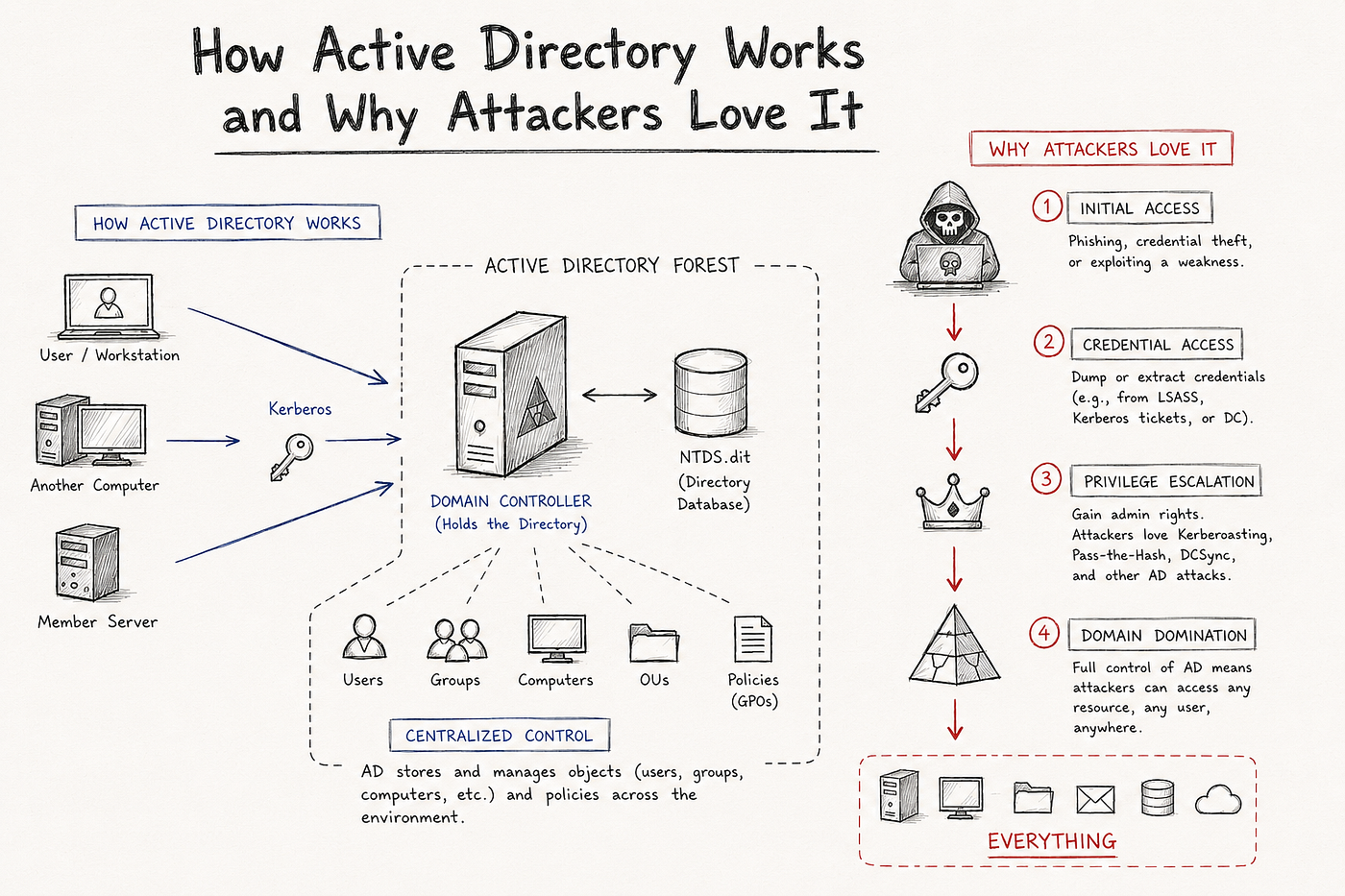
Imagine walking into a company with 5,000 employees. Every one of them logs in every morning with a username and password and automatically gets access to their email, file shares, printers, and business applications. None of that happens by accident.
Behind the scenes, Active Directory is making it all possible. If you have ever seen “Active Directory experience required” in a cybersecurity job posting, this is why. It is not just an IT administration tool. It is the backbone of nearly every Windows enterprise environment, and one of the first things attackers go after when they get inside.
What is Active Directory?
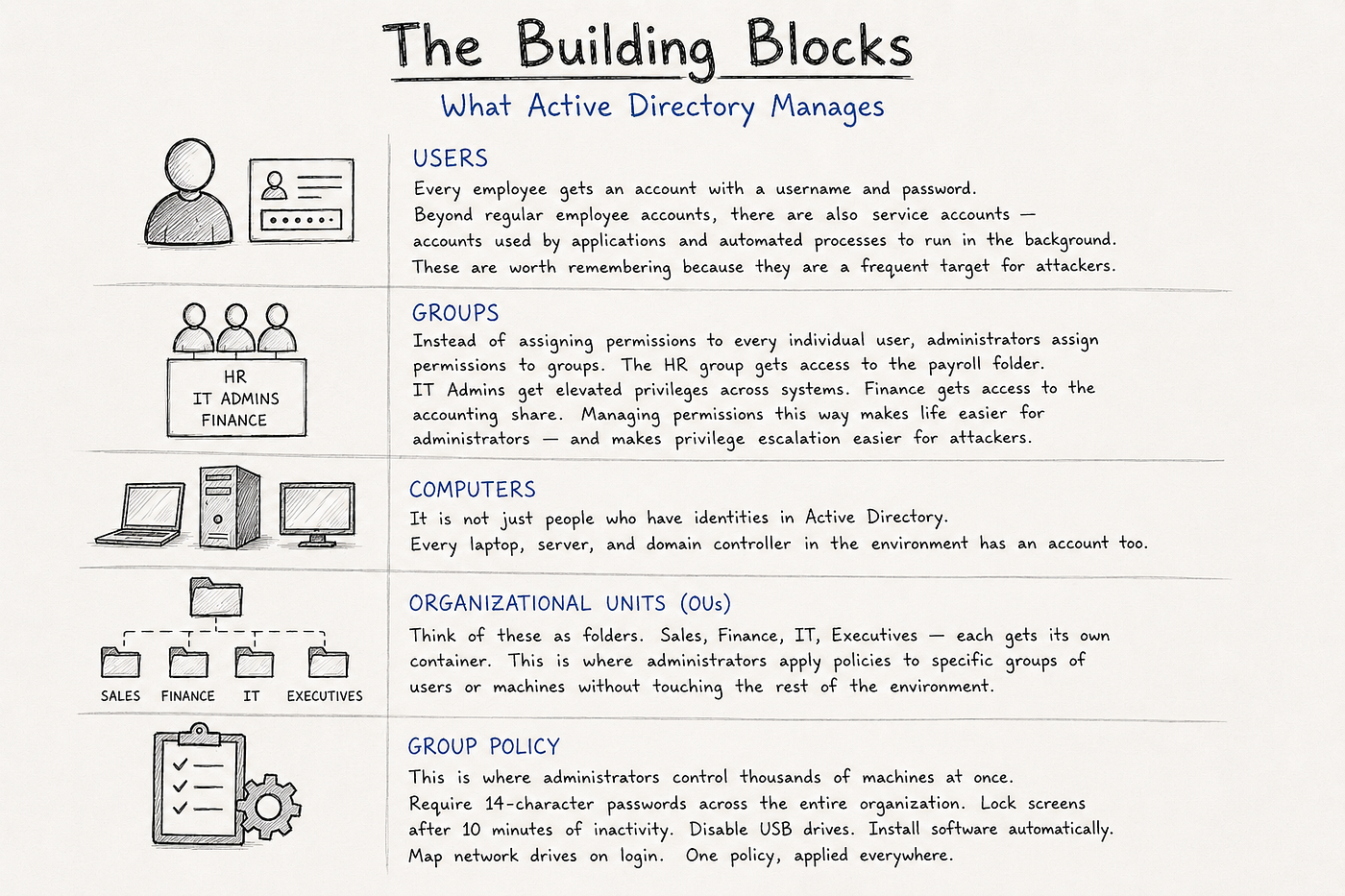
At its core, Active Directory is Microsoft’s identity management system. It stores user accounts, computers, and groups, controls permissions across the environment, and handles authentication for everything from email to VPN access.
The Building Blocks
How Authentication Works
When you log in to your work computer, you type your username and password just once.
Your computer sends those credentials to a Domain Controller, which verifies that you are who you claim to be. If everything checks out, it issues you a Kerberos ticket — think of it like a digital badge that proves your identity.
From that point on, when you open Outlook, access a shared folder, or connect to another resource, your computer presents that ticket instead of asking you to enter your password again. That’s why you can move between applications without constantly logging in.
This matters from a security perspective because attackers don’t always need your password. If they can steal — or even forge — a valid Kerberos ticket, they can often access the same resources you can, all without ever knowing your password.
Why Do Attackers Love Active Directory ?
For years, the goal of many attackers was simple: become a Domain Admin. If they could control Active Directory, they could control the organization.
That hasn’t changed — but the definition of “the organization” has.
Today’s enterprise isn’t confined to an office building. Employees work remotely, applications run in the cloud, and identities are spread across Microsoft 365, Azure, VPNs, SaaS platforms, and on-premises infrastructure. Yet for many organizations, Active Directory still sits at the center of it all, often synchronized with Microsoft Entra ID to provide a seamless login experience across both on-premises and cloud resources.
This means that compromising Active Directory is no longer just about gaining access to file servers or shared drives. A single privileged identity can become the gateway to an organization’s entire hybrid environment.
Attackers rarely begin with that level of access. Instead, they build toward it.
It might start with a phishing email that captures one employee’s credentials. That employee has local administrator rights on a handful of machines. Those machines contain cached credentials or active sessions belonging to other administrators. Each new compromise expands the attacker’s reach, allowing them to move laterally through the environment until they reach a highly privileged account.
That’s why lateral movement is such a fundamental concept in cybersecurity. A compromised workstation is rarely the objective — it’s simply the first stepping stone.
Whether an organization is fully on-premises, fully cloud-based, or somewhere in between, identity has become the new security perimeter. And because Active Directory remains the foundation of identity for so many enterprises, it continues to be one of the most valuable targets for attackers.
Common Active Directory Attacks
You don’t need to be a penetration tester to understand these techniques. But if you’re pursuing a career in cybersecurity, you’ll see these names come up repeatedly in job interviews, threat reports, and real-world incident investigations.
Password Spraying
Instead of trying hundreds of passwords against one account — which would quickly lock it out — attackers try one common password (like Winter2026!) across hundreds or even thousands of accounts. It’s slower, but much quieter and far more likely to avoid detection.
Kerberoasting
Many applications run under service accounts in Active Directory. Attackers can request Kerberos tickets for these accounts and attempt to crack them offline. If the service account has a weak password, the attacker may gain elevated privileges without ever exploiting a vulnerability.
Pass-the-Hash
Normally, you’d think an attacker needs your password to log in. With Pass-the-Hash, they don’t. If an attacker steals the password hash, they can sometimes use that hash to authenticate directly, allowing them to impersonate a user without ever knowing the actual password.
Golden Ticket
This is one of the most powerful attacks against Active Directory. If an attacker compromises the KRBTGT account on a Domain Controller, they can forge their own Kerberos tickets, effectively creating valid credentials for almost any user in the environment.
DCSync
Domain Controllers regularly replicate account information with one another. If an attacker gains the right privileges, they can impersonate a Domain Controller and request password hashes for every account in Active Directory — including highly privileged administrators.
These attacks aren’t just concepts you’ll read about in textbooks. They continue to appear in real-world ransomware campaigns, nation-state intrusions, and enterprise breach investigations because they target the one thing every organization depends on: identity.
Why SOC Analysts Need to Understand Active Directory
You don’t need to be a Windows administrator to understand Active Directory. But if you’re a SOC analyst — or hoping to become one — you’ll interact with it almost every day.
Many of the alerts that land in a SOC have an identity component. A user suddenly signs in from an unfamiliar country. A service account starts failing authentication hundreds of times. An employee is unexpectedly added to a privileged security group. A disabled account becomes active again. An administrator account is created in the middle of the night.
On the surface, these might look like unrelated alerts. In reality, they’re often pieces of the same story — and Active Directory is where that story comes together.
Understanding how Active Directory manages users, groups, permissions, and authentication gives you the context to recognize when something isn’t normal. It helps you ask better questions, investigate faster, and understand the impact of what you’re seeing.
That’s why you’ll find Active Directory listed in so many cybersecurity job postings. You don’t need to know how to build or administer an entire domain, but you do need to understand how it works. Because when an incident involves identity (and many of them do) Active Directory is often one of the first places you’ll look.
How to Learn Active Directory for Free
You do not need a corporate environment or an expensive lab setup to build real familiarity with Active Directory. Everything you need is free or close to it.
Microsoft Learn — Microsoft’s official learning platform has free modules covering Active Directory fundamentals. It is dry but thorough and comes straight from the source.
TryHackMe — The Active Directory Basics room walks you through the core concepts in a guided, hands-on environment. Attacktive Directory takes it further and puts you in an offensive scenario so you can see how the attacks actually work.
Hack The Box Academy — Has structured AD content that goes deeper for those who want to move beyond the basics.
Build your own lab — Spin up a Windows Server VM and a Windows 11 VM. Join the client to the domain. Create users, groups, and OUs. Apply some Group Policy. It sounds intimidating but the setup is straightforward and nothing teaches AD faster than breaking it yourself.
BloodHound Community Edition — Once you are comfortable with the basics, BloodHound visualizes AD relationships and attack paths the way attackers see them. It is one of the most eye-opening tools you can run against your own lab environment.
메타데이터
- post_id
- 824096e4b015
- slug
- how-active-directory-works-and-why-attackers-love-it-824096e4b015
- url
- https://meetcyber.net/how-active-directory-works-and-why-attackers-love-it-824096e4b015
- canonical_url
- https://meetcyber.net/how-active-directory-works-and-why-attackers-love-it-824096e4b015
- author_url
- https://medium.com/@gilirene21
- status
- ok
- fetched_at
- 2026-07-23 10:19:01