Why the Mac Mini Is the AI Credit Saver Nobody Is Talking About
A typical developer spending $150/month on Claude or OpenAI API credits can reduce that to near zero by routing everyday tasks to a local…
Why the Mac Mini Is the AI Credit Saver Nobody Is Talking About
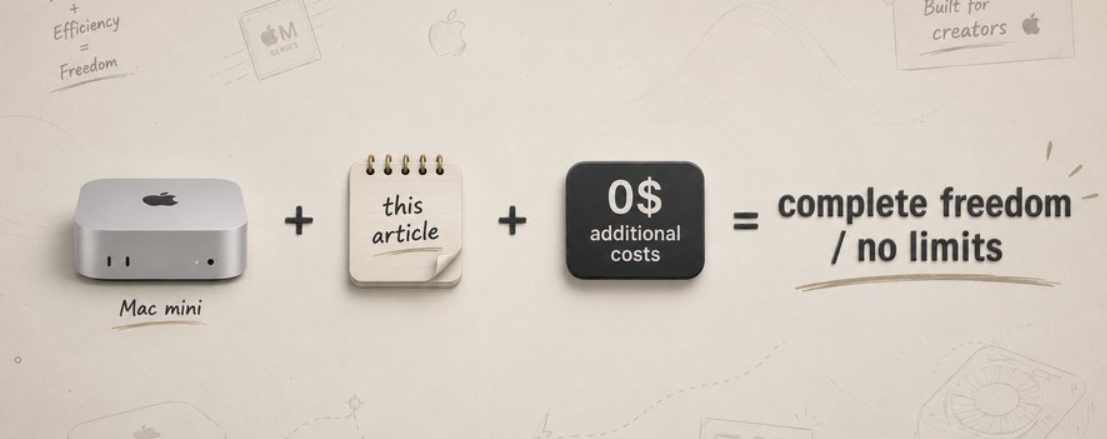
A typical developer spending $150/month on Claude or OpenAI API credits can reduce that to near zero by routing everyday tasks to a local model on a Mac Mini M4. One-time cost: $599–$2,000. Monthly electricity: $3–5. This is the complete guide to setting it up, every command, every config, every routing decision.
Here’s the situation most developers find themselves in: they’re using Claude Sonnet or GPT-4 for everything • code reviews • quick formatting tasks • simple summaries • repetitive cron jobs • draft emails.
And at the end of the month they get an API bill that stings, because 70–80% of those calls didn’t need a frontier model. They needed any reasonably capable model, fast, for free.
The Mac Mini M4 with Ollama solves this. You run powerful open-source models locally > Qwen > Llama > Gemma > Phi and route those routine tasks to them at zero marginal cost. The hard stuff (complex reasoning, production code, customer-facing writing) still goes to Claude. The result: same or better output quality across your workflow, 60–80% lower monthly AI spend.
The Hardware Advantage That Changes the Math
Running LLMs locally is not new. What’s new is that Apple Silicon makes it viable for normal people on normal budgets. Three technical reasons the Mac Mini is the default choice for local AI in 2026:

Unified Memory Architecture CPU and GPU share one memory pool. The model loads once and both processors access it simultaneously with no copying penalty. — This is why a Mac Mini outperforms a discrete GPU system at the same price point for LLM inference.
Remarkably low power draw The M4 Mac Mini draws 12W at idle and 20–30W under full LLM inference load. Run it 24/7 as your AI server for $3–5/month in electricity. — An NVIDIA GPU workstation doing the same job costs $30–80/month in power alone.
Privacy by default Your code, your documents, your client data, none of it leaves your machine. The model runs locally and the responses never touch a third-party server. — For regulated industries or anyone handling sensitive information, this resolves the compliance question entirely.
Which Mac Mini to Buy / The Honest Guide
Memory determines which models you can run and at what speed. This is the only spec that matters for AI workloads. → More memory = larger models = better output quality.

RECOMMENDATION: Start with the 24GB M4 Pro ($1,399). It runs 14B–27B models at usable speeds (15–25 tokens/sec), handles most daily coding and writing tasks without API calls, and pays for itself in 8–10 months of saved API credits for a typical developer spending $150–200/month. The 64GB version is only worth it if you’re running multi-agent systems or need near-GPT-4 quality from local models.
From Unboxed Mac Mini to Running AI in 10 Minutes
STEP 1 / INSTALL OLLAMA ↓
Ollama is the layer everything else builds on. It manages model downloads, handles quantization, configures GPU allocation, and serves models via an HTTP API compatible with both OpenAI and (since v0.14.0) Anthropic’s message format.
# Install via Homebrew (recommended)
brew install ollama
# Start Ollama as a background service (auto-starts on login)
brew services start ollama
# Verify it's running
curl http://localhost:11434
#Ollama is running
# Enable maximum GPU acceleration (Apple Silicon)
export OLLAMA_METAL=1
export OLLAMA_NUM_GPU=999 # Use all GPU cores
STEP 2 / PULL YOUR FIRST MODEL ↓
#16 GB Mac Mini fast, lightweight
ollama pull phi4-mini
#54 tok/s, great for quick tasks
ollama pull llama3.2:8b
# solid all-rounder
ollama pull gemma3:12b
# Google's best compact model
#24 GB Mac Mini recommended tier
ollama pull qwen2.5:14b
# excellent coding + tool calling
ollama pull qwen2.5-coder: 14b
# specialized for code tasks
ollama pull mistral:12b
# reliable for structured tasks
#64 GB Mac Mini production tier
ollama pull qwen3-coder: 30b
# MoE: only 3B active params, fast
ollama pull llama3.3:70b
# PhD-level quality, 8-12 tok/s
ollama pull qwen2.5:72b
#fits in ~47GB, near-frontier
# Check what's downloaded and running
ollama list
ollama ps # shows memory usage per loaded model
STEP 3 / CONNECT CLAUDE CODE TO LOCAL MODELS VIA LITELLM ↓
This is the step most guides skip. Ollama uses OpenAI’s API format. Claude Code sends requests in Anthropic’s format. Without a translation layer, they can’t talk to each other. LiteLLM is that layer, it intercepts Claude Code’s API calls and routes them to your local Ollama instance.
# Install LiteLLM first: pip install litellm
#litellm_config.yaml
model_list:
# When Claude Code asks for Sonnet route to local 14B model
model_name: claude-sonnet-4-6
litellm_params:
model: ollama/qwen2.5-coder: 14b
api_base: http://localhost:11434
# When Claude Code asks for Haiku route to fast local model
model_name: claude-haiku-4-5-20251001
litellm_params:
model: ollama/phi4-mini
api_base: http://localhost:11434
# Keep Opus routing to real Anthropic API (complex tasks only)
model_name: claude-opus-4-7
litellm_params:
model: anthropic/claude-opus-4-7
general_settings:
master_key: sk-local-dev-key
port: 4000
# Install
pip install litellm
# Start the proxy (runs on port 4000)
litellm --config litellm_config.yaml
# Set Claude Code to use your local proxy instead of Anthropic
export ANTHROPIC_API_KEY="sk-local-dev-key"
export ANTHROPIC_BASE_URL="http://localhost:4000"
# Claude Code now routes to local models automatically
claude # works exactly as before just zero API cost per requestWhich Tasks Go Local, Which Stay in the Cloud
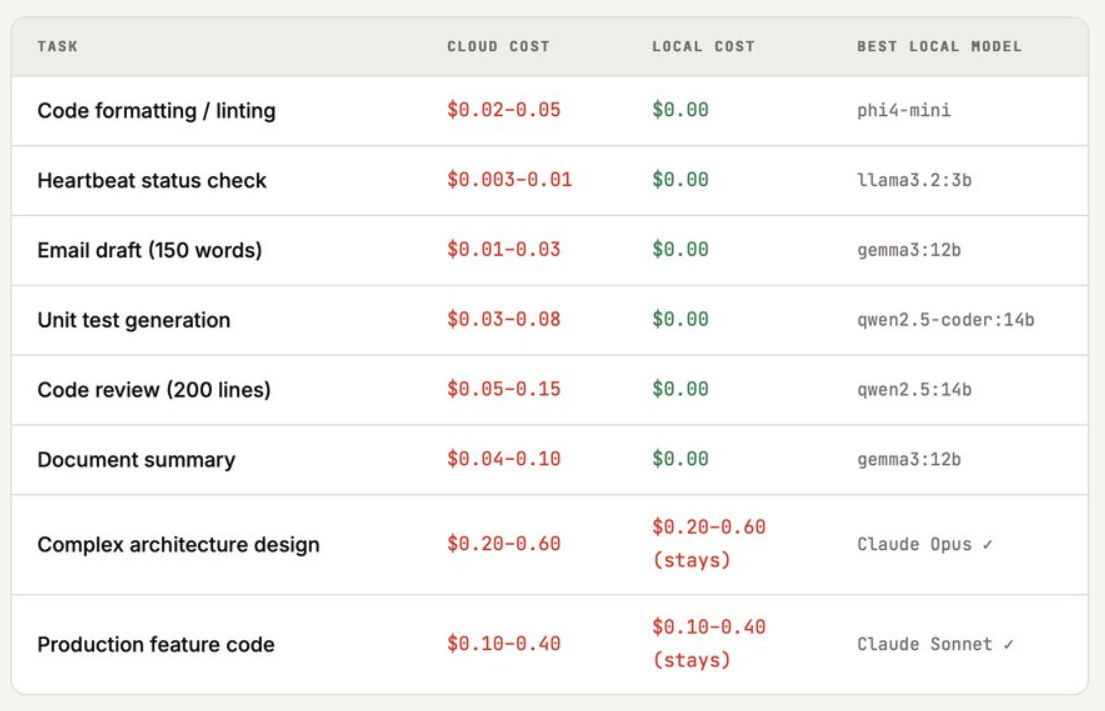
The mistake most people make when they get a Mac Mini: they try to run everything locally. The result is worse outputs on complex tasks and frustration. The right approach is a tiered hybrid, local models for high-frequency, lower-complexity tasks; Claude for the stuff that actually requires frontier-level reasoning.
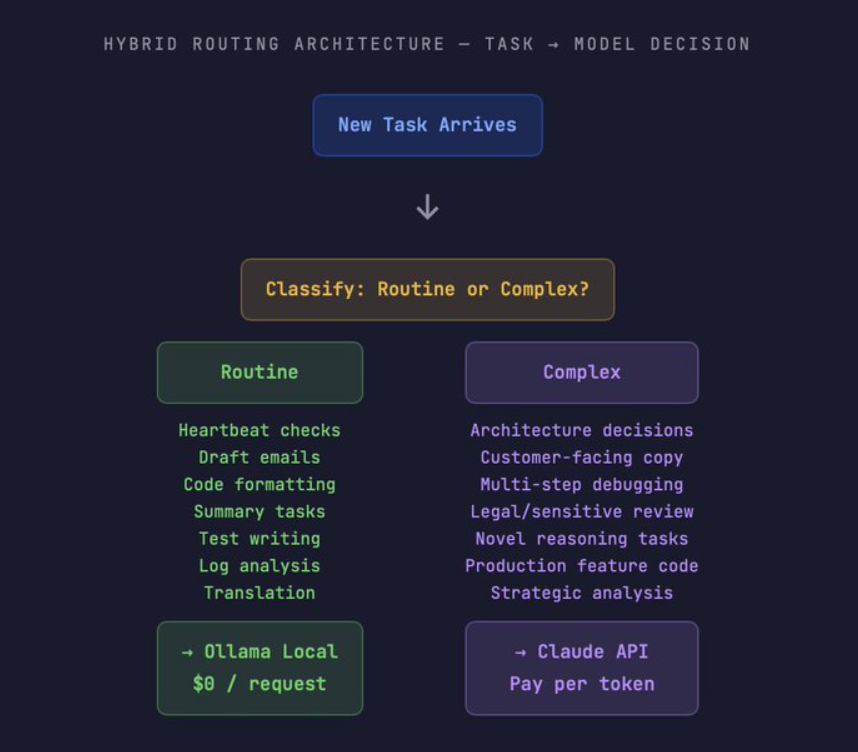
THE CRON JOB MATH / WHERE LOCAL MODELS WIN BIGGEST
One developer’s documented case makes the point clearly: a heartbeat cron firing every 30 minutes is 48 API calls per day, 1,440 per month. At $0.003–0.01 per Claude Sonnet call for a simple status check, that’s $4–14/month just for heartbeats. On Ollama: $0. Multiply that across a typical agent setup with 5–10 cron tasks and the monthly saving is $50–150 before you count any interactive sessions.
What Goes Local, What It Saves
A Self-Hosted Interface for the Whole Team
Open WebUI is a self-hosted ChatGPT interface that connects to your Ollama instance. Deploy it on the Mac Mini and every device on your network — phone — laptop — tablet gets access to a private AI assistant with no monthly subscription and no data leaving your building.
# Install Docker Desktop for Mac first, then:
docker run -d \
--name open-webui
--add-host=host.docker.internal:host-gateway \
-p 3000:8080 \
-v open-webui:/app/backend/data \
-e OLLAMA_BASE_URL=http://host.docker.internal:11434 \
--restart always
ghcr.io/open-webui/open-webui:main
# Access from any device on your network:
# http://[mac-mini-ip]:3000
# Find your IP: ifconfig | grep "inet " | grep -v 127.0.0.1
# Features: RAG, document upload, model switching, history
# All running locally, no data leaves your machine
PRACTICAL RESULT One developer documented replacing a $200/month family of ChatGPT Plus subscriptions (3 members) with a single shared Open WebUI instance on their Mac Mini, total ongoing cost $3/month in electricity. The interface is identical to ChatGPT. > The models are local.
What Speed to Actually Expect
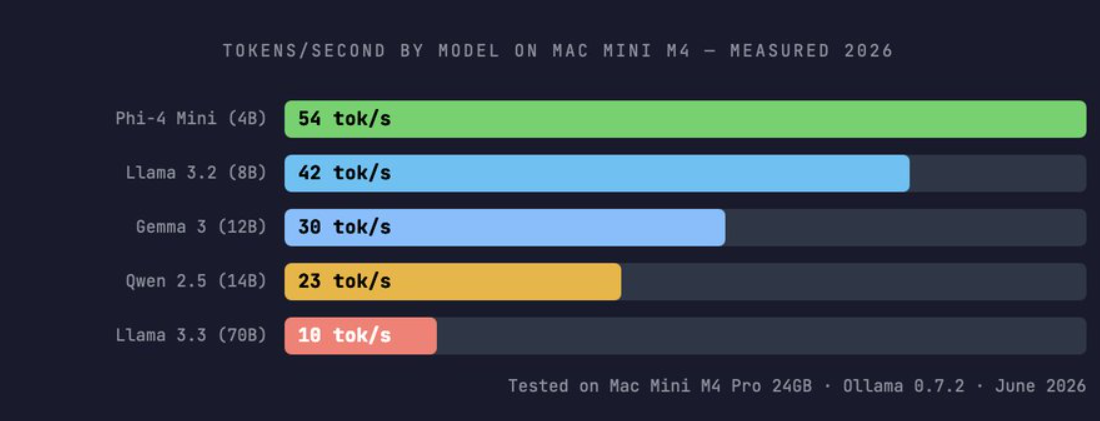
For context: human reading speed is roughly 3–5 tokens per second. Even the 70B model at 10 tokens/second is faster than you can read the output. For coding tasks where the bottleneck is your review of the generated code rather than generation speed, 10–25 tok/s is entirely practical.
When Does the Hardware Pay for Itself
Scenario A / Light User ($80/month API spend)
Occasional coding help, some drafts, few cron tasks
Hybrid setup saves ~60% = $48/month. Mac Mini 16GB costs $599. Payback: 12.5 months. Marginal, consider whether local models fit your workflow before buying. — The 16GB model is enough to test the concept.
Scenario B / Active Developer ($150/month API spend)
Daily Claude Code sessions, agent crons, code reviews
Hybrid setup saves ~75% = $112/month. Mac Mini 24GB costs $1,399. Payback: 12.5 months. Clear positive ROI by month 13, pure savings thereafter. — This is the typical case for someone using Claude Code seriously.
Scenario C / Heavy Agent User ($300+/month API spend)
Multi-agent systems, 24/7 background agents, high-frequency tasks
Hybrid setup saves ~80% ($240/month). A 64GB Mac mini costs $2,000. Payback: 8.3 months. Strong positive ROI: the hardware pays for itself in under 9 months and then saves $240/month indefinitely.
The obvious choice for serious builders.
THE QUALITY CAVEAT
Local models in 2026 are genuinely capable for routine tasks, but they are not equal to Claude Sonnet or GPT-4 for complex reasoning, nuanced writing, or production code that needs to be right on the first pass. The hybrid strategy above routes those tasks to cloud models specifically because local models still lose there. A workflow that sends everything locally will produce lower-quality outputs for complex tasks. Know the difference.
Routing Agents Automatically to Local vs Cloud
import anthropic
import requests
from enum import Enum

class TaskComplexity(Enum):
    ROUTINE = "routine"   # → Local Ollama
    COMPLEX = "complex"   # → Claude API

def classify_task(prompt: str) -> TaskComplexity:
    """Quick rule-based classification — no API call needed."""

    routine_signals = [
        "format",
        "lint",
        "test",
        "draft",
        "summarize",
        "translate",
        "check",
        "status",
        "log",
        "review",
    ]

    complex_signals = [
        "architect",
        "design",
        "strategy",
        "production",
        "customer",
        "legal",
        "sensitive",
        "debug complex",
    ]

    prompt_lower = prompt.lower()

    for signal in complex_signals:
        if signal in prompt_lower:
            return TaskComplexity.COMPLEX

    return TaskComplexity.ROUTINE

def smart_complete(prompt: str, local_model="qwen2.5:14b") -> str:
    complexity = classify_task(prompt)

    if complexity == TaskComplexity.ROUTINE:
        # Route to local Ollama — zero cost
        response = requests.post(
            "http://localhost:11434/api/generate",
            json={
                "model": local_model,
                "prompt": prompt,
                "stream": False,
            },
        )

        return response.json()["response"]

    else:
        # Route to Claude API — use tokens wisely
        client = anthropic.Anthropic()

        msg = client.messages.create(
            model="claude-sonnet-4.6",
            max_tokens=2000,
            messages=[
                {
                    "role": "user",
                    "content": prompt,
                }
            ],
        )

        return msg.content[0].text

# Usage:
# smart_complete("format this code: ...")
# → Local (free)

# smart_complete("design the auth architecture")
# → Claude (paid)
Cloud AI taught you to ration your thinking. Local AI teaches you to think freely again.
메타데이터
- post_id
- 82550c56e85b
- slug
- why-the-mac-mini-is-the-ai-credit-saver-nobody-is-talking-about-82550c56e85b
- url
- https://medium.com/coding-nexus/why-the-mac-mini-is-the-ai-credit-saver-nobody-is-talking-about-82550c56e85b
- canonical_url
- https://medium.com/coding-nexus/why-the-mac-mini-is-the-ai-credit-saver-nobody-is-talking-about-82550c56e85b
- author_url
- https://medium.com/@codebun
- status
- ok
- fetched_at
- 2026-07-11 02:02:54