AI Social Media Posting Automation with n8n, Google Sheets, and OpenAI
How I built an automation workflow that turns content ideas into captions, hashtags, and published social media posts.
AI Social Media Posting Automation with n8n, Google Sheets, and OpenAI
How I built an automation workflow that turns content ideas into captions, hashtags, and published social media posts.
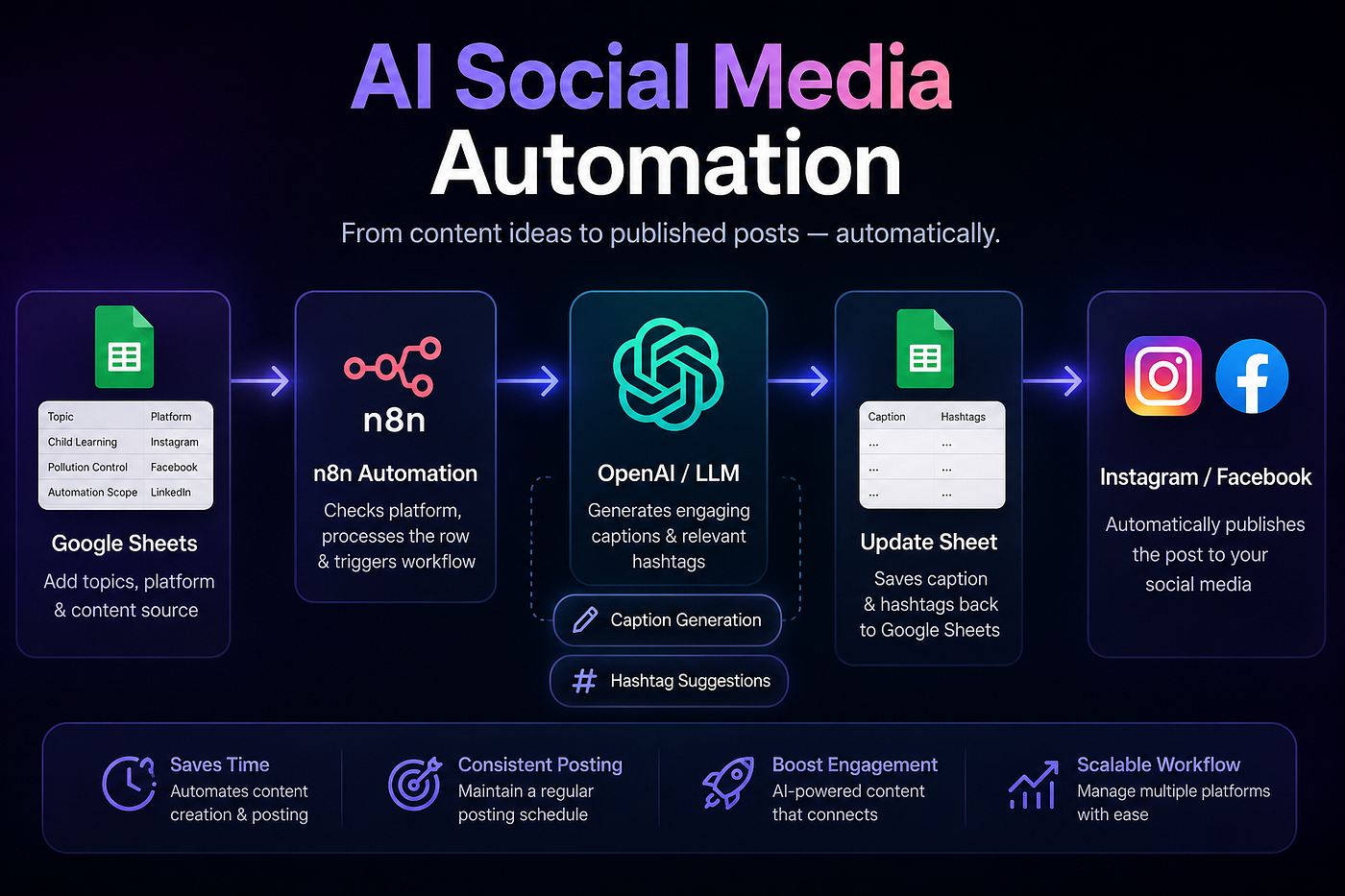
Banner
Introduction:
Managing social media content manually can take a lot of time.
You have to plan topics, write captions, find hashtags, update your content sheet, and then publish the post on different platforms. If you are doing this regularly, the process becomes repetitive very quickly.
To solve this, I built an AI-powered social media automation workflow using n8n, Google Sheets, OpenAI, Instagram, and Facebook.
The goal was simple:
Add content ideas in Google Sheets, let AI generate the caption and hashtags, update the sheet, and publish the post automatically.
This workflow uses Google Sheets as the content planning system.
The user adds a topic, target platform, and content source. After that, n8n processes the row, sends the information to OpenAI, generates the caption and hashtags, saves the result back into Google Sheets, and publishes the post to Instagram or Facebook.
Workflow:
Google Sheets → n8n → OpenAI → Google Sheets → Instagram/Facebook
Tools Used: n8n, Google Sheets, OpenAI / LLM, Structured Output Parser, Instagram Developer API, Facebook Developer API
The Problem:
Social media posting usually involves many manual steps:
- Planning content ideas
- Writing captions
- Finding hashtags
- Copying content between tools
- Tracking what has been posted
- Publishing manually
This can slow down creators, businesses, and marketing teams.
The main problem was not just content creation. The real issue was the repeated manual work around it.
The Solution:
I created an n8n workflow that automates the process from content idea to published post.
Instead of manually writing captions and hashtags, the user only adds the basic topic in Google Sheets.
The workflow then:
- Detects the new or updated row
- Checks the target platform
- Sends the topic and content source to OpenAI
- Generates a caption
- Generates relevant hashtags
- Updates the Google Sheet
- Publishes the post to Instagram or Facebook
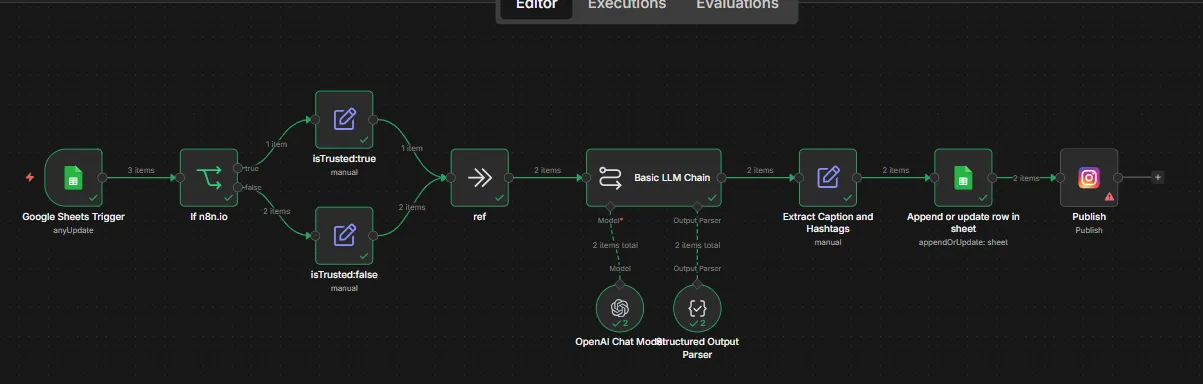
Workflow
How the Workflow Works
1. Google Sheets Trigger
The workflow starts when a row is added or updated in Google Sheets.
The sheet includes columns like:
Topic Target Platform Content Source Caption Hashtags
This makes Google Sheets work like a simple content dashboard.
2. Platform Check
n8n checks the selected platform, such as Instagram or Facebook.
This allows the workflow to route the content correctly.
3. AI Caption and Hashtag Generation
OpenAI generates a caption and hashtags based on the topic and content source.
The output is structured so the caption and hashtags can be saved separately.
4. Update Google Sheets
The generated caption and hashtags are saved back into the same row.
This keeps everything organized and easy to review.
5. Publish to Social Media
After the content is ready, the workflow publishes the post to the selected platform.
This removes the need to manually copy and paste content into Instagram or Facebook.
The final workflow turns a simple spreadsheet into a lightweight AI-powered content management and publishing system.
Example Output
Topic: Pollution Control
Generated Caption: Pollution threatens our health and the planet. Take action today by reducing single-use plastics, choosing cleaner transport, conserving energy, and supporting stronger pollution control efforts.
Generated Hashtags: #PollutionControl #CleanAir #CleanWater #ZeroWaste #EcoAction #ActNow

Sheets Result
This workflow turns a simple Google Sheet into an AI-powered social media publishing system.
It helps with:
- Saving time
- Generating captions faster
- Creating hashtags automatically
- Keeping content organized
- Reducing copy-paste work
- Publishing posts more efficiently
The biggest benefit is that the user can manage content from one place instead of switching between multiple tools.
Business Value
This automation can be useful for:
- Small businesses
- Marketing teams
- Social media managers
- UGC creators
- Agencies
- Personal brands
It is especially helpful for anyone who posts regularly and wants to reduce repetitive content tasks.
Possible Improvements
This workflow can be improved further by adding:
- Post approval before publishing
- Scheduled posting
- LinkedIn support
- TikTok content planning
- Canva integration
- Slack or Telegram notifications
- Performance tracking
- Error handling
Final Thoughts
This project shows how AI and automation can simplify a real content workflow.
By connecting Google Sheets, n8n, OpenAI, Instagram, and Facebook, I created a system that helps plan, generate, organize, and publish social media content automatically.
It saves time, reduces repetitive work, and makes content posting more consistent.
Project Summary
Project: AI Social Media Posting Automation Type: AI Automation / Social Media Automation Tools: n8n, Google Sheets, OpenAI, Instagram, Facebook Workflow: Google Sheets → n8n → OpenAI → Google Sheets → Instagram/Facebook
Want a similar automation for your business?
I build AI automation workflows for content, leads, emails, reporting, and business operations.
Contact: harisalimughal077@gmail.com Portfolio: https://harisalimughal.netlify.app/
메타데이터
- post_id
- 83ec2bc40b0c
- slug
- ai-social-media-posting-automation-with-n8n-google-sheets-and-openai-83ec2bc40b0c
- url
- https://medium.com/@harisalimughal_74431/ai-social-media-posting-automation-with-n8n-google-sheets-and-openai-83ec2bc40b0c
- canonical_url
- https://medium.com/@harisalimughal_74431/ai-social-media-posting-automation-with-n8n-google-sheets-and-openai-83ec2bc40b0c
- author_url
- https://medium.com/@harisalimughal_74431
- status
- ok
- fetched_at
- 2026-06-09 15:37:30


