Web Applications vs. Websites: Understanding the Key Differences
If you are new to the tech world, you have probably come across the terms website and web application many times. Interestingly, many…
Web Applications vs. Websites: Understanding the Key Differences
If you are new to the tech world, you have probably come across the terms website and web application many times. Interestingly, many people use these terms interchangeably because both can be accessed through a web browser. At first glance, they may seem very similar.
When I first started learning about web technologies, I also assumed there was no major difference between the two. If both open in a browser and require an internet connection, aren’t they basically the same thing? Not exactly.
While websites and web applications may share certain similarities, they are built for different purposes and offer different levels of functionality. Understanding these differences can be helpful for students, developers, business owners, and anyone interested in technology.
Let’s explore this in more detail.
What is a Website?
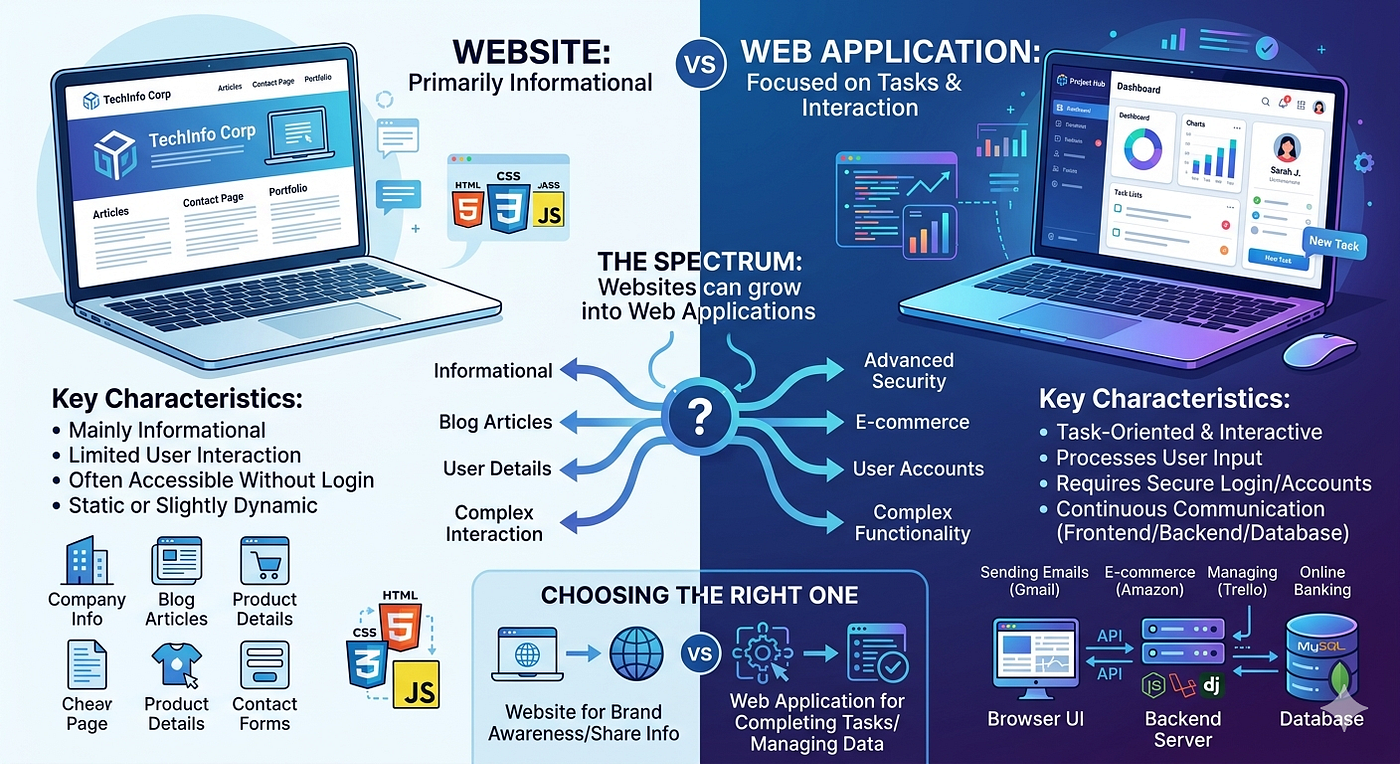
A website is a collection of interconnected web pages primarily designed to provide information to users. The primary goal of a website is to present content in a way that visitors can easily read, view, or navigate.
Websites usually contain content such as:
- Company information
- Blog articles
- News updates
- Product details
- Contact information
- Portfolios
- Educational resources
For example, when you visit Wikipedia to search for information, browse articles on BBC, or explore a business portfolio site, you are interacting with a website. Most traditional websites are static, meaning the content remains the same for every visitor unless manually updated by the website owner.
However, modern websites can also include dynamic features such as:
- Search bars
- Contact forms
- Comment sections
- Basic chat support
Even with these features, their primary function remains content delivery.
Key characteristics of websites:
- Mainly informational
- Limited user interaction
- Often accessible without logging in
- Easier and less expensive to develop
- Can be static or slightly dynamic
A good example would be a restaurant website where customers can check the menu, location, opening hours, and reservation contact details.

What is a Web Application?
A web application is far more interactive and focuses on allowing users to perform specific tasks online. Unlike websites, web applications are designed to process user input and provide personalized responses based on user actions.
Examples include:
- Sending emails through Gmail
- Shopping on Amazon
- Managing projects using Trello
- Using social media platforms like Facebook
- Online banking systems
In web applications, users typically:
- Create accounts
- Log in securely
- Submit information
- Make transactions
- Manage personal data
- Interact with real-time systems
For example, when you order food through an online delivery platform, add items to your cart, make payments, and track your delivery, you are using a web application. These tasks require continuous communication between the user interface, backend systems, and databases.

How They Are Built Differently
This is where things get more technical.
Websites typically use:
- HTML
- CSS
- Basic JavaScript
- Content Management Systems like WordPress
These technologies are mainly used to create visually appealing pages and display content.
Web applications typically use:
- Front-end frameworks like React, Angular, or Vue.js
- Backend technologies like Node.js, Laravel, or Django
- Databases such as MySQL or MongoDB
- APIs for system integration
Web applications require more development time because they involve more functionality, security requirements, and performance considerations.

Security Differences
Web applications usually require stronger security than websites.
Since web applications often handle sensitive user information such as:
- Passwords
- Payment information
- Personal data
- Banking details
They require advanced security measures like:
- Authentication systems
- Data encryption
- Secure payment gateways
- Regular security updates
A simple informational website may not require this level of protection.

Can a Website Become a Web Application?
Yes, and this happens very often. Many businesses begin with a basic website to establish their online presence.
Over time, they may add features like:
- Online booking systems
- Customer dashboards
- E-commerce functionality
- User accounts
- Live chat systems
Once users begin actively interacting with the platform and performing tasks, the website gradually becomes a web application. For example, Amazon includes both informational website features and web application features.
Which One Should You Choose?
The answer depends on your goals.
Choose a website if you want to:
- Share information
- Build brand awareness
- Showcase products or services
- Publish blogs or news
Choose a web application if you want users to:
- Complete tasks online
- Manage accounts
- Make payments
- Interact with personalized systems
Businesses should carefully analyze their customers' needs before deciding.
Final Thoughts
Although websites and web applications may appear similar on the surface, their purpose, complexity, and user interaction levels make them very different. Websites focus more on delivering information, while web applications focus on solving problems through interaction.
As technology continues to evolve, many modern platforms combine both concepts. Understanding these differences helps developers create better solutions and helps businesses make smarter digital decisions.
💻👩💻👨💻💻👩💻👨💻💻👩💻👨💻💻👩💻👨💻💻👩💻👨💻💻👩💻👨💻💻👩💻👨💻💻
And that’s all for this topic. I hope you found it helpful, and I look forward to sharing another interesting topic with you soon.
Have a wonderful day!
메타데이터
- post_id
- 845bbe2cf96e
- slug
- web-applications-vs-websites-understanding-the-key-differences-845bbe2cf96e
- url
- https://medium.com/@vidumibandara23/web-applications-vs-websites-understanding-the-key-differences-845bbe2cf96e
- canonical_url
- https://medium.com/@vidumibandara23/web-applications-vs-websites-understanding-the-key-differences-845bbe2cf96e
- author_url
- https://medium.com/@vidumibandara23
- status
- ok
- fetched_at
- 2026-06-09 15:37:30