FDMEE Transformation Step taking a long time to execute in Oracle Cloud
Things have been quite easier with the Oracle cloud environment, providing a seamless approach. Still, tackling the performance issues…
FDMEE Transformation Step taking a long time to execute in Oracle Cloud
Things have been quite easier with the Oracle cloud environment, providing a seamless approach. Still, tackling the performance issues becomes difficult since you have no control over the underlying infrastructure.
Data Exchange is a powerful tool for integrating data between Oracle EPBCS and external data sources. While it offers a seamless way to extract, transform, and load (ETL) data, performance issues can arise, especially in production environments with large datasets and complex mappings.
This blog post will delve into a real-world case study where a customer faced significant performance degradation during data loads in their PBCS application. We’ll explore the root cause, troubleshooting steps, and the eventual solution that resolved the issue.
Problem:
A customer had an Oracle EPBCS application configured with integration defined to extract data from a specific data source and load it into the planning application. The data load process, which typically ran smoothly in the test environment, was experiencing substantial delays in the production environment. Upon investigating the logs, it became evident that the “validate” step within Data Management was the primary bottleneck.
The validate step took only 1 minute to execute in the Test but it was taking 10 minutes in the Production environment causing significant delays in the entire data load process.
Cause:
A custom dimension called ServiceType defined in the data column UD6 was causing problems and taking a long time to process the mappings. As a result, the entire validation step took a long time to execute. All the mappings defined for this dimension were Explicit.
Resolution:
There are 2 possible solutions for this issue:
- Involve the DBA who has access to underlying architecture in the Oracle cloud environment and perform a cleanup of the TDATASEG_T table after the backup. A cleanup is required sometimes to clear all the accumulated data from the previous runs.
- Recreate the entire integration from scratch and verify.
- Change the data column name of that particular dimension in Data Load Mappings from UD6 to UD20 or some other column that is not in use.
Before:
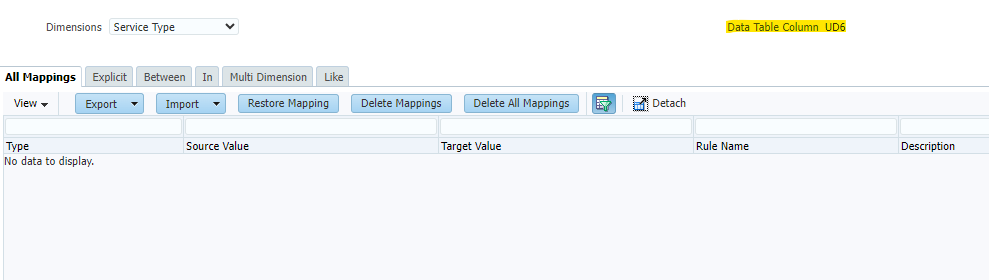
After:

메타데이터
- post_id
- 845f464849e3
- slug
- fdmee-transformation-step-taking-a-long-time-to-execute-in-oracle-cloud-845f464849e3
- url
- https://medium.com/@ankurx/fdmee-transformation-step-taking-a-long-time-to-execute-in-oracle-cloud-845f464849e3
- canonical_url
- https://medium.com/@ankurx/fdmee-transformation-step-taking-a-long-time-to-execute-in-oracle-cloud-845f464849e3
- author_url
- https://medium.com/@ankurx
- status
- ok
- fetched_at
- 2026-06-10 18:44:10





