Axelera AI Metis M.2 — First Impressions
Axelera Metis board has been available on the market for just a couple of months. Let’s dive in, see what it can do, and discuss its…
Axelera AI Metis M.2 — First Impressions
Axelera Metis board has been available on the market for just a couple of months. Let’s dive in, see what it can do, and discuss its strengths and weaknesses.
[embed]You can check this article as the video
There is a second video with the situation half a year later:
[embed]
Performance
First, let’s talk about performance — this is where the Metis M.2 really shines. Axelera AI claims 214 TOPS, representing a significant leap compared to other popular edge AI solutions. For context:
- It’s about 10x faster than Hailo-8 (26 TOPS),
- Around 4x faster than Qualcomm’s Snapdragon X,
- And comparable to NVIDIA Jetson Orin AGX in certain cases.
The performance-to-price ratio is also impressive. Among M.2 form-factor boards, there are very few competitors: mainly Hailo, Google Coral, Kneron, DeepX, and Sima.ai. However, in terms of raw performance, the Metis M.2 is currently one of the fastest options available.
Is this performance real? Good question. But even Axelera highlights it:
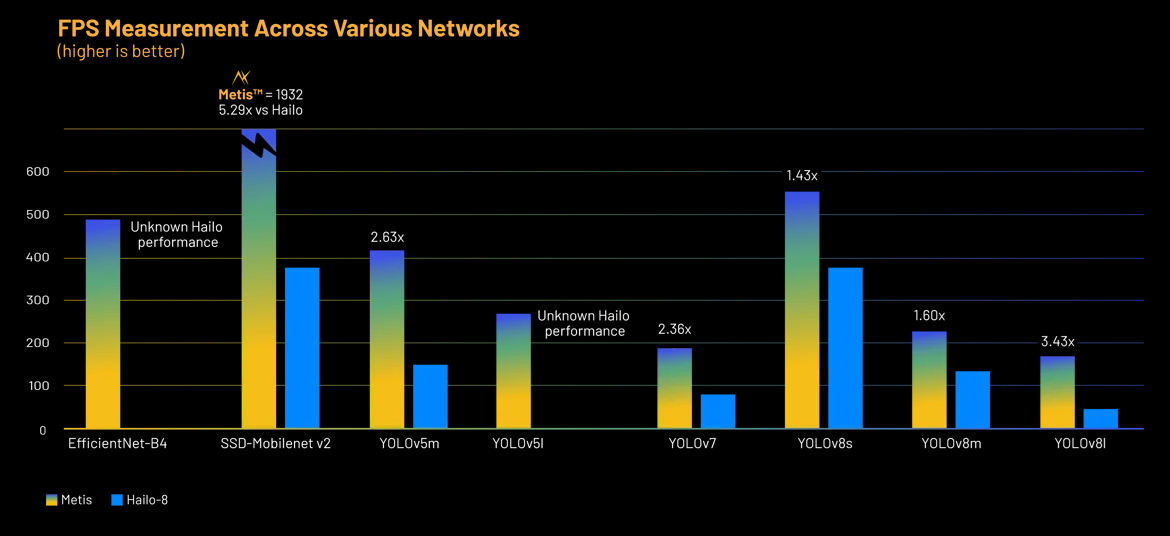
Image from Axelera site
I think that for Hailo, it may be a little slower for the real application for the full cycle than Axelera. So. For the real performance, you need to check your real pipeline.
Architecture: A Different Approach
Now, let’s talk about the architecture, which is quite different from what you might expect if you’ve worked with other AI accelerators like Jetson, Hailo, or Rockchip.
With most platforms, the typical workflow looks like this:
- Train a model in PyTorch or TensorFlow,
- Convert it to ONNX or another supported format,
- Deploy the model directly to the board for inference.
However, with Axelera Metis, things aren’t that straightforward. Yes, they do have some kind of direct model inference support, but it’s very limited. Their official documentation provides only a single example, and I couldn’t get it to run — there’s just not enough information or detailed instructions. Perhaps it’s because I had limited time for experiments. However, the documentation is definitely insufficient.
I even tried using their Voyager SDK and explored it with the help of GPT models, but still didn’t manage to get a working pipeline for custom models. So, if you’re expecting to just load a PyTorch or ONNX model and start running it on the board, it’s not quite that simple.
Pipelines Over Models
Instead of a model-centric approach, Axelera focuses on **pipelines. This is similar to NVIDIA DeepStream or GStreamer**: you build a pipeline where multiple pre-defined models and tasks are connected together. This works well for: object detection or basic classification tasks.
But for more advanced or custom scenarios — like license plate recognition pipelines, multi-stage processing, or non-standard architectures — the pipeline system feels too restrictive.
For example, if you’re working on complex applications like:
- Multi-algorithm vehicle analysis,
- Robotics,
- Drones,
You may encounter limitations, as it is not easy to access and modify individual model components within the pipeline.
Model Export: Challenges
Another challenge is model export. Axelera provides a **Deploy tool** for model preparation, but in my experience, it’s not very user-friendly at the moment:
- It often lacks clear error messages,
- Most of my models didn’t export successfully.
I tried:
- Damo-Yolo
- Dinov2
- Some transformer-based detection architectures,
- Depth estimation networks.
All of them failed. I’m sure it’s possible, but it would likely require deep dives into the codebase, custom dataloaders, and a lot of trial and error. For now, I’d say model export is a significant bottleneck.
Hardware Compatibility: Not Plug-and-Play
Another issue is hardware support. I tried running the Metis M.2 on different platforms:
- AMD PC — didn’t work. I used this guide to fix the issue, but it did not help.
- NVIDIA Jetson Orin — not detected at all,
- Intel PC — finally worked out of the box.
So, if you’re planning to use Metis M.2, make sure you’re using a modern Intel machine for the best chance of compatibility. This is quite different from other accelerators like Hailo, which I’ve successfully run on a variety of hardware.
Energy Consumption
We checked the Energy consumption. And it was about claimed. The maximum we get is +18W during the inference. However, a significant part was due to the additional Intel performance.
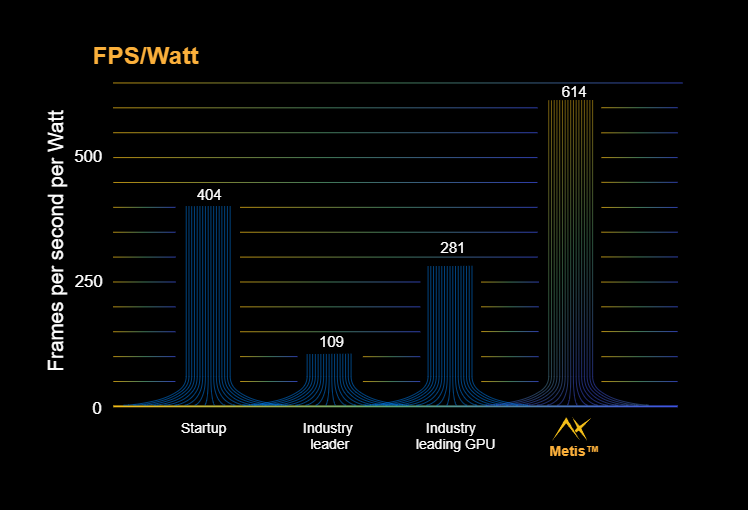
Image from Axelera site
Final Thoughts
So, what’s the verdict?
On the one hand: ✅ Amazing performance and competitive price, ✅ Energy consumption, ✅ Super good performance for easy cases.
On the other hand: ❌ Immature software stack, ❌ Limited support for custom models, ❌ Hardware compatibility issues.
But it seems fixable at the moment.
If you’re building something simple — like a camera system for basic object detection — Metis M.2 could be a great option right now. But if your project involves complex AI models, robotics, or multi-stage pipelines, I’d recommend waiting. Give Axelera some time to improve their software and documentation. Hopefully, in a few months (or a year), this platform will become a much more robust option.
Update from November 2025
The board partially solved its problems. Now there is Python support, some LLM support, and more supported networks. You can find my video with thoughts here.
메타데이터
- post_id
- 849a67f09dc1
- slug
- axelera-ai-metis-m-2-first-impressions-849a67f09dc1
- url
- https://medium.com/@zlodeibaal/axelera-ai-metis-m-2-first-impressions-849a67f09dc1
- canonical_url
- https://medium.com/@zlodeibaal/axelera-ai-metis-m-2-first-impressions-849a67f09dc1
- author_url
- https://medium.com/@zlodeibaal
- status
- ok
- fetched_at
- 2026-06-09 15:37:30



