The 98% Problem: Why Most WordPress Visitors Leave Without Buying — and How WPBot Can Turn Them…
WPBot turns a passive WordPress website into an active conversion system by engaging visitors with AI chat, Conversational Forms, human…
The 98% Problem: Why Most WordPress Visitors Leave Without Buying — and How WPBot Can Turn Them Into Customers

The 98% Problem: Why Most WordPress Visitors Leave Without Buying — and How WPBot Can Turn Them Into Customers
WPBot turns a passive WordPress website into an active conversion system by engaging visitors with AI chat, Conversational Forms, human Live Chat, product assistance, and onsite retargeting. WPBot can capture intent before a visitor leaves, answer objections when a visitor hesitates, collect qualified leads, and trigger targeted messages that create another conversion opportunity.

A WordPress website can attract thousands of visitors and still generate disappointing sales.
The problem is often not traffic. The problem is the conversion gap between visitor interest and visitor action.
A visitor can arrive through Google, browse a product, read a service page, compare pricing, hesitate over one unanswered question, and leave.
WordPress records the page view. Google records the visit. Analytics records the session.
The sale disappears.
WPBot attacks that gap by adding a conversational layer to the website. WPBot can engage visitors, collect information, provide assistance, connect visitors with human operators, and use onsite retargeting to bring attention back to an offer.
The important part is not simply adding another chatbot.
The important part is designing a conversion sequence.
WPBot Conversational Forms → WPBot Live Chat → WPBot Retargeting → More opportunities to convert
Why Do 98% of Visitors Leave Before a WordPress Sale Happens?
The “98% problem” is best understood as a conversion model rather than a universal benchmark.
For example, imagine a WordPress store receives 10,000 qualified visitors in a month.
If 2% convert:
10,000 × 2% = 200 customers
That leaves:
10,000 − 200 = 9,800 non-buying visitors
The opportunity is obvious.
If WPBot helps recover just 1% of the 9,800 non-buying visitors, the store gains:
9,800 × 1% = 98 additional customers
If average order value is $60:
98 × $60 = $5,880 additional revenue
The calculation is not a promise of WPBot performance. The calculation shows why small improvements in the non-converting visitor pool can have meaningful financial impact.
WPBot’s job is to create more opportunities for those visitors to continue the buying conversation.
What Actually Makes a WordPress Visitor Leave Without Buying?
WPBot can address several common forms of conversion friction.
- WPBot can answer product questions when visitors cannot find the information quickly.
- WPBot can collect contact information when visitors are interested but not ready to purchase.
- WPBot can connect visitors with human support when automated answers are not enough.
- WPBot can trigger retargeting messages when visitors show abandonment behavior.
- WPBot can support WooCommerce product discovery through the WooCommerce integration.
- WPBot can use conversational interactions instead of forcing visitors through traditional static forms.
The conversion problem therefore becomes more specific:
How can WPBot intervene at the exact moment when visitor intent is still alive?
That question leads to the first pillar.
Why Are Traditional WordPress Forms Losing High-Intent Leads?
Traditional forms ask visitors to stop browsing and start filling out fields.
A visitor sees:
Name → Email → Phone → Subject → Message → Submit
WPBot Conversational Forms change the interaction model.
WPBot can present questions progressively through a conversational flow. WPBot Conversational Forms support conditional logic, variables, multiple field types, calculations, appointment requests, contact forms, surveys, and lead capture.
The difference is important.
A traditional form asks:
“Give us your information.”
WPBot can structure the interaction around:
“Tell WPBot what you need.”
How Can WPBot Conversational Forms Qualify Leads Before Sales Teams Get Involved?

How Can WPBot Conversational Forms Qualify Leads Before Sales Teams Get Involved?
WPBot Conversational Forms can turn a generic contact request into structured qualification data.
For example, a web-design agency can build a WPBot flow like:
WPBot: What type of website do you need?
Visitor: WooCommerce store.
WPBot: How many products?
Visitor: Around 500.
WPBot: What is your approximate budget?
Visitor: $3,000–$5,000.
WPBot: When do you want to launch?
Visitor: Within two months.
The resulting lead contains substantially more commercial context than:
Name: John Email: john@example.com Message: Please contact me.
WPBot Conversational Forms can save form entries in the database and export form entries as CSV, while WPBot can also email completed conversations to administrators.
Which WPBot Conversational Form Fields Can Improve Lead Qualification?
WPBot Conversational Forms support several field types that can turn conversations into structured business data.

WPBot documentation currently lists 10 input-field types and multiple ready-made templates for use cases such as contact forms, feedback, surveys, calculators, appointments, bookings, and room-area calculations.
Why Does Conditional Logic Matter More Than Adding More Form Fields?
More fields do not automatically produce better leads.
WPBot Conditional Forms can ask different questions based on previous answers.
For example:
WPBot: What do you need?
Visitor: SEO service.
WPBot can then ask SEO-specific questions.
A visitor selecting “Website Development” can receive a different WPBot question path.
The result is a shorter interaction with more relevant qualification.
WPBot conditional logic therefore helps replace the “one giant form for everyone” approach with branching conversations.
How Can WPBot Turn One Conversation Into Multiple Conversion Paths?
WPBot can create different conversational experiences for different visitor goals.
A business website could use:
- WPBot Sales Conversation for pricing inquiries.
- WPBot Lead Form for quote requests.
- WPBot Appointment Flow for consultations.
- WPBot Support Conversation for existing customers.
- WPBot Feedback Form for post-purchase feedback.
- WPBot Calculator for service estimates.
WPBot can expose conversational forms through the chatbot Start Menu, specific intents, page-level widgets, or click-to-chat buttons.
That flexibility matters because conversion intent changes by page.
A pricing-page visitor does not necessarily need the same WPBot conversation as a support-page visitor.
Why Does Live Chat Matter When WPBot Already Has AI?

Why Does Live Chat Matter When WPBot Already Has AI?
AI can answer many routine questions.
High-value visitors sometimes need something different: confidence from a real person.
WPBot Live Chat adds human escalation to the automated experience. WPBot Live Chat can operate through the WordPress dashboard or Slack, with features including operators, chat history, offline controls, and language translation.
The strongest workflow is not:
AI versus human
The stronger workflow is:
WPBot AI → WPBot qualification → WPBot human escalation
How Can WPBot Live Chat Rescue a Visitor Who Is Ready to Buy?
Consider a visitor looking at a $1,500 software service.
The visitor has one question:
“Does this work with my existing CRM?”
The visitor cannot find a clear answer.
Without WPBot Live Chat, the visitor may leave and continue searching.
With WPBot Live Chat, the interaction can become:
WPBot: I can help with that. Would you like to speak with a support specialist?
Visitor: Yes.
WPBot Live Chat: A human operator joins the conversation.
The visitor gets an answer while purchase intent is still active.
WPBot’s current Live Human Chat module supports operator management and allows visitors to request live support from inside the chatbot.
Why Is Human Handoff One of the Most Important WPBot Conversion Features?
WPBot does not need to answer every question.
WPBot can handle repetitive questions while WPBot Live Chat handles situations where human judgment adds value.
A practical routing model looks like this:

This structure prevents human support teams from spending valuable time answering questions that WPBot can handle automatically.
How Can WPBot Slack Live Chat Fit Into a Real Support Workflow?
WPBot Live Chat can connect customer conversations with Slack-based support workflows.
The operational sequence can be:
Visitor → WPBot → Human handoff → Slack → Operator response → Visitor
WPBot documentation lists Slack Live Chat support, while WPBot’s Live Chat module supports human operators and chatbot-to-human assistance.
For distributed teams, WPBot Slack Live Chat can reduce the need for support staff to constantly monitor a separate WordPress dashboard.
Why Does WPBot Retargeting Matter After the Visitor Leaves?
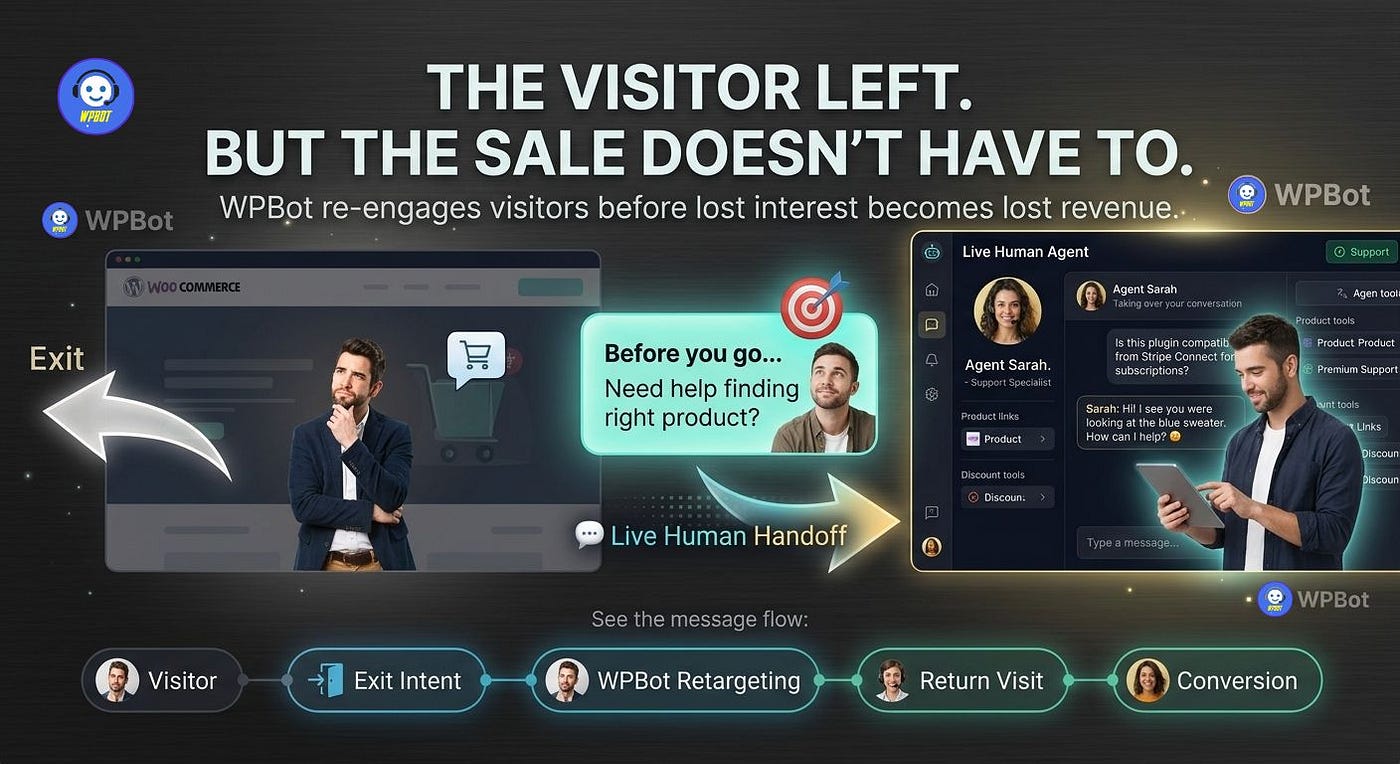
Why Does WPBot Retargeting Matter After the Visitor Leaves?
The biggest mistake is treating abandonment as the end of the customer journey.
WPBot includes onsite retargeting capabilities designed to re-engage visitors before the visitor fully exits the conversion journey.
WPBot can trigger retargeting messages based on exit intent, page scroll percentage, or elapsed time, and WPBot can apply different messages to different pages.
That means WPBot can react to visitor behavior instead of showing the same generic popup to everyone.
How Does WPBot Exit-Intent Retargeting Work?
A simplified WPBot retargeting sequence looks like this:
Step 1 — Visitor lands
WPBot can remain available without immediately interrupting the visitor.
Step 2 — Visitor browses
WPBot can provide assistance when the visitor wants help.
Step 3 — Visitor hesitates
WPBot can use configured time or scroll triggers.
Step 4 — Visitor attempts to leave
WPBot can display an exit-intent message.
Step 5 — WPBot presents a relevant action
WPBot can present an offer, subscription request, coupon, reminder, or conversational interaction.
The objective is simple:
Give the visitor one more useful reason to continue.
Can WPBot Retargeting Recover More Than Abandoned Shopping Carts?
Yes, because WPBot onsite retargeting does not have to be limited to a cart page.
WPBot supports page-specific retargeting logic, allowing WPBot administrators to create different messages for different pages.
Examples include:
- WPBot Pricing Retargeting: “Need help choosing the right plan?”
- WPBot Product Retargeting: “Want help comparing these products?”
- WPBot Service Retargeting: “Would you like a free consultation?”
- WPBot Content Retargeting: “Get the complete guide by email.”
- WPBot Exit Retargeting: “Before you leave, can WPBot help answer one question?”
The important technical principle is contextual relevance.
A visitor reading a pricing page should not receive the same WPBot message as a visitor reading a support article.
How Does WPBot WooCommerce Integration Connect Retargeting With Shopping?
WPBot’s WooCommerce integration can allow shoppers to search products, view product details, and add products to the cart directly from the chatbot interface. WPBot’s WooCommerce module also includes order-history functionality and conversion reporting.
That creates a useful commerce loop:
WPBot Product Discovery → WPBot Product Information → WPBot Cart Action → WPBot Retargeting
The visitor does not have to navigate through multiple disconnected interfaces.
What Does a WPBot WooCommerce Conversion Journey Look Like?
Imagine a visitor searching for a laptop accessory.
Stage 1 — WPBot discovers intent
The visitor asks WPBot for a compatible accessory.
Stage 2 — WPBot narrows the choice
WPBot helps identify relevant WooCommerce products.
Stage 3 — WPBot answers objections
WPBot can answer questions using configured knowledge or supported AI integrations.
Stage 4 — WPBot encourages action
WPBot can help the shopper move toward cart activity.
Stage 5 — WPBot detects abandonment
WPBot onsite retargeting can respond according to configured visitor behavior.
Stage 6 — WPBot offers another conversion path
WPBot can present a reminder, assistance message, subscription prompt, or offer.
The visitor gets multiple opportunities to continue instead of receiving one chance to buy.
How Should a Business Measure WPBot ROI Instead of Counting Chat Messages?
Chat volume is not the most important KPI.
WPBot should be measured against business outcomes.
Useful metrics include:
A simple revenue model can be:
Incremental Revenue = Recovered Visitors × Conversion Rate × Average Order Value

For example:
500 recovered visitors × 4% conversion × $80 AOV = $1,600
The model gives developers and marketers a concrete way to evaluate WPBot without relying on vanity metrics.
How Does WPBot Compare With a Typical SaaS Chatbot?
WPBot follows a WordPress-native model, while many SaaS chatbot products rely on external dashboards and recurring subscriptions.
The exact commercial terms vary by product and license, so the comparison should focus on architecture rather than assuming every SaaS product works identically.

WPBot’s current pricing documentation lists support for OpenAI, Gemini, Grok, OpenRouter and models/providers including Claude, Cohere, DeepSeek, Mistral and Llama, alongside RAG and vector database capabilities.
How Can WPBot Control AI API Costs Instead of Creating an Unlimited Token Bill?
WPBot does not make AI API usage magically free.
When WPBot connects to external AI providers, the external provider can charge according to the provider’s pricing and usage model.
WPBot documentation specifically notes that supported AI integrations require the site’s own API configuration and that RAG knowledge-base creation requires a paid API key from the selected AI service.
A practical WPBot cost formula is:
AI Cost = Input Tokens × Input Price + Output Tokens × Output Price + Embedding/Tool Costs
Developers can reduce WPBot AI expenditure by:
- WPBot can use deterministic responses for common FAQs.
- WPBot can use AI only when predefined answers fail.
- WPBot can limit unnecessary conversation history.
- WPBot can use RAG instead of repeatedly sending large documents.
- WPBot administrators can monitor provider usage independently.
- WPBot can route different workloads to different supported AI services.
The best WPBot architecture is not “AI everywhere.”
The best WPBot architecture is AI where AI adds measurable value.
How Can WPBot Support OpenAI, Gemini, DeepSeek, and Other AI Architectures?
WPBot currently documents integrations across multiple AI ecosystems, including OpenAI, Gemini, Grok, OpenRouter, Claude, Cohere, DeepSeek, Mistral and Llama through supported integrations.
WPBot can also use RAG and vector database functionality to work with website content and uploaded materials.
WPBot documentation describes support for sources such as pages, posts, custom post types, PDFs, CSV files, DOCX files, XML files, sitemaps, and other supported data sources.
That architecture gives WordPress developers more control over where conversational knowledge comes from.
Why Should Developers Care About WPBot’s Server Resource Usage?
A WordPress chatbot can increase server work through AJAX requests, database operations, session/history storage, form processing, and third-party API calls.
WPBot does not mean every request consumes an AI token.
A properly designed WPBot implementation can separate:
Local WordPress processing → External AI processing
WPBot can handle deterministic conversations locally, while supported AI providers handle requests that require language-model processing.
That separation is useful for both performance and cost control.
What Is the Best WPBot Architecture for a High-Traffic WordPress Site?
A high-traffic WPBot installation should avoid treating every visitor interaction as an expensive AI request.
A practical architecture is:
Visitor
↓
WPBot interface
↓
WPBot predefined responses / search / forms
↓
WPBot AI fallback when required
↓
WPBot Live Chat for complex cases
↓
WPBot retargeting for abandoning visitors
This architecture reduces unnecessary external API calls while keeping AI available where AI provides meaningful value.
How Can WPBot Turn the 98% Problem Into a Conversion System?
The strongest WPBot strategy connects the three core pillars rather than deploying the three features independently.
WPBot Pillar 1 — Conversational Forms
WPBot captures structured visitor intent.
Goal: Turn anonymous interest into actionable lead data.
WPBot Pillar 2 — Live Chat
WPBot escalates high-value or complex conversations to human operators.
Goal: Remove purchase objections while visitor intent remains high.
WPBot Pillar 3 — Retargeting
WPBot re-engages visitors who show abandonment behavior.
Goal: Create another conversion opportunity before the visitor disappears.
The complete WPBot funnel becomes:
WPBot engages → WPBot qualifies → WPBot assists → WPBot escalates → WPBot retargets → WPBot converts
That is much more useful than a chatbot that simply answers “Hello.”
What Should Developers Build First When Deploying WPBot?
Developers should start with the highest-friction conversion points.
1. WPBot should start with the pricing page.
WPBot can answer common buying questions and offer human assistance.
2. WPBot should add one high-value Conversational Form.
WPBot can qualify visitors without forcing visitors through a long static form.
3. WPBot should configure Live Chat escalation.
WPBot can route high-intent visitors to human operators.
4. WPBot should configure retargeting triggers.
WPBot can test exit intent, scroll percentage, and timed messages.
5. WPBot should connect WooCommerce where applicable.
WPBot can help shoppers search products and move products toward cart actions.
6. WPBot should measure conversion events.
WPBot should be evaluated through completed forms, assisted purchases, qualified leads, and recovered visitors.
What Happens When WPBot Is Treated as More Than a Chat Bubble?
WPBot becomes much more valuable when WPBot is designed as a conversion layer rather than a decorative website widget.
WPBot Conversational Forms capture information.
WPBot Live Chat resolves uncertainty.
WPBot WooCommerce integration supports product discovery and cart actions.
WPBot Retargeting creates another opportunity when visitors hesitate.
WPBot AI integrations provide broader conversational intelligence.
WPBot RAG can connect supported AI workflows with website and uploaded business knowledge.
The real opportunity is therefore not:
“Add a chatbot to WordPress.”
The stronger strategy is:
“Build a conversion conversation around the moments where visitors hesitate.”
Technical Objection FAQ: What Will Developers Ask Before Installing WPBot?
Does WPBot create significant server resource overhead?
WPBot resource consumption depends on traffic volume, enabled modules, conversation complexity, database activity, AI usage, and hosting architecture.
WPBot can perform local operations such as predefined responses and conversational-form processing without sending every interaction to an external AI API. External AI calls add network latency and provider-side processing, while WPBot database-backed features add WordPress database workload.
For high-traffic WPBot deployments, developers should monitor PHP workers, MySQL queries, object caching, AJAX requests, memory usage, and external API response times.
A useful WPBot capacity model is:
Peak WPBot Requests per Second × Average WPBot Request Processing Time = Concurrent WPBot Worker Demand
WPBot should therefore be load-tested on staging before a major campaign or traffic spike.
How can developers control WPBot API token billing across OpenAI, Gemini, and DeepSeek?
WPBot connects supported AI integrations through provider API credentials, meaning the AI provider controls API billing.
WPBot documentation specifically states that AI/RAG functionality requires a supported paid API key and provider-side funding or usage capacity.
A practical WPBot cost-control strategy is:
- WPBot can use deterministic responses for repetitive questions.
- WPBot can use RAG for grounded business knowledge.
- WPBot can limit unnecessary AI fallback requests.
- WPBot administrators can monitor provider dashboards.
- WPBot developers can set provider-side spending limits where supported.
- WPBot developers can avoid sending unnecessarily large conversation histories.
The key distinction is important:
WPBot controls when an AI request is made; the AI provider controls the API billing.
How should WPBot data be structured for GDPR and privacy compliance?
WPBot can store conversational and form information depending on enabled features and configuration. WPBot documentation states that Conversational Forms can save entries in the database and that WPBot includes GDPR-related functionality such as privacy-page messaging.
Developers should therefore map the actual WPBot data lifecycle:
Visitor → WPBot browser interaction → WordPress request → WPBot database/email storage → External AI provider if AI is enabled
The WPBot implementation should identify:
- WPBot personal-data fields
- WPBot database storage locations
- WPBot email recipients
- WPBot external AI processors
- WPBot retention periods
- WPBot consent requirements
- WPBot privacy-policy disclosures
- WPBot deletion/export procedures
WPBot does not automatically make a website GDPR-compliant.
The WordPress site owner remains responsible for configuring WPBot and the wider website according to applicable privacy obligations.
How can developers reduce WPBot webhook latency?
WPBot webhook latency depends on the complete network chain:
WPBot → WordPress/PHP → Webhook endpoint → External processing → Webhook response
A slow webhook can make a WPBot conversation feel slow even when the WordPress server itself is fast.
Developers should therefore design WPBot webhook workflows asynchronously where possible.
A strong WPBot architecture is:
WPBot → Fast webhook acknowledgment → Queue → Background processing → External service
Rather than:
WPBot → Webhook → Long API operation → Database processing → Final response
Developers should also measure:
- WPBot request time
- WPBot DNS lookup time
- WPBot TLS connection time
- WPBot external API time
- WPBot webhook processing time
- WPBot database query time
- WPBot total time to visible response
WPBot webhook workflows should return quickly whenever the business process does not require synchronous completion.
Is the 98% Problem Really a Traffic Problem?
Usually, the more useful question is not how to attract another 10,000 visitors.
The more useful question is:
What happens to the 9,800 visitors who already arrived and did not buy?
WPBot gives WordPress developers several intervention points.
**WPBot Conversational Forms** can capture intent.
**WPBot Live Chat** can resolve high-value objections.
WPBot WooCommerce integration can support product discovery and cart actions.
**WPBot Retargeting** can create another opportunity when visitors attempt to leave.
**WPBot AI and RAG integrations** can expand automated assistance using supported business knowledge sources.
The 98% problem does not require every visitor to become a customer.
The real goal is to stop treating every non-converting visitor as a permanently lost visitor.
WPBot gives WordPress websites another conversation before the visitor disappears.
메타데이터
- post_id
- 84cba4aa0742
- slug
- the-98-problem-why-most-wordpress-visitors-leave-without-buying-and-how-wpbot-can-turn-them-84cba4aa0742
- url
- https://medium.com/@anmd.toha/the-98-problem-why-most-wordpress-visitors-leave-without-buying-and-how-wpbot-can-turn-them-84cba4aa0742
- canonical_url
- https://medium.com/@anmd.toha/the-98-problem-why-most-wordpress-visitors-leave-without-buying-and-how-wpbot-can-turn-them-84cba4aa0742
- author_url
- https://medium.com/@anmd.toha
- status
- ok
- fetched_at
- 2026-09-11 12:22:09






