OpenFlight: building an open source golf launch monitor with Raspberry Pi, Grafana Cloud, and…
Frustrated by the cost and limitations of commercial golf launch monitors, I built OpenFlight, an open source launch monitor to measure…
OpenFlight: building an open source golf launch monitor with Raspberry Pi, Grafana Cloud, and Claude
Frustrated by the cost and limitations of commercial golf launch monitors, I built OpenFlight, an open source launch monitor to measure ball speed, club speed, and more.
I’ve been a golfer my whole life. I grew up working at a golf course, and over the past few years I’ve gotten serious about actually getting better — drawing lines on swing videos, FaceTiming my coach for emergency lessons, and accumulating an embarrassing number of gadgets in the name of practice.
One of those gadgets is a launch monitor. If you’re not a golfer: it’s a device that measures the metrics of your swing and ball flight, like speed, spin, launch angle, and trajectory. It’s how players get fit for clubs and how serious amateurs and professionals alike diagnose what’s actually happening when they hit a shot.
Every few months I’d go through the same cycle and think maybe it’s time to buy one. And every few months I’d start researching, get a few hours in, and give up, because no matter which direction I looked, the options just didn’t seem great.
Here’s what I found:
- A really good launch monitor costs $30,000.
- A cheap one will work… sort of. It’ll hallucinate numbers and estimate when it can’t measure.
- The ones in the middle? They charge you a subscription to use the hardware you already bought.
- All of them ship with subpar software.
So, being a software engineer at Grafana Labs, I decided to take matters into my own hands during one of our recent Hackathon events. That’s how OpenFlight — an open source launch monitor that uses Doppler radar to measure ball speed, club speed, launch angle, spin rate, and carry distance — was born.
Turns out, an open source launch monitor was a pretty novel idea in the golf world. The OpenFlight repo has over 450 GitHub stars and contributors from around the world; one of them even designed a 3D-printed enclosure I now ship with the reference build. Along the way, I started sharing my journey, including successes, failures, and lessons learned, and the golf community really embraced it. That led to podcast invitations, Q&As with golf news sites, and a TikTok following I definitely never expected.
Here, we’ll take a closer look at how OpenFlight works and how I built it using Grafana Cloud, Claude, and Raspberry Pi.
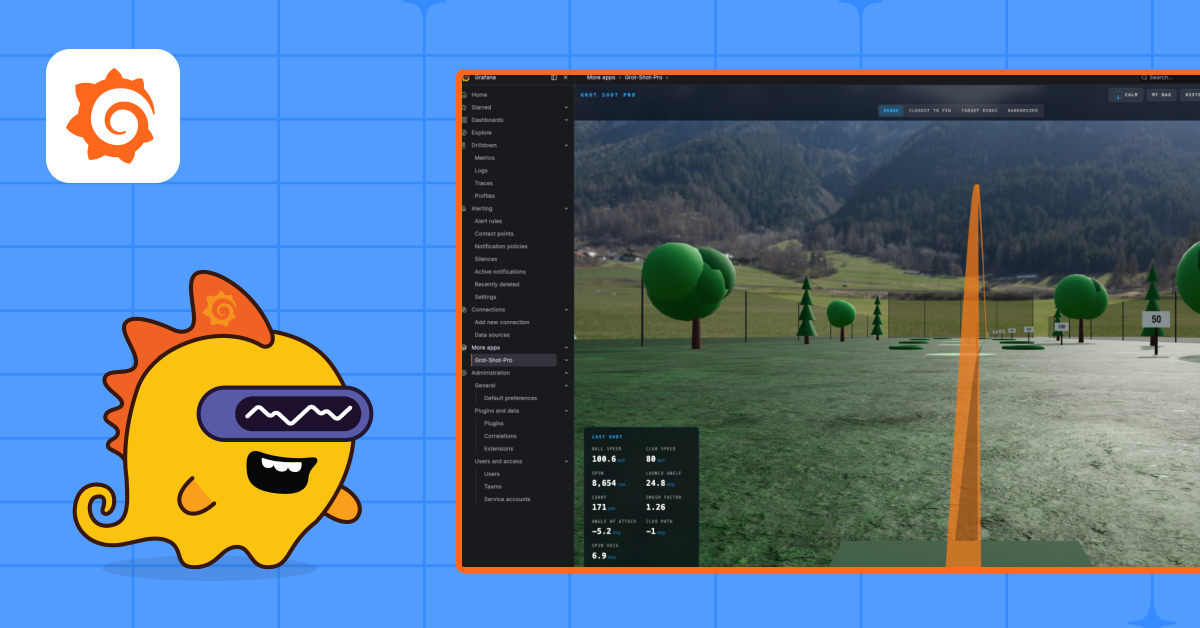
Note: At GrafanaCON 2026, I presented a Science Fair project called GrotShotPro, which is the full golf-simulator experience built on top of OpenFlight. To see some demo footage, and learn more about OpenFlight in general, check out my talk below.
[embed]
A quick primer on how launch monitors work
There are two approaches to launch monitors: camera-based and radar-based.
Camera-based monitors use a high-speed camera to capture a few frames at impact and then estimate the rest of the ball flight. They use a combination of machine learning and computer vision to calculate the trajectory of the ball.
OpenFlight uses radar — specifically, three radars on a Raspberry Pi, all driven by Python.
Two of the radars are FMCW (frequency-modulated continuous wave). The important thing about FMCW is that it has one transmitter and two receivers. That physical separation between the receivers gives you enough data to compute a vector to the ball, which is how you get direction and trajectory.
The third is a Doppler radar. If you’ve ever heard a police car’s siren shift pitch as it passes you, that’s the Doppler effect. It’s a frequency change that tells you how fast something is moving. Doppler doesn’t know direction, but it knows speed. And here’s the part I didn’t expect: you can measure spin with Doppler too. When a spinning object flies through the air, it wobbles slightly, and the radar picks that up. It’s the same trick astronomers use to observe planets spinning in space.
Where Grafana Cloud comes in
Once a shot is hit, OpenFlight crunches the radar data and emits the whole thing as a JSON log. From there, the pipeline looks like this:
- Alloy runs on the Raspberry Pi and ships the shot logs to Loki.
- A custom Grafana app plugin polls Loki every few seconds.
- A physics engine I built (with some help from Claude) turns the metrics into a rendered ball flight, which you can then visualize in Grafana Cloud.

The result is a working golf simulator in your backyard, powered by an observability stack that’s similar to what many teams use to monitor production systems at work. Hit a ball, and a few seconds later you watch it fly across a Grafana Cloud dashboard.
Try it, fork it, break it
OpenFlight is fully open source. If you’re a golfer, an engineer, a radar nerd, or all three, you can clone it, contribute, file issues, and ship a PR. The whole point of this project is that launch monitor technology shouldn’t be locked behind a $30k paywall or a subscription.
Give it a try and let me know what you think. Fore!
메타데이터
- post_id
- 84d68ad40fc5
- slug
- openflight-building-an-open-source-golf-launch-monitor-with-raspberry-pi-grafana-cloud-and-84d68ad40fc5
- url
- https://medium.com/grafana-labs/openflight-building-an-open-source-golf-launch-monitor-with-raspberry-pi-grafana-cloud-and-84d68ad40fc5
- canonical_url
- https://medium.com/grafana-labs/openflight-building-an-open-source-golf-launch-monitor-with-raspberry-pi-grafana-cloud-and-84d68ad40fc5
- author_url
- https://medium.com/@coleman.rollins
- status
- ok
- fetched_at
- 2026-06-09 15:37:30