Why auditd Still Matters in 2026 (Especially for Security Teams)
In the world of EDR, XDR, SIEM, and shiny security platforms, it’s easy to overlook one of the most powerful native security tools in…
Why auditd Still Matters in 2026 (Especially for Security Teams)
In the world of EDR, XDR, SIEM, and shiny security platforms, it’s easy to overlook one of the most powerful native security tools in Linux:
auditd.
It’s not flashy. It doesn’t come with a dashboard. But it gives you something extremely valuable:
Ground-truth visibility at the kernel level.
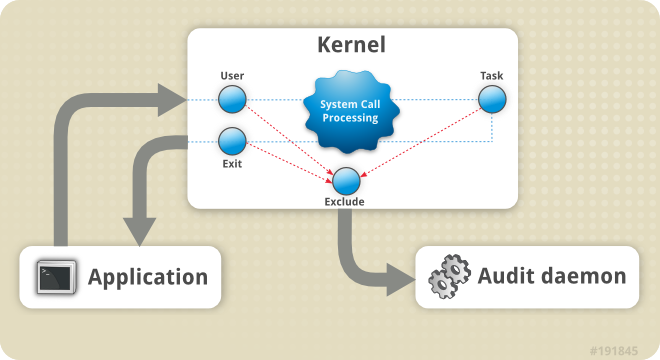
Audit System Architecture (source: RedHat)
If you’re serious about detection engineering, threat hunting or incident response in Linux environments, auditd is not optional.
Let’s break it down.
What is auditd?

Source: kifarunix.com
auditd (Linux Audit Daemon) is a userspace service that collects and stores security-relevant events from the Linux kernel audit framework.
Unlike syslog, which logs what applications decide to report, auditd logs what the kernel actually sees happening.
That includes:
- File access
- Permission changes
- User logins
- Process execution
- Privilege escalation
- System call activity
If something sensitive happens on a Linux system, auditd can be configured to record it.
Why auditd is Powerful for Security
1️. It Sees System Calls
Most Linux attacks eventually rely on system calls:
execve()→ running malwareopen()→ accessing sensitive fileschmod()/chown()→ modifying permissionssetuid()→ privilege escalation
Auditd can log these at the syscall level.
That means you’re not just seeing “a command ran” — you’re seeing how it interacted with the system.
For threat hunting? That’s gold.
2. It’s Native (No Agent Required)
Auditd is built into Linux.
No third-party agent. No licensing. No cloud dependency.
For environments like:
- Air-gapped labs
- OT networks
- Restricted production servers
- Compliance-heavy systems
This matters.
3️. It Supports Compliance Out of the Box
Auditd is commonly used for:
- PCI-DSS
- ISO 27001
- CIS benchmarks
- NIST controls
Why?
Because it can track:
- Access to
/etc/passwd - Changes to
/etc/sudoers - Root activity
- Authentication events
- Configuration file changes
Auditors love evidence. Auditd gives you exactly that.
Basic Example: Monitoring Sensitive Files
Here’s a simple example.
Monitor changes to /etc/passwd:
auditctl -w /etc/passwd -p wa -k passwd_changes-w→ watch file-p wa→ log write and attribute changes-k→ tag with a key for easier searching
Then search logs:
ausearch -k passwd_changesNow you know:
- Who changed it
- When it was changed
- What process made the change
- From which UID
That’s investigation-ready data.
Detecting Suspicious Behavior
Let’s say you want to detect privilege escalation attempts.
You can monitor execution of commands by users with UID ≥ 1000:
auditctl -a always,exit -F arch=b64 -S execve -F uid>=1000 -F uid!=4294967295 -k user_execNow every user command execution is logged.
From there, you can:
- Ship logs to Elasticsearch
- Map to ECS
- Build detection rules in Kibana
- Alert on suspicious tools like
nc,nmap,curl,wget, etc.
This is where auditd becomes part of your detection pipeline.
auditd + ELK = Real Visibility
If you’re running Elasticsearch (like most SOC labs), auditd becomes even more powerful.
Flow looks like this:
Linux Host → auditd → Filebeat → Logstash → Elasticsearch → KibanaNow you can:
- Visualize root activity
- Track file integrity changes
- Build detection dashboards
- Hunt for lateral movement
- Correlate with Zeek logs
For example:
- Suspicious outbound traffic in Zeek
- Correlated with execution of
/tmp/.xbinary from auditd - Followed by modification of crontab
Now you’re doing real threat hunting.
Things to Be Careful About
Auditd is powerful — but misconfigured, it can hurt performance.

Source: vootwerk.com
⚠️ Log Volume
If you log every syscall without filtering, your logs will explode.
Be intentional.
Focus on:
- Execve
- Privilege changes
- Sensitive file access
- Kernel module loading
- Network configuration changes
⚠️ Rule Persistence
Use /etc/audit/rules.d/ for persistent rules.
Don’t rely on temporary auditctl rules unless you’re testing.
When Should You Use auditd?
You should absolutely deploy auditd if:
- You run Linux production servers
- You handle sensitive data
- You want kernel-level visibility
- You’re building a SOC lab
- You’re teaching threat hunting
- You’re preparing for incident response maturity
In modern Linux security, auditd is foundational.
Not optional.
Final Thoughts
Security tools come and go.
But visibility at the kernel level? That’s timeless.
Auditd may not look exciting. It won’t impress management in a demo. But during an incident — when you need hard evidence — it becomes your best friend.
If you’re serious about Linux detection engineering, start with auditd.
Build from there.
References
- https://linux.die.net/man/8/auditd
- https://linux.die.net/man/8/auditctl
- https://linux.die.net/man/8/ausearch
- https://www.elastic.co/docs/reference/beats/filebeat/filebeat-module-auditd
- https://nvlpubs.nist.gov/nistpubs/Legacy/SP/nistspecialpublication800-92.pdf
- https://www.redhat.com/en/blog/configure-linux-auditing-auditd
메타데이터
- post_id
- 84ec188ce0a8
- slug
- why-auditd-still-matters-in-2026-especially-for-security-teams-84ec188ce0a8
- url
- https://medium.com/@y0tz/why-auditd-still-matters-in-2026-especially-for-security-teams-84ec188ce0a8
- canonical_url
- https://medium.com/@y0tz/why-auditd-still-matters-in-2026-especially-for-security-teams-84ec188ce0a8
- author_url
- https://medium.com/@y0tz
- status
- ok
- fetched_at
- 2026-06-09 21:21:26