Azure Storage Services
In cloud computing, efficient storage solutions are essential for handling large-scale data, managing deployments, and ensuring seamless…
Azure Storage Services
In cloud computing, efficient storage solutions are essential for handling large-scale data, managing deployments, and ensuring seamless application performance. Microsoft Azure offers multiple storage services, each tailored to specific needs — ranging from storing unstructured data to managing shared files and processing asynchronous messages.
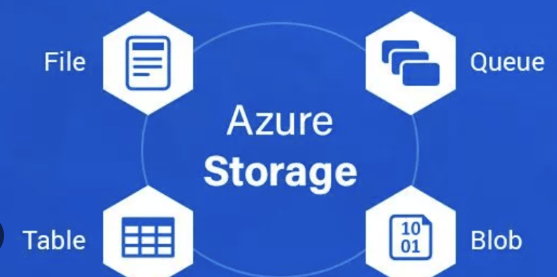
Azure Storage Services:
- Azure Blob Storage — Large-scale object storage for unstructured data
- Azure File Storage — Managed SMB/NFS file shares for applications and VMs
- Azure Tables — NoSQL key-value storage for structured and semi-structured data
- Azure Queue Storage — Message queuing for decoupled service communication
1️⃣ Azure Blob Storage: Scalable Object Storage for Massive Data
What is Azure Blob Storage?
Azure Blob Storage is an object storage solution designed to store and manage massive amounts of unstructured data such as:
- Text files and documents
- Images, videos, and audio
- Logs and telemetry data
- Backups, snapshots, and archives
Unlike traditional file systems, Blob Storage doesn’t impose hierarchical structures. Instead, it organizes data into containers, making it ideal for distributed and scalable workloads.
When to Use Azure Blob Storage?
- Storing static website content (e.g., images, CSS, JavaScript)
- Managing application logs and backups
- Hosting large-scale data lakes for big data and analytics
- Storing deployment artifacts in CI/CD pipelines
- Handling media streaming applications
DevOps Use Case
A DevOps engineer can use Azure Blob Storage for:
- Storing and retrieving build artifacts generated in CI/CD pipelines
- Automating uploads and downloads using Azure CLI, PowerShell, or REST APIs.
- Implementing lifecycle policies to automatically archive or delete old logs and backups.
Key Features
Hot, Cool, and Archive Tiers — Optimize storage costs based on access frequency. Secure Data Access — Supports SAS tokens, RBAC, and private endpoints. Geo-Redundancy — Ensures high availability with GZRS and RA-GRS replication.
AWS Equivalent
Amazon S3 (Simple Storage Service) — AWS’s object storage with lifecycle management, fine-grained permissions, and intelligent tiering.
2️⃣ Azure File Storage: Cloud-Based File Shares for Applications
What is Azure File Storage?
Azure File Storage is a fully managed cloud-based file sharing service that provides:
- SMB (Server Message Block) protocol support for Windows-based applications.
- NFS (Network File System) protocol support for Linux-based workloads.
Unlike Blob Storage, Azure Files behaves like a traditional file system, allowing multiple VMs, applications, and containers to access files simultaneously.
When to Use Azure File Storage?
- Storing configuration files shared across multiple application instances.
- Managing shared logs and reports in distributed environments.
- Providing persistent storage for Kubernetes and Docker containers.
- Acting as a network drive replacement for cloud-based applications.
DevOps Use Case
A DevOps engineer may use Azure File Storage to:
- Mount shared files in Azure Kubernetes Service (AKS) or virtual machines.
- Centralize application configuration files to maintain consistency across deployments.
- Automate file storage provisioning using Azure ARM templates or Terraform.
Key Features
Fully Managed — No need to manage file servers. Snapshots & Backups — Built-in Azure Backup integration. Hybrid Connectivity — Can be mounted from on-premises using Azure File Sync.
AWS Equivalent
Amazon EFS (Elastic File System) — A scalable NFS-based file system for Linux workloads.
3️⃣ Azure Tables: NoSQL Key-Value Storage for Scalable Workloads
What is Azure Tables?
Azure Tables is a NoSQL key-value store optimized for high-speed queries on structured and semi-structured data. It is designed for:
- Storing metadata, user profiles, and application settings.
- Handling large-scale logging and event processing.
- Managing audit trails and time-series data.
Unlike relational databases, Azure Tables does not enforce a strict schema, making it flexible and highly scalable.
When to Use Azure Tables?
- Storing dynamic application configurations.
- Managing session data for web applications.
- Keeping IoT device telemetry and logs.
- Handling feature flags for A/B testing in deployments.
DevOps Use Case
A DevOps engineer can use Azure Tables for:
- Centralized application settings retrieval across different environments.
- Version tracking of deployments by logging metadata.
- Dynamic feature flagging to control releases without redeploying.
Key Features
High Scalability — Supports billions of entities per table. Partitioned Storage — Enables fast lookups based on keys. Low-Cost Storage — Pay per read/write operation.
AWS Equivalent
Amazon DynamoDB — AWS’s fully managed NoSQL key-value store with low-latency queries.
4️⃣ Azure Queue Storage: Asynchronous Message Queuing
What is Azure Queue Storage?
Azure Queue Storage provides a reliable way to send, store, and process messages asynchronously between components of a distributed application.
Queues ensure fault-tolerant, scalable communication between microservices, backend jobs, and event-driven workflows.
When to Use Azure Queue Storage?
- Managing asynchronous background jobs (e.g., image processing, data ingestion).
- Implementing task queues in serverless or microservices architectures.
- Handling event-driven triggers for workflow automation.
- Decoupling front-end and back-end services to improve scalability.
DevOps Use Case
A DevOps engineer may use Queue Storage to:
- Queue up deployment tasks in a CI/CD pipeline.
- Prioritize and schedule background jobs.
- Orchestrate workflows across microservices.
Key Features
FIFO and Visibility Timeout Support — Ensures messages are processed in order. Reliable Delivery — Messages persist until processed. Scalable & Cost-Effective — Suitable for high-throughput workloads.
AWS Equivalent
Amazon SQS (Simple Queue Service) — A fully managed message queue for distributed systems.
메타데이터
- post_id
- 84fa6ba2f73a
- slug
- azure-storage-services-84fa6ba2f73a
- url
- https://medium.com/@srirammoorthy11/azure-storage-services-84fa6ba2f73a
- canonical_url
- https://medium.com/@srirammoorthy11/azure-storage-services-84fa6ba2f73a
- author_url
- https://medium.com/@srirammoorthy11
- status
- ok
- fetched_at
- 2026-08-03 23:20:39