Unblocking the Single Thread: A Beginner’s Guide to Synchronous vs. Asynchronous JavaScript
If you’ve spent any time writing JavaScript, you’ve probably heard the phrase: “JavaScript is single-threaded.”
Unblocking the Single Thread: A Beginner’s Guide to Synchronous vs. Asynchronous JavaScript
If you’ve spent any time writing JavaScript, you’ve probably heard the phrase: “JavaScript is single-threaded.”
But what does that actually mean? By default, JavaScript is synchronous. It executes code line by line, from top to bottom. It has one call stack and one memory heap. Because of this, it can only do one thing at a time.
While this makes the code predictable, it creates a massive problem: synchronous blocking behavior.
Let’s break this down using a simple real-world analogy, see how it looks in code, and explore how Asynchronous JavaScript and Callbacks come to the rescue.
The Restaurant Analogy: Synchronous Blocking
Imagine a restaurant with two customers and only one waiter.
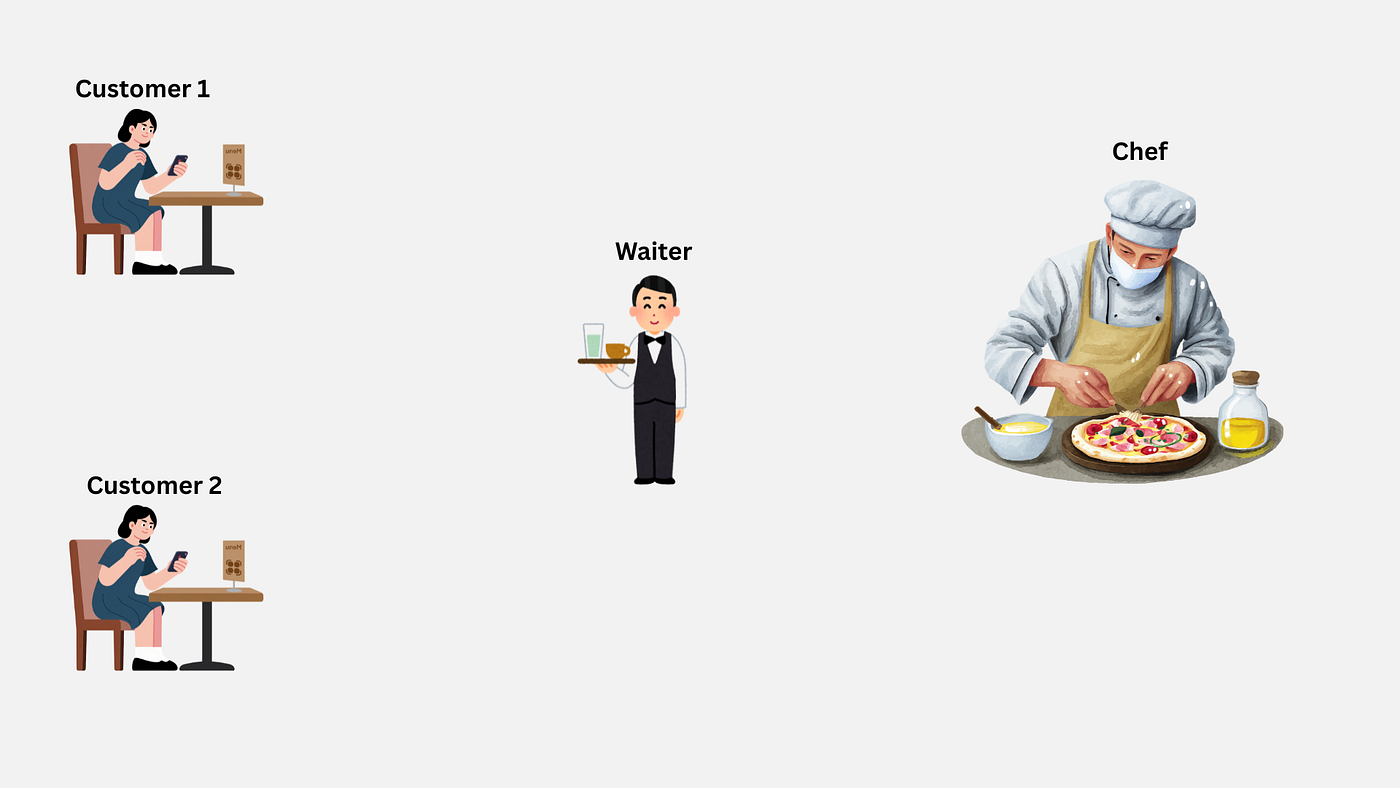
In a strictly synchronous world, the waiter takes an order from Customer 1 and takes it to the kitchen. But instead of tending to Customer 2, the waiter stands in the kitchen staring at the chef until the food is completely cooked. Only after serving Customer 1 can the waiter finally approach Customer 2.
Customer 2 is officially “blocked.” In web development, if your code works this way, your entire webpage freezes while waiting for a task (like fetching data from a server) to finish.
Let’s look at how this blocking behavior appears in code.
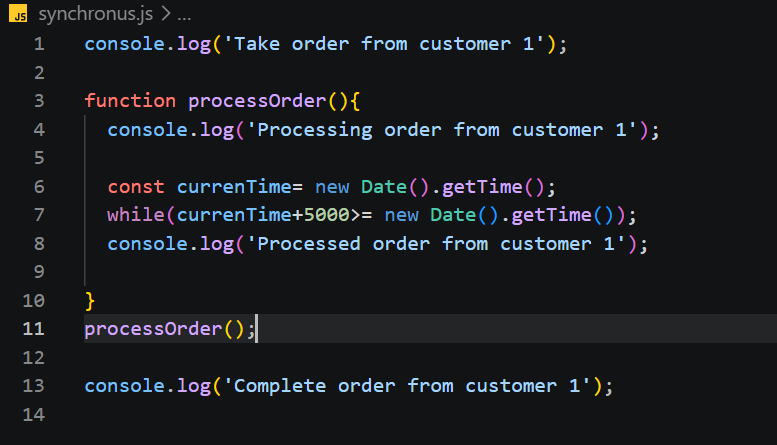
code snippet of synchronus.js
In the code above, we simulate the kitchen’s cooking time using a while loop that delays the execution for 5 seconds.
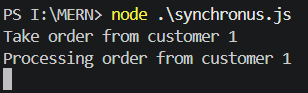
halted for 5s
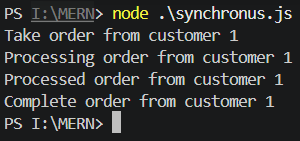
output of synchronus.js
As you can see in the terminal output, the program is completely halted for 5 seconds between “Processing order” and “Processed order.” Nothing else can happen during this time.
Asynchronous JavaScript
To fix this freezing issue, JavaScript gives us Asynchronous capabilities.
Going back to our restaurant: an asynchronous waiter takes Customer 1’s order, hands it to the kitchen, and immediately goes to take Customer 2’s order. The kitchen handles the cooking in the background.
In JavaScript, we achieve this using functions like setTimeout. But if JavaScript is single-threaded, how does it do things in the background?
This is where the browser (or Node.js) steps in with its working mechanism.
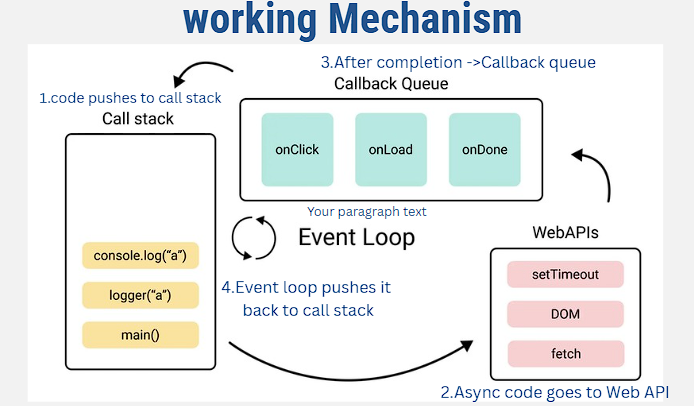
working mechanism of how javascript handles the asynchronus code
Here is exactly what happens behind the scenes:
- The Call Stack: JavaScript executes normal synchronous code here.
- Web APIs: When JS encounters an async function (like setTimeout or an API fetch), it hands that task off to the Web API. The call stack immediately moves on to the next line of code.
- Callback Queue: Once the Web API finishes the background task (e.g., the 3-second timer finishes), it pushes the result into the Callback Queue.
- Event Loop: The Event Loop constantly checks if the main Call Stack is empty. If it is, it takes the pending task from the Callback Queue and pushes it back onto the Call Stack to be executed.
Lets see code with example:
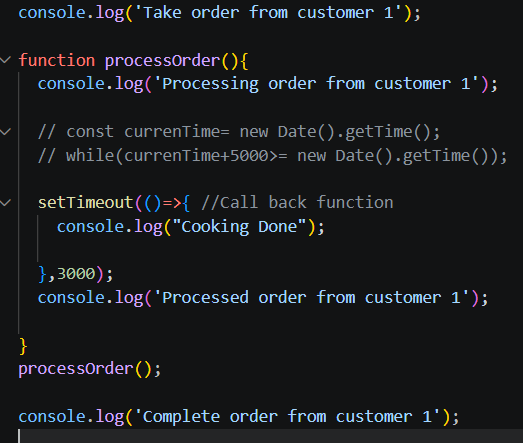
snippet of asynchronus.js with setTimeout function
Here, we replaced our blocking while loop with setTimeout, an asynchronous function. The waiter has handed the order to the kitchen. Let’s look at the output.
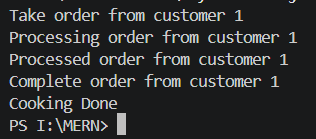
output of asynchronus.js
Here we can see the “cooking Done” line comes after “complete order from customer 1” which breaks the control flow.
To solve the Issue: Callbacks to the Rescue
To restore the logical flow while keeping our application unblocked, we use Callback Functions.
A callback is simply a function that you pass into another function as an argument, with the instruction: “Execute this function only after you have finished your current task.”
Let’s rewrite our code using callbacks to ensure the food is actually cooked before the order is completed.
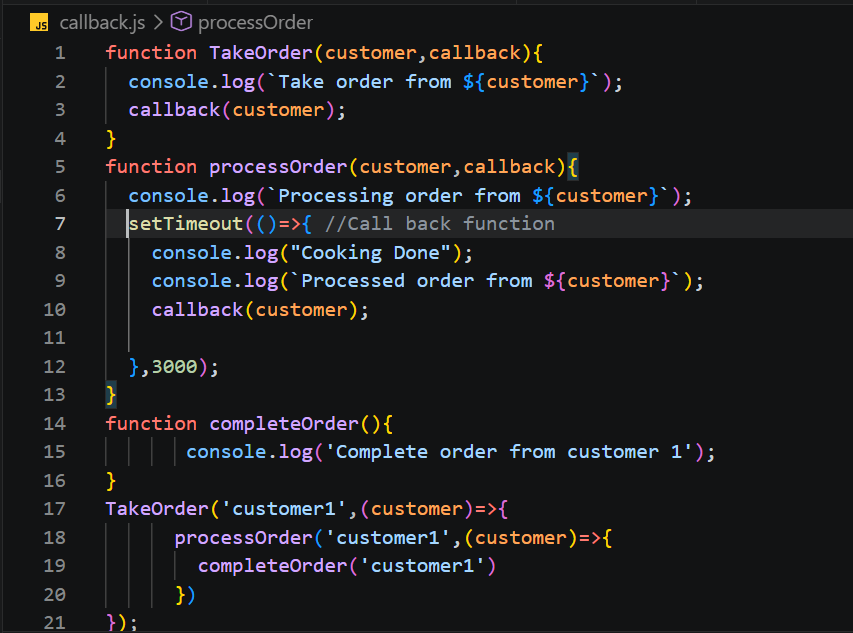
callback.js function
Here we noticed, how processOrder now accepts a callback argument. We place the callback(customer) execution inside the setTimeout. This guarantees that the next step in our process won’t trigger until the 3-second cooking timer is fully complete.
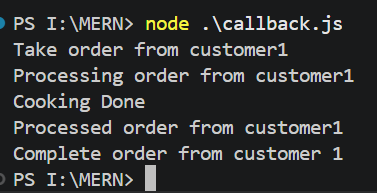
Output of callback.js
Conclusion
If welook at that final output, everything finally makes sense. We successfully stopped our program from freezing, and more importantly, we made sure the food was actually cooked before handing it to the customer!
메타데이터
- post_id
- 8549673dbe89
- slug
- unblocking-the-single-thread-a-beginners-guide-to-synchronous-vs-asynchronous-javascript-8549673dbe89
- url
- https://medium.com/@sakib.ssadman/unblocking-the-single-thread-a-beginners-guide-to-synchronous-vs-asynchronous-javascript-8549673dbe89
- canonical_url
- https://medium.com/@sakib.ssadman/unblocking-the-single-thread-a-beginners-guide-to-synchronous-vs-asynchronous-javascript-8549673dbe89
- author_url
- https://medium.com/@sakib.ssadman
- status
- ok
- fetched_at
- 2026-06-09 15:37:30




