Building a Scalable Data Bridge from C# to Iceberg Tables in S3
For many teams, exporting data directly from a database to S3 in CSV format seems like a quick win — until scale, flexibility, and update…
Building a Data Bridge from C# to Iceberg Tables in S3
For many teams, exporting data directly from a database to S3 in CSV format seems like a quick win — until scale, flexibility, and update needs emerge.
In my recent project, I set out to fix this by building a data pipeline that transfers data from C# to S3 Iceberg tables, without putting load on the database.
This post walks through:
- Why traditional CSV-based S3 exports are limiting
- How I built a lightweight C# → S3 → Iceberg data bridge
- Common pitfalls when configuring S3 Table Buckets, catalogs, and Glue Spark jobs
- Lessons learned for building efficient, updatable data lakes
Full source code: GitHub: CSharp-S3-DataBridge
The Problem: Pushing Data from the Database to S3
In many systems, the database is responsible for exporting data directly to S3 as CSV files. This design looks simple but introduces several bottlenecks:
- Database Load: Continuous export jobs put unnecessary pressure on the database.
- Limited Transformation Options: Complex logic is difficult to handle in SQL alone.
- Heavy Format: CSV files are bulky and inefficient for analytics.
- No Update Mechanism: Updating or deleting records in S3 CSV files is almost impossible.
The goal was to:
- Offload processing from the database
- Enable deduplication and updates
- Store data efficiently using an Iceberg table
- Support multiple data sources (Database, SQS, Kafka, or custom inputs)
The Architecture: Decoupled, Flexible, and Cloud-Native
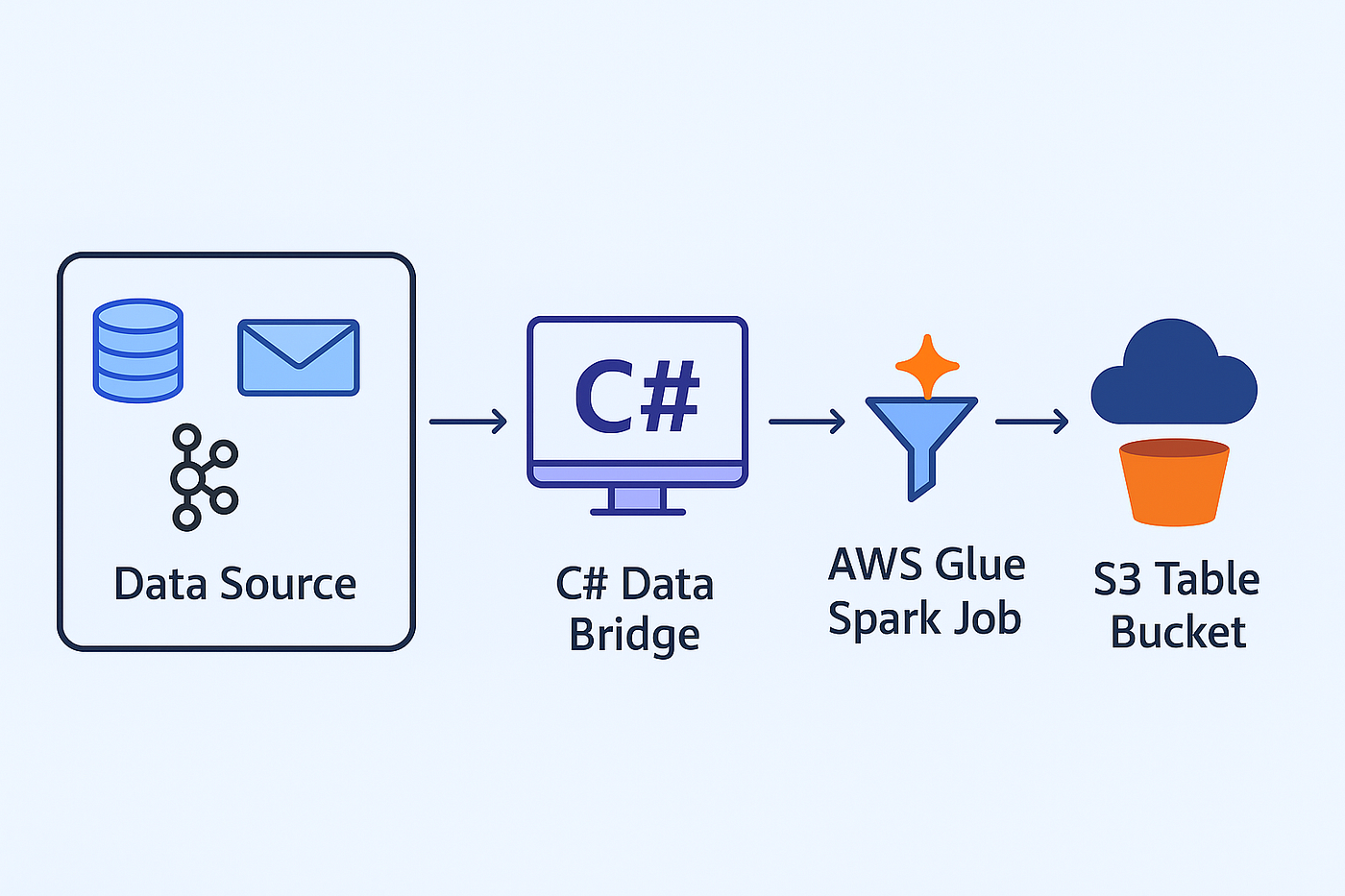
High-level flow:

Key Components
- Data Source: Can be a database, SQS, or Kafka — flexible by design.
- C# Data Bridge : C# processor that reads data from source, buffer it and pushes it periodically to staging bucket.
- Staging Bucket: Stores Parquet files before merge; these can be cleared after each commit.
- S3 Table Bucket: Hosts the Iceberg table and supports incremental updates.
- Glue Spark Job: Executes upsert logic, removes duplicates, and maintains Iceberg tables efficiently.
Why Iceberg?
Apache Iceberg enables ACID-compliant operations (INSERT, UPDATE, DELETE) directly on S3. Unlike static files, Iceberg tables support schema evolution, partitioning, and snapshot rollback — essential for production-grade data lakes.
By using S3 Table Buckets, we gain tight integration with AWS Lake Formation, allowing Athena and Glue to access Iceberg tables as native catalog entries.
The Spark Glue Job
Below is the Spark job that performs deduplication and merges data from the staging bucket into the Iceberg table:
import sys
from pyspark.sql import SparkSession
from awsglue.utils import getResolvedOptions
from pyspark.sql import functions as F, Window
region = "your-region"
aws_account_id = "1234567890"
table_bucket_name = "your-s3-table-bucket"
s3_catalog_name = f"{aws_account_id}:s3tablescatalog/{table_bucket_name}"args = getResolvedOptions(sys.argv, [
'JOB_NAME', 'STAGING_BUCKET', 'TABLE_BUCKET_ARN',
'DATABASE_NAME', 'TABLE_NAME', 'PRIMARY_KEY'
])spark = SparkSession.builder \
.appName("AccessS3TableBucket") \
.config("spark.sql.catalog.s3_tables", "org.apache.iceberg.spark.SparkCatalog") \
.config("spark.sql.catalog.s3_tables.type", "rest") \
.config("spark.sql.catalog.s3_tables.uri", f"https://glue.{region}.amazonaws.com/iceberg") \
.config("spark.sql.catalog.s3_tables.warehouse", s3_catalog_name) \
.config("spark.sql.catalog.s3_tables.rest.sigv4-enabled", "true") \
.config("spark.sql.catalog.s3_tables.rest.signing-region", region) \
.getOrCreate()staging_path = f"s3://{args['STAGING_BUCKET']}/"
staging_df = spark.read.parquet(staging_path)window = Window.partitionBy("id").orderBy(F.desc("time"))
staging_dedup = (
staging_df
.withColumn("rn", F.row_number().over(window))
.filter("rn = 1")
.drop("rn")
)
staging_dedup.createOrReplaceTempView("staging_dedup")merge_query = f"""
MERGE INTO s3_tables.{args['DATABASE_NAME']}.{args['TABLE_NAME']} target
USING staging_dedup source
ON target.{args['PRIMARY_KEY']} = source.{args['PRIMARY_KEY']}
WHEN MATCHED THEN UPDATE SET target.time = source.time, updated_at = current_timestamp
WHEN NOT MATCHED THEN INSERT (id, time, updated_at) VALUES (source.id, source.time, current_timestamp)
"""spark.sql(merge_query)Highlights
- Deduplication using
row_number()over a window - Merge-into operation for upserts
- No explicit location needed when using
S3TableCatalog
Setting Up S3 Table Buckets and Catalogs
S3 Table Buckets are designed for Iceberg tables by supporting automatic compaction, snapshots, and other Iceberg optimization features.
They integrate directly with AWS Lake Formation, which allows automatic discovery and catalog registration of Iceberg tables.
Setup Steps
- Create an S3 Table Bucket.
- Add a Namespace (this appears as a database in Athena).
- Add a Table.
- Configure Lake Formation permissions for both Glue and Athena roles.
- Ensure the Spark and Glue job configurations point to
S3TableCatalog.
If you cannot see the S3 Table Bucket catalog in Athena, it’s almost always a permissions issue. Check Lake Formation grants for your IAM role and Glue job.
Common Pitfalls
- Using the default catalog instead of
S3TableCatalog - Missing Lake Formation permissions for Glue or Athena roles
- Specifying a table location manually (not required for S3 Table Buckets)
- Duplicated data in staging (solved via deduplication before merge)
Results
This setup provides a clear separation of responsibilities:
- The database remains light — no export workload.
- Processing and transformation happen in the Spark job.
- Iceberg tables in S3 allow updates, schema evolution, and efficient querying.
- The architecture easily extends to new data sources or streaming systems.
What’s Next
This foundation can be expanded with:
- Real-time streaming from Kafka
- Schema versioning and evolution management
- Automated compaction and snapshot lifecycle workflows
- Orchestration via AWS Step Functions
Final Thoughts
Building a data bridge from C# to S3 Iceberg tables was a challenging but rewarding experience. It shifted how I think about data movement — away from static exports and toward dynamic, maintainable lake house architecture.
If you’re moving beyond CSV-based data pipelines or looking to enable updates in your data lake, this approach is a strong foundation to start from.
Code and scripts are available here: GitHub: CSharp-S3-DataBridge
메타데이터
- post_id
- 85a685fd4f25
- slug
- building-a-scalable-data-bridge-from-c-to-iceberg-tables-in-s3-85a685fd4f25
- url
- https://medium.com/@junaidulhaq723/building-a-scalable-data-bridge-from-c-to-iceberg-tables-in-s3-85a685fd4f25
- canonical_url
- https://medium.com/@junaidulhaq723/building-a-scalable-data-bridge-from-c-to-iceberg-tables-in-s3-85a685fd4f25
- author_url
- https://medium.com/@junaidulhaq723
- status
- ok
- fetched_at
- 2026-08-10 04:45:40