Cloud Monitoring-Part2
CloudTrial and VPC Flow Logs
Cloud Monitoring-Part2
CloudTrial and VPC Flow Logs
Source: Google images
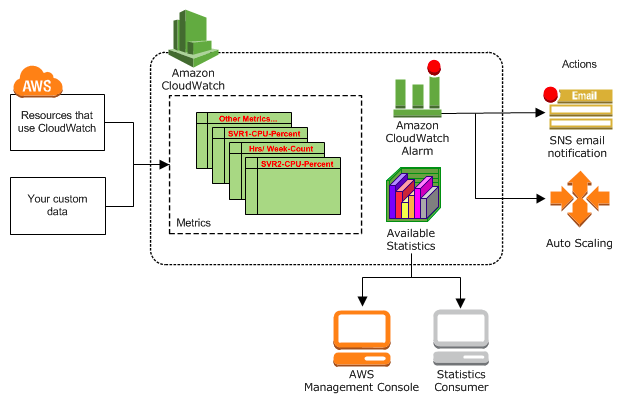
Hello everyone, in my previous article I explained about Amazon CloudWatch, CloudWatch logs, and how they monitor the user events. But with Amazon CloudWatch you know only what happened in AWS and you don’t know who did it. So for that, there is a concept called CloudTrial through which you can know who did which event in AWS. So let’s get into the topic CloudTrial.
CloudWatch is a monitoring service for AWS resources and applications. CloudTrail is a web service that records API activity in your AWS account. They are both useful monitoring tools in AWS.
CloudTrail
AWS CloudTrail is a service that enables governance, compliance, operational auditing, and risk auditing of your AWS account. With CloudTrail, you can log, continuously monitor, and retain account activity related to actions across your AWS infrastructure. CloudTrail provides event history of your AWS account activity, including actions taken through the AWS Management Console, AWS SDKs, command line tools, and other AWS services. This event history simplifies security analysis, resource change tracking, and troubleshooting.
Source: Google images
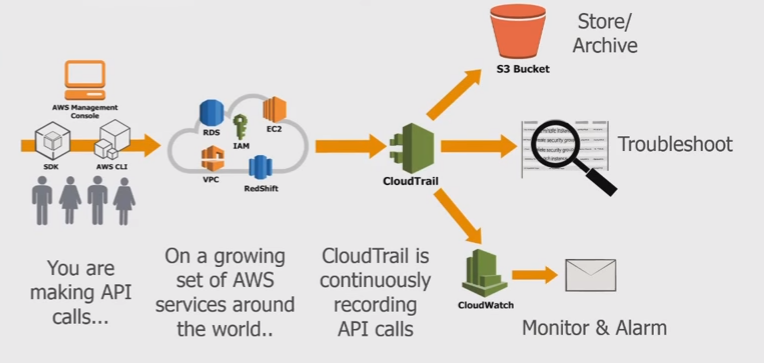
CloudTrail is enabled by default when you create your AWS account. Now, any APIs calls that are logged against an account will be recorded in CloudTrail. For example, when you create a user that’s an API call, when you create an S3 bucket that’s an API call, if you change the security group that’s an API call. Any API calls inside an AWS account are logged to CloudTrail and as default, you’ve got access to all of those events for the last 90 days and that’s inside the event history.
Event history is the default configuration of CloudTrail, where it stores events that are relevant to that account. So the event history allows you to browse through these events. You can search on them, you can interact with them and get a good overall view of anything that’s happened inside this AWS account.
You also create a trial inside a CloudTrail is essentially a unit of configuration. It’s how you define advanced options inside the product. Trail define exactly what is logged and where you want that data logged to. So, by default CloudTrail is just logging its information into the event history but if you want to store the data more than 90 days or want to do something specific with that data then you need to create a trail and the trail is a per region configuration.
How CloudTrail works?
Source: Google images
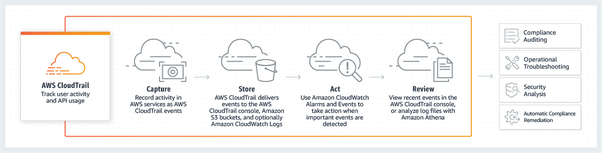
The order of operations in CloudTrail is Capture, Store, Act and Review.
- Capture — records all the API activities
- Store — stores it in an S3 bucket
- Act — If you have Alarms or events registered with it, then those actions are made (like sending an email)
- Review — Check and manage your logs
Now, you can use these logs which are stored in S3 for other operations. You can check the security issues and use them for compliance auditing.
Use cases of CloudTrail
1. Compliance aid
AWS CloudTrail makes it easier to ensure compliance with internal policies and regulatory standards by providing a history of activity in your AWS account.
2. Security analysis
You can perform security analysis and detect user behavior patterns by ingesting AWS CloudTrail events into your log management and analytics solutions.
3. Data exfiltration
You can detect data exfiltration by collecting activity data on S3 objects through object-level API events recorded in CloudTrail. After the activity data is collected, you can use other AWS services, such as Amazon CloudWatch Events and AWS Lambda, to trigger response procedures.
4. Operational issue troubleshooting
You can troubleshoot operational issues by leveraging the AWS API call history produced by AWS CloudTrail. For example, you can quickly identify the most recent changes made to resources in your environment, including creation, modification, and deletion of AWS resources (e.g., Amazon EC2 instances, Amazon VPC security groups, and Amazon EBS volumes).
5. Unusual activity detection
You can detect unusual activity in your AWS accounts by enabling CloudTrail Insights. For example, you can quickly alert and act on operational issues such as erroneous spikes in resource provisioning or services hitting rate limits.
So far we discussed CloudTrail and its use cases now let's get into VPC Flow Logs.
VPC Flow Logs
VPC Flow Logs is a feature that enables you to capture information about the IP traffic going to and from network interfaces in your VPC. VPC Flow log data can be published to Amazon CloudWatch Logs or Amazon S3. After you’ve created a flow log, you can retrieve and view its data in the chosen destination.
Why you have to use VPC Flow Logs?
If you use an AWS VPC to host a website or web app, a lot of web traffic flows through your virtual hosting environment. Monitoring and analyzing that data can lead to key insights about who is using your site or app, how they are connecting when they are logging in, and so on.
VPC Flow data is equally important for monitoring internal application metrics, especially for apps built using microservice architectures. That’s because the microservices that constitute an app rely heavily on the internal network to communicate. Monitoring internal traffic is, therefore, key to understanding how the app is performing.
VPC Flow Logs collect the following types of information.
- Where a connection originated (such as the source IP).
- Detect connection’s endpoint (such as the destination IP).
- The Protocol used to send the data.
- Port numbers used for requests.
- Success or failure of the data flow.
- Traffic rejected due to security group and network Access Control List rules.
So this is what I want to cover in this article I hope this article helped you to understand better about CloudTrail and VPC Flow logs. If you want to know more about any other AWS services for your applications, we as developers at Vitwit are here to help you. If you need an AWS Solutions Architect, don’t hesitate to contact Vitwit.
메타데이터
- post_id
- 85c1916d7519
- slug
- cloud-monitoring-part2-85c1916d7519
- url
- https://medium.com/@venkatesh.gopireddy1/cloud-monitoring-part2-85c1916d7519
- canonical_url
- https://medium.com/@venkatesh.gopireddy1/cloud-monitoring-part2-85c1916d7519
- author_url
- https://medium.com/@venkatesh.gopireddy1
- status
- ok
- fetched_at
- 2026-06-24 18:57:25