Privately allow access to the static content in the S3 bucket through Amazon CloudFront
Security is a very crucial factor when you are using the cloud services. As per the AWS Shared Responsibility Model, security in the cloud…
Privately allow access to the static content in the S3 bucket through Amazon CloudFront
Security is a very crucial factor when you are using the cloud services. As per the AWS Shared Responsibility Model, security in the cloud is the customers’ responsibility.
While hosting the static content on the S3 bucket, you have to keep the content public to make it accessible from the internet. This is not a good practice to keep the content public.
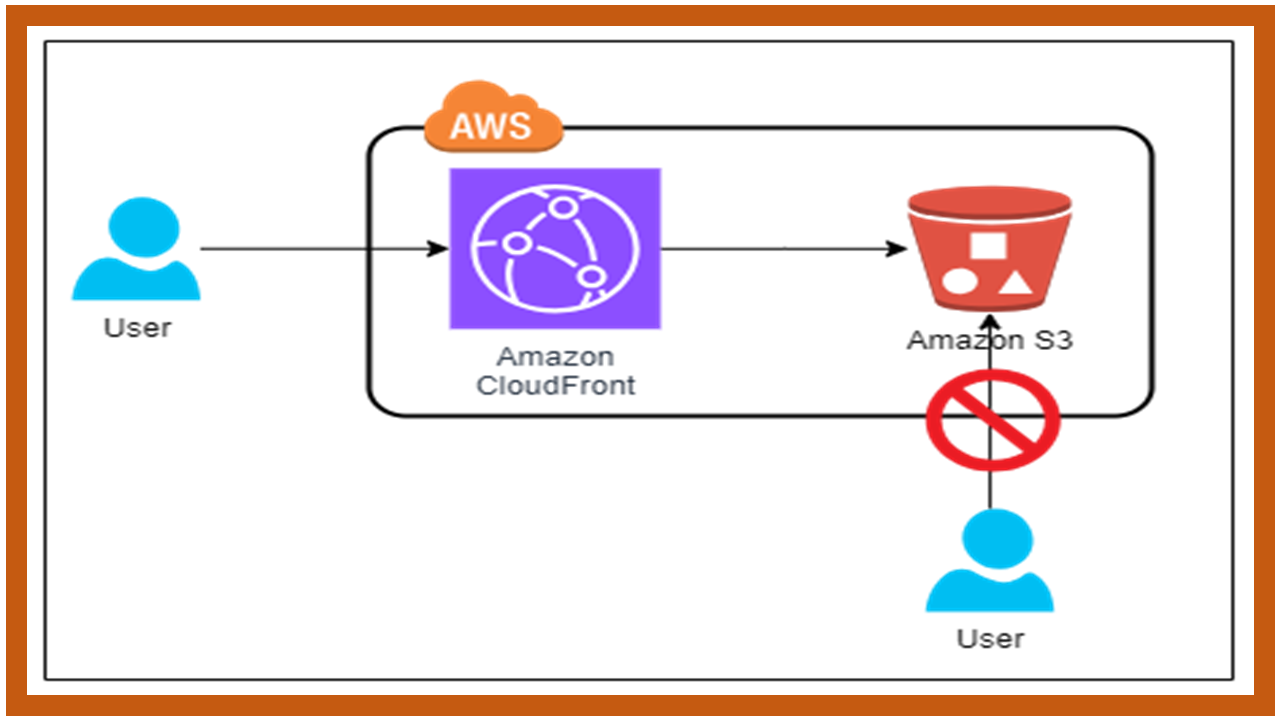
In this case, you can keep the S3 bucket behind the Origin Access Control (OAC) enabled Amazon CloudFront distribution.
OAC allows users to access the content in the S3 bucket only through CloudFront while keeping them private in the bucket. Thus, the users cannot be able to see the object URL and access the content directly in the S3 bucket. In any case, if the user finds the object URL, the content will not be accessible directly.
Let’s see how it can be configured.
First of all, create an S3 Bucket not have public access enabled.
Make sure you have Block Public Access enabled. You can check this in the permissions tab once you create the bucket.

For simplicity, I have uploaded a basic index.html file to the bucket.
You can check whether the page in the bucket is accessible using the object URL or not. Let’s check.
Copy the object URL by selecting the object and clicking Copy URL.

Browse that URL in the browser. As the bucket is private, you can see a similar response as follows:

Now, let’s create a CloudFront distribution.
Redirect to the Amazon CloudFront service on the console. Click Create a CloudFront distribution.

In the Origin section, select the bucket URL as the Origin domain.

Now, under Origin access, select Origin access control settings (recommended).

Click Create control setting. Fill in the details in the form opened and click Create.

This will create a bucket policy which you have to copy and paste in the bucket policy of the respective bucket. You will get the link to it once the distribution is created.
Under Default cache behavior, you can select the options based on the requirements. I am keeping them as default.


Under Web Application Firewall (WAF), I am not enabling it for now. You can enable it if you want to enable the WAF protection.

Under Settings, put the Default root object. Let me put index.html as the root object and click Create distribution.

You can see the distribution created. At the top of the page, you can see instructions to copy the bucket policy to the respective bucket. Click Copy and paste it to the bucket policy.

Move to the S3 bucket, click on the permissions tab, and edit the bucket policy.


Paste the policy and save it.
Now, move to the CloudFront distribution, copy the distribution domain name, and browse it on the browser.

Note: Make sure you remove “https” from the link if you have not configured an SSL certificate with the CloudFront distribution.

That’s it! This is how you can allow users to privately access the static content in the S3 bucket.
If this post was helpful, please do follow and click the clap 👏 button below to show your support.
Thank you for reading!
In Plain English
Thank you for being a part of our community! Before you go:
- Be sure to clap and follow the writer! 👏
- You can find even more content at **PlainEnglish.io 🚀**
- Sign up for our **free weekly newsletter**. 🗞️
- Follow us: **Twitter(X**), ***LinkedIn, [YouTube](https://www.youtube.com/channel/UCtipWUghju290NWcn8jhyAw), [Discord](https://discord.gg/in-plain-english-709094664682340443).***
- Check out our other platforms: **Stackademic**, ***CoFeed, [Venture](https://venturemagazine.net/)***.
메타데이터
- post_id
- 85c8e1bf6500
- slug
- privately-allow-access-to-the-static-content-in-the-s3-bucket-through-amazon-cloudfront-85c8e1bf6500
- url
- https://awstip.com/privately-allow-access-to-the-static-content-in-the-s3-bucket-through-amazon-cloudfront-85c8e1bf6500
- canonical_url
- https://awstip.com/privately-allow-access-to-the-static-content-in-the-s3-bucket-through-amazon-cloudfront-85c8e1bf6500
- author_url
- https://medium.com/@aniruddhfataniya
- status
- ok
- fetched_at
- 2026-06-12 18:14:10