StegoRSA | PicoCTF Challenge Writeup
Exploiting Steganography and Weak RSA Encryption to Recover the Hidden Flag
PicoCTF Writeup
StegoRSA | PicoCTF Challenge Writeup
Exploiting Steganography and Weak RSA Encryption to Recover the Hidden Flag

Category: Cryptography
Difficulty: Easy
Description
A message has been encrypted using RSA. The public key is gone… but someone might have been careless with the private key. Can you recover it and decrypt the message?
Hints
- Hint 1: Metadata can tell you more than you expect.
- Hint 2: Hex can be turned back into a key file.
Walkthrough
First, I downloaded the given encoded flag and the image on my system.
Next, as the hint suggested, I examined the image metadata using exiftool.
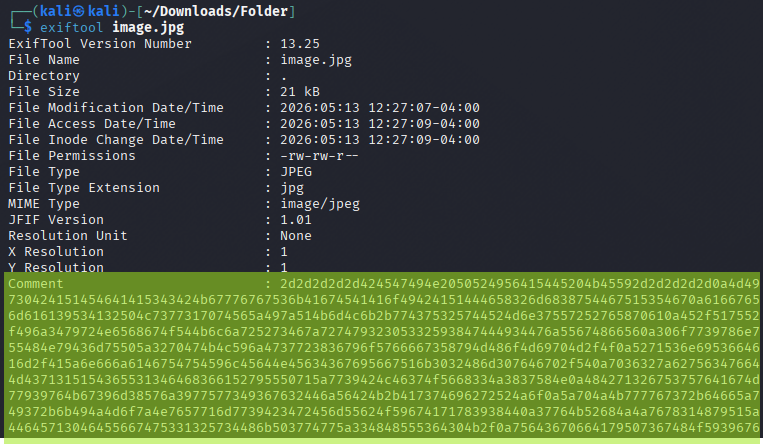
There, I saw a comment that looked like it was hiding something confidential in hex encoding.
I copied the entire comment and created a comment.txt file using nano.
comment:
2d2d2d2d2d424547494e2050524956415445204b45592d2d2d2d2d0a4d494945766749424144414e42676b71686b6947397730424151454641415343424b67776767536b41674541416f49424151444658326d6838754467515354670a6166765a307a59767250504b2f664a4b6772505855364d6d616139534132504c7377317074565a497a514b6d4c6b2b774375325744524d6e37557252765870610a452f517552475869547a5a704e6942434e6c4c595276424d4f496a3479724e6568674f544b6c6a725273467a72747932305332593847444934476a55674866560a306f7739786e774c414865463646304e456468486c434b554a6655484e79436d75505a3270474b4c596a4737723836796f5766667358794d486f4d69704d2f4f0a5271536e69536646663138382b6e46664e4a475745575848526b72416d2f415a6e666a6146754754596c45644e45634367695667516b3032486d307646702f540a7036327a62756347664e357679437566544357777a313445794d5046374d4371315154365531346468366152795550715a7739424c46374f5668334a3837584e0a484271326753757641674d77939764b67396d38576a3977577349367632446a56424b2b417374696272524a6f0a5a704a4b777767372b64665a749372b6b494a4d6f7a4e7657716d7739423472456d55624f59674171783938440a37764b52684a4a7678314879515a44645713046455667475331325734486b503774775a334848555364304b2f0a75643670664179507367484f59396762b664341653465723072715a447341694e732f4f49702b6e467469445a0a316f43644b752f797a666d6933587664697584a68714f36312f45595939675a594d32596276514668785067360a453876566a41707630736e4f4a6c775875756685542514b4267514451346458354b7138436d617547344536630a4a4a75545679366d36536632354b3869766552391536875754e314b33734338724768786639396d49776b44320a766c6f544a7a766e2f6d506234395050586e43466f564364c2b336761645649774b446368596f7053456937560a695a42796b5950506e563768383874595661666c33435577276775a466f575742444846634b505331687437300a715944415375483649622b596e784875592b48726e685a636337a76354c344c326e7565756b734a683068704e0a505457622f504173364968565a514c446e38526a654b5339424686638565131492b556e6158306171336e5a320a592b6d4c5265447034774b42674533694a747045354152674c2b6955437674968466b7748774f3666473279640a424d51482f4e55477a4e4e6b70563841506c5966346a79574f5849596ef734b5574536e646b4f3249453377580a687638432b4b2b4837506263794b6430337a5139696e445551536267794c359744d315452416f4742414b466c0a38644468522b2f68476f784e3252463872773138442b632b4c496b7968484561652515a71415870554b4a77450a446c695167776f70615a32734259677565324f7967304f6f434b726356564255467335444416b496930446a320a7846394d6373373649323579646536586b565776662b65457974495876564d684e794d332306c506247524a510a7251532b454d6754484933693732303043424c687733444548594266473141652b7a3735345513171384155530a482b50484a486a3337694862572b5a7571556a576434643056646b632b315041757257726a6e336414f7469550a75486e6d495375493476676d5753614b6f576363674f6a520a2d2d2d2d2d454e442050524956415Then I decoded the comment:
cat comment.txt | xxd -r -p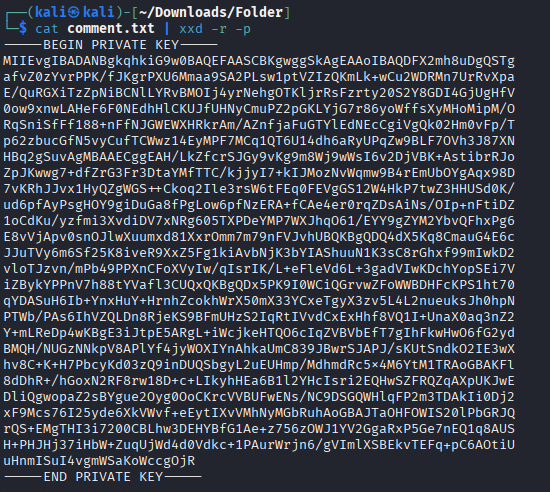
After decoding the comment, I found a private key.
Then, I stored the private key in key.pem file using the following command:
xxd -r -p comment.txt > key.pem
Then, I used the openssl pkeyutl -decrypt command with the private key to decrypt flag.enc and saved the output to flag.txt.
openssl pkeyutl -decrypt -inkey key.pem -in flag.enc -out flag.txt
Finally, I used the cat flag.txt command to display the decrypted flag on the terminal.
FLAG: picoCTF{_***_**}
메타데이터
- post_id
- 85d04d7df4e9
- slug
- stegorsa-picoctf-challenge-writeup-85d04d7df4e9
- url
- https://medium.com/@devdebug/stegorsa-picoctf-challenge-writeup-85d04d7df4e9
- canonical_url
- https://medium.com/@devdebug/stegorsa-picoctf-challenge-writeup-85d04d7df4e9
- author_url
- https://medium.com/@devdebug
- status
- ok
- fetched_at
- 2026-06-09 15:37:30