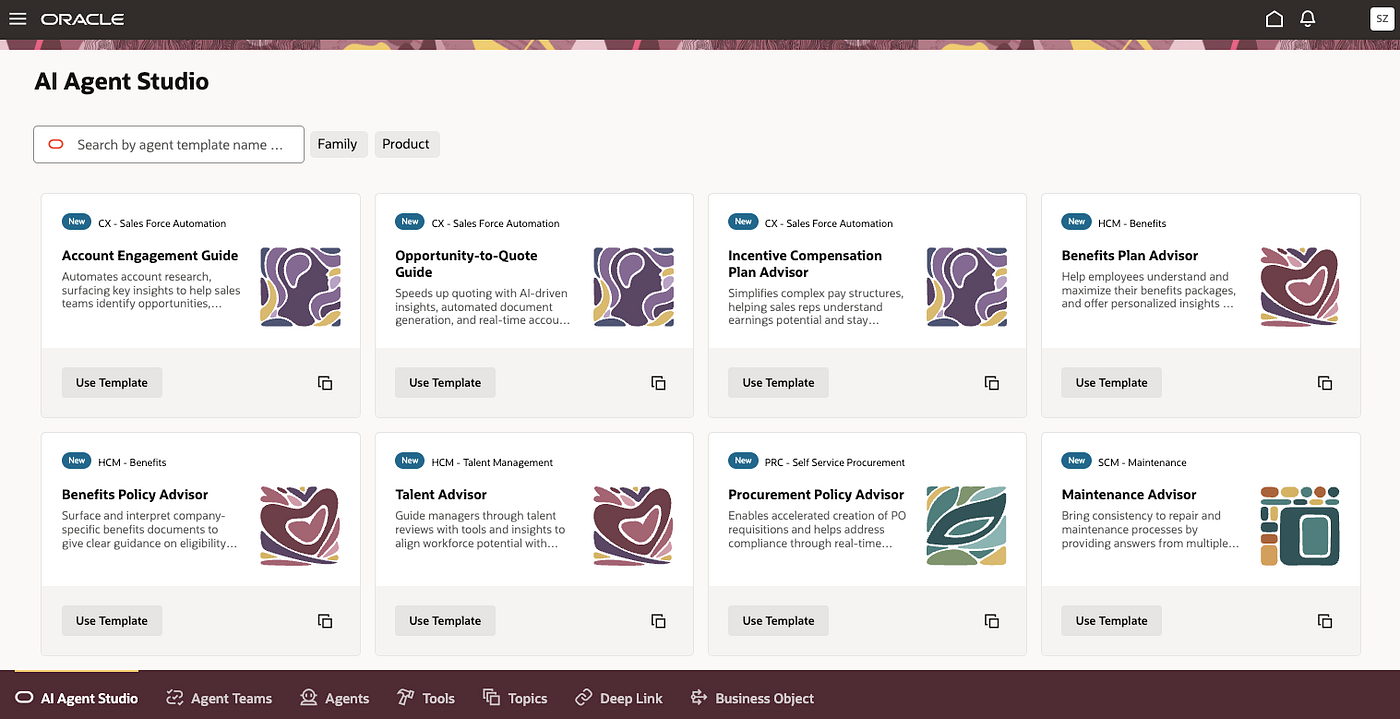
Agentic Apps — Oracle AI Agent Studio
Build, Configure, and Deploy Intelligent Agentic Apps with Oracle AI Agent Studio
Agentic Apps — Oracle AI Agent Studio
DISCLAIMER: The views expressed in this story are my own and do not necessarily reflect the views of Oracle.
Overview
Agentic apps combine multiple AI agents into intelligent business applications that help organizations analyze information, support decision-making, and automate actions. Each agent is specialized for a specific domain, such as sales, finance, or inventory, allowing the application to deliver more accurate insights, focused reasoning, and better business outcomes.
Built with Oracle AI Agent Studio, they combine: AI agents, enterprise data, business workflows, and GenAI capabilities.
Unlike traditional dashboards or assistants, agentic apps are proactive and action-oriented. They identify risks and opportunities in real time, prioritize what matters most, recommend actions, and help users move work forward instead of simply displaying data.
Key Capabilities:
- Proactive alerts and recommendations
- Context-aware decision support
- Intelligent workflow coordination
- Action-oriented business insights
- Scalable multi-agent collaboration
Components:
- Information Displays — AI-generated charts, tables, lists, and visualizations that provide real-time business insights.
- Advisors — AI agents that answer questions independently or collaboratively across multiple domains.
- Actions — AI-generated recommendations and decision points that help users take business actions with approval workflows.
- Communications — AI-assisted outbound messages, such as emails or Slack notifications, generated from predefined templates.
Together, these capabilities help businesses create intelligent applications that improve productivity, automate workflows, and support faster, smarter decision-making.
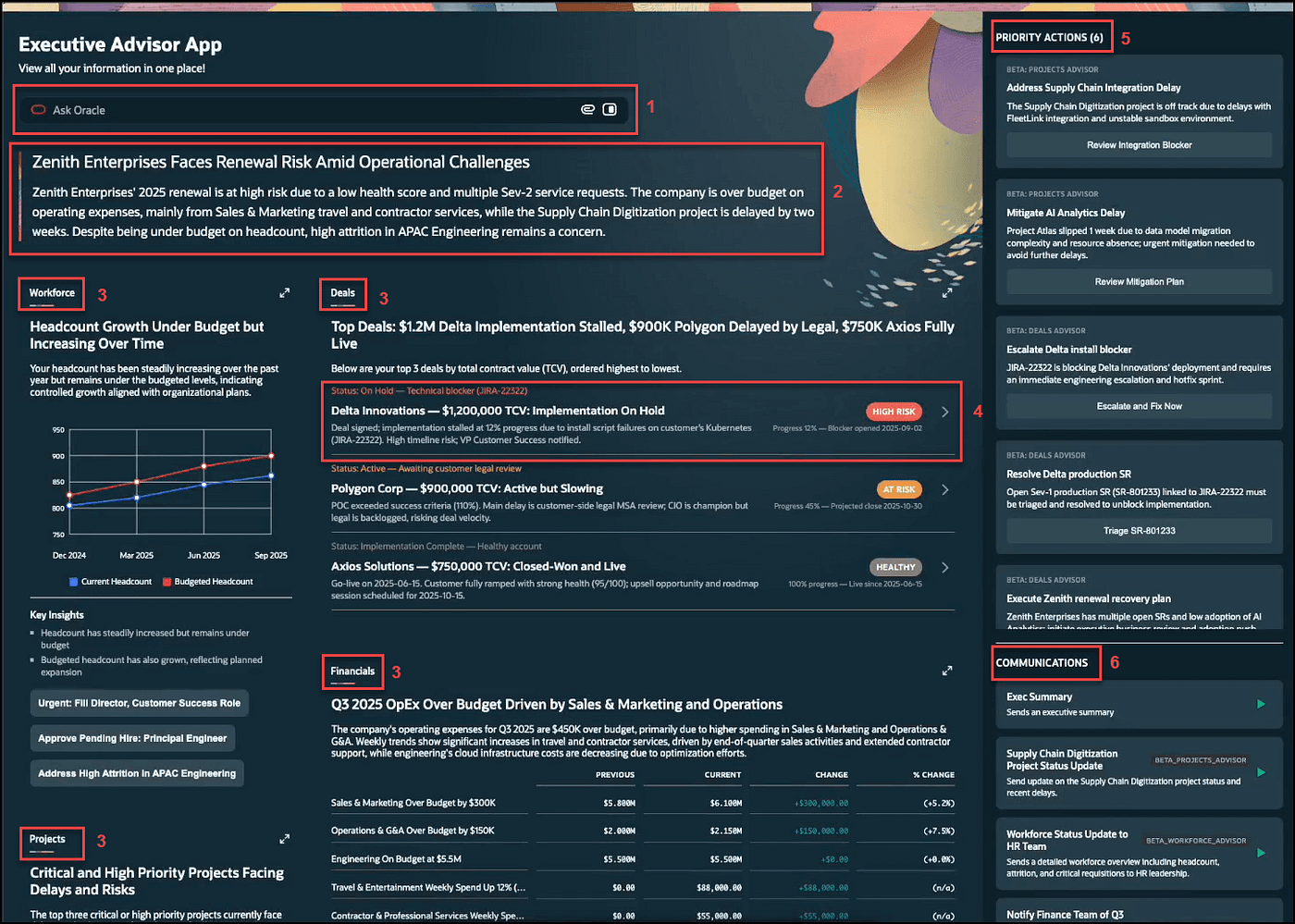
Anatomy of an Agentic App (Source: https://docs.oracle.com/en/cloud/saas/fusion-ai/aiaas/anatomy-of-an-agentic-app.html)
1 — Ask Oracle Advisor: Lets you ask natural language questions against the set of agents included in the app.
2—Summary Section: Displays the most critical information across all the domains in the app’s agents. The summary is typically the first content users read when opening the app.
3 — Agents: The example agentic app includes four agents, each represented by a tile on the dashboard. An agent can provide its own headline to convey the most important information for the app user. Users can zoom in on any agent to keep focus on that agent. Any subsequent questions, actions, and communications are then scoped to the selected agent.
4 — Widget: A widget generated by an agent from the widget library. Each widget has space for the agent to provide its own insights, and capabilities that the user can choose from. Widgets can also have agent-specific actions that the user can act upon.
5 — Priority Actions: App-specific critical information that require the user’s immediate attention and provide options for the user to take action.
6 — Communications: Outbound message suggestions that may be predefined by the app or generated by the LLM. It can start a flow allowing the user to construct the content and send the communication.
Features
- AI Agents — Build intelligent AI agents
- Low-Code Tools — Create apps with less coding
- Workflow Automation — Automate business tasks
- GenAI Support — Use AI and LLM capabilities
- Data Integration — Connect enterprise data and systems
- Oracle Fusion Integration — Work with Oracle Fusion Applications
- Third-Party Connections — Integrate external APIs and tools
- Smart Recommendations — Deliver AI-driven insights and actions
- Security Controls — Enterprise security and governance
- Monitoring Tools — Track agent activity and performance
- Scalable Deployment — Deploy across the enterprise
Architecture
Oracle AI Agent Studio connects AI agents, enterprise data, workflows, and business applications into one intelligent platform.
User Layer
- Oracle Fusion Applications
- Dashboards
- Mobile and web apps
- AI assistants
AI Agent Layer
- Automate tasks
- Coordinate workflows
- Support business decisions
GenAI Layer
- AI-generated insights
- Recommendations
- Summaries
- Natural language interactions
Workflow Layer
- Business processes
- Approvals
- Tasks
- Workflow actions
Data & Integration Layer
- Oracle Fusion Applications
- Enterprise systems
- APIs
- Third-party applications
Security Layer
- Access control
- Data security
- Governance
- Monitoring and compliance
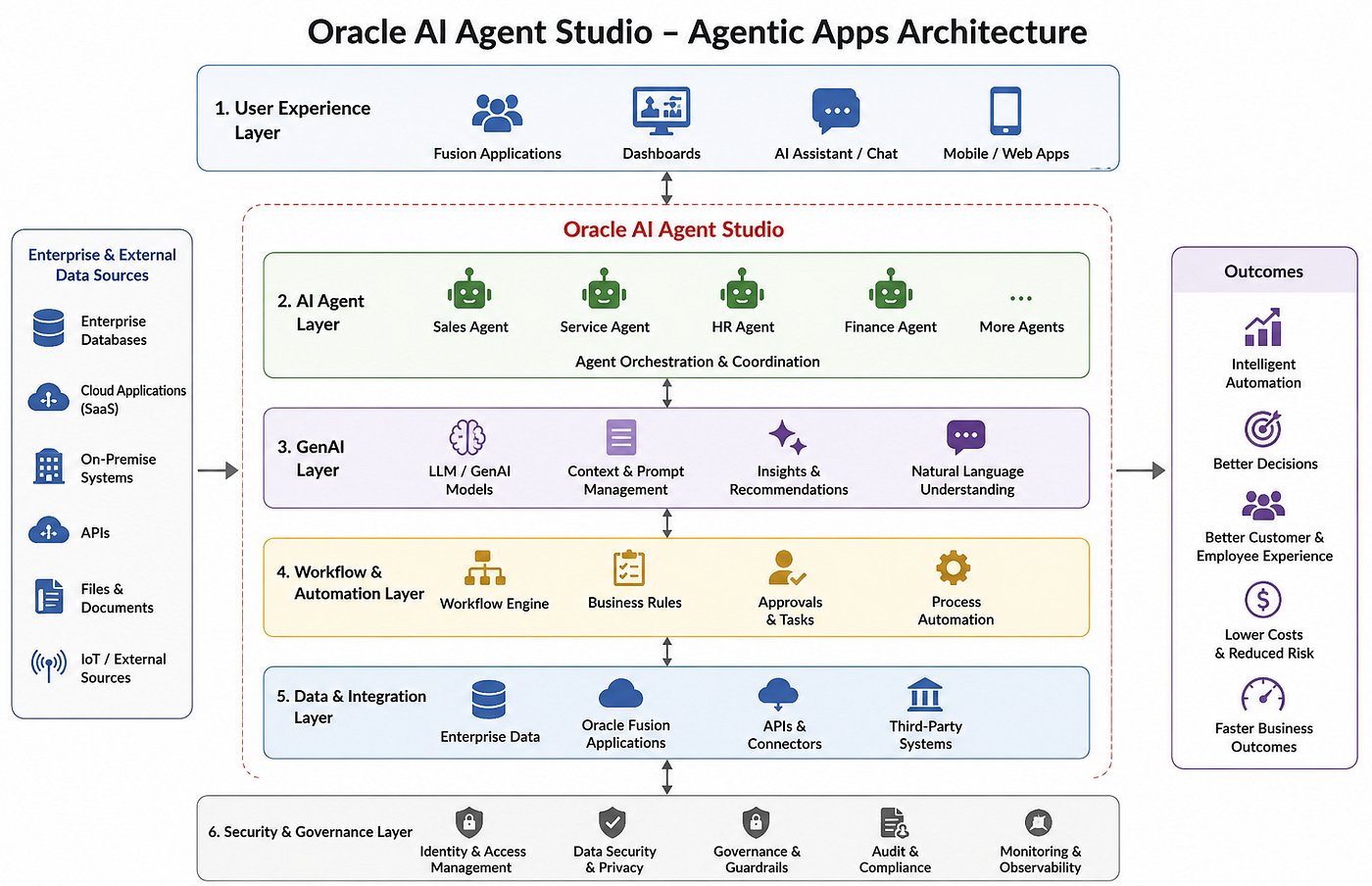
Oracle AI Agent Studio — Agentic Apps Architecture Diagram
Configuration
- Use Workflow Agent Teams — Workflow agent teams provide structured inputs and predictable workflows.
- Define Clear Descriptions — Clearly describe each agent team’s purpose and specialization so the app can identify the right team for each request.
- Build Smaller Specialized Teams — Create focused, topic-specific agent teams that can be combined within the agentic app when needed.
- Keep Workflows Lightweight — Reduce unnecessary LLM and agent nodes to improve performance and minimize delays.
- Pass User Context Explicitly — Conversation history and user input are not automatically shared with internal nodes. Use variables or code nodes to pass required context, such as
$context.$system.$inputMessage. - End with an Agent or LLM Node — Finishing the workflow with an agent or LLM node helps improve response handling and reduce output streaming issues.
See Build Agentic Apps Using Agents from AI Agent Studio for more details on how to create and configure agentic apps.
Fusion Agentic Apps
Fusion Agentic Applications help organizations improve operations across Oracle Fusion Cloud Applications, including CX, HCM, SCM, and ERP, by using AI-driven automation, intelligent workflows, and coordinated AI agents to reduce manual work, accelerate business operations, deliver better customer and employee experiences, and enable smarter AI-driven decision-making.
CX
Capabilities
- Sales insights and opportunity recommendations
- Customer engagement automation
- Cross-sell and upsell suggestions
- Lead and renewal management
- Customer service coordination
Use Cases
- Improve sales pipeline visibility
- Increase upsell and cross-sell opportunities
- Automate lead follow-up and engagement
- Improve customer retention and renewals
- Enhance customer service experiences
HCM
Capabilities
- Workforce scheduling
- Payroll and HR workflow automation
- Talent management
- Employee onboarding and support
- HR operations coordination
Use Cases
- Reduce payroll and scheduling issues
- Automate employee onboarding workflows
- Improve workforce productivity
- Streamline HR operations
- Enhance employee experiences
SCM
Capabilities
- Supplier and sourcing coordination
- Inventory and logistics monitoring
- Procurement automation
- Compliance tracking
- Supply chain optimization
Use Cases
- Improve supplier collaboration
- Reduce sourcing and operational costs
- Optimize inventory management
- Streamline procurement workflows
- Increase supply chain efficiency
ERP
Capabilities
- Financial workflow automation
- Cash collection management
- Invoice and expense processing
- Budgeting and forecasting support
- Financial reporting and analytics
Use Cases
- Accelerate financial operations
- Improve cash flow management
- Reduce manual finance tasks
- Improve operational visibility
- Support faster business decision-making
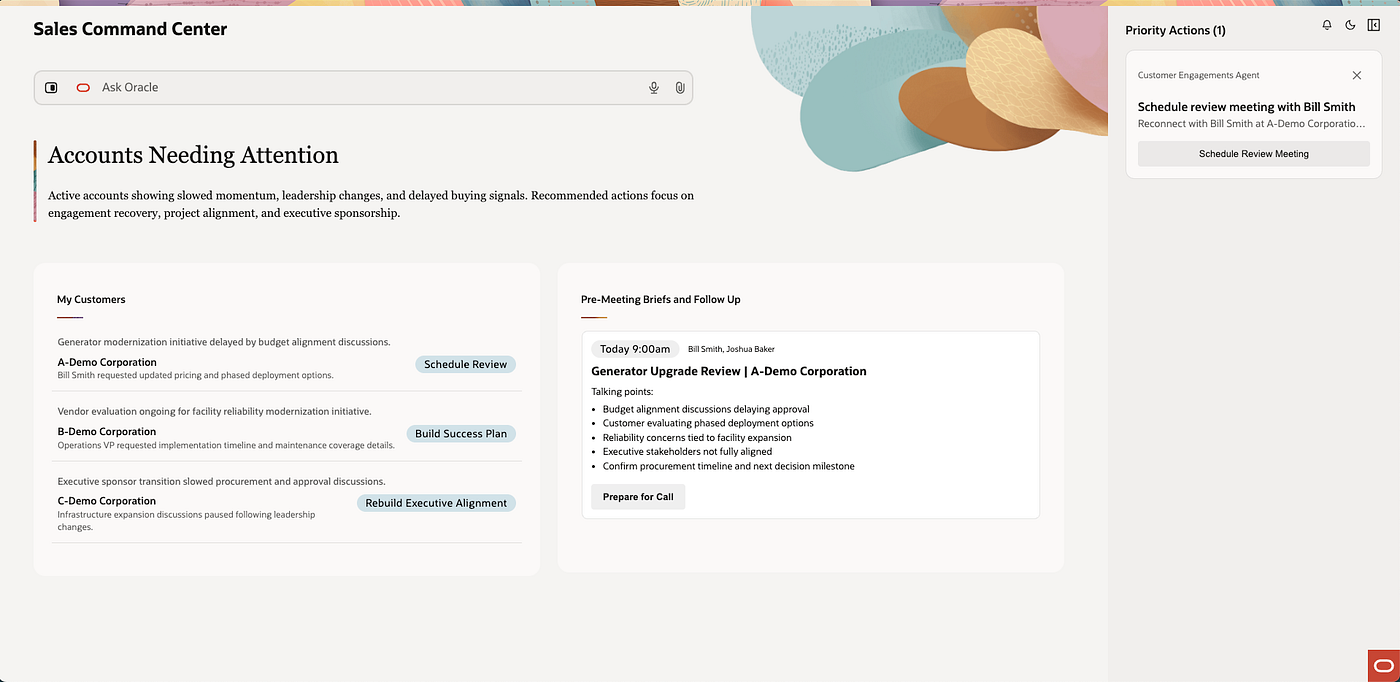
Sample Fusion Agentic App — Sales Command Center
References
메타데이터
- post_id
- 85d577816f2c
- slug
- agentic-apps-oracle-ai-agent-studio-85d577816f2c
- url
- https://medium.com/oracle-saas-paas/agentic-apps-oracle-ai-agent-studio-85d577816f2c
- canonical_url
- https://medium.com/oracle-saas-paas/agentic-apps-oracle-ai-agent-studio-85d577816f2c
- author_url
- https://medium.com/@mzebib
- status
- ok
- fetched_at
- 2026-06-09 15:37:30