A simple sample redirect an URL with the value in the querystring by using CloudFront Functions
For the website that has been ‘re-contructed’ or migrated, it is always crucial to ensure your website is backward compatible. I mean…
A simple sample redirect an URL with the value in the querystring by using CloudFront Functions

For the website that has been ‘re-contructed’ or migrated, it is always crucial to ensure your website is backward compatible. I mean, ensure the existing URLs around world are still valid after the migration.
In general, we have to ways to do it:
- redirect the old URLs to the new ones with HTTP redirection.(in this article)
- ensure the old URLs still being accessible.(would be provided soon)
If you are using CloudFront, I would like to introduce a simple sample code to do redirection with CloudFront Functions. Of course, you can do it in your webserver, such as Nginx, and if you would like to do it without changing anything on your webserver, you may continue the reading. I hope the sample could be helpful for you.
This is a simple sample to parse the input string and compose a new URL with the value in the querystring. The redirection is done by sending HTTP 301 to the client.
[embed]
Of course, don’t forget to deploy it to your CloudFront function.
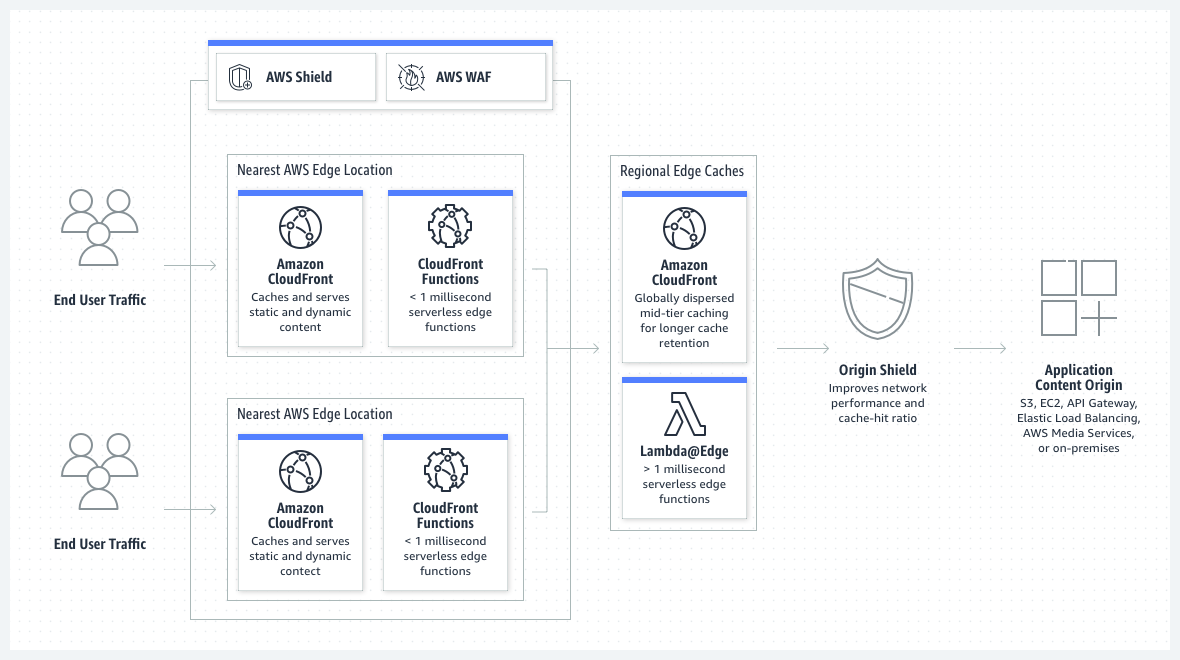
[1] Please be noted the cover image of the article is from the following URL — https://d1.awsstatic.com/products/cloudfront/product-page-diagram_CloudFront_HIW.475cd71e52ebbb9acbe55fd1b242c75ebb619a2e.png
메타데이터
- post_id
- 86202fbdd203
- slug
- a-simple-sample-redirect-an-url-with-the-value-in-the-querystring-by-using-cloudfront-functions-86202fbdd203
- url
- https://medium.com/@kenex/a-simple-sample-redirect-an-url-with-the-value-in-the-querystring-by-using-cloudfront-functions-86202fbdd203
- canonical_url
- https://medium.com/@kenex/a-simple-sample-redirect-an-url-with-the-value-in-the-querystring-by-using-cloudfront-functions-86202fbdd203
- author_url
- https://medium.com/@kenex
- status
- ok
- fetched_at
- 2026-07-25 19:03:14