From DNS to DHCP: Building a Network Services Server on Ubuntu 24.04
After building my DNS server with BIND9, the next logical step was DHCP.
From DNS to DHCP: Building a Network Services Server on Ubuntu 24.04
After building my DNS server with BIND9, the next logical step was DHCP.
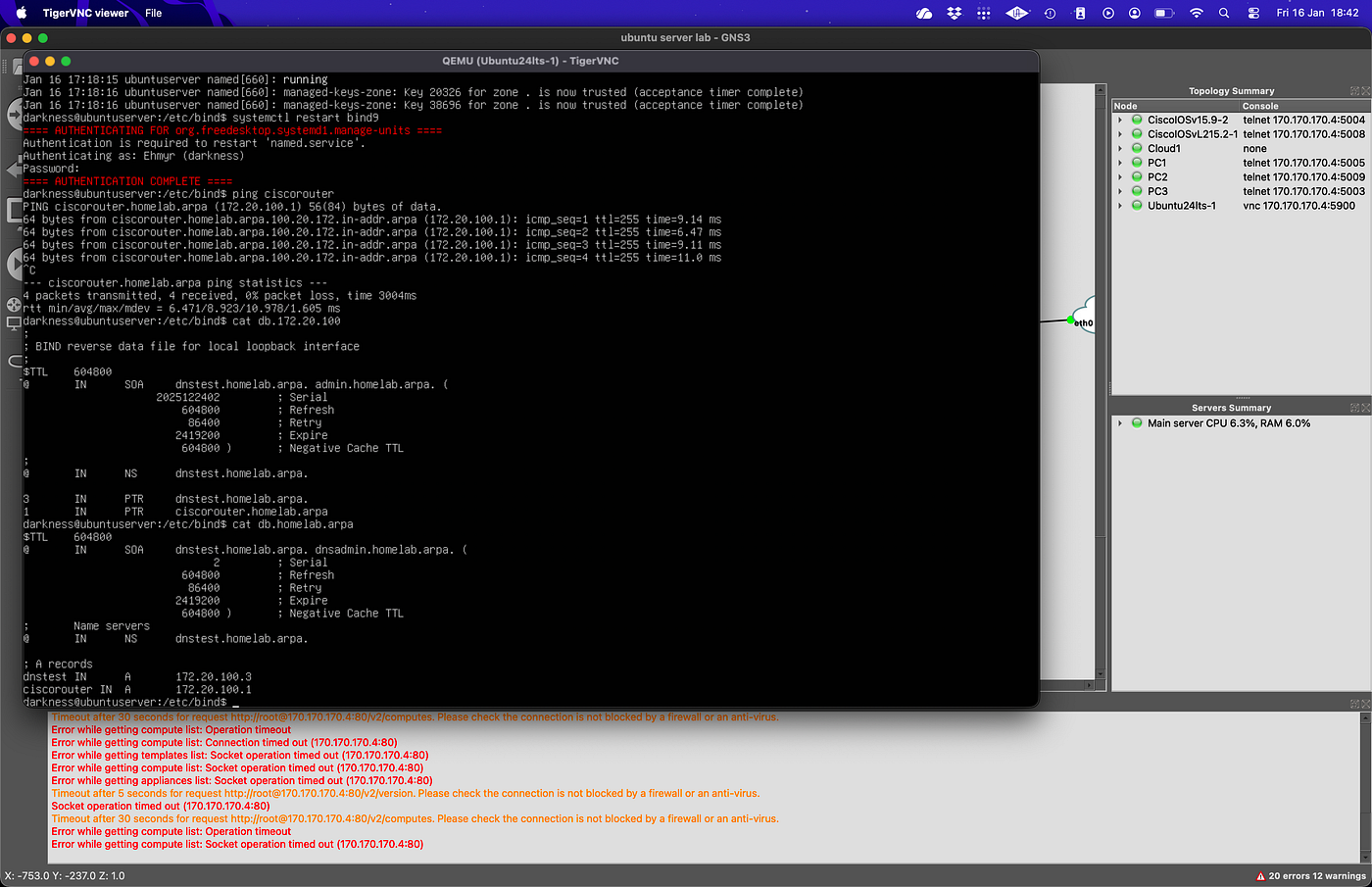
Before I moved on to DHCP I added the router’s forward (A) and reverse (PTR) DNS records, ensuring bidirectional name resolution for all network devices.

Now it’s time for DHCP. Let us begin.
DNS on its own is static.
DHCP is where a network becomes dynamic and where design mistakes surface immediately.
This phase of the project focused on turning the same Ubuntu Server into a network services host, providing both DNS and DHCP, and verifying that clients could come online with no manual configuration and resolve names end-to-end.
Project Context
This is part of a larger infrastructure build where an Ubuntu Server acts as a dedicated network services node.
At this stage, the server provides:
- DNS (BIND9)
- DHCP (ISC DHCP server)
Other services (NTP, syslog, AAA) will be implemented later on.
Environment Overview
- OS: Ubuntu Server 24.04
- Virtualisation: QEMU (via GNS3)
- Network interface: ens3
- Static IP: 172.20.100.3/24
DNS
- Software: BIND9
- Authoritative domain: homelab.arpa
- Reverse zone: 100.20.172.in-addr.arpa
DHCP
- Software: ISC DHCP
- Subnet: 172.20.100.0/24
- Dynamic range: 172.20.100.11–172.20.100.60
Why DHCP Changes Everything
With DNS alone, if it happens to fail, it will be hidden.
Once DHCP is introduced:
- Clients depend on the server for IP, gateway, DNS, and domain
- Service startup order matters
- Persistence matters
- Misconfiguration becomes immediately visible
If DNS or DHCP is wrong, clients simply won’t work.
Installing and Enabling DHCP
The ISC DHCP server was installed from the Ubuntu repository and enabled as a systemd service.
Once running, the service listens on the server’s network interface and waits for client requests.
At this point, nothing works yet, DHCP without configuration is just a daemon.
DHCP Configuration
The core configuration was done in:
/etc/dhcp/dhcpd.conf
A single subnet was defined:
- Network: 172.20.100.0/24
- Router (gateway): 172.20.100.1
- DNS server: 172.20.100.3
- Domain name: homelab.arpa

The DHCP server was configured to hand out:
- An IP address
- Subnet mask
- Default gateway
- DNS server address
- Local domain name
This ensures that clients receive DNS configuration automatically, without any static configuration.
Service Validation (Server Side)
After configuration:
- The DHCP service was restarted
- systemctl status isc-dhcp-server confirmed:
- Service active
- No crash loops or errors
- Logs showed:
- Interface binding
- Subnet recognition
- Lease handling
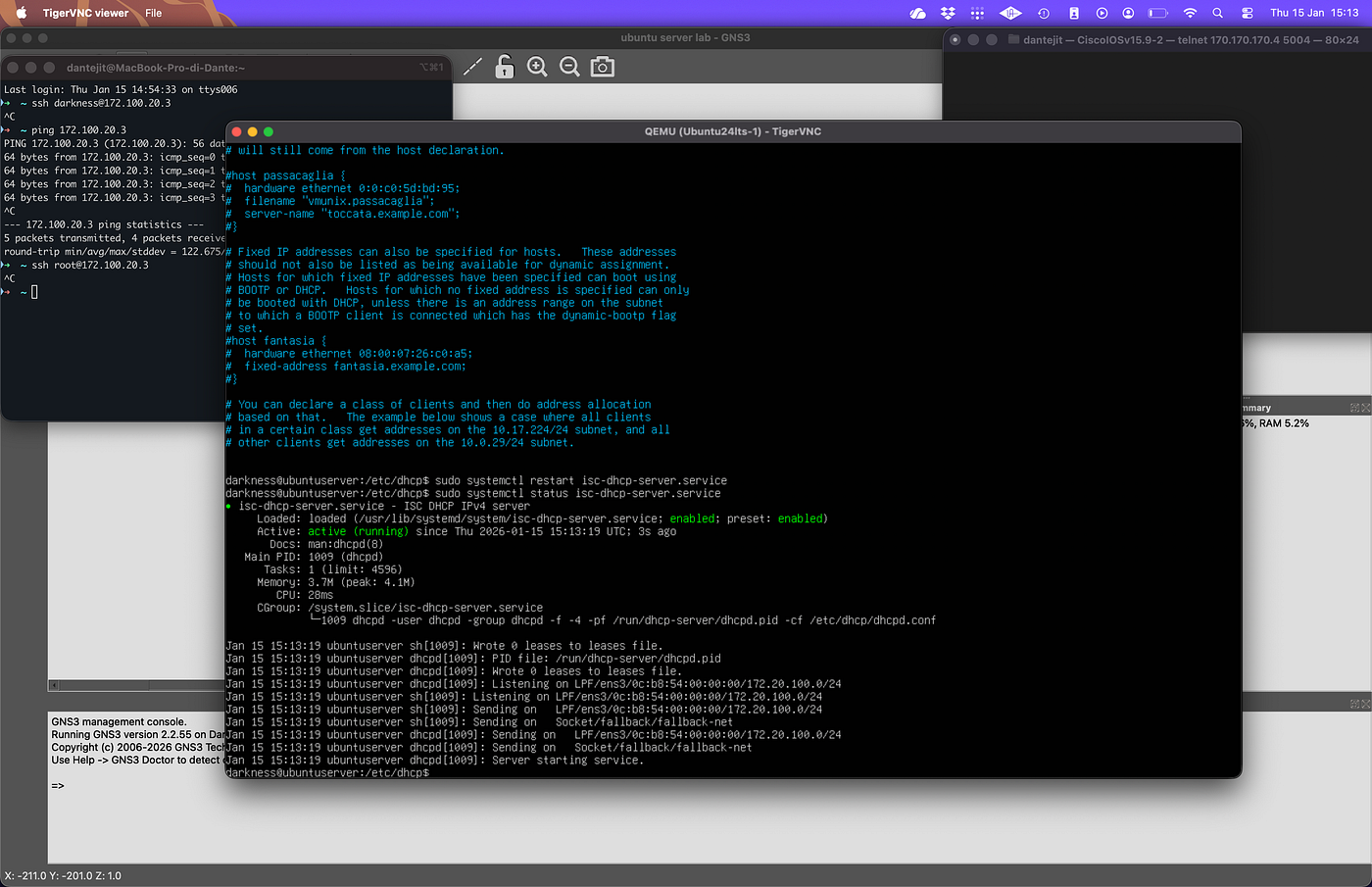
At this point, the server was ready, the next step was to test the client.
Client Testing
Client was connected to the network.
The client:
- Requested a DHCP lease
- Received an IP address in the expected range
- Received the DNS server (172.20.100.3)
- Received the domain name (homelab.arpa)
No manual configuration was applied on the clients.
DHCP Lease Verification
Clients successfully obtained addresses such as:
172.20.100.11/24
with the correct gateway and DNS settings.
DNS Resolution via DHCP
The key validation step was confirming DNS resolution through DHCP, not static configuration.
From the client:
ping dnstest
Result:
- dnstest resolved to dnstest.homelab.arpa
- IP resolved to 172.20.100.3
- ICMP replies received
This confirmed:
- DHCP correctly delivered DNS settings
- DNS resolved forward and reverse records
- The full path (DHCP → DNS → network) worked end-to-end
At this point, the server was no longer “a DNS box” — it was acting as a core network server.
What Broke (and Why)
Nothing broke in this phase, why? Because the DNS groundwork was solid, I previously broke DNS configurations, it failed, stopped working and I fixed it.
This phase was less about fixing syntax and more about observability and integration.
What This Project Demonstrates
- DHCP and DNS integration
- End-to-end network service delivery
- systemd-managed infrastructure services
- Client validation, not just server-side success
- How “basic” services depend on each other
Most importantly, it demonstrated that DNS and DHCP are not separate services, they are tightly coupled.
Known Limitations
At this stage, the setup does not include:
- NTP
- High availability
- Authentication or access controls
- logging
As I progress through this project I will implement more infrastructure services.
Next Steps
The next stages of this project will expand the server into a fuller network services host, adding:
- NTP
- Centralised logging (syslog) and log rotation (logrotate)
- Authentication services (RADIUS / TACACS+)
Each service will be integrated deliberately, with validation at every step.
Till next time ✌🏾
메타데이터
- post_id
- 866c492d2b2b
- slug
- from-dns-to-dhcp-building-a-network-services-server-on-ubuntu-24-04-866c492d2b2b
- url
- https://medium.com/@pmagyei/from-dns-to-dhcp-building-a-network-services-server-on-ubuntu-24-04-866c492d2b2b
- canonical_url
- https://medium.com/@pmagyei/from-dns-to-dhcp-building-a-network-services-server-on-ubuntu-24-04-866c492d2b2b
- author_url
- https://medium.com/@pmagyei
- status
- ok
- fetched_at
- 2026-06-17 08:20:12