First Principles Decision Making
Why I Used S3 Instead of EC2, Elastic Beanstalk, ECS, or Lambda
First Principles Decision Making
Why I Used S3 Instead of EC2, Elastic Beanstalk, ECS, or Lambda
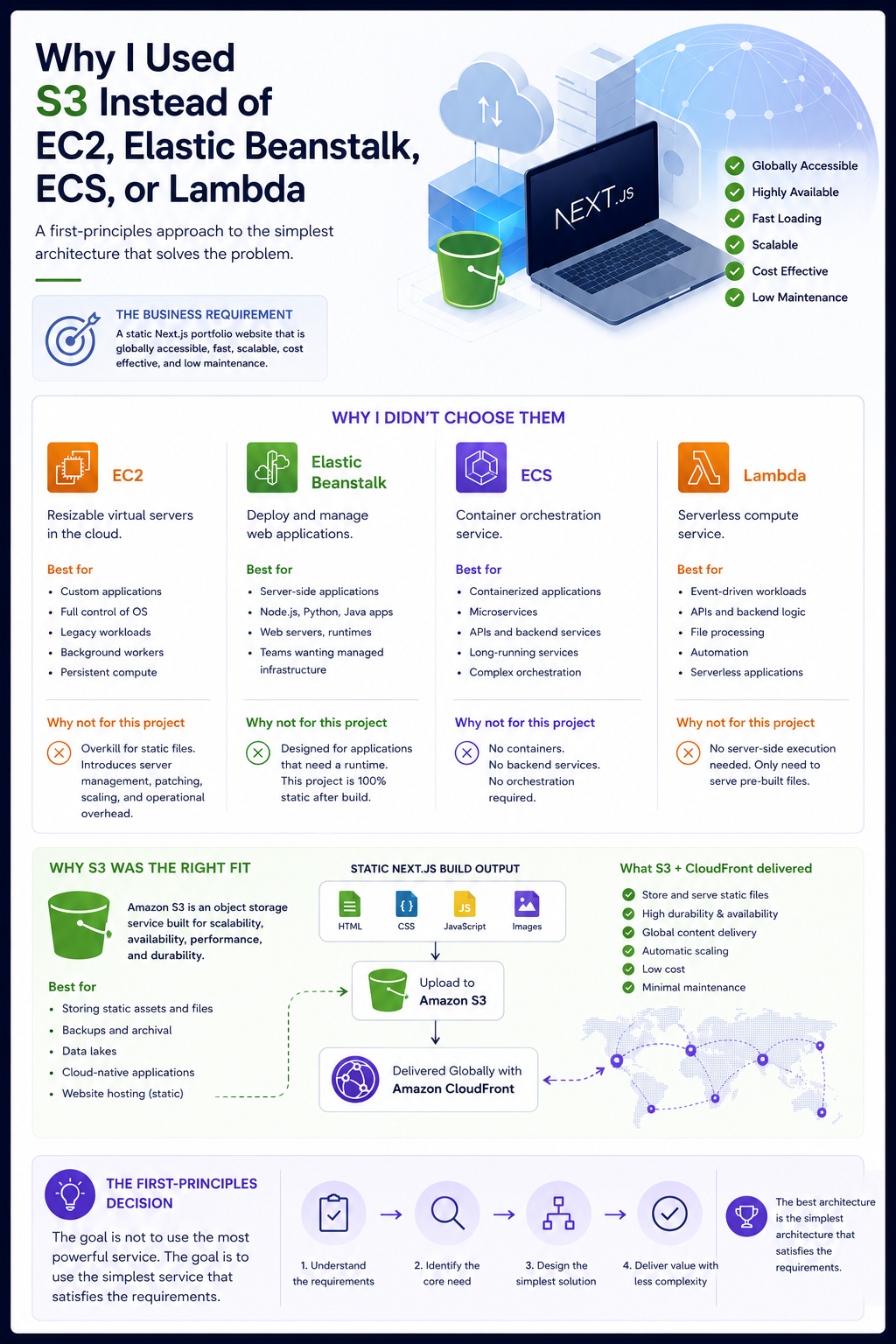
In my recent cloud engineering project, I deployed a static Next.js portfolio website using Terraform, Amazon S3, and CloudFront.
At first, I found myself asking a very common beginner cloud question:
Should I use EC2, Elastic Beanstalk, ECS, Lambda, or S3?
That question seems reasonable, but it actually starts in the wrong place.
A better first-principles question is:
What does the system actually need to do?
Once I answered that, the architecture became much simpler.
The Business Requirement
The project was based on a freelance web designer who needed a portfolio website that was:
- Globally accessible
- Highly available
- Fast loading
- Scalable
- Cost effective
- Low maintenance
The important detail is that the Next.js application was configured for static export.
After running:
npm run buildthe app became a set of static files:
- HTML
- CSS
- JavaScript
- Images
- Static assets
That changed everything.
A static site does not need a traditional application server.
It only needs storage and delivery.
Option 1: EC2
Amazon EC2 provides resizable virtual servers in the cloud. It is best suited for workloads where you need control over the operating system, runtime, networking, installed software, or server configuration. EC2 is a strong choice for custom applications, legacy workloads, full-stack web servers, background workers, game servers, batch jobs, and workloads that need persistent compute.
But for this project, EC2 would have been overkill.
Using EC2 would mean managing:
- Server patching
- Operating system updates
- Security hardening
- Web server configuration
- Scaling policies
- Availability design
- Monitoring
Could EC2 host the website?
Yes.
Was it the simplest architecture for static files?
No.
For this project, EC2 introduced compute where compute was not required.
Option 2: Elastic Beanstalk
AWS Elastic Beanstalk helps deploy and manage web applications. It can automatically handle infrastructure provisioning, load balancing, scaling, application health monitoring, and platform management. It is well suited for teams that want to deploy application code without manually configuring all the underlying AWS infrastructure.
Elastic Beanstalk makes sense when you have a server-side application that needs a runtime environment.
For example:
- Node.js applications
- Python applications
- Java applications
- Dockerized web applications
- Applications that need a web server or application server
But my exported Next.js project did not need a running Node.js server.
After the build process, it was just static content.
Elastic Beanstalk would have hidden some operational complexity, but it still would have introduced unnecessary infrastructure for a static website.
Option 3: ECS
Amazon ECS is a container orchestration service. It is useful when you need to run containerized applications, manage services, scale workloads, and coordinate containers across compute capacity.
ECS is a strong fit for:
- Microservices
- Containerized APIs
- Backend services
- Long-running application services
- Applications that require custom runtimes
- Workloads that need orchestration
But this project did not require containers.
There was no backend service to run.
No API server.
No container lifecycle to manage.
No image registry requirement.
No service orchestration problem.
Using ECS for this project would have meant creating a container architecture for a workload that had already been reduced to static files.
That would have been complexity without value.
Option 4: Lambda
AWS Lambda is a serverless compute service that runs code without requiring you to provision or manage servers. It automatically scales and uses pay-per-use pricing. Lambda is especially useful for event-driven workloads, APIs, backend tasks, file processing, automation, and serverless application logic.
Lambda is excellent when something needs to happen in response to an event.
For example:
- Process an uploaded file
- Run API logic
- Trigger automation
- Transform data
- Handle backend workflows
- Power serverless applications
But this project did not need server-side execution.
Users were not triggering backend compute.
The website only needed to serve pre-built files.
Lambda would have introduced function logic where no function logic was needed.
Why S3 Was the Right Fit
Amazon S3 is an object storage service designed for scalability, availability, security, and performance. It is commonly used to store and retrieve data for a wide range of use cases, including static assets, backups, data lakes, application files, and cloud-native applications.
For this project, S3 matched the workload perfectly.
The website output was:
- Static
- File-based
- Read-heavy
- Low maintenance
- Easy to cache
- Easy to distribute globally
S3 gave me exactly what I needed:
- A place to store the static website files
- High durability
- High availability
- Low cost
- No servers to manage
- Native compatibility with CloudFront
Then CloudFront handled the global delivery layer.
Together, S3 and CloudFront satisfied the business requirements without unnecessary compute.
The First-Principles Decision
The real decision was not:
Which AWS service is most powerful?
The real decision was:
What is the simplest architecture that satisfies the requirements?
The requirements were:
- Store files
- Serve files
- Deliver globally
- Scale automatically
- Keep costs low
- Minimize maintenance
That points directly to:
S3 + CloudFrontNot because EC2, Elastic Beanstalk, ECS, or Lambda are bad services.
They are excellent services when the workload requires them.
But the key is matching the service to the problem.
The Lesson
This project taught me that cloud engineering is not about picking the most advanced AWS service.
It is about understanding the workload.
If the workload requires compute, use compute.
If the workload requires containers, use containers.
If the workload requires event-driven execution, use Lambda.
But if the workload is static files, do not invent a server problem.
Use object storage and a CDN.
That is the first-principles lesson I took from this project:
The best architecture is not the most complex architecture.
The best architecture is the simplest architecture that satisfies the requirements.
메타데이터
- post_id
- 867e52bb4c12
- slug
- first-principles-decision-making-867e52bb4c12
- url
- https://medium.com/@ismail.abdur.rahmanmba/first-principles-decision-making-867e52bb4c12
- canonical_url
- https://medium.com/@ismail.abdur.rahmanmba/first-principles-decision-making-867e52bb4c12
- author_url
- https://medium.com/@ismail.abdur.rahmanmba
- status
- ok
- fetched_at
- 2026-06-17 13:50:26



