Error Handling in Cloud Flow
Introduction
Error Handling in Cloud Flow
Introduction
Cloud flows are becoming much more popular day by day in Customer Engagement projects because of No-Code approach. But this situation also cause potential maintenance issues and unaware business processes. Then Monitoring of the cloud flows becoming much more important if we decide to use Cloud flows in our projects. There are several approaches to handle errors in cloud flow but we will deep dive into one of them which is useful to migrate any Customer Engagement project.
Use Case : Monitor All Errors in CE
In this use case, the approach will be monitor all issues from OOB Dashboard in Customer Engagement with collecting all issues which occurs in Cloud flows into one of the Custom Table. We will need following implementations;
- Create a new Table which Name is “Cloud Flow Errors” in CE with following columns; Name → Refers to Cloud Flow Name Error Level →(Low, Medium, High) Refers to Severity of the issue Error Date → Refer to issue date Error Detail → Refer to issue detail which u faced in Cloud flow
- Extend your existing flows with following format that is provided below;
- Add new scope (New Step → Control →Scope) to your flow and Rename it as “Try”. Then Drag your all business into this Scope.
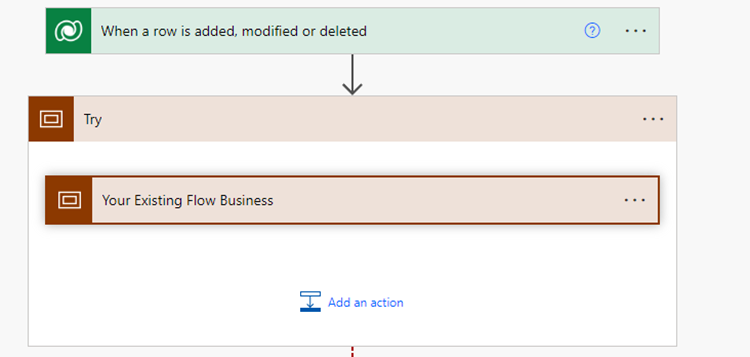
- As a next step, Create one more scope and rename it as “Catch”. This scope will be our error handling area.

- Click “…” in Catch scope and Change “Configure run After” like following. This will provide you in case of any error the scope will be run by cloud flow;

- Add Filter Array Step (New Step →Data Operation →Filter Array) with following formula; From → result(’Try’) Map → item()?[‘status’] is equal to Failed

- Add Json Parse Step (New Step à Data Operation à Parse JSON) with following formulas; Content →body(‘Filter_Failed_Only’) Schema → Generate schema from file which is attached to article. (See Json) Important Note: This schema is refer to Dataverse connector response type.

- Add Dataverse “Add Row” step with following formulas; Table Name → Cloud Flow Errors Name → workflow()?[‘tags’]?[‘flowDisplayName’] Error Date → utcNow() Error Level → Choose (Low, Medium, High) Error Detail → first(body(‘Parse_Errors_to_JSON’))?[‘error’]?[‘message’]

- Add Terminate to last step to tell that flow got fail (New Step → Control →Terminate)

As soon as the steps are completed, your Catch scope should be shown like below;

Congratulations, your flow is handling all errors anymore!
Conclusion
As a result of this changes, all Cloud flows will be tracked in one of the custom Table. Then You can create an alert mechanism based on Record creation of the Cloud Flow Errors in CE. And You can also have a dashboard to show weekly /monthly based issues which occurs on your cloud flow.
Important Tip: Normally, Cloud flow histories can be read via Graph Api (https://docs.microsoft.com/en-us/graph/use-the-api) with registering an App to Azure Active directory and and giving access to read Api with Read All flow permission. But this case generally does not acceptable by company IT departmants due to GDPR rules. And also there are several restriction to keep cloud flow run histories.
메타데이터
- post_id
- 86d87b933ec3
- slug
- error-handling-in-cloud-flow-86d87b933ec3
- url
- https://medium.com/adessoturkey/error-handling-in-cloud-flow-86d87b933ec3
- canonical_url
- https://medium.com/adessoturkey/error-handling-in-cloud-flow-86d87b933ec3
- author_url
- https://medium.com/@murat.kayhan00
- status
- ok
- fetched_at
- 2026-07-27 05:39:41