Install RUST on Windows & MAC
Explains how to install RUST on Mac and Windows machines.
Install RUST on Windows & MAC
Explains how to install RUST on Mac and Windows machines.
MAC
Installing RUST is very simple when you are installing it on MAC.
Step 1: Download and install rustup
Rustup is the Rust toolchain installer. It installs all necessary tools along with the Rust compiler.
// install rustup// more details https://www.rust-lang.org/tools/install
# curl --proto '=https' --tlsv1.2 -sSf https://sh.rustup.rs | shTo verify the Installation
// Verify the installation# rustc --version# cargo --versionWindows
Download the installer from this URL and execute the file.
https://static.rust-lang.org/rustup/dist/x86_64-pc-windows-gnu/rustup-init.exeStep 1: Type 1 and hit enter
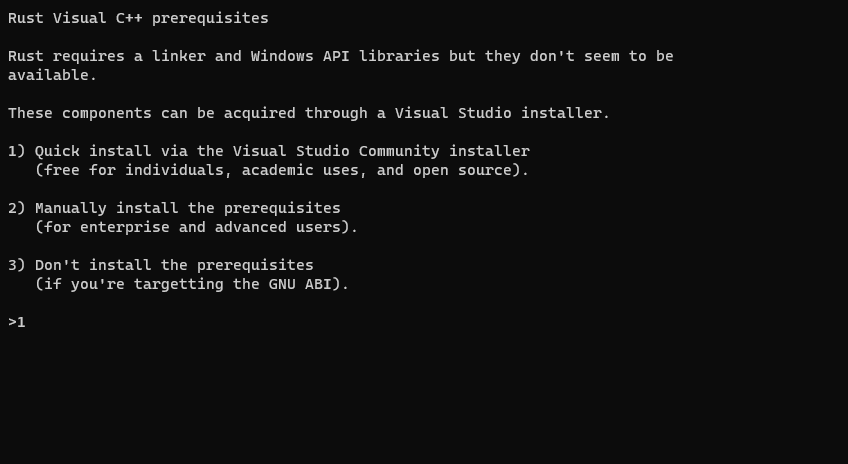
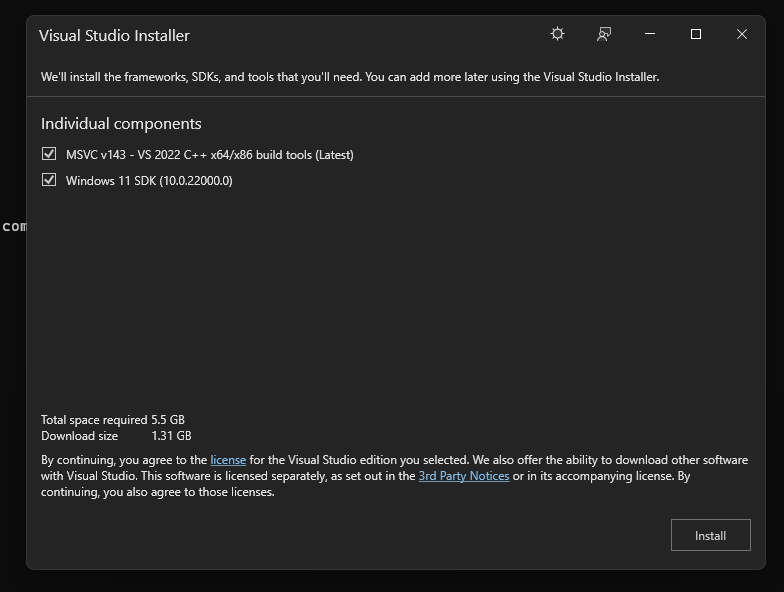
Step 2: Setup will download and install Visual Studio Installer. It doesn’t matter even if you have VS Code, as this is a different installer.

Step 3: Check the components and click Install.
Note: Based on the version of your windows, the screen will display the appropriate version number.
Step 4: Type 1 and press Enter to proceed with default installation. If you want to customize, then type 2 and press Enter.

Step 5: In the previous step, if you had chosen option 2, confirm your settings and type 1 to proceed with the installation.

Step 6: Verify the installation
Goto Command prompt (Start > Run > cmd)
C:> rustc --versionC:> cargo --version[embed]Get an email whenever Ganesh Chandrasekaran publishes. Edit descriptionganeshchandrasekaran.com
메타데이터
- post_id
- 871c6bdd73ef
- slug
- install-rust-on-windows-mac-871c6bdd73ef
- url
- https://medium.com/@gchandra/install-rust-on-windows-mac-871c6bdd73ef
- canonical_url
- https://medium.com/@gchandra/install-rust-on-windows-mac-871c6bdd73ef
- author_url
- https://medium.com/@gchandra
- status
- ok
- fetched_at
- 2026-07-26 16:54:43