Managed vs External Tables in Unity Catalog: The Decision That’s Silently Inflating Your Cloud Bill
Most Databricks cost conversations end up pointing at cluster sizing, autoscaling, or job schedules. Those are real levers. But there’s a…
Managed vs External Tables in Unity Catalog: The Decision That’s Silently Inflating Your Cloud Bill
Most Databricks cost conversations end up pointing at cluster sizing, autoscaling, or job schedules. Those are real levers. But there’s a decision that gets made early in every project, usually without much discussion, that ends up quietly inflating storage and compute costs for months afterward.
It’s the choice between a Managed table and an External table.
Not because either one is wrong. Because most teams default to External without understanding what they’re giving up, and that default has compounding consequences. Let’s walk through exactly what those are.

The Setup: What Are We Actually Choosing?
In Databricks Unity Catalog, every Delta table you create falls into one of two categories: Managed or External.
Managed Table (no LOCATION clause):
CREATE TABLE catalog.schema.my_table (
  id BIGINT,
  event_date DATE
);
External Table (with LOCATION clause):
CREATE TABLE catalog.schema.my_table (
  id BIGINT,
  event_date DATE
)
LOCATION 'abfss://container@storageaccount.dfs.core.windows.net/path/my_table';
The difference is who owns the files. With a Managed table, Databricks owns the storage lifecycle. With an External table, you do.
That distinction drives everything that comes after.
The Hidden Costs of External Tables
1. You’re Paying for Files Nobody is Using
This one catches people off guard. When you DROP an External table in Unity Catalog, Databricks removes the metadata but leaves every single underlying Parquet file sitting in your storage account.
You’ve dropped the table. The data is gone from Databricks’ perspective. But Azure or AWS is still charging you for it every month.
Over time, in a busy data platform, this creates what I call a Storage Tax: orphaned data from dropped tables, old experiments, one-off ingestions, abandoned pipelines. None of it shows up in your catalog. All of it shows up on your bill.
With Managed tables, dropping the table drops the data. No leftover files. No lingering charges.
2. Predictive Optimization Doesn’t Apply to External Tables
This is the bigger performance and cost trap.
Databricks’ Predictive Optimization is a background service that automatically runs OPTIMIZE and VACUUM on your tables using serverless compute. It analyses your tables, decides when compaction is needed, and handles it without you spinning up a cluster.
Predictive Optimization only works on Managed tables.
If you’re running External tables, you have to handle compaction yourself. The common workaround is enabling these table properties:
ALTER TABLE catalog.schema.my_external_table
SET TBLPROPERTIES (
  'delta.autoOptimize.autoCompact' = 'true',
  'delta.autoOptimize.optimizeWrite' = 'true'
);
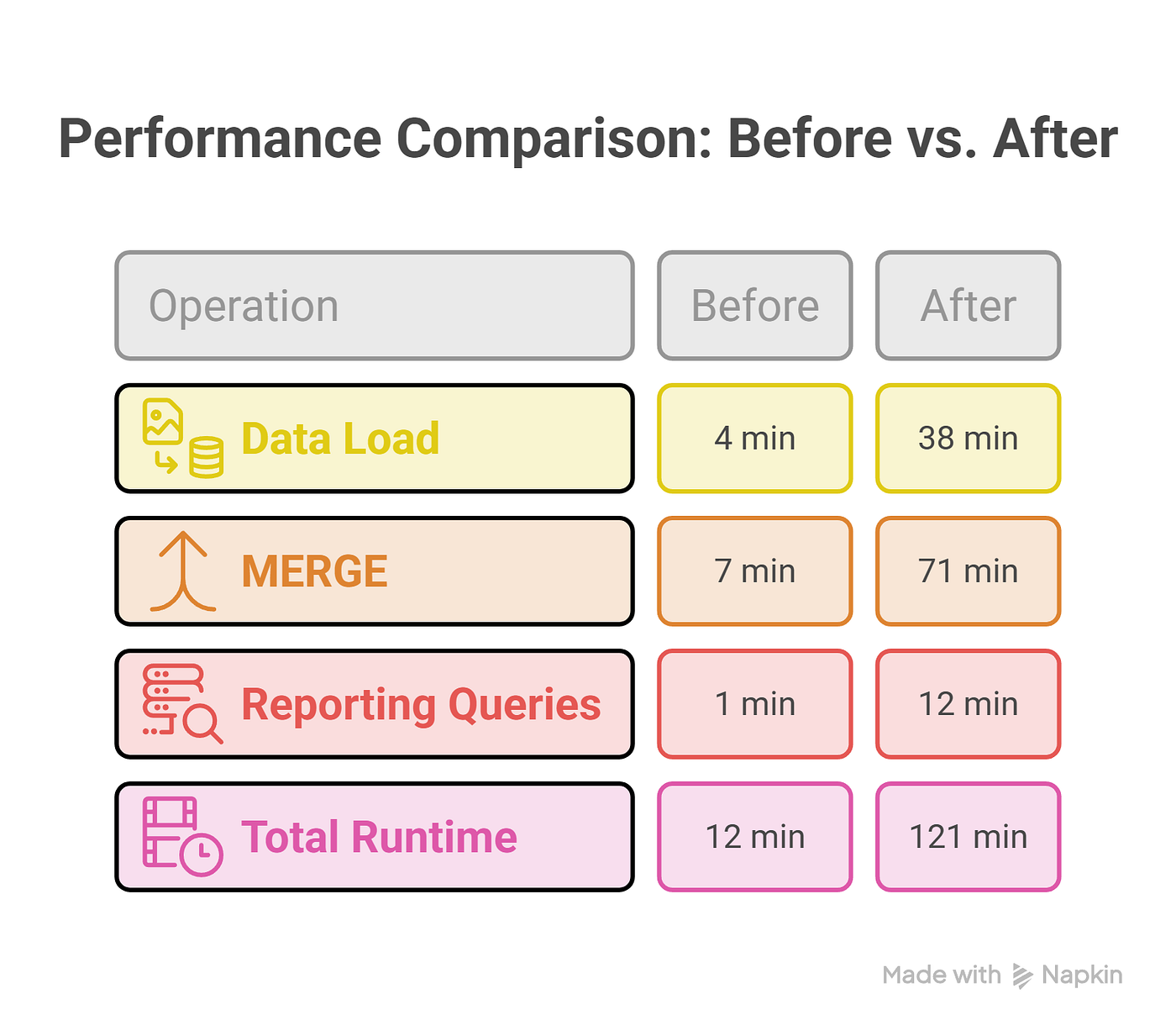
These properties help, but they run during your ETL job on your job cluster. So every write operation now includes compaction overhead. Your jobs run longer. You consume more DBUs. The cost doesn’t disappear; it just moves from a storage problem to a compute problem.
With Managed tables, the background serverless optimization runs independently of your pipelines. Your jobs stay lean, and the housekeeping happens on Databricks’ dime.
A Quick Comparison

When External Tables Actually Make Sense
There are legitimate reasons to use External tables. If another system outside Databricks needs to read those files directly, for example a legacy application, a third-party BI tool that can’t go through Unity Catalog, or a cross-account data share, then you need External tables because you need control over exactly where those files live.
The key word is need. External tables are a deliberate choice for a specific integration pattern, not the default.
If you’re building Bronze, Silver, and Gold layers that only Databricks workloads will ever touch, there is no good reason to use External tables. You’re trading away automation and cost efficiency for complexity you don’t need.
The Right Pattern: Let MANAGED LOCATION Do Its Job
The SCHEMA_CREATION notebook (and the equivalent for Silver and Gold) sets a MANAGED LOCATION at the schema level for exactly this reason:
CREATE SCHEMA IF NOT EXISTS catalog.bronze
MANAGED LOCATION 'abfss://container@storageaccount.dfs.core.windows.net/unity-catalog/bronze';
Once this is set, every table created in that schema without a LOCATION clause will store its data inside that managed path. Unity Catalog handles the folder structure, the file lifecycle, and the cleanup. You get Predictive Optimization for free. And when a table is dropped, the files go with it.
This is the architectural decision baked into the schema setup script. It’s not a default you can change later without migrating data.
What This Looks Like in Practice
Here’s a scenario I’ve seen play out more than once.
A team starts building a new pipeline. They use External tables because “we might need to access this from outside later.” They never do. Six months in, they’ve accumulated 400GB of abandoned experiment data in their storage account from tables that no longer exist in the catalog. Their ETL jobs are running 15% longer than they should because autoCompact is running inline on every write. And their data team is spending two days a month manually running OPTIMIZE and VACUUM scripts on the tables they actually care about.
None of this is catastrophic. But it’s all avoidable with the right default.
The Rule of Thumb
Default to Managed. The moment you know a specific dataset needs to be accessed by something outside Databricks, switch that specific table to External with a deliberate LOCATION path.
Everything else: let Unity Catalog own it, let Predictive Optimization maintain it, and stop paying a Storage Tax for data that stopped being useful months ago.
If you found this useful, the same principle applies when you hit schema evolution issues with External tables after a MERGE operation. That’s a whole separate problem worth understanding before it bites you in production. Read more here: Delta Lake Schema Evolution: Why Recreating Your External Table Fails After a MERGE
메타데이터
- post_id
- 8751df2ebd0c
- slug
- managed-vs-8751df2ebd0c
- url
- https://blog.stackademic.com/managed-vs-8751df2ebd0c
- canonical_url
- https://blog.stackademic.com/managed-vs-8751df2ebd0c
- author_url
- https://medium.com/@avinash.narala6814
- status
- ok
- fetched_at
- 2026-06-22 12:55:45