Create a Docker Container using MCP with Cursor AI IDE
TLDR:Use natural language in Cursor to create Docker containers. Connect MCP, run PostgreSQL, and monitor logs without CLI commands.
Create a Docker Container using MCP with Cursor AI IDE
TLDR:Use natural language in Cursor to create Docker containers. Connect MCP, run PostgreSQL, and monitor logs without CLI commands.
Github: https://github.com/balarabetahir/Create-a-Docker-Container-using-Cursor-MCP
I spent an hour last week creating a PostgreSQL database without typing a single command. Not one. I opened an AI chat window and asked it to make me a container. It did. Then I asked it to show me the logs. It did that too. This is not a small change.
For years, Docker has been one of those tools you had to learn the hard way. You memorized flags. You debugged port conflicts. You wrote YAML files with the wrong indentation and spent twenty minutes finding the extra space. The payoff was worth it. Containers let you run software without installing it on your machine. But the learning curve was real.
Now that curve is flattening. And the method is surprising: you talk to it.
Setting Up the Bridge
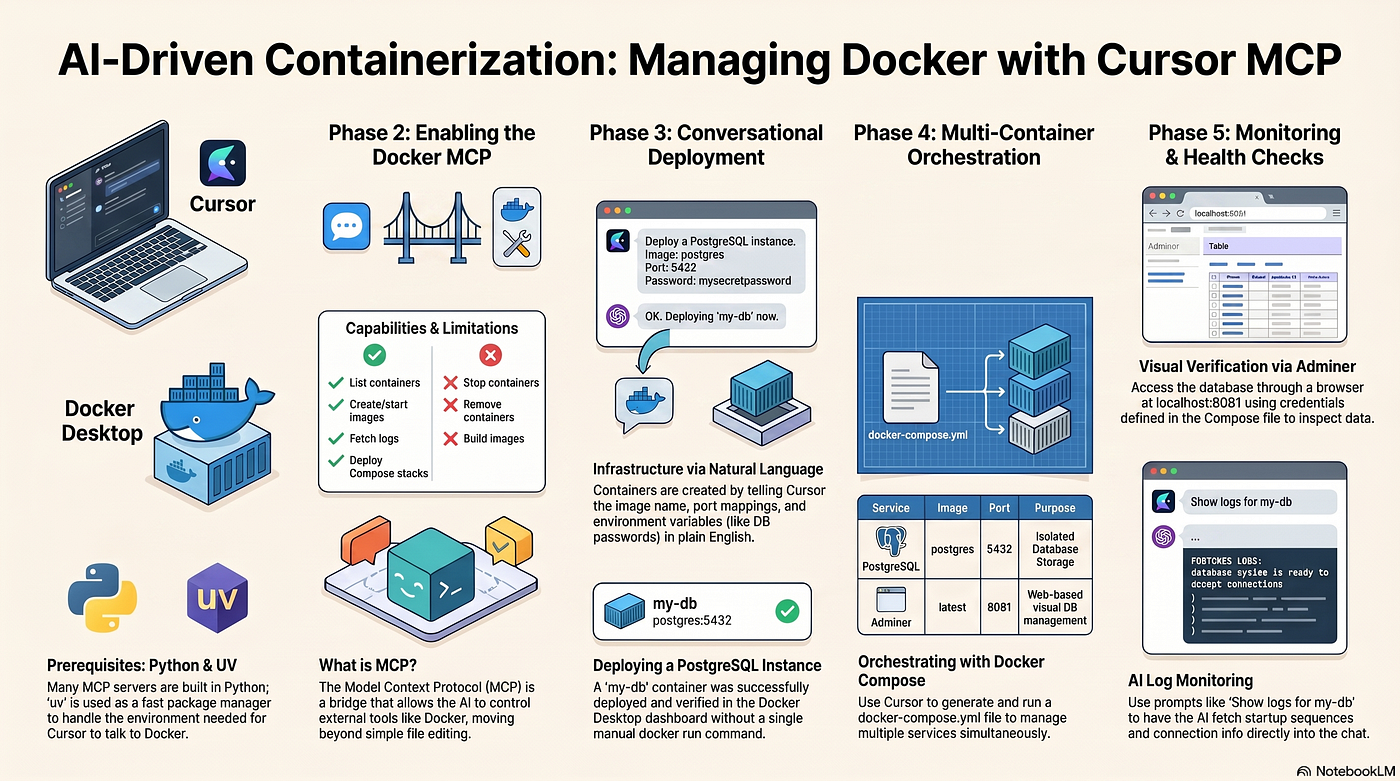
I used Cursor, an AI code editor, connected to something called an MCP server. MCP stands for Model Context Protocol. Think of it as a bridge between AI and external tools. In this case, the bridge went straight into Docker Desktop.
The setup was not instant. I had to install Python and a package manager called uv to get the MCP server running. Cursor needed to know where to find these tools on my system. That part took focus. But once the connection was live, the rest was smooth.
What Changed
I asked Cursor in plain English to create a PostgreSQL container. I specified:
- The container name
- The port mapping
- The environment variables, including the database password
Cursor translated this into Docker commands and ran them. I opened Docker Desktop and saw my container running with a green light. No terminal. No syntax to get wrong.
This sounds like a gimmick until you try it. Then it feels obvious. Why should I translate my intent into a command language when the computer can do that translation for me?
The Real Problem
The hard part of infrastructure work was never the idea. I always knew what I wanted: a database running on port 5432 with a password I chose. The hard part was the mechanical translation of that idea into commands the computer understood.
That translation layer is where errors live:
- Miss a flag
- Forget a volume
- Misplace a comma in YAML
Then you spend your time debugging syntax instead of thinking about your actual goal.
Natural language removes that layer. Or rather, it moves it. The AI becomes the translator. You say what you want. It figures out how.
The Multi-Container Step
Consider what I did after the single container. I wanted a web interface for my database, so I set up Docker Compose with two services:
- PostgreSQL, named my-db, with database nextwork, username admin, password xxxxxx, on port 5432
- Adminer, using the latest image, mapped to port 8081 on my host
I wrote the YAML file with Cursor’s help, then asked it to deploy the stack. Both containers started together. I opened localhost:8081 and logged into Adminer. My empty database stared back at me. The whole system was running, and I had not opened a terminal once.
Reading Logs Through Conversation
Then I asked Cursor to show me the logs from my PostgreSQL container. It returned:
- The startup sequence
- The version info
- The connection readiness messages
I asked it to explain what each section meant. It did.
This is the part that feels like a shift in kind, not just degree. I was not only executing commands faster. I was reasoning about my infrastructure with an assistant that could both act and explain.
The Limits
There are boundaries. The Docker MCP I used cannot:
- Stop or remove containers
- Build images
- Manage volumes directly
These limits are sensible. You do not want an AI with unlimited power over your system. But they also mean this is a beginning, not an end. Future MCP servers will expand what is possible. I have already seen hints of MCP for cloud providers, for Kubernetes, for services that now require clicking through web consoles or memorizing CLI patterns.
What This Means for Learning
I used to think the path to infrastructure skill was linear:
- Learn Linux
- Learn Docker
- Learn orchestration
- Learn cloud platforms
Each step took months. Now I think the path forks. You can still go deep on the mechanics, and you should if you build platforms for others. But you can also start with intent, use AI to execute, and learn the mechanics as you need them.
The second path is faster. It may also be broader, because you spend less time stuck on syntax and more time solving problems.
Try It
If you are starting out, my advice is to try this path:
- Install Cursor
- Install Docker Desktop
- Find an MCP server for a tool you want to use
- Ask it to do something simple
- Watch it work
- Then ask it to do something harder
You will learn what the tool does by using it, not by reading about it. That is the oldest kind of learning, made new again because the barrier to first action has dropped so low.
The Pattern
The pattern is clear. First, a tool exists and experts learn its interface. Then, an AI layer arrives and lets you operate the tool through conversation. The tool does not change. The way you reach it does.
I did this project because I wanted to see if AI could handle real infrastructure, not just toy examples. A database is real. Logs are real. A web admin panel is real. It all worked. The most honest thing I can say is that it felt too easy, which means the old way was too hard.
The future of infrastructure is not no-code or low-code in the old sense of visual drag-and-drop interfaces. It is intent-driven. You say what you need. The system builds it. You review and refine. This is how I made a PostgreSQL database last week. It is how I will make the next thing, and the thing after that.
Further Reading:
Automate AI Second Brain(LLM Wiki Pattern) With Claude Code and Obsidian
**Build an AI Second Brain(LLM Wiki Pattern) With Claude Code and Obsidian**
🛡️Building an AI-Powered Python Security Scanner with Gemini
Architecting Autonomous Deep Research Agents with LangGraph
How to Ship a Landing Page with v0 and Vercel
Build a Telegram AI Bot with 🦞OpenClaw + Anthropic API
Engineering Persistent Memory and Personality in OpenClaw 🦞
Automate Your Daily AI News with OpenClaw 🦞
🤖Building a Local Multi-User RAG API with FastAPI
Part 1: Building AI Data Governance
**Part 2: Building The HR Agent**
Part 3: Evaluating and Deploying the HR Analytics Agent
Build AI Customer Support Agents with PydanticAI
Frequently Asked Questions (FAQ)
1. What is Docker MCP and why do I need it?
Docker MCP is a protocol that lets Cursor AI control Docker directly. You need it because Cursor cannot manage containers without this connection. MCP acts as a bridge between natural language commands and Docker operations.
2. How long does this entire project take to complete?
The complete setup takes 60 to 90 minutes. This includes installing Cursor, Docker Desktop, Python, uv, configuring the MCP connection, creating your PostgreSQL container, and setting up Adminer. Most users finish within 75 minutes.
3. Do I need prior Docker experience to follow this guide?
No prior Docker experience is required. The project is designed for beginners. You will create containers using natural language prompts instead of manual Docker commands. Basic computer skills are sufficient.
4. What operating systems are supported for this setup?
Docker Desktop and Cursor work on Windows, macOS, and Linux. Windows users need WSL2 enabled. macOS requires version 10.15 or newer. Linux distributions need kernel 3.10 or higher.
5. Can I use a different database instead of PostgreSQL?
Yes, you can replace PostgreSQL with MySQL, MariaDB, or MongoDB. Simply change the image name in your prompt or docker-compose.yml file. The port mappings and environment variables will differ for each database.
6. What happens if the Docker MCP fails to connect?
Common fixes include checking your Python installation, verifying uv is in your system PATH, restarting Cursor, and ensuring Docker Desktop is running. The article’s troubleshooting section covers six specific error scenarios.
7. How do I stop and remove the containers when I finish?
Use natural language prompts like “Stop the my-db container” or “Remove all containers from my compose project”. The Docker MCP supports stop and remove operations. You can also use Docker Desktop’s graphical interface.
8. Is my data saved if I delete the PostgreSQL container?
No, container data is ephemeral by default. To persist data, you must add a volume mount to your docker-compose.yml file. The best practices section of the article explains how to configure persistent storage.
9. Can I run multiple projects with different containers simultaneously?
Yes, Docker supports multiple isolated container sets. Each compose project creates a separate network. You can run PostgreSQL for project A and MySQL for project B on different ports without conflicts.
10. How do I access my database from a programming language?
Connect using standard database drivers. Use host “localhost”, port “5432”, username “admin”, password “secretpass123”, database “nextwork”. This works for Python, Node.js, Java, PHP, and any PostgreSQL-compatible client.
11. What should I do if port 5432 or 8081 is already in use?
Change the host port numbers in your docker-compose.yml file. Use “5433:5432” or “8082:8080” instead. The left side of the port mapping controls the host port. Your container will still function normally.
메타데이터
- post_id
- 876bbffc9f60
- slug
- create-a-docker-container-using-mcp-with-cursor-ai-ide-876bbffc9f60
- url
- https://medium.com/@tahirbalarabe2/create-a-docker-container-using-mcp-with-cursor-ai-ide-876bbffc9f60
- canonical_url
- https://medium.com/@tahirbalarabe2/create-a-docker-container-using-mcp-with-cursor-ai-ide-876bbffc9f60
- author_url
- https://medium.com/@tahirbalarabe2
- status
- ok
- fetched_at
- 2026-06-28 14:26:31