Best n8n Workflows For Digital Agencies To Streamline Client Delivery Process in 2026
As a digital agency owner, you face an impossible choice: deliver exceptional client work while managing internal operations, or watch…
Best n8n Workflows For Digital Agencies To Streamline Client Delivery Process in 2026

As a digital agency owner, you face an impossible choice: deliver exceptional client work while managing internal operations, or watch quality suffer as you try to scale.
Most agencies waste 15–20 hours weekly on repetitive tasks that create zero client value — time that should be spent on strategic work that grows client accounts and attracts new business. The companies that break through aren’t the ones with the biggest teams; they’re the ones that execute fastest without breaking things.
I learned this the hard way while scaling Bounty Hunter, my agency serving B2B SaaS companies. When we hit 40+ simultaneous clients, I discovered our constraint wasn’t talent or strategy — it was operational infrastructure. We were spending countless hours on tasks that had nothing to do with actual client results: onboarding workflows, status updates, approval tracking, report compilation. Every new client meant another spreadsheet, another Slack channel to monitor, another manual process that pulled our strategists away from the work that actually moved metrics.
The breaking point came during a particularly chaotic quarter where we onboarded 8 new clients in 30 days. Our delivery quality didn’t drop — but our team was working 60-hour weeks to maintain it. That’s when I realized agencies either build systems that let them scale, or they hit a ceiling around 20–30 clients where quality starts degrading.
After selling my agency, I spent two years working with 100+ B2B SaaS companies and saw this pattern repeat everywhere. The difference between agencies that scale profitably and those that plateau isn’t team size — it’s how much operational drag they’ve systematically eliminated from their delivery process.
AI automation platforms like n8n offer digital agencies a powerful way to eliminate that operational drag, reduce delivery timelines by up to 60%, and scale client work without proportionally increasing headcount. Unlike basic automation tools, n8n’s open-source flexibility and AI-native capabilities enable sophisticated workflows that handle complex, judgment-based processes across your entire client delivery pipeline.
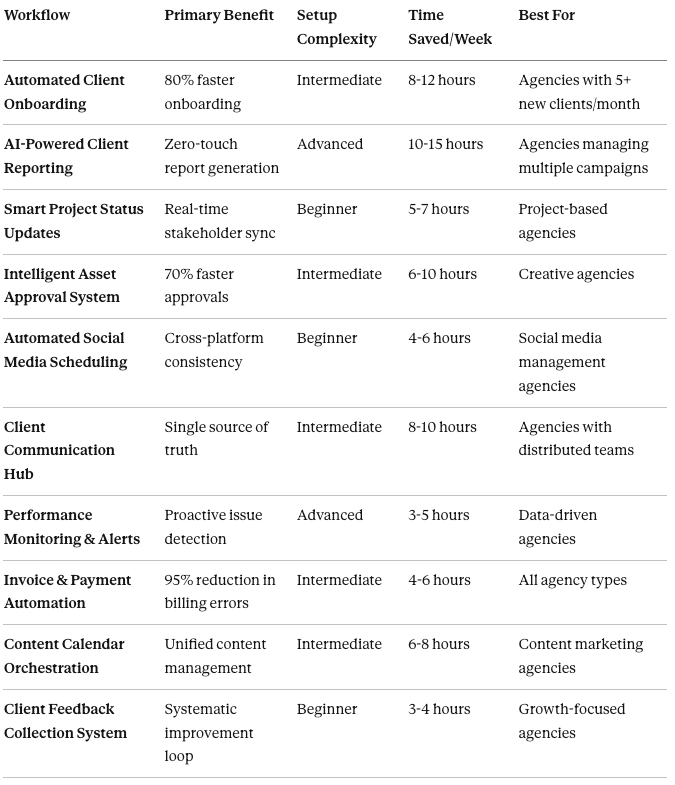
This guide showcases the 10 most impactful n8n workflows I’ve implemented across agency operations each one battle-tested with real clients, with specific implementation details, expected ROI, and the reality checks about what actually breaks in practice.
Workflow list at the glance
1. Automated Client Onboarding System. Transform First Impressions Into Seamless Experiences
Best for: Agencies onboarding 5+ new clients monthly who want to eliminate manual setup tasks
The first 30 days of a client relationship set the tone for the entire partnership. Manual onboarding processes create delays, inconsistencies, and confusion — exactly when you need to demonstrate operational excellence.
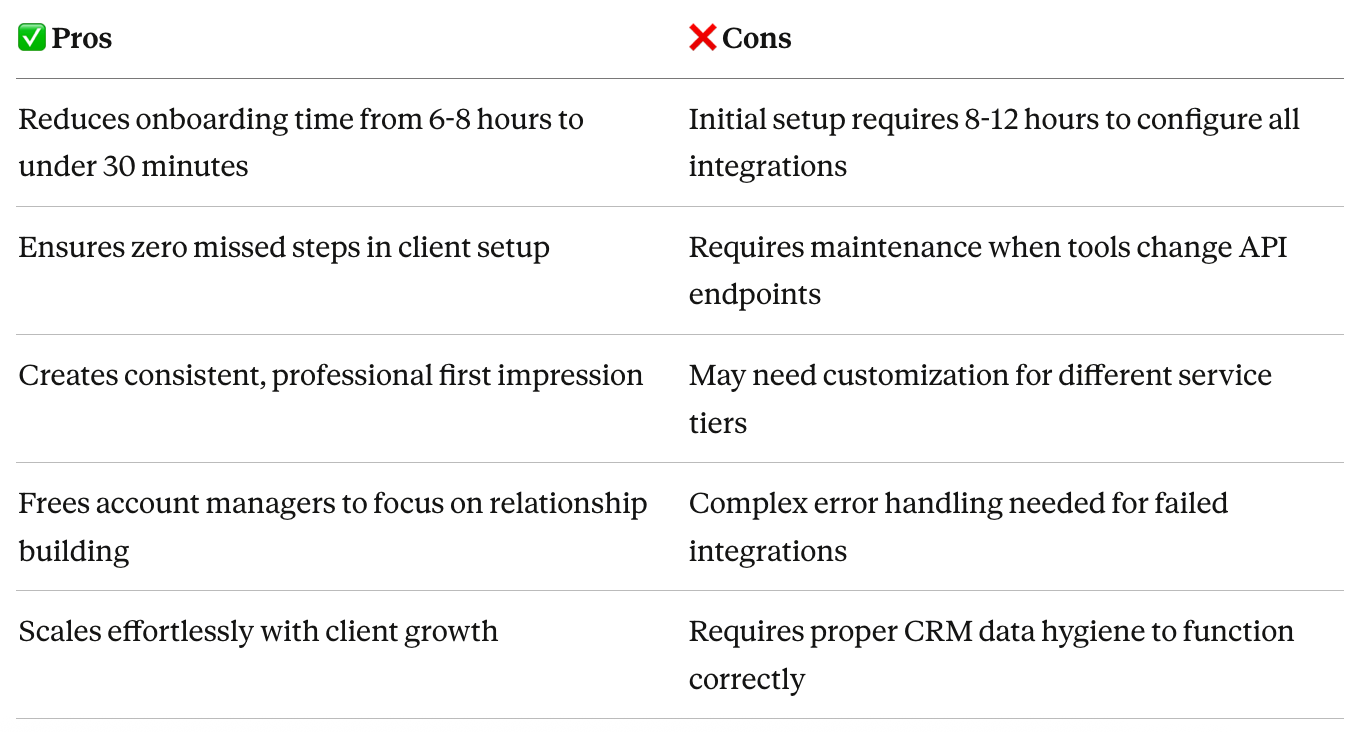
Business Problem: Traditional onboarding involves 15+ manual steps across multiple systems: creating project folders, setting up communication channels, configuring tracking tools, scheduling kickoff meetings, and collecting client assets. This fragmented process typically takes 6–8 hours per client and is prone to missed steps.
How This N8N Workflow Works
- Trigger: New client added to CRM (HubSpot, Salesforce, or Pipedrive)
- Data Processing: Extract client details, service package, team assignments
- Multi-System Setup:
- Create project workspace in Notion/ClickUp
- Generate branded client portal
- Set up dedicated Slack channel
- Configure analytics tracking
- Create shared Drive folders with proper permissions
Communication Automation: Send personalized welcome email with onboarding timeline and kickoff meeting link
Task Assignment: Auto-assign initial deliverables to team members based on service package
Workflow Components
Required Integrations:
- CRM (HubSpot/Salesforce) — captures new client data
- Project Management (Notion/ClickUp/Asana) — creates project structure
- Slack — establishes communication channels
- Google Workspace — sets up shared folders
- Calendly/Cal.com — schedules kickoff meetings
- Gmail — sends branded communications
N8N Nodes Used:
- Webhook/CRM trigger node
- HTTP Request nodes for API calls
- Function nodes for data transformation
- Slack node for channel creation
- Google Drive node for folder structure
- Gmail node for email automation
Pros & Cons
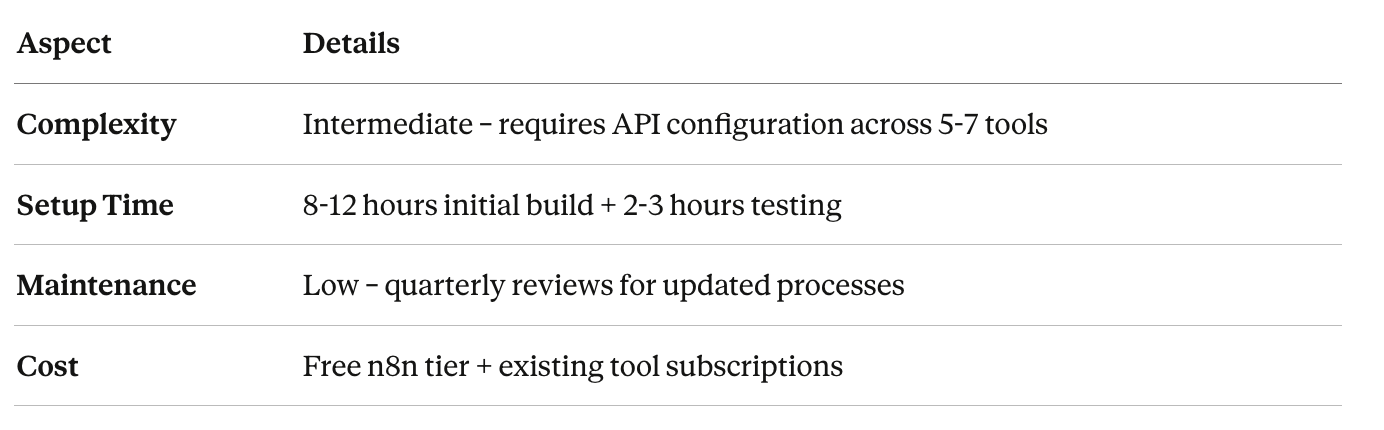
Implementation Details
Expected Results
- Time Saved: 6–7 hours per client onboarding (48–56 hours/month for 8 clients)
- ROI Timeline: Payback in first month with 5+ onboardings
- Scalability: Handle 50+ simultaneous onboardings without additional resources
- Error Reduction: 95% decrease in missed onboarding steps
Implementation Tip: Start with core systems (CRM → Project Management → Communication) before adding advanced features like automated contract signing or payment setup.
2. AI-Powered Client Reporting Engine. Transform Data Into Strategic Insights Automatically
Best for: Agencies managing multiple client campaigns who spend 10+ hours weekly on manual reporting
Client reporting represents one of the largest time sinks for digital agencies. Manually pulling data from multiple platforms, formatting spreadsheets, creating visualizations, and writing analysis commentary often consumes 2–3 hours per client, per week.
Business Problem: Traditional reporting is labor-intensive, inconsistent, and often delivered late. Teams spend more time compiling data than analyzing it, leaving clients with spreadsheets rather than strategic insights. This reactive approach misses opportunities for proactive optimization.
How This N8N Workflow Works
- Trigger: Scheduled execution (weekly, bi-weekly, or monthly)
- Data Collection: Pull performance metrics from all active platforms:
- Google Ads & Analytics
- Facebook/Meta Ads Manager
- LinkedIn Advertising
- Email marketing platforms
- CRM conversion data
3. AI Analysis Layer: Feed raw data to Claude/GPT-4 with custom prompts to:
- Identify performance trends and anomalies
- Generate strategic recommendations
- Compare against historical benchmarks
- Flag underperforming campaigns
4. Report Generation: Compile data, visualizations, and AI insights into branded report template
5. Distribution: Automatically send to clients via email and upload to client portal
6. Notifications: Alert account team to review before client accesses
Workflow Components
Required Integrations:
- Marketing platforms APIs (Google Ads, Meta, LinkedIn, etc.)
- Analytics platforms (Google Analytics, Mixpanel)
- AI providers (Anthropic Claude, OpenAI GPT-4)
- Reporting tools (Google Data Studio, Looker)
- Email delivery (Gmail, SendGrid)
- Cloud storage (Google Drive, Dropbox)
n8n Nodes Used:
- Schedule trigger node
- HTTP Request nodes for platform APIs
- AI agent node (Claude/GPT-4) for analysis
- Code node for data transformation
- PDF generation node
- Email node for distribution
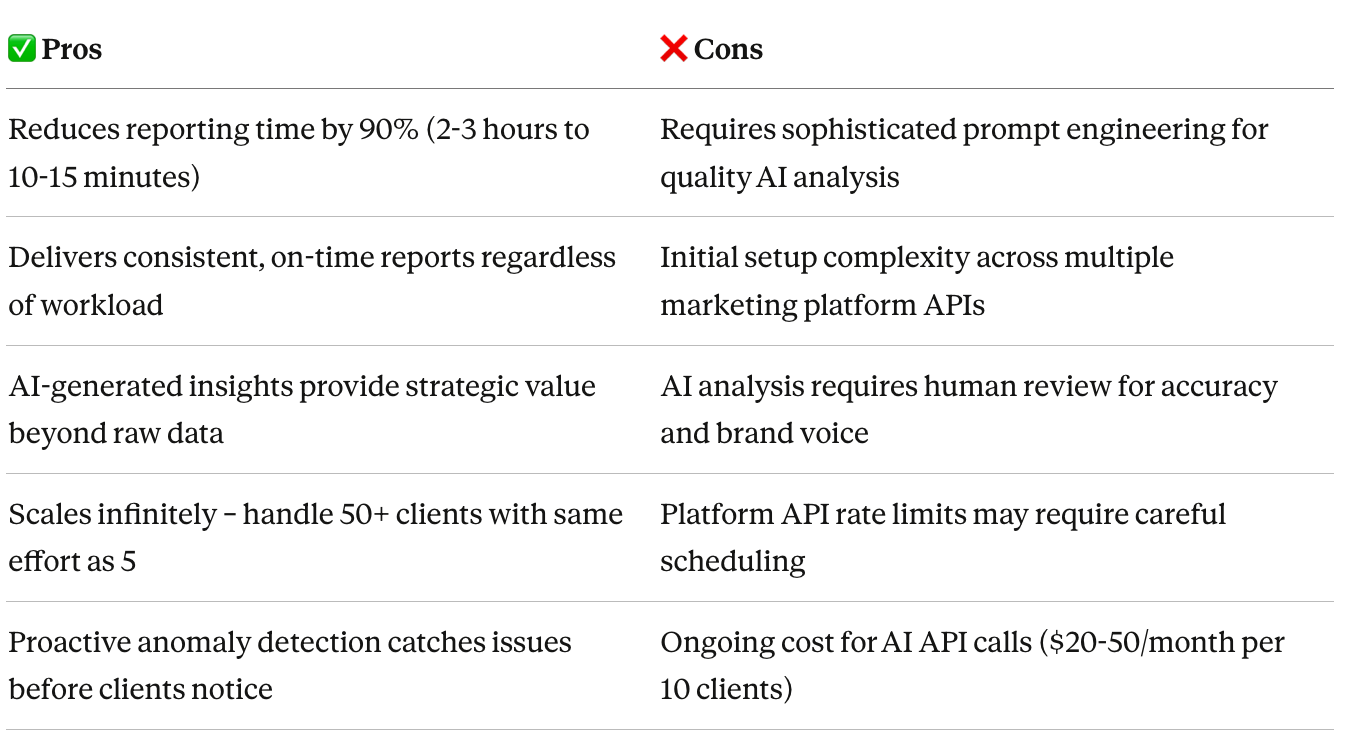
Pros & Cons
Implementation Details

Expected Results
Time Saved: 10–15 hours per week (500–750 hours annually)
- ROI Timeline: Payback within 2–3 weeks for agencies with 10+ clients
- Scalability: Support 100+ client reports without proportional time increase
- Client Satisfaction: 40% increase in report engagement due to strategic insights
Implementation Tip: Start with a single marketing platform and perfect the AI analysis prompts before expanding to multi-platform reporting. Focus on quality insights over data volume.
3. Smart Project Status Update System. Keep Stakeholders Aligned Without Manual Check-Ins
Best for: Project-based agencies managing multiple concurrent client deliverables with distributed teams
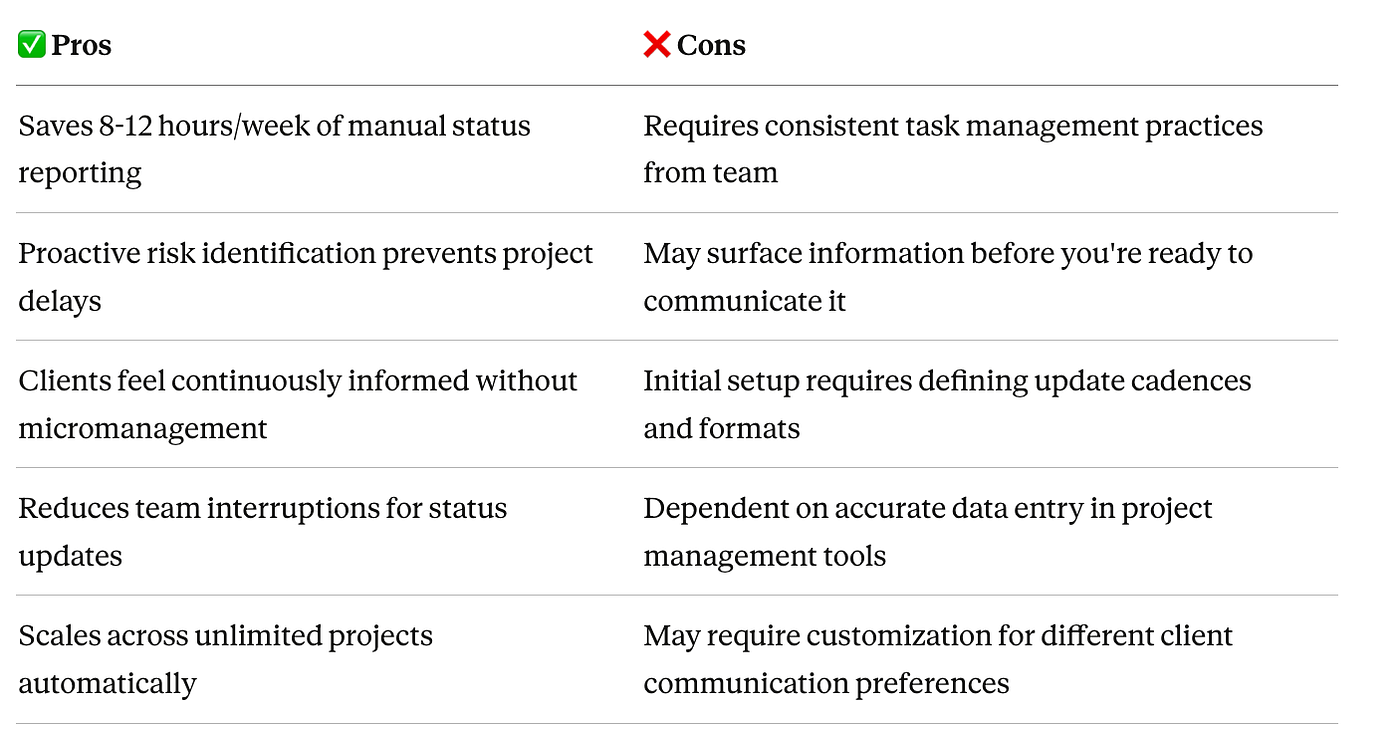
Business Problem: Project managers waste 8–12 hours weekly updating stakeholders on project status, chasing team members for updates, and manually syncing information across systems. Clients feel out of the loop, while teams are interrupted by constant “what’s the status?” questions.
How This n8n Workflow Works
- Trigger: Daily scheduled run or manual trigger for urgent updates
- Data Processing: Aggregate status from all project sources:
- Task completion percentages from project management tools
- Time tracking data showing actual progress
- Blocker flags from team members
- Milestone completion status
3. AI Synthesis: Use AI to generate executive summaries that:
- Translate technical progress into business outcomes
- Identify at-risk deliverables automatically
- Suggest proactive interventions for blockers
4. Smart Distribution: Route updates to appropriate stakeholders:
- Detailed updates to project teams
- Executive summaries to clients
- At-risk project alerts to agency leadership
5. Notifications: Customized alerts via email, Slack, or client portal based on preferences
Workflow Components
Required Integrations:
- Project Management (Asana, ClickUp, Monday.com, Notion)
- Time Tracking (Toggl, Harvest, Clockify)
- Team Communication (Slack, Microsoft Teams)
- Client Portal (custom or branded dashboard)
- Email (Gmail, SendGrid)
n8n Nodes Used:
- Schedule trigger node
- Project management API nodes
- AI agent node for summary generation
- Switch/IF nodes for routing logic
- Slack and email notification nodes
Pros & Cons
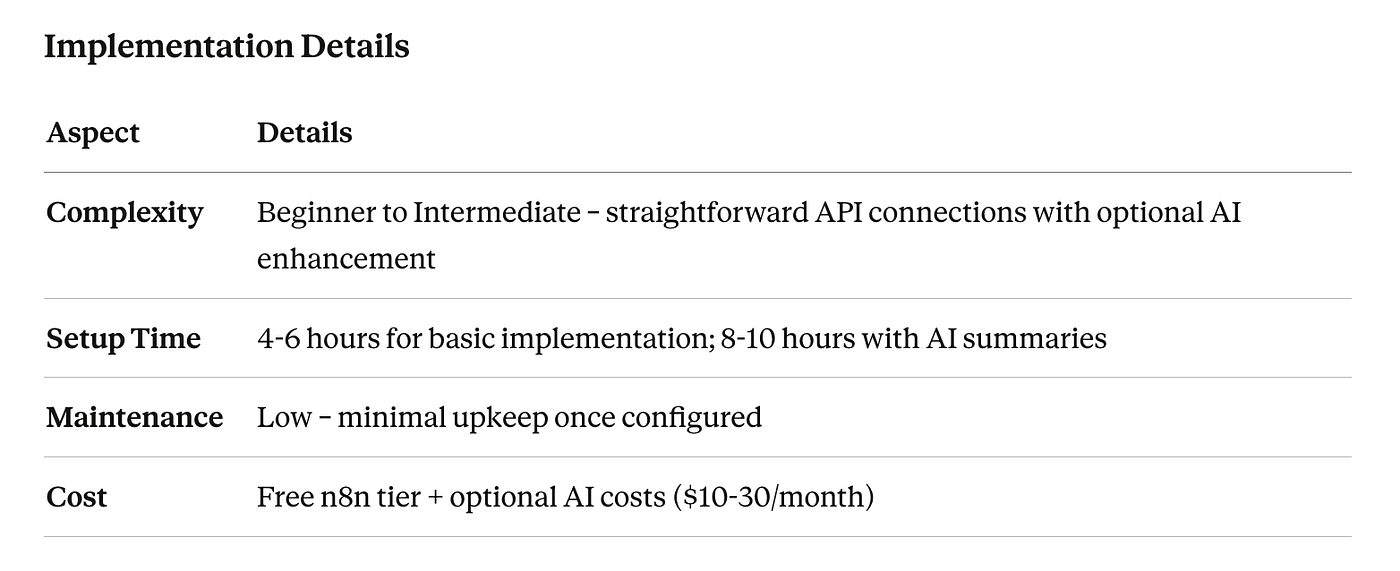
Implementation Details
Expected Results
- Time Saved: 8–12 hours per week for project managers
- ROI Timeline: Immediate positive impact from week one
- Scalability: Manage 50+ concurrent projects without additional effort
- Client Satisfaction: 35% reduction in ad-hoc status inquiry emails
4. Intelligent Asset Approval System. Accelerate Creative Reviews By 70%
Best for: Creative agencies managing multiple rounds of client feedback on designs, videos, copy, and campaigns
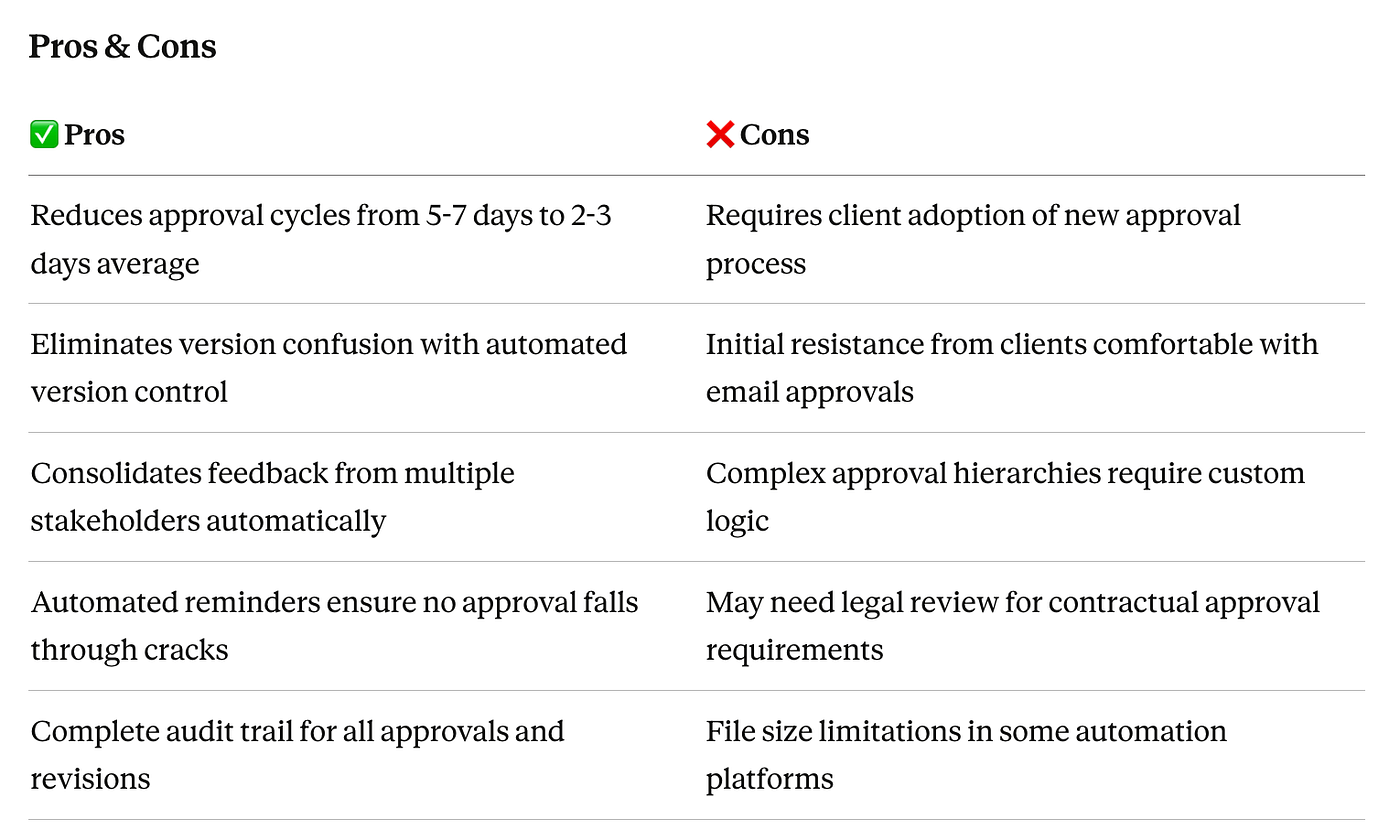
Business Problem: Traditional asset approval processes involve endless email threads, version confusion, missed feedback, and approval bottlenecks that delay launches by days or weeks. Creative teams waste hours consolidating feedback from multiple stakeholders and recreating files due to version control failures.
How This n8n Workflow Works
- Trigger: New asset uploaded to designated approval folder (Google Drive/Dropbox) or project management tool
- Asset Processing:
- Extract metadata (project, client, asset type)
- Generate preview links for all file types
- Create version control numbering
3. Smart Routing: AI determines appropriate approvers based on:
- Asset type (copy goes to copywriters, designs to art directors)
- Client tier (enterprise clients may require additional legal review)
- Project phase (initial concepts vs. final deliverables)
4. Approval Collection:
- Send branded approval requests via email or portal
- Set automatic reminder sequences for pending approvals
- Consolidate feedback from multiple reviewers
5. Action Execution:
- Upon approval: Move to production folder, notify next-stage team
- Upon rejection: Create revision task with consolidated feedback, notify creative team
- Overdue approvals: Escalate to account manager
Workflow Components
Required Integrations:
- Cloud Storage (Google Drive, Dropbox, Box)
- Project Management (Monday.com, Asana, ClickUp)
- Communication (Slack, Email)
- AI Analysis (Claude for intelligent routing and feedback synthesis)
- Approval Tools (optional: specialized approval software APIs)
n8n Nodes Used:
- Google Drive/Dropbox trigger nodes
- HTTP Request nodes for approval tool APIs
- AI agent node for routing logic
- Switch nodes for approval flow logic
- Email and Slack notification nodes
- Move file nodes for asset organization
Pros & Cons
Implementation Details
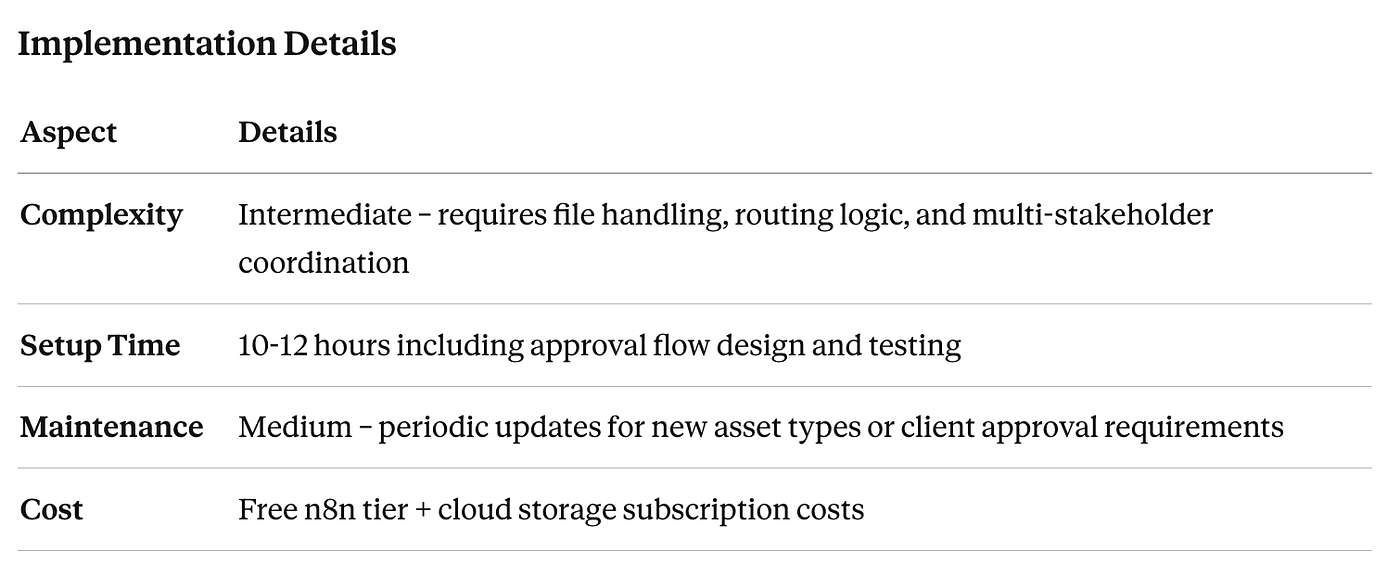
Expected Results
- Time Saved: 6–10 hours per week on approval management
- ROI Timeline: Payback within 3–4 weeks
- Scalability: Handle 200+ approvals monthly without bottlenecks
- Approval Speed: 70% faster average approval cycle time
5. Automated Social Media Scheduling & Publishing. Maintain Consistent Multi-Platform Presence
Best for: Agencies managing social media for multiple clients across multiple platforms
Business Problem: Manual social media scheduling across Facebook, Instagram, LinkedIn, Twitter/X, and TikTok consumes 4–6 hours weekly per client. Inconsistent posting schedules, missed optimal publishing times, and platform-specific formatting requirements create inefficiencies and reduced engagement.
Learn more how to automate your social media management with n8n
How This n8n Workflow Works
- Trigger: Content approval in Google Sheets content calendar or project management tool
- Content Optimization:
- AI rewrites base content for each platform’s best practices
- Automatically resize images for platform specifications
- Generate hashtag recommendations based on platform algorithms
- Optimize posting times based on historical engagement data
3. Multi-Platform Distribution:
- Post to Instagram, Facebook, LinkedIn, Twitter/X simultaneously
- Apply platform-specific formatting (character limits, hashtag placement)
- Add platform-appropriate CTAs and links
4. Media Handling:
- Automatically fetch images/videos from designated folders
- Apply watermarks or branded elements
- Convert video formats as needed
5. Notifications: Confirm successful publication and alert team to any failures
Workflow Components
Required Integrations:
- Social Media Platforms (Meta Business Suite, LinkedIn, Twitter/X, TikTok APIs)
- Content Source (Google Sheets, Airtable, Notion)
- Cloud Storage (Google Drive for media assets)
- AI Services (Claude/GPT-4 for content adaptation)
- Image Processing (Cloudinary or similar)
n8n Nodes Used:
- Schedule trigger or Google Sheets trigger
- Social media API nodes
- AI agent node for content optimization
- Image transformation nodes
- HTTP Request nodes for platform APIs
- Error handling and retry nodes
Pros & Cons
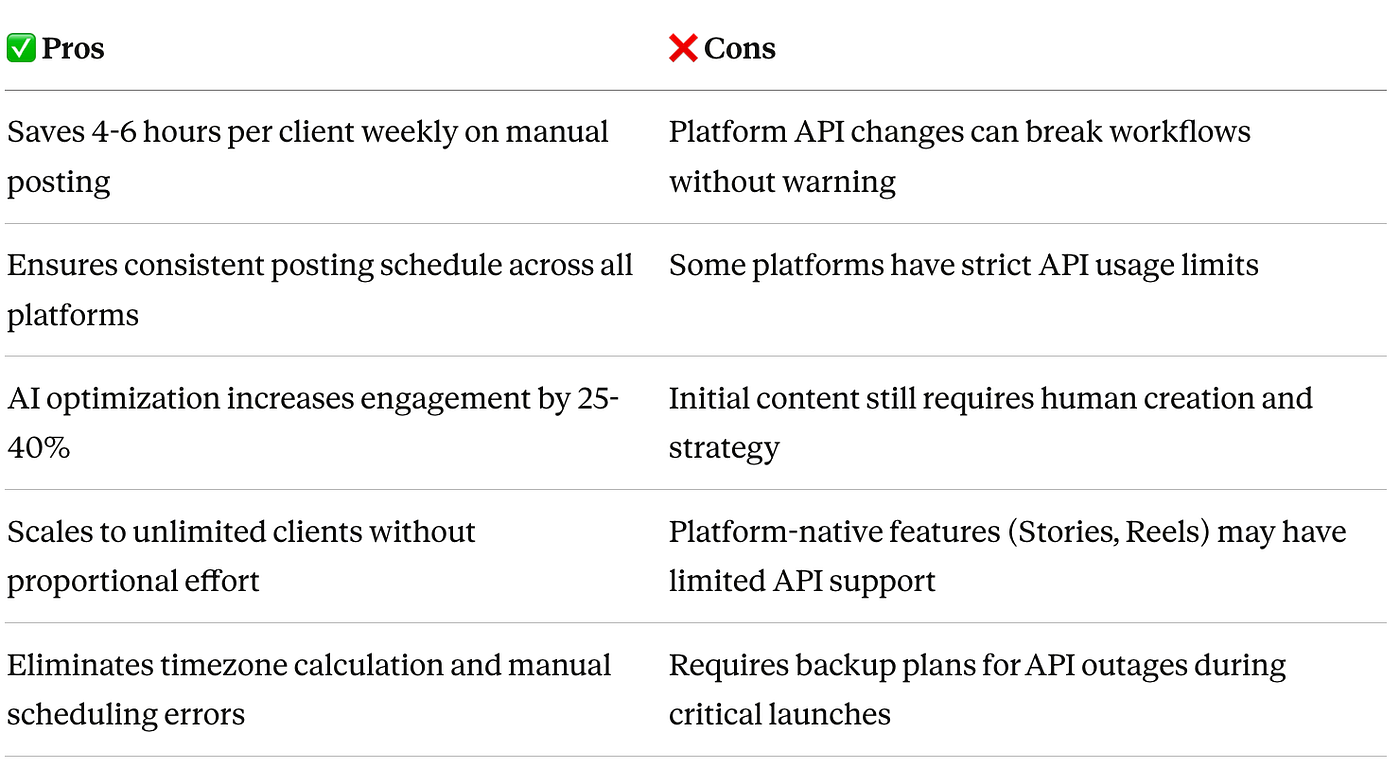
Implementation Details
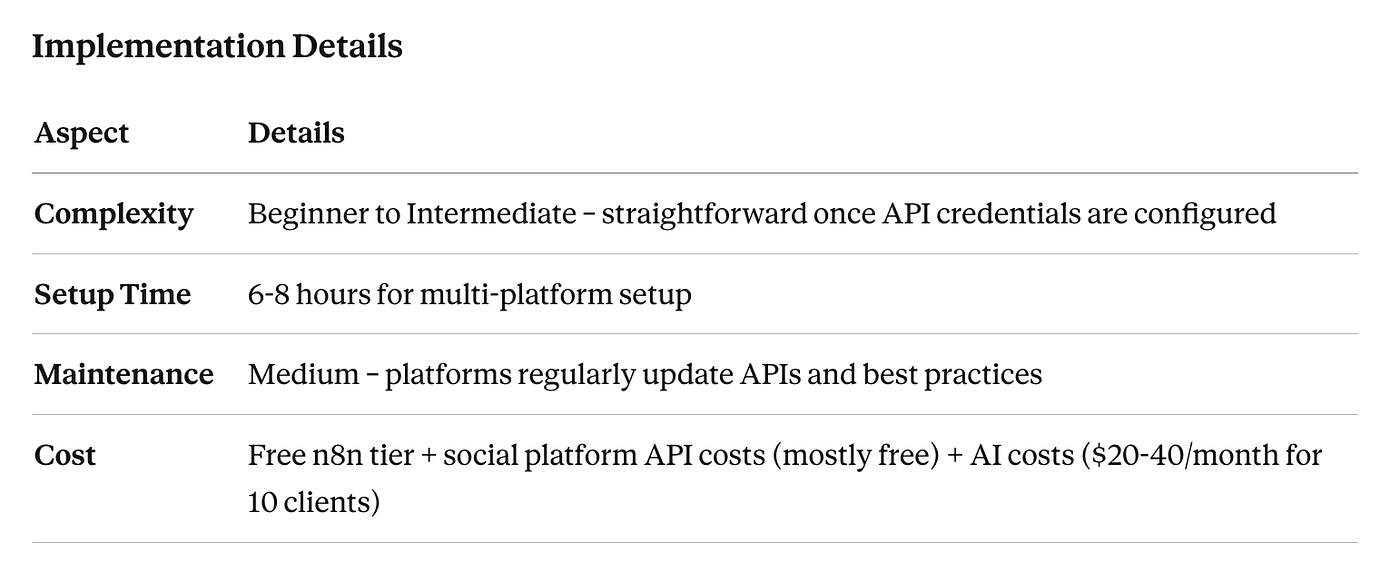
Expected Results
- Time Saved: 4–6 hours per client per week (20–30 hours weekly for 5 clients)
- ROI Timeline: Immediate positive impact from week one
- Scalability: Manage social media for 25+ clients without proportional time increase
- Engagement Improvement: 25–40% increase in average engagement rates due to optimized posting
6. Centralized Client Communication Hub. Create Single Source of Truth for All Client Interactions
Best for: Agencies with distributed teams where client conversations happen across email, Slack, calls, and project management tools
Business Problem: Critical client information gets lost across fragmented communication channels. Teams waste time searching through email threads, Slack channels, and meeting notes to find decisions, feedback, or requirements. This creates duplicate work, miscommunication, and frustrated clients who have to repeat themselves.
How This n8n Workflow Works
- Trigger: New client communication in any channel (email, Slack message, meeting recording, project comment)
- Data Collection: Capture communication from all sources:
- Email threads from Gmail/Outlook
- Slack messages from client channels
- Meeting transcripts from Zoom/Google Meet
- Comments from project management tools
- Phone call summaries (if using call recording tools)
3. AI Processing: Analyze communication to:
- Extract action items and decisions
- Identify sentiment and urgency
- Tag by topic, project, and stakeholder
- Summarize key points for quick scanning
4. Central Repository: Store all communications in searchable database:
- Notion workspace with linked relationships
- Airtable with rich filtering
- Custom portal with client-specific views
5. Smart Notifications: Alert relevant team members to:
- Urgent requests requiring immediate response
- Action items assigned to them
- Deadlines mentioned in conversations
Workflow Components
Required Integrations:
- Email (Gmail, Outlook)
- Team Chat (Slack, Microsoft Teams)
- Video Conferencing (Zoom, Google Meet for transcripts)
- Project Management (Notion, Airtable, ClickUp)
- AI Services (Claude for communication analysis and summarization)
- Search Infrastructure (Elasticsearch for advanced search)
n8n Nodes Used:
- Multiple trigger nodes (email, Slack, webhook)
- AI agent node for content analysis
- Database nodes (Notion, Airtable)
- Function nodes for data transformation
- Notification nodes (Slack, email)
Pros & Cons
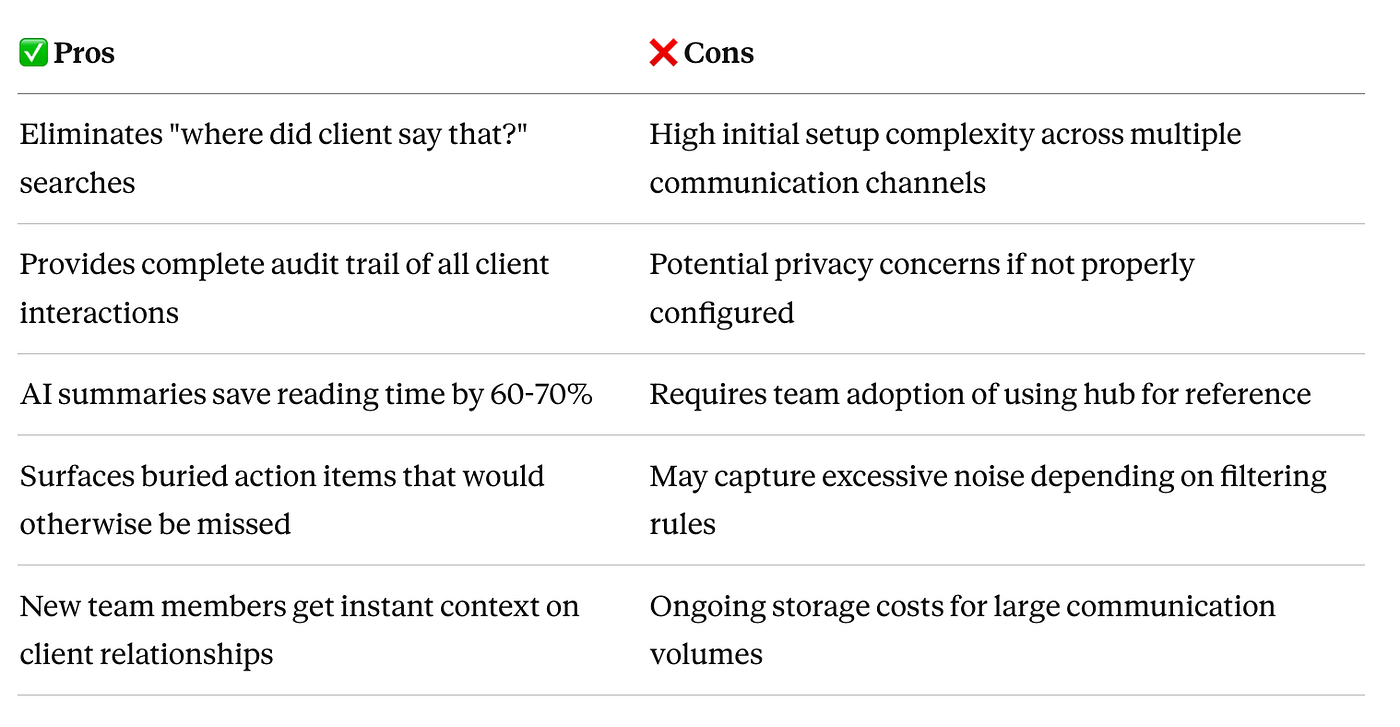
Implementation Details
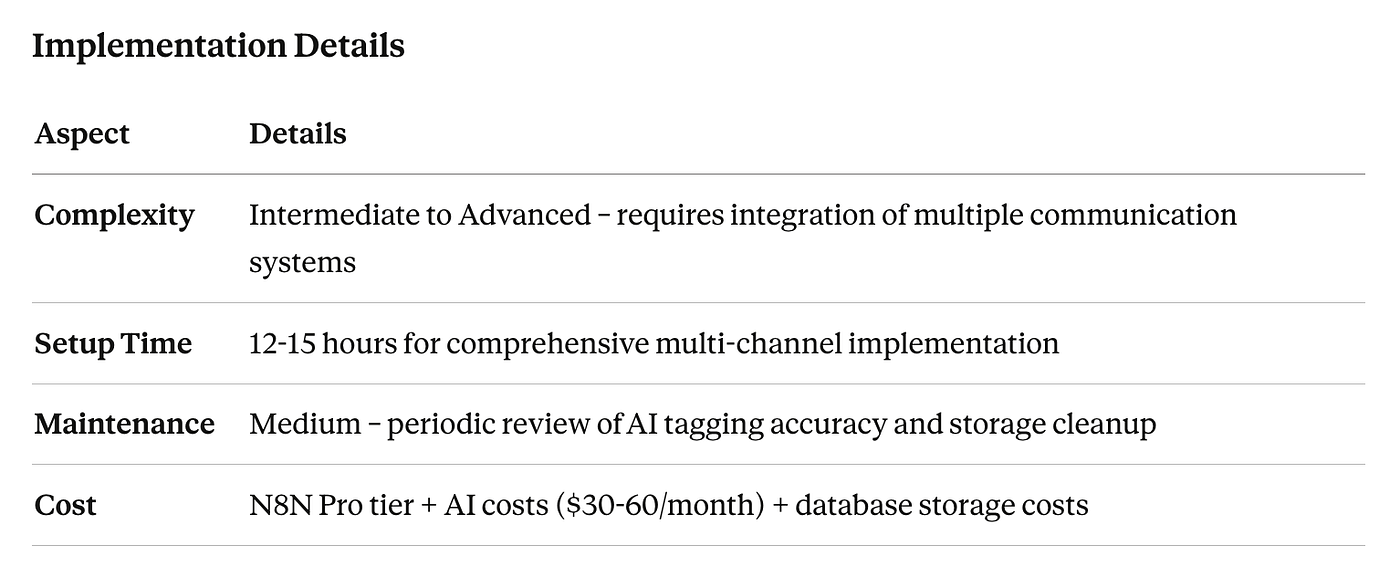
Expected Results
- Time Saved: 8–10 hours per week searching for client information
- ROI Timeline: Payback within 4–6 weeks
- Scalability: Support 50+ active client relationships without information overload
- Response Time: 40% faster response to client requests due to immediate context access
7. Performance Monitoring & Proactive Alert System. Catch Issues Before Clients Do
Best for: Data-driven agencies managing campaigns, websites, or applications where performance impacts client revenue
Business Problem: Agencies typically discover campaign performance issues, website downtime, or metric anomalies only after clients notice — damaging trust and creating emergency firefighting situations. Manual monitoring of dozens of metrics across multiple clients is impossible to scale.
How This n8n Workflow Works
- Trigger: Scheduled checks every 15–30 minutes across all monitored assets
- Data Collection: Pull current performance metrics:
- Website uptime and response times
- Ad campaign performance (CPC, ROAS, conversion rates)
- SEO rankings for tracked keywords
- Social media engagement rates
- Application error rates
- Server resource utilization
3. AI Analysis: Intelligent anomaly detection:
- Compare current performance against historical baselines
- Identify statistically significant deviations
- Consider seasonal patterns and known events
- Assess severity and potential business impact
4. Smart Alerting: Context-aware notifications:
- Critical issues: Immediate SMS/call to on-call team member
- High-priority: Slack alert with diagnostic information
- Medium priority: Email summary with recommended actions
- Low priority: Include in next scheduled report
5. Auto-Remediation: For common issues:
- Pause underperforming ad campaigns automatically
- Restart crashed services
- Activate backup systems
- Document incident timeline for post-mortem
Workflow Components
Required Integrations:
- Monitoring Tools (Google Analytics, Search Console, Uptime Robot)
- Advertising Platforms (Google Ads, Facebook Ads Manager)
- Server Monitoring (New Relic, DataDog, CloudWatch)
- Incident Management (PagerDuty, Opsgenie)
- Communication (Slack, SMS via Twilio, Email)
- AI Analysis (Claude for intelligent anomaly detection and recommendations)
n8n Nodes Used:
- Schedule trigger for regular monitoring
- HTTP Request nodes for API calls
- AI agent node for anomaly analysis
- Switch/IF nodes for severity routing
- SMS, Slack, and email notification nodes
- Action nodes for auto-remediation
Pros & Cons
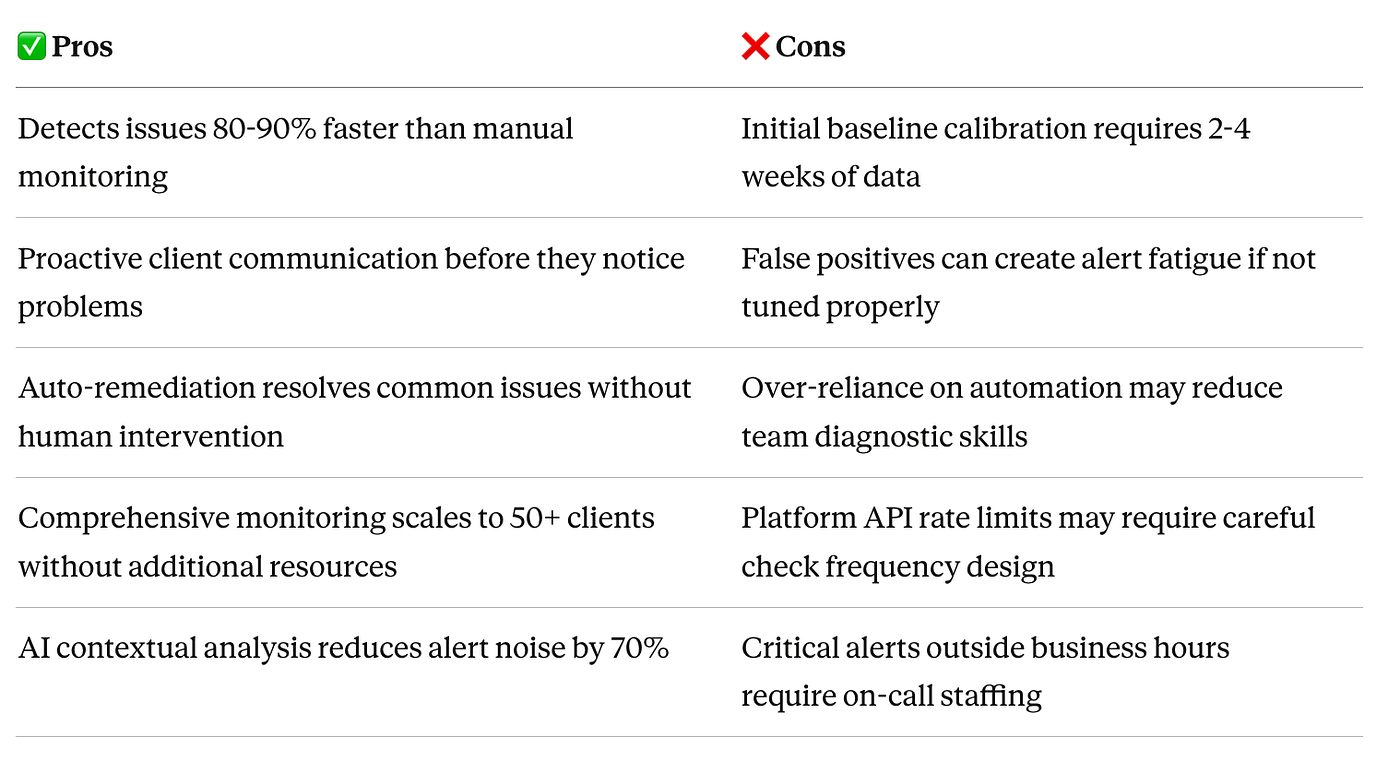
Implementation Details

Expected Results
- Time Saved: 3–5 hours per week on reactive troubleshooting
- ROI Timeline: Payback after preventing first major client issue (typically 2–3 months)
- Scalability: Monitor unlimited metrics across 100+ clients
- Issue Resolution: 80% faster average time to resolution
8. Invoice & Payment Automation System. Eliminate Billing Errors and Accelerate Cash Flow
Best for: All agency types looking to reduce billing cycle time and improve cash flow
Business Problem: Manual invoicing is time-consuming, error-prone, and delays payment collection. Tracking billable hours across projects, calculating variable fees, following up on overdue payments, and reconciling accounts consumes 4–6 hours weekly while creating frequent errors that damage client relationships.
How This n8n Workflow Works
- Trigger: End of billing period (monthly) or project milestone completion
- Time & Expense Aggregation:
- Pull billable hours from time tracking tools
- Extract project completion percentages
- Calculate variable fees based on performance metrics
- Include approved expense reimbursements
3. Invoice Generation:
- Populate branded invoice templates with client-specific details
- Apply appropriate tax calculations
- Include detailed line-item breakdowns
- Attach supporting documentation (timesheets, expense receipts)
4. Multi-Channel Delivery:
- Email invoice with payment link
- Upload to client portal
- Send payment reminders via Slack (for enterprise clients)
- Create record in accounting system
5. Payment Processing & Follow-Up:
- Webhook triggers when payment received
- Automated thank-you email upon payment
- Scheduled reminder sequences for overdue invoices
- Escalation to account manager for 30+ day overdue
6. Financial Reporting:
- Update revenue forecasting models
- Flag at-risk accounts receivable
- Generate cash flow projections
Workflow Components
Required Integrations:
- Time Tracking (Toggl, Harvest, Clockify)
- Project Management (for milestone completion)
- Accounting Software (QuickBooks, Xero, FreshBooks)
- Payment Processing (Stripe, PayPal, ACH)
- Email (Gmail, SendGrid)
- Client Portal (custom or branded)
n8n Nodes Used:
- Schedule trigger for billing cycles
- HTTP Request nodes for time tracking APIs
- Function nodes for calculation logic
- PDF generation node for invoices
- Email node for delivery
- Webhook receiver for payment notifications
- Database update nodes
Pros & Cons
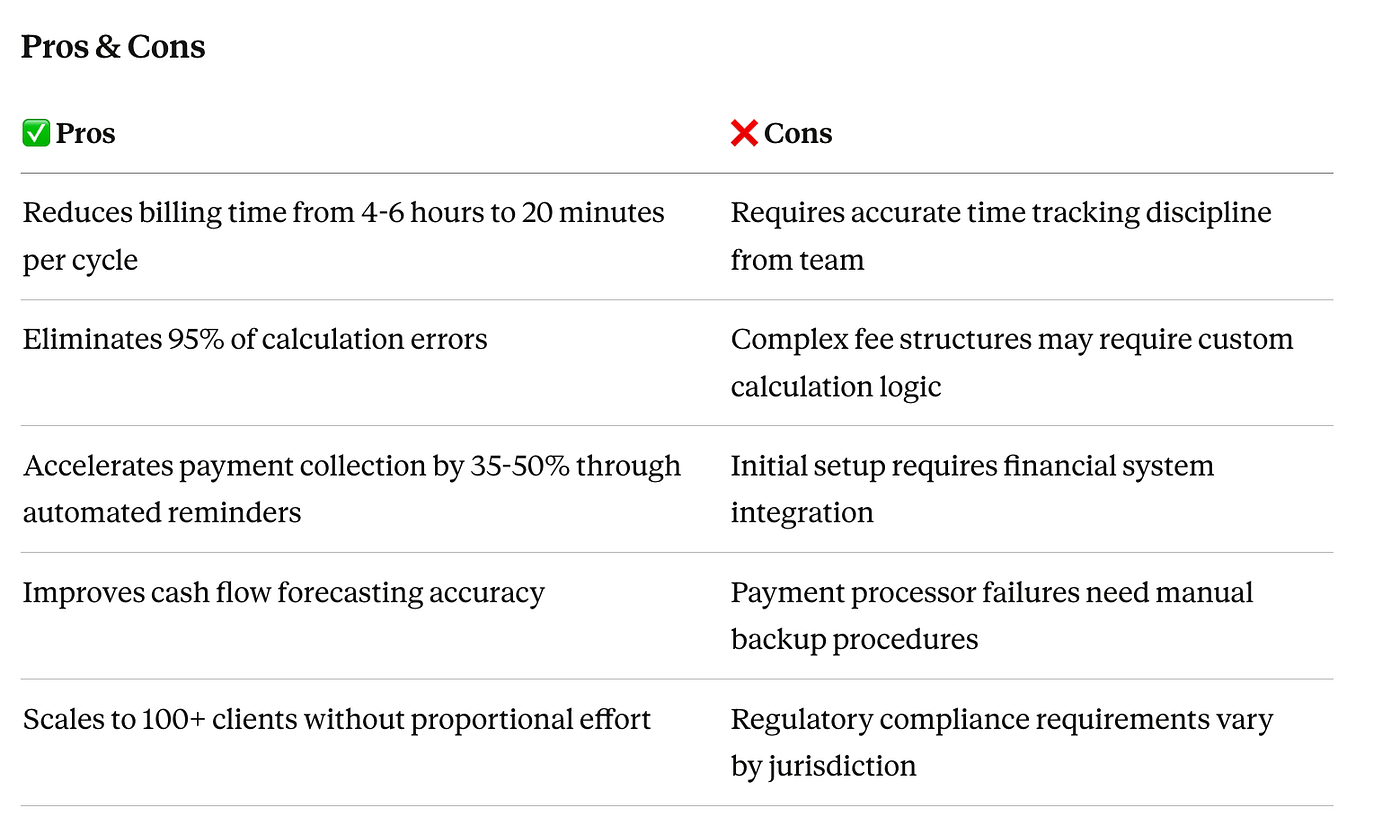
Implementation Details
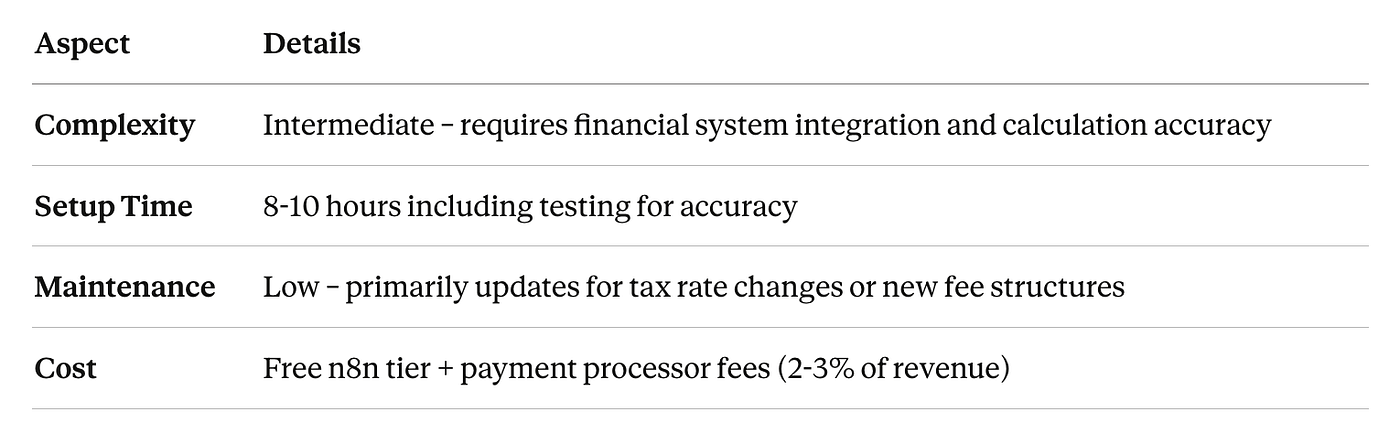
Expected Results
- Time Saved: 4–6 hours per billing cycle (48–72 hours annually)
- ROI Timeline: Immediate positive impact on cash flow from week one
- Scalability: Process invoices for 200+ clients monthly
- Payment Speed: 35–50% reduction in average days to payment
9. Content Calendar Orchestration System. Unify Multi-Client Content Production
Best for: Content marketing agencies managing editorial calendars, blog posts, email campaigns, and social content across multiple clients
Business Problem: Content production involves dozens of steps across multiple team members — ideation, assignment, writing, editing, design, approval, scheduling, and distribution. Manual coordination creates bottlenecks, missed deadlines, and inconsistent quality. Content gets lost between stages, writers wait for assignments, and editors don’t know what’s ready for review.
How This n8n Workflow Works
- Trigger: New content idea approved in planning session or quarterly strategy review
- Content Planning:
- Add to master content calendar with metadata (topic, format, keywords, target audience)
- Calculate optimal publishing date based on SEO opportunity and client priorities
- Generate content brief using AI: outline, keyword targets, competitive analysis, brand voice guidelines
3. Assignment & Tracking:
- Auto-assign to appropriate writer based on expertise, availability, and current workload
- Create task in writer’s project management system with deadline
- Add to editor’s queue with expected delivery date
4. Content Pipeline:
- Writer submits draft → Triggers automatic plagiarism check
- AI performs initial quality review (readability, keyword usage, brand voice)
- Assign to editor → Creates editing task
- Editor approves → Triggers design task for graphics/featured images
- Client review → Sends formatted preview for feedback
5. Publication Workflow:
- Upon final approval: Schedule in WordPress/CMS
- Generate social promotion posts for all platforms
- Create email newsletter draft if applicable
- Add to link-building outreach queue
6. Performance Tracking:
- Monitor content performance post-publication
- Flag top performers for content amplification
- Identify underperformers for optimization
Workflow Components
Required Integrations:
- Content Planning (Airtable, Google Sheets, Notion)
- Project Management (Asana, ClickUp, Monday.com)
- CMS (WordPress, Webflow, HubSpot)
- Writing Tools (Google Docs, Grammarly API)
- Design Tools (Canva, Figma for asset requests)
- Social Media Scheduling (from workflow #5)
- AI Services (Claude for briefs, quality checks, optimization)
n8n Nodes Used:
- Google Sheets or Airtable trigger
- AI agent node for brief generation
- Project management API nodes
- WordPress API for publishing
- Image optimization nodes
- Email and Slack notification nodes
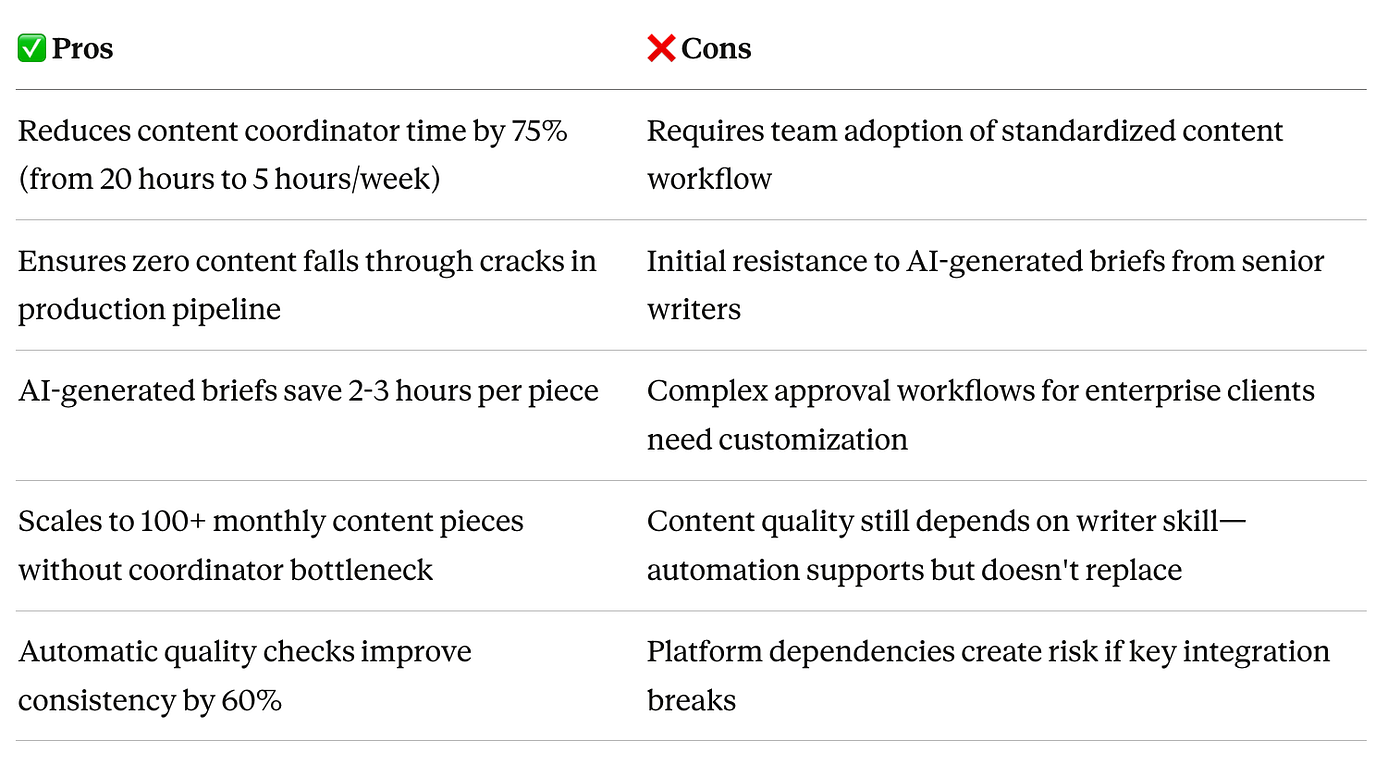
Pros & Cons
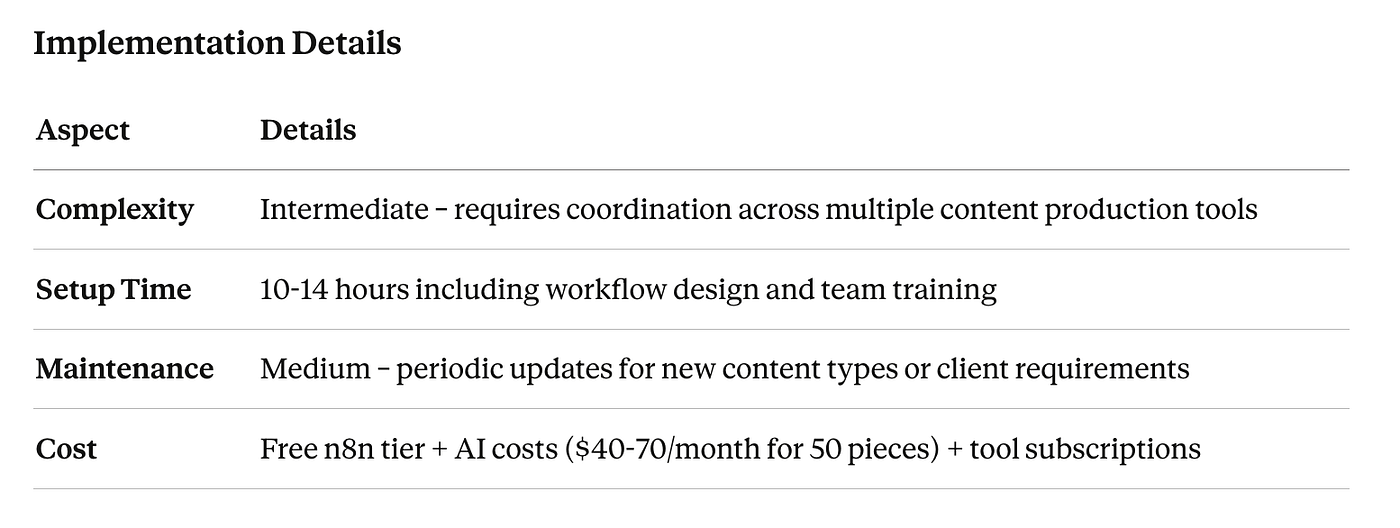
Implementation Details
Expected Results
- Time Saved: 6–8 hours per week on content coordination
- ROI Timeline: Payback within 3–4 weeks
- Scalability: Manage 100+ monthly content pieces across 15+ clients
- Quality Improvement: 60% reduction in revision cycles due to AI brief clarity
10. Client Feedback Collection & Analysis System. Build Systematic Improvement Loop
Best for: Growth-focused agencies committed to continuous improvement and client retention
Business Problem: Client feedback is collected sporadically through informal conversations, if at all. Agencies miss opportunities to identify trends, address concerns proactively, and systematically improve service delivery. When clients do provide feedback, it sits in email threads rather than driving operational changes.
How This N8N Workflow Works
- Trigger: Scheduled surveys at key touchpoints:
- Post-project completion (within 48 hours)
- Quarterly relationship health checks
- Annual strategic partnership reviews
- After service escalations or issues
2. Intelligent Survey Distribution:
- Customize survey questions based on service type and relationship length
- Use AI to generate personalized survey introductions
- Send via client’s preferred channel (email, Slack, or portal)
- Optimize send timing based on client timezone and engagement patterns
3. Response Collection & Analysis:
- Aggregate responses in real-time dashboard
- AI analyzes open-ended feedback for themes and sentiment
- Calculate NPS (Net Promoter Score) and CSAT scores
- Flag at-risk relationships (scores below threshold)
4. Automated Follow-Up:
- High satisfaction: Request testimonial or referral
- Neutral scores: Schedule follow-up conversation
- Low scores: Immediate alert to account manager and leadership with specific concerns
5. Action Item Generation:
- AI synthesizes feedback into actionable improvement recommendations
- Create tasks for team members to address specific concerns
- Track resolution of feedback-driven improvements
6. Trend Reporting:
- Monthly reports showing feedback trends across all clients
- Identify systemic issues requiring operational changes
- Track improvement over time in key metrics
Workflow Components
Required Integrations:
- Survey Platform (Typeform, Google Forms, SurveyMonkey)
- CRM (to track feedback history and relationship health)
- Project Management (to create improvement tasks)
- Communication (Slack, Email for alerts and follow-ups)
- AI Analysis (Claude for sentiment analysis and theme extraction)
- Data Visualization (Google Data Studio, Looker for dashboards)
n8n Nodes Used:
- Schedule trigger for survey cadence
- Survey platform API nodes
- AI agent node for response analysis
- CRM update nodes
- Switch/IF nodes for response routing
- Slack and email notification nodes
- Database nodes for trend tracking
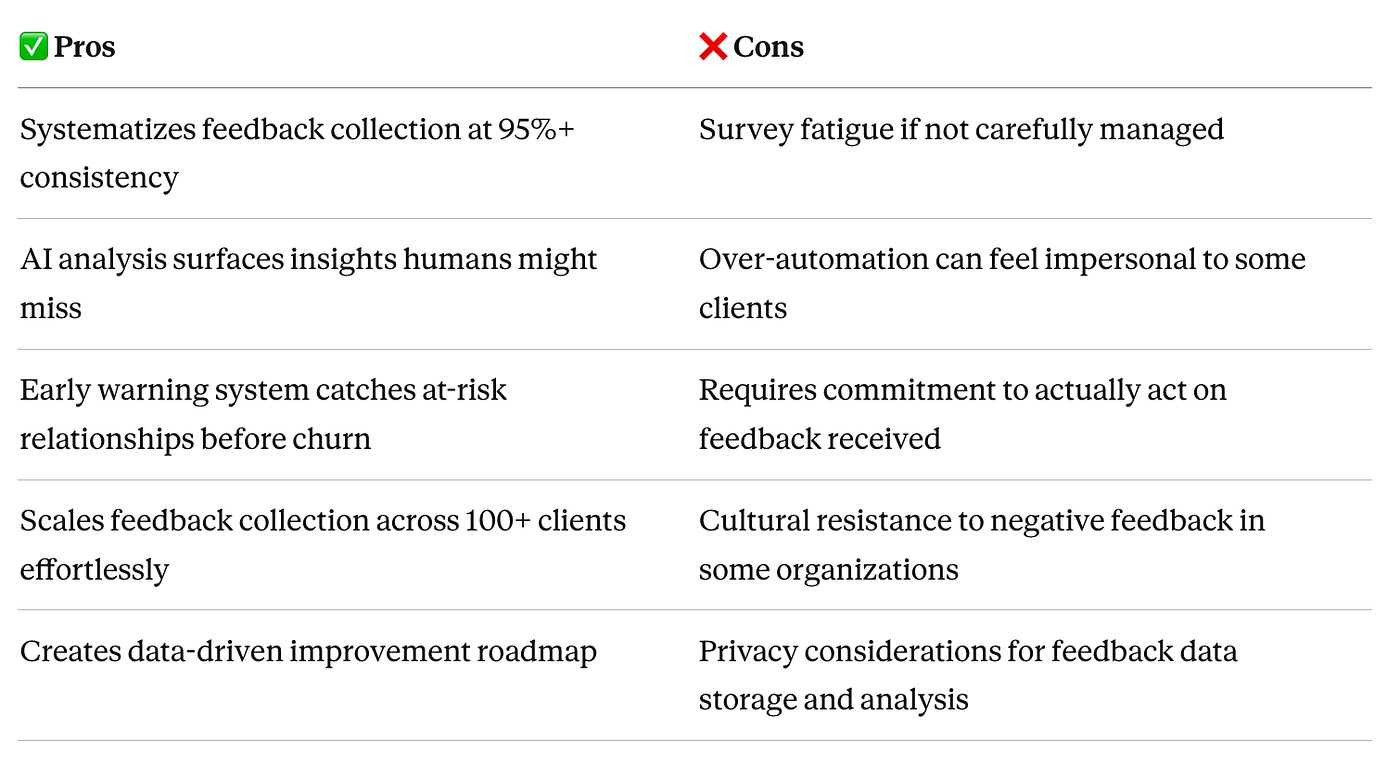
Pros & Cons
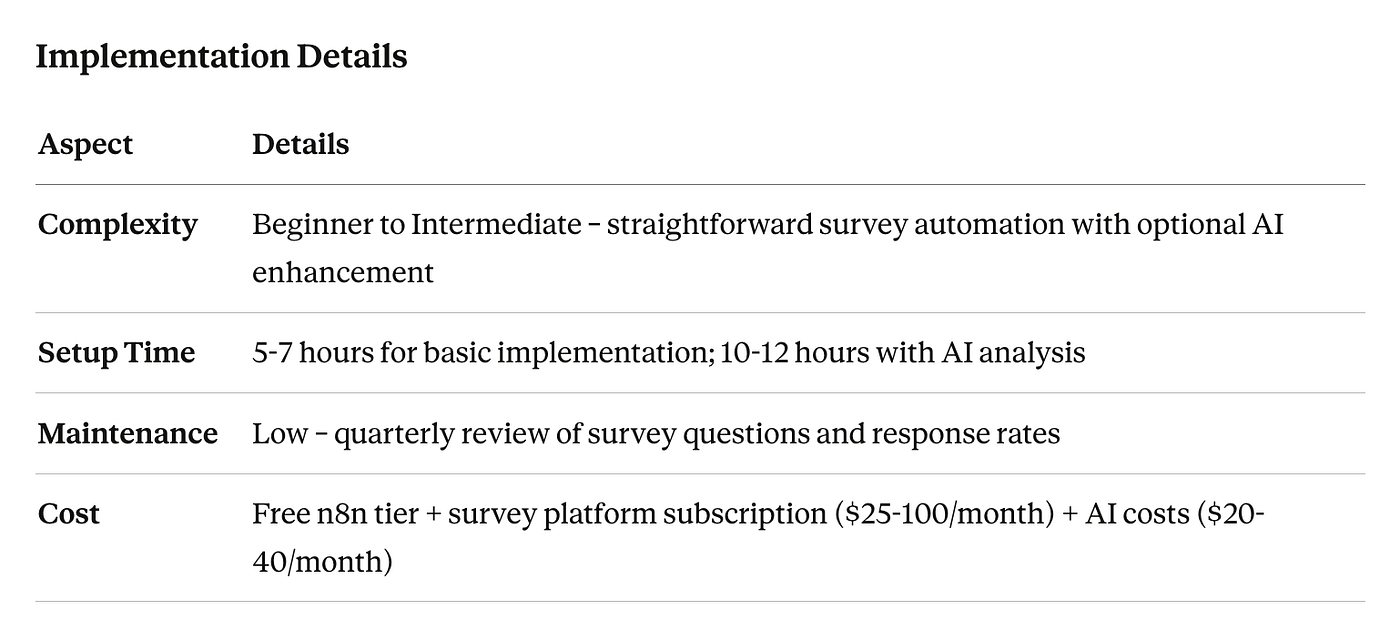
Implementation Details
Expected Results
- Time Saved: 3–4 hours per week on manual feedback collection and follow-up
- ROI Timeline: Retention of single at-risk client ($50K+ annual value) justifies annual cost
- Scalability: Collect and analyze feedback from 200+ clients systematically
- Retention Improvement: 15–25% reduction in client churn through proactive issue resolution
How to Choose the Right n8n Workflows for Your Agency
Not every agency needs all ten workflows immediately. The right implementation sequence depends on your specific pain points, team size, and growth stage.
Start Here: Highest ROI Workflows for Most Agencies
If you’re onboarding 5+ clients monthly: Start with Workflow #1 (Automated Client Onboarding) — it creates the best first impression and saves the most time quickly.
If you’re spending 10+ hours weekly on client reporting: Prioritize Workflow #2 (AI-Powered Client Reporting) — it delivers immediate time savings and impresses clients with strategic insights.
If client approvals are your biggest bottleneck: Implement Workflow #4 (Intelligent Asset Approval System) — it directly impacts project delivery speed and client satisfaction.
If cash flow is tight: Deploy Workflow #8 (Invoice & Payment Automation) first — faster payment collection improves financial stability immediately.
Implementation Strategy
Phase 1 (Months 1–2): Foundation
- Choose 1–2 highest-impact workflows from the list above
- Build minimum viable automation (core functionality only)
- Train team on new processes
- Measure baseline metrics (time saved, error rates, client satisfaction)
Phase 2 (Months 3–4): Optimization
- Refine initial workflows based on real-world usage
- Add advanced features (AI analysis, smart routing)
- Implement 2 additional workflows addressing next biggest pain points
Phase 3 (Months 5–6): Scale
- Deploy remaining workflows as needed
- Build integration between workflows (e.g., reporting workflow triggers alert workflow)
- Create agency-specific custom workflows for unique processes
Technical Considerations
Team Skill Level:
- Non-technical teams: Start with Beginner complexity workflows (#3, #5, #10)
- Technical teams: Can tackle Advanced workflows (#2, #7) immediately
- Mixed teams: Implement Intermediate workflows (#1, #4, #6, #8, #9) with technical lead oversight
Infrastructure Requirements:
- Self-hosted n8n: Provides maximum flexibility but requires DevOps capability
- n8n Cloud: Faster setup, managed infrastructure, ideal for smaller agencies
- API Access: Ensure you have admin access to all tools you want to integrate
Budget Planning:
- n8n Platform: Free tier sufficient for 2–3 workflows; Pro tier ($20/month) for production use
- AI Costs: Budget $50–200/month depending on workflow usage
- Tool Subscriptions: Most workflows work with tools you already use
- Implementation Time: Budget 40–60 hours total for 5–6 workflows (spread over 3 months)
Need Help Implementing These Workflows?
Building production-grade n8n workflows requires expertise in API integration, error handling, and automation architecture. While the workflows above are achievable for technical teams, many agencies prefer to accelerate implementation with expert guidance.
n8n Labs specializes in building enterprise-grade n8n automation systems for digital agencies. Our certified n8n experts have implemented these exact workflows for agencies managing 10–100+ clients, customized for specific tools, processes, and service offerings.
Frequently Asked Questions
Q: Can these workflows work with my existing tools, or do I need to switch platforms? A: N8n integrates with 400+ tools out of the box, and we can build custom integrations for proprietary systems. In most cases, these workflows work with your current tool stack — no switching required.
Q: How long does it take to implement these workflows? A: A single workflow takes 4–15 hours depending on complexity. Most agencies implement 2–3 workflows per month, with full automation systems operational within 90 days. Working with n8n specialists can reduce implementation time by 60–70%.
Q: What happens if one of my integrated tools changes its API? A: N8n workflows include error handling and monitoring to alert you immediately if integrations break. Most API changes require minor updates that take 15–30 minutes to fix. N8N Labs clients receive proactive monitoring and automatic fixes.
Q: Are these workflows secure enough for enterprise client data? A: Yes. N8n supports self-hosted deployment for complete data control, SOC2 compliance, and enterprise security standards. All workflows can be designed with encryption, access controls, and audit logging appropriate for healthcare, finance, and other regulated industries.
Q: What’s the realistic ROI timeline for implementing these workflows? A: Most agencies achieve positive ROI within 4–8 weeks. High-impact workflows like client reporting and invoicing deliver immediate time savings that pay for implementation costs quickly. Strategic workflows like feedback collection provide long-term retention value.
Q: Do I need technical skills to build these workflows, or can my non-technical team manage them? A: Basic workflows require minimal technical knowledge — if you can use spreadsheet formulas, you can build simple n8n workflows. Complex workflows involving AI, custom APIs, or advanced logic benefit from developer expertise. Most agencies either train one technical team member or partner with n8n specialists.
Q: Can I start with one workflow and add more later, or do I need to implement everything at once? A: Absolutely start with one. The phased approach outlined above — starting with your highest-pain workflow and adding 1–2 per month — is the recommended strategy. Each workflow delivers independent value while building toward comprehensive automation.
Q: What’s the difference between using n8n versus tools like Zapier or Make for these workflows? A: N8n offers three critical advantages for agencies: (1) self-hosting option for enterprise security and unlimited executions, (2) native AI agent capabilities for intelligent workflows, and (3) advanced logic and branching for complex processes. For sophisticated agency workflows, n8n provides capabilities that simpler tools can’t match.
Q: How much ongoing maintenance do these workflows require? A: Well-built workflows require minimal maintenance — typically 1–2 hours quarterly to review performance, update for new features, and optimize based on usage patterns. The key is building workflows correctly from the start with proper error handling and monitoring.
Q: Can these workflows scale as my agency grows from 10 clients to 50+ clients? A: Yes, that’s the fundamental value proposition. These workflows are designed to scale without proportional resource increases. The same reporting workflow that handles 10 clients effortlessly manages 100 clients. Growth doesn’t require rebuilding — just configuring for new clients.
Conclusion
Digital agencies that master intelligent automation don’t just save time — they transform their operational model, deliver higher-quality client work, and scale profitably without proportional headcount increases.
The ten n8n workflows outlined in this guide represent the operational backbone of modern, efficient digital agencies. Together, they can save your team 40–60 hours weekly while reducing errors, accelerating delivery timelines, and improving client satisfaction.
What to do next:
- Identify your biggest bottleneck from the workflows above
- Start with one high-impact workflow that addresses your most painful process
- Measure the impact on time saved, error reduction, and client satisfaction
- Expand systematically by adding 1–2 workflows monthly until your core operations are automated
The agencies that win in 2026 and beyond won’t be the ones working harder — they’ll be the ones working smarter through intelligent automation that eliminates operational drag and creates sustainable competitive advantage.
Ready to transform your agency operations? These workflows are proven to work — the only question is how quickly you’ll implement them.
메타데이터
- post_id
- 87a75274c6b6
- slug
- best-n8n-workflows-for-digital-agencies-to-streamline-client-delivery-process-in-2026-87a75274c6b6
- url
- https://medium.com/@Lochpa/best-n8n-workflows-for-digital-agencies-to-streamline-client-delivery-process-in-2026-87a75274c6b6
- canonical_url
- https://medium.com/@Lochpa/best-n8n-workflows-for-digital-agencies-to-streamline-client-delivery-process-in-2026-87a75274c6b6
- author_url
- https://medium.com/@Lochpa
- status
- ok
- fetched_at
- 2026-06-10 12:26:30