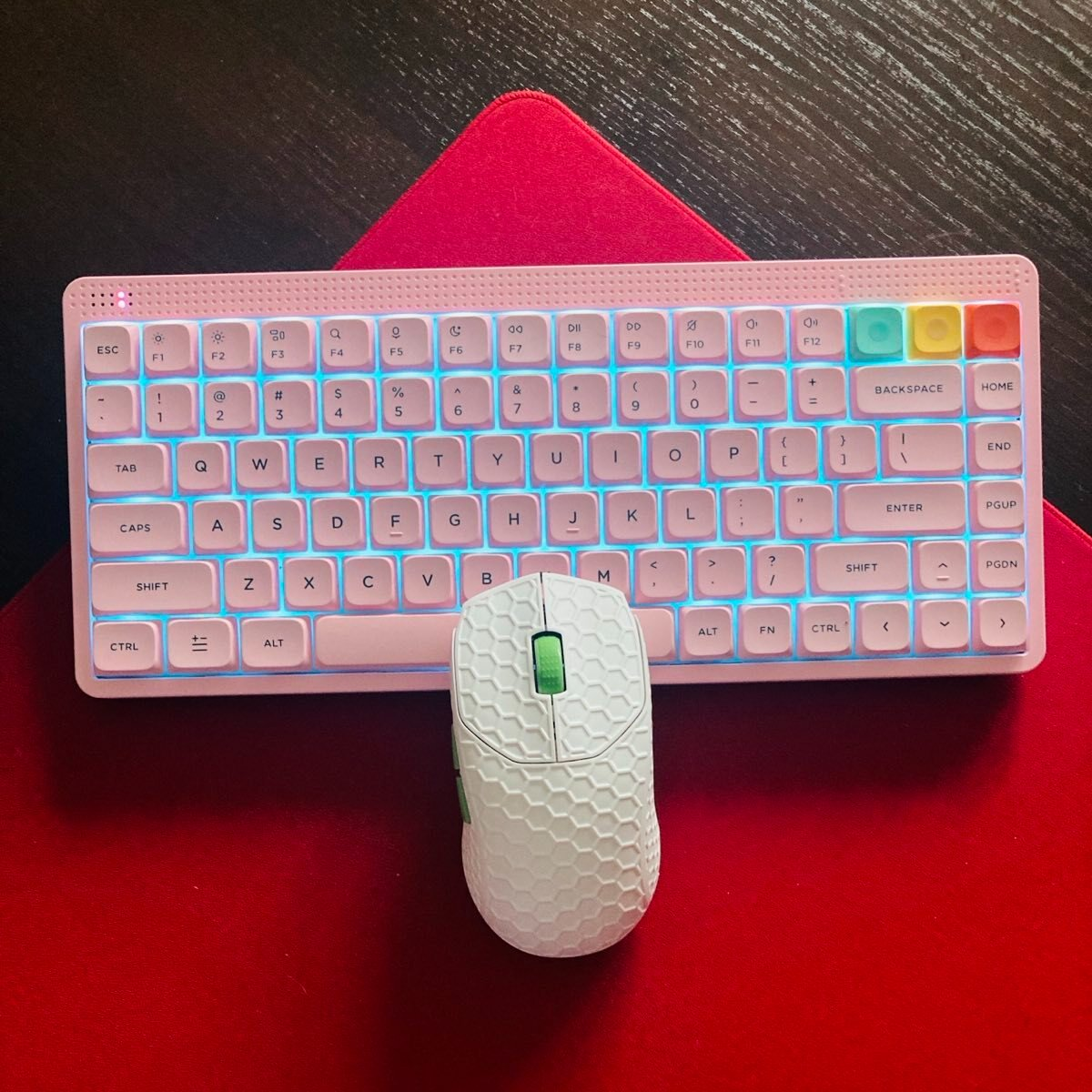
Magnetic Duel for the Masses: Monsgeek Fun68HE vs Akko TAC75HE
MonsGeek, as a sister brand to Akko, was the first to introduce TMR technology into the world of magnetic keyboards about a year ago…
Magnetic Duel for the Masses: Monsgeek Fun68HE vs Akko TAC75HE
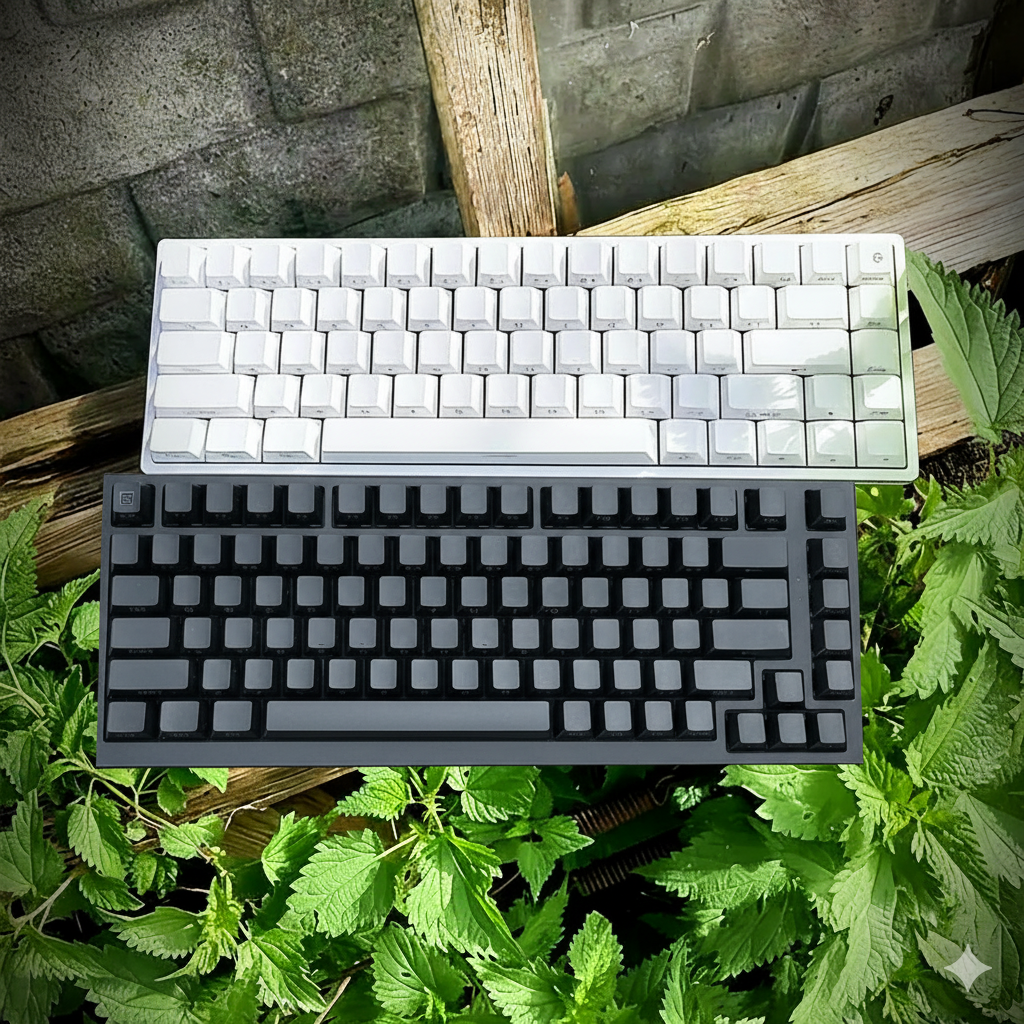
Fun68HE and TAC75HE
MonsGeek, as a sister brand to Akko, was the first to introduce TMR technology into the world of magnetic keyboards about a year ago, setting a new benchmark for responsiveness and precision. This time, however, the Fun68 HE takes a different route — no TMR support is provided here. Still, it promises that signature MonsGeek polish and speed. And it takes on a slightly bigger counterpart of Akko — TAC75HE in this duel of affordable magnetics. Let’s see what comes on top.
Fun68HE
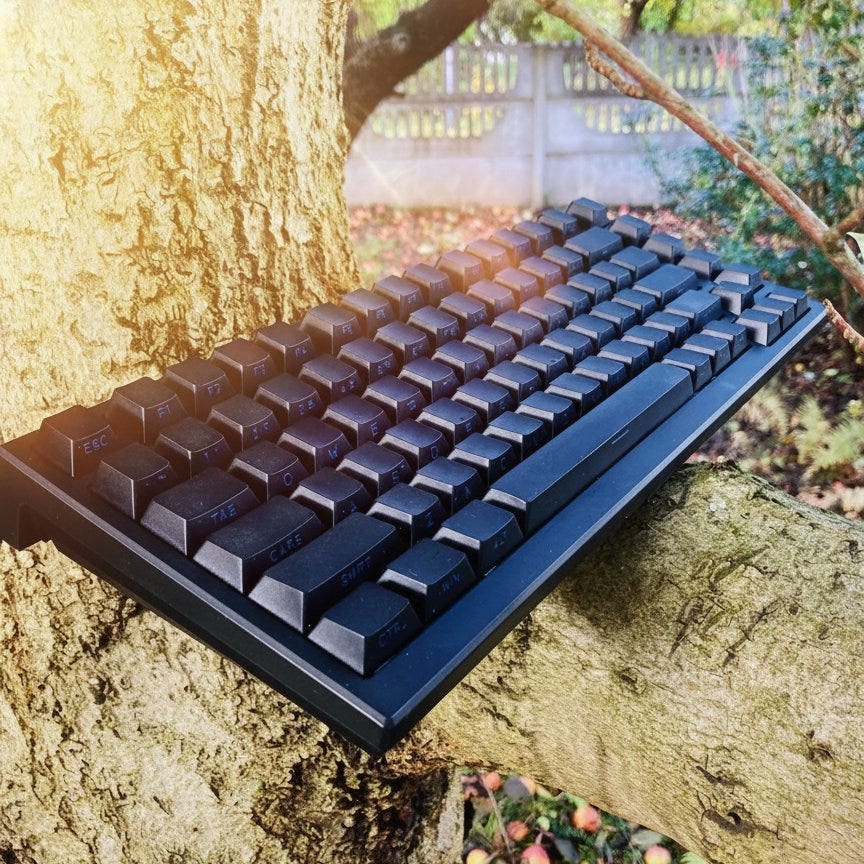
TAC75HE
Disclaimer: These units were sent out to me for review; however, the opinions are mine only.
Unboxing of FUN68HE
Sound Test of FUN68HE
Unboxing of TAC75HE
Sound Test of TAC75HE
In the Box
Fun68 HE box and Astrolink switches
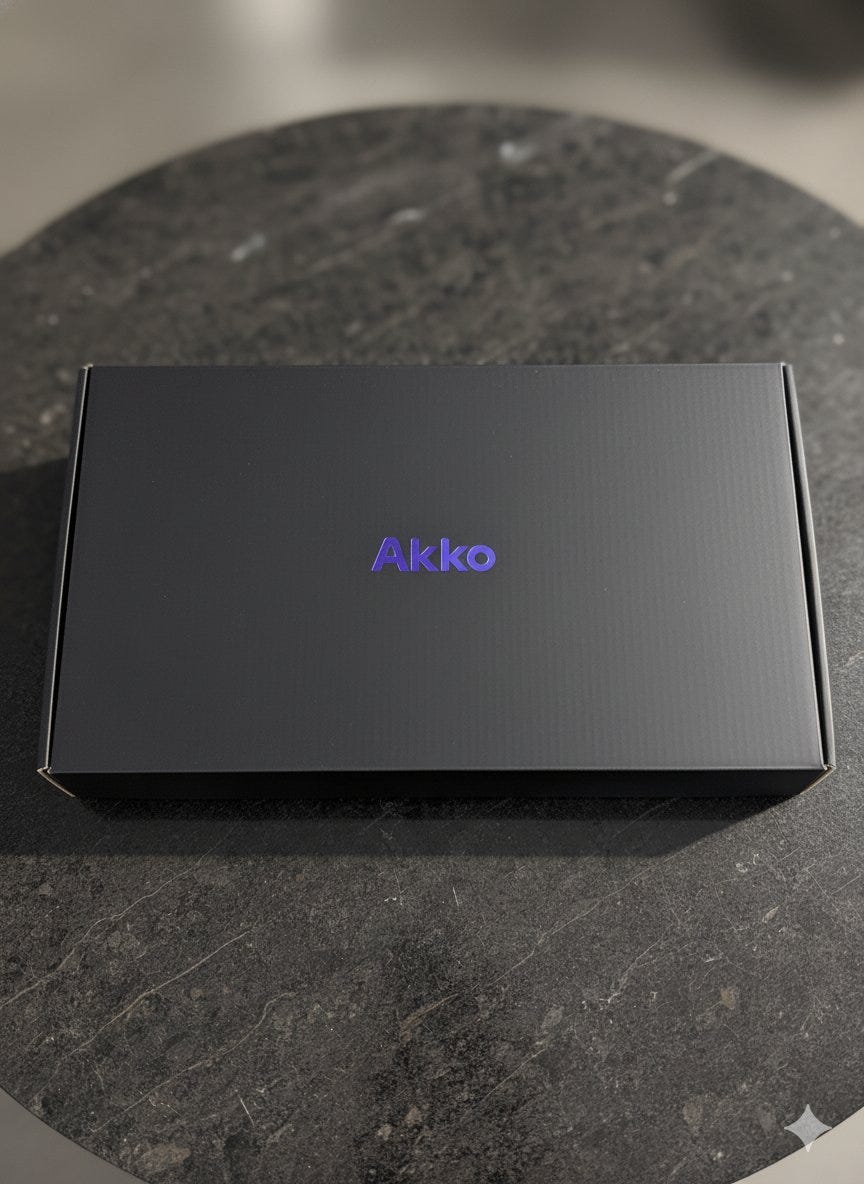
TAC75HE box
For Fun68HE:
- Fun68 HE magnetic keyboard
- manual
- USB-A to C cable (not braided)
- keycap/switch puller
- dust cover
- wireless dongle
For TAC75HE
- TAC75HBE Magnetic Keyboard
- manual
- USB-A to C cable (not braided)
- dust cover
- keycap/switch puller
Bottom line? Very simplistic and no additional goodies inside.
Specs and Features
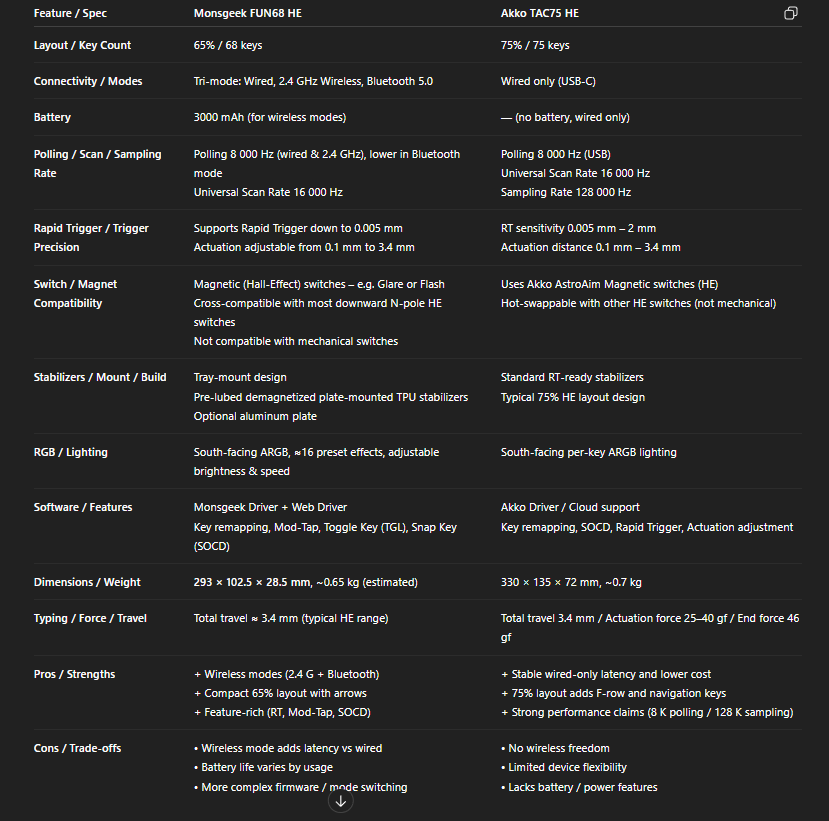
Tri-mode vs Wired is the most important thing here
🧱 Design & Build Quality
At first glance, both boards feel solid and well thought out for their price range — but they approach design from slightly different angles.
TAC75HE
The Monsgeek Fun68 HE goes for a more modern, almost minimalist vibe. Its compact 65% layout feels slick and dense, with tight tolerances and a clean profile that looks more expensive than it is. The materials feel well-finished, the case edges are smoother, and even the subtle RGB underglow somehow fits the overall aesthetic instead of screaming for attention. It’s one of those boards that you can drop on any desk setup and it just looks right — no clutter, no unnecessary branding. In hand, the Fun68 HE also gives off a more refined feel; the shell doesn’t flex, the keycaps sit neatly, and nothing rattles unless you force it. It is tray-mounted, so it doesn’t give in; it’s very stable and precise (good for gaming).
Not that big of a keyboard, FUN68HE
The Akko Tac75 HE, on the other hand, feels more traditional — a proper wired board that sticks to the basics and does it confidently. The 75% layout is familiar and slightly bulkier, with dedicated function keys and a design that leans toward practicality rather than flair. There’s a clever little touch, though: a cable routing channel underneath that lets you guide the USB-C cable either left, right, or straight out the middle. It’s simple, but genuinely useful if you care about desk cable management. I personally use it the standard way, but it’s nice that the option’s there. It is also tray-mounted, so the typing feel will not be to everyone’s taste, but it’s a gaming keyboard after all.
Chilling
Now, one strange detail on the TAC75 HE — it actually has a tri-mode switch under the case, even though there’s no wireless version. It’s probably a leftover from a shared design template, but it feels a bit out of place on a wired-only keyboard. Makes you wonder if Akko had plans for a wireless model that never happened or if someone in the design team simply forgot to remove it.
Back panel of FUN68HE
Side by side, the Fun68 HE just feels more premium overall. The finish is smoother, the build tighter, and the visual balance cleaner. The Tac75 HE isn’t bad by any means — it’s sturdy, practical, and clearly built to last — but it lacks that extra bit of polish and compact elegance that Monsgeek somehow nailed.
Notice the cable routing channel
In short, the Fun68 HE looks and feels like a refined next-gen design, while the Tac75 HE stays closer to the old-school formula. Both get the job done — but if you care about aesthetics and attention to detail, the Fun68 HE definitely takes the point here.
Bottom line? Fun68HE takes the lead here.
⚙️ Keycaps & Switches
Both keyboards come with side-printed Cherry-profile PBT keycaps, which is a good thing already — no cheap ABS stuff here. They’re textured, resistant to fading, and the side legends let the ARGB lighting glow through in this subtle, almost ambient way that looks great at night. It’s not the overdone gamer RGB effect, more of a soft under-glow that just feels right.
Still, I have to say I liked the white keycaps on the Fun68 HE a lot more. They look cleaner, sharper, and they just make the whole board feel lighter on the desk. On the Tac75 HE, the black ones started showing that slight shine after a bit of heavy use — nothing dramatic, but it’s there. One last thing about the TAC75HE keycaps is that the quality of printing leaves a bit to be desired — some keycaps don’t look clean, and the RGB shows it.
TAC75HE in the sunshine
Now, the interesting part — the switches. My Fun68 HE came fitted with Akko Flash magnetic switches, while the Tac75 HE runs Akko’s AstroAim (or Astrolink) switches. Both are Hall-effect types, meaning no metal contacts, just magnet sensors measuring key travel in real time. But they feel quite different.
The Flash switches have this crisp and snappy bottom-out — light but controlled, with just enough resistance to keep you from fat-fingering. They’re smooth all the way down, consistent, and somehow cleaner in their actuation feel. You can really tell they’re tuned with some care. Honestly, after trying a bunch of different magnetics lately, I’d still put the Flashes at the top for overall feel. There’s something about their return speed and stability that just works perfectly for both typing and gaming.
The AstroAim switches on the Tac75 HE are also smooth, maybe even lighter in initial force, and they do well for fast inputs, especially in games. But they feel a bit less refined — maybe slightly more hollow, a touch noisier on impact. Not bad by any means, just a bit more “raw” compared to the tight, snappy feel of the Flash.
Akko Flash vs Akko Astrolink
One big plus for both boards is switch compatibility. Both keebs are hot-swappable within the magnetic family, so you can experiment with all sorts of Hall-effect switches — Akko’s Windy, Glare, AstroAim, Astrolink, or from other brands like Gateron Jade, Jade Pro, Jade Gaming, TTC Uranus, and TTC King. If you’re into fine-tuning your board’s feel, this is where the fun begins.
And there’s another thing Monsgeek did right — the stabilizers on the Fun68 HE. They’re demagnetized and pre-lubed, which sounds like a marketing gimmick until you actually type on it. What it does is reduce magnetic interference between the switch sensors, keep trigger accuracy consistent, and make the overall feel smoother and tighter. Long term, it should also help the board stay stable and reliable without the usual rattles creeping in.
Overall, both boards deliver that distinct “magnetic switch” smoothness that’s addictive once you get used to it, but the Fun68 HE’s Flash switches and tuned stabilizers make the whole experience just a bit more refined. It’s faster, cleaner, and just feels better under the fingers — the kind of difference you only notice when you go back to something else and realize how good it actually was.
Bottom line? Again, Fun68HE is slightly ahead.
⚙️Software
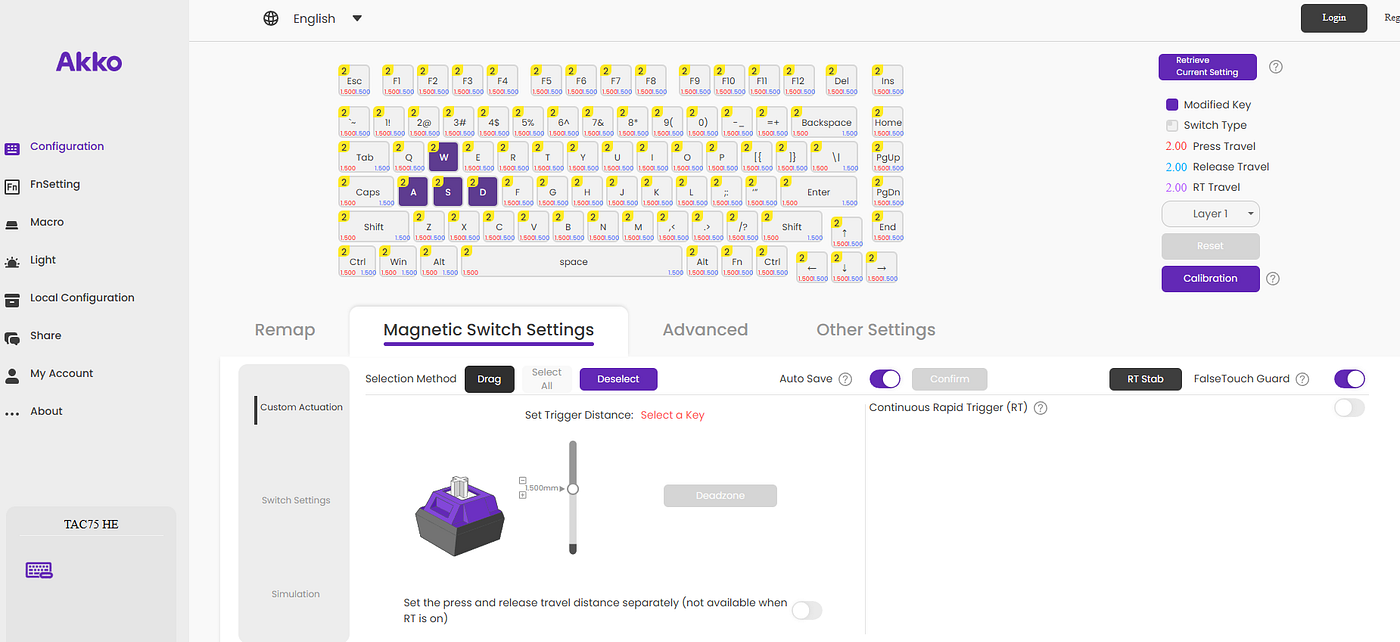
Akko’s web driver is the same as Monsgeek’s
The new MonsGeek V4 Driver, available at app.monsgeek.com, is now plugin-free — no .exe file download is required for customization which is great improvement over the previous versions. Same goes for Akko, so one of the main hurdles from the past is now gone.
So, the whole experience is pretty enjoyable and far better than a year ago — it looks like the web drivers have been polished and upgraded. The system now gives you a clear hint at what a feature actually does (when you hover over the question mark), and your transition is fluid.
It provides almost everything you need: Rapid Trigger up to 0.005mm per single press, customizable actuation, macros, key remapping/layers, RGB lighting customization, SOCD, TGL, Mod Tap, profile management, and DKS. You can also toggle the polling rate and turn on the Continuous Rapid Trigger (which, for some reason, is called TR Turbo Mode in the Monsgeek app). Also, setting up the Dead Zone (both up and bottom) is a great thing.
The Roar Mode is still there, but it’s always on — the last 8 keys pressed get a boost in latency, according to Akko/Monsgeek.
Quirks? My settings were lost once when I replugged my keyboard (TAC75HE), and to be sure, I had to restore it to the factory settings. On FUN68HE, the switches’ official data is not the same as on the official website (the total travel of switches differs). Sometimes, both drivers lagged in opening or saving the settings, but it was pretty rare.
It is also commendable that, besides the web software, the downloadable drivers also exist.
Battery life of FUN68HE should also be mentioned here (it doesn’t apply to TAC75HE as it’s a wired-only keyboard). It features a 3000mAh unit and lasts for about a few days with RGB on, so it does what it’s supposed to do, without flaws or any bells and whistles.
Bottom line? The software has been improved since the last year, too bad you still have to download a file to operate the web-version.
⚡ Latency & Gaming Performance
Both keyboards are insanely fast — way beyond what most people will ever notice in real use — but they go about it a bit differently.
White looks so clean
The Akko Tac75 HE is clearly built with gaming as its main focus. On paper, it’s a monster: single key press latency measured around 19 ms at 0.005 mm Rapid Trigger, with 8 kHz polling, 16 kHz scan rate, and a ridiculous 128 kHz sampling rate. Those numbers basically scream, “I’m made for competitive players.” It reacts instantly, stays consistent, and never skips a beat, no matter how chaotic things get.
The Monsgeek Fun68 HE, on the other hand, hits around 0.23 ms latency in wired mode, which is absurdly low too, especially considering it’s a tri-mode board with wireless options on top. It’s honestly one of the fastest “non-Wooting” magnetics I’ve used so far.
Now, the truth is: you won’t feel that difference between 0.23 ms and 19 ms in actual gameplay. Human reaction time is way slower than that, and at that point, it all comes down to switch feel, firmware optimization, and your personal comfort. What matters more is how stable and predictable the response feels — and both boards nail that part completely.
In-game, both performed beautifully. Movement felt responsive, taps were clean, no input lag or jitter whatsoever. Once you spend a bit of time in the software and set your own actuation depths and Rapid Trigger thresholds, these keyboards turn into pure extensions of your fingers. It takes a bit of tuning and a few sessions to get used to how sensitive they can be, but once you dial it in, you’re golden.
If I had to pick one, I’d say I slightly preferred the Fun68 HE — not because it’s faster (it isn’t, technically), but because it just felt smoother and more comfortable for longer sessions. Still, both are easily among the best performers in the sub-$100 Hall-Effect category, and neither will disappoint you once they’re properly tuned.
Bottom line? Technically, TAC75HE is slightly faster, but it’s not noticeable in games by any means.
🧲 Monsgeek Fun68 HE — Who Is It For?
As a part pf my setup
You should buy it if…
- You want tri-mode freedom (wired, 2.4 GHz, Bluetooth) to switch between PC, laptop, or tablet without cables.
- You like compact 65% layouts that still keep arrow keys and leave more room for mouse movement.
- You’re into FPS movement precision and want to experiment with Rapid Trigger and adjustable actuation per key.
- You like pretty and clean aesthetics that are all present in Fun68HE
- You’re looking for one of the most affordable Hall-Effect boards with strong specs and 8 kHz wired / 2.4 G performance.
- You occasionally need wireless convenience for travel, couch gaming, or office use — even if Bluetooth adds a bit of delay.
You might skip it if…
- You only play wired, latency-critical games and won’t ever use wireless.
- You prefer a bigger layout with a function row or dedicated navigation keys.
⚙️ Akko Tac75 HE — Who Is It For?
Typical 75% layout, exploded
You should buy it if…
- You prefer a simple wired-only setup that’s consistent every time you plug it in.
- You like 75% layouts — compact but still including F-keys and navigation for productivity or streaming.
- You value stability and speed: 8 kHz polling, 16 kHz scan rate, and Rapid Trigger precision down to 0.005 mm.
- You want a budget-friendly HE keyboard that still feels fast and competitive for gaming.
You might skip it if…
- You need wireless connectivity for multiple devices — the Tac75 HE is strictly wired.
- You look for better-made and looking keycaps
- You prefer a more spacious layout; the 75% form can feel dense compared to TKL or full-size.
⚔️ All in all…
- Pick the Fun68 HE if you want wireless versatility, compact size, and adjustability.
- Pick the Tac75 HE if you want wired consistency, extra keys, and the purest value-for-money ratio.
🏁Summary
This duel of budget magnetics shows how far the entry-level Hall Effect scene has evolved. The Monsgeek Fun68 HE feels like a little all-rounder — wireless, compact, adjustable, and surprisingly polished for its price. The Akko Tac75 HE, on the other hand, takes the opposite route: wired-only, heavier, but focused entirely on raw performance and consistency.
Neither is objectively better — it’s about how you play. If you live in shooters and crave minimal delay, the Tac75 HE will make more sense. If you value comfort, flexibility, and daily usability, the Fun68 HE is the smarter pick. Both prove that “budget” and “Hall Effect” no longer need to be opposites — and that’s already a win for everyone.
Chlling again
Matrix vibes
Get these keyboards from the official websites
***FUN68HE***
***TAC75HE***
Disclaimer
This review is not a paid endorsement. I want to ensure transparency and let you know that I am not receiving any compensation, monetary or otherwise, for evaluating or discussing this tech product.
메타데이터
- post_id
- 892e27a42e7c
- slug
- magnetic-duel-for-the-masses-monsgeek-fun68he-vs-akko-tac75he-892e27a42e7c
- url
- https://medium.com/@damiancooper/magnetic-duel-for-the-masses-monsgeek-fun68he-vs-akko-tac75he-892e27a42e7c
- canonical_url
- https://medium.com/@damiancooper/magnetic-duel-for-the-masses-monsgeek-fun68he-vs-akko-tac75he-892e27a42e7c
- author_url
- https://medium.com/@damiancooper
- status
- ok
- fetched_at
- 2026-07-16 07:43:41