No More _state + state: Simplifying ViewModels with Kotlin 2.3
Clean up your Android code with Explicit Backing Fields — the modern way to handle read-only state without the boilerplate.
No More _state + state: Simplifying ViewModels with Kotlin 2.3

No More _state + state: Simplifying ViewModels with Kotlin 2.3
Not a Medium Member? “Read For Free”
TL;DR: Kotlin 2.3 introduces explicit backing fields, allowing you to replace the classic _state + state boilerplate with a single, cleaner property—provided you're okay with a few experimental trade-offs.
If you’ve been developing Android apps, you know the “Backing Property Dance.” It’s that repetitive ritual where we create a private MutableStateFlow and a public StateFlow just to ensure encapsulation.
The “Old” Way (The Boilerplate)
private val _uiState = MutableStateFlow(UiState.Loading)
// Exposing a read-only view of the mutable internal state
val uiState: StateFlow<UiState> = _uiState.asStateFlow()
We’ve done this for years to prevent external classes from mutating our state. While effective, it pollutes our IDE suggestions with underscores and adds unnecessary ceremony to every single ViewModel.
The “New” Way: Explicit Backing Fields
In Kotlin 2.3, you can now define a field block inside a single property. This allows you to define a specific internal storage type while exposing only a read-only API to the outside world.
class UserProfileViewModel : ViewModel() {

    // One property name, two distinct types
    val uiState: StateFlow<ProfileState>
        field = MutableStateFlow(ProfileState.Loading)

    fun updateUsername(newName: String) {
        // Inside the class, 'field' gives us direct mutable access
        uiState.value = ProfileState.Success(username = newName)
    }
}
⚡ Quick Guide: Should You Switch?
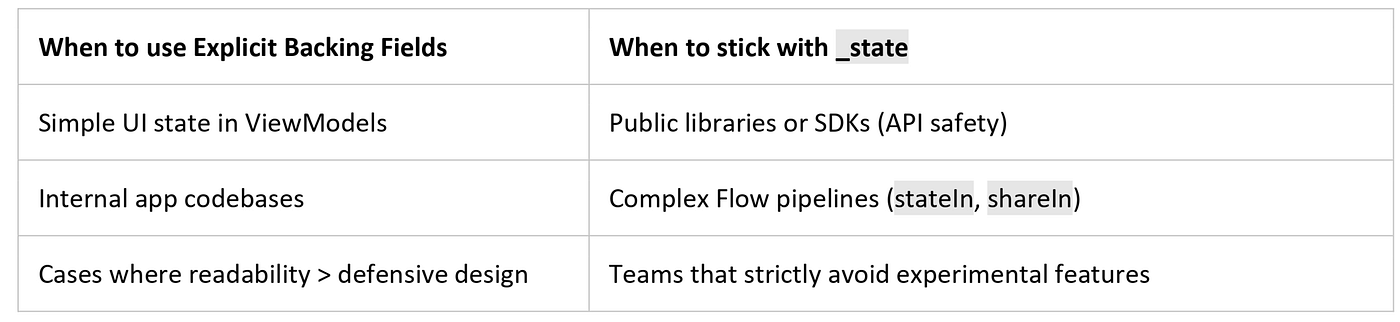
Quick Guide: Should You Switch?
⚠️ The Engineering Reality
Before you go on a mission to delete every underscore in your codebase, there are a few critical caveats to consider:
- Read-Only vs. Immutable: Types like
StateFloworListare read-only views, not necessarily immutable. The underlying data can still change via the backing field; the public API just doesn't provide the tools to do so. - Simple Initialization Only: Explicit backing fields work best with straightforward assignments. If your state requires chained operators (like
.stateIn()) or conditional logic based on constructor parameters, the traditional two-property approach is still more flexible. - Strictly Experimental: This feature is hidden behind the
-Xexplicit-backing-fieldscompiler flag. Syntax and IDE support (autocomplete/refactoring) may feel a bit unstable in current versions of Android Studio. - The Runtime Safety Gap: The
_state.asStateFlow()pattern creates a wrapper that prevents casting back toMutableStateFlowat runtime. Explicit backing fields don't inherently provide this "cast-proofing."
A Win for Readability
This change is a massive win for Kotlin’s ergonomics. It moves us toward intent-first code. We are telling the compiler exactly what we want — a public read-only interface with private mutable storage — without the “hacky” feel of dual variables.
🙋♂️ Frequently Asked Questions (FAQs)
Does this work with LiveData too?
Yes! You can define a val data: LiveData<T> with a field = MutableLiveData<T>().
Will this break my Unit Tests?
No. Your tests will interact with the public property as usual. However, you’ll no longer need “internal” workarounds to access mutable state if your test is in the same scope.
How do I try this right now?
Add this to your build.gradle.kts:
kotlinOptions {
    freeCompilerArgs += "-Xexplicit-backing-fields"
}
💬 Join the Discussion!
- The “Underscore” Loyalty: Do you prefer seeing
_statebecause it makes mutability obvious at a glance? - Experimental Comfort: Do you enable experimental flags in production, or wait for the “Stable” stamp?
- The Next Boilerplate: What other common Kotlin pattern do you wish would get a built-in fix?
Documentation & Deep Dives:
📱 Go Beyond Using Jetpack Compose
If you’re building on Android, understanding what happens under the hood separates developers who use Compose from those who master it. I highly recommend “Mastering Jetpack Compose Internals”. It’s a deep, architecture-first walkthrough of the composition tree, the slot table, snapshot state, and the runtime that powers modern Android UI — capped off with a full case study building a real app called Mosaic.
- E-book: Available on Google Play
- Kindle Edition: Available on Amazon
- Also available in Paperback & Hardcover
메타데이터
- post_id
- 898d06f5ae91
- slug
- no-more-state-state-simplifying-viewmodels-with-kotlin-2-3-898d06f5ae91
- url
- https://medium.com/@sivavishnu0705/no-more-state-state-simplifying-viewmodels-with-kotlin-2-3-898d06f5ae91
- canonical_url
- https://medium.com/@sivavishnu0705/no-more-state-state-simplifying-viewmodels-with-kotlin-2-3-898d06f5ae91
- author_url
- https://medium.com/@sivavishnu0705
- status
- ok
- fetched_at
- 2026-08-01 20:51:11







