11.4 Giga Lips with a Budget Laptop
At the end of 2025 we acquired a couple of AI Laptops , that were still cheap, since RAM prices had not yet rocketed. The intend was to tap…
11.4 Giga Lips with a Budget Laptop
At the end of 2025 we acquired a couple of AI Laptops , that were still cheap, since RAM prices had not yet rocketed. The intend was to tap into the Copilot+ certified hardware, and shave off some of the TOPS to do Prolog inferencing. Amazingly our π-WAM can churn 11.4 GIGA LIPS.
WebGPU Sand Box
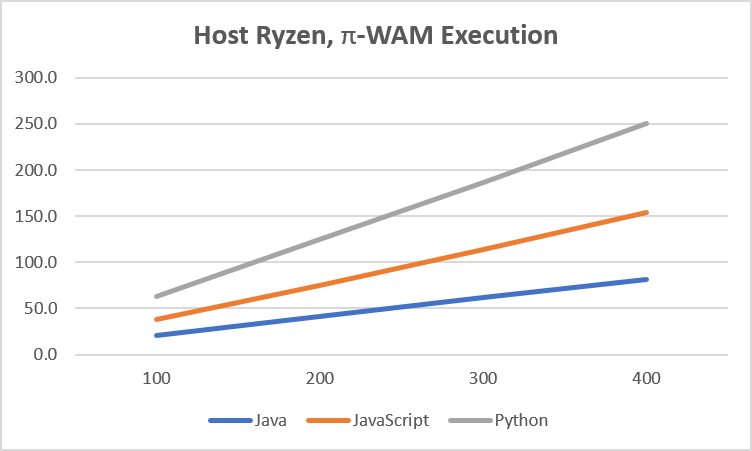
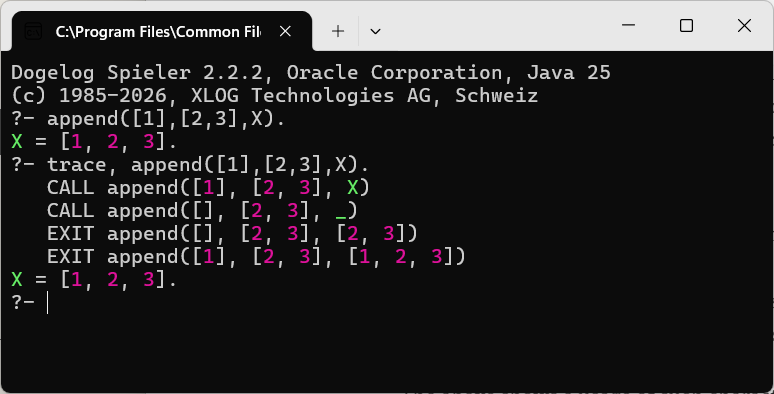
The new library(edge/brainfog) permits the execution of certain Prolog goals in a π-WAM backend. The concept of a π-WAM embraces a fusion of a processs (π) calculus a Warren Abstract Machine (WAM). The recent release of Dogelog Player includes a Prolog emulator and a CPU backend.
Concerning the Copilot+ certified hardware, it slowly emerged to us that the main powerhouse is not the NPU, which has a rather narrow application domain, but unexpectedly the GPU. Especially since GPUs have evolved form lock-step to independent thread scheduling.
To perform our GPU experiment we did a little HTML page, that uses WebGPU, the W3C successor to WebGL. We began slowly, derived a live edit page from the WebGPU tour GitHub repository. So our first take was verifying that a GPU supports a while statement:

The control constructs such as while and if-then-else can now be used in ordinary shaders and so called compute shaders, is a result of independent thread scheduling. If each logical thread in a GPU has an individual program counter, the threads can do whatever control constructs.
WebGPU Input Field
A further agreable thing is the WGSL language, that can be used to program compute shaders. It has a Rust inspired syntax and offers local block variables, as well as formal parameters and return values to functions. Functions have to be declared before use and there is no recursion.
The communication between the CPU host and the GPU device happens through buffers. The GPU device can be instructed to copy these buffers, either from CPU to GPU or from GPU to CPU. So adding for example an input field involved a new HTML field:
<input type="text" id="param" size="10" value="5"/>And then on the compute shader side:
@group(0) @binding(1) var<uniform> param : i32;And then on the JavaScript side:
let arg = parseInt(document.getElementById("param").value);
const uniformBuffer = device.createBuffer({
      size: 4,
      usage: GPUBufferUsage.UNIFORM | GPUBufferUsage.COPY_DST,
});
const uniformData = new Int32Array([arg]);
device.queue.writeBuffer(
     uniformBuffer,
     0,
     uniformData.buffer,
     uniformData.byteOffset,
     uniformData.byteLength
);
The above is a simplification, since using a WebGPU will also require to create bindings, a pipeline and further commands to get things going. Still it shows the core abstraction of JavaScript buffer definitions, and command queuing on the GPU device. We can now do:

WebGPU Boot Shader
To run Prolog code on the WebGPU. We ported the corresponding Hack virtual machine variant, that is the low level backend of our π-WAM. We kept the live editing textarea, but under the hood the compute shader is prepended by a bootstrap shader, that contains Hack in WGSL.
Porting Hack to WGSL was straight forward. In the single shader version the main loop of the Hack virtual machine variant, is again a while loop. This time not written in JavaScript, Python or Java. But in the WGSL language, as follows, tapping into independent thread scheduling:
fn run() {
    var pc : i32 = 0;
    var accu : i32 = 0;
    while (pc < i32(arrayLength(&code))) {
        var instr : i32 = code[pc];
        pc += 1;
        var value : i32 = run_get(instr);
        accu = run_fun(instr, accu, value);
        run_set(instr, accu);
        pc += run_jump(instr, accu);
    }
}
We then run a simple benchmark, which has this Dogelog Baseline:

On a single compute shader it takes a little longer:

WebGPU Multiple Shaders
The GPU starts shining when we use multiple compute shaders. Since the ration between 110.692 ms and 543 ms is roughly 1:5, we can extrapolate the produced Lips for a single compute shader to 27924 k / 5 ≈ 5584 k. We now went to a larger number of compute shader:
let NUM_SHADERS = 4096;
let GROUP_SIZE = 32;
The chosen number of compute shader need not match the hardware of the GPU. The GPU will do some scheduling on its own and intelligently use the given hardware. To account for multiple Hack virtual machines running in parallel, we simply flat memory multiplied the state:

The signature for of run() has now an additional offset parameter into the state memory. And when returning the result of the 2nd variable, we use this offset as well. The offset is computed from id, which in turn is taken from the global_id.x parameter to main(). The time effort doubled:

If we do the Lips calculation again, we get 5584 k / 2 * 4096 ≈ 11436032 k. Thats a wooping 11.4 Giga Lips! The result is from an AI Laptop AMD Ryzen AI 7 350 w/ Radeon 860M. We could not reproduce the same result on other AI Laptops so far, there are currently issues with a GPU watchdog.
Conclusions
GPUs have evolved form lock-step to independent thread scheduling. This made it possible to port the Hack VM variant, that forms the basis for our π-WAM, to WebGPU computer shaders. Using NUM_SHADERS = 4096 we could produce 11.4 Giga Lips on a Ryzen AI 7 350 w/ Radeon 860M.
See also:
GitHub Repository — 11.4 Giga Lips https://github.com/Jean-Luc-Picard-2021/gigabudget
메타데이터
- post_id
- 899b0d5c027b
- slug
- dogelog-player-11-4-giga-lips-with-a-budget-laptop-899b0d5c027b
- url
- https://medium.com/@janburse_2989/dogelog-player-11-4-giga-lips-with-a-budget-laptop-899b0d5c027b
- canonical_url
- https://medium.com/@janburse_2989/dogelog-player-11-4-giga-lips-with-a-budget-laptop-899b0d5c027b
- author_url
- https://medium.com/@janburse_2989
- status
- ok
- fetched_at
- 2026-07-13 06:23:13