IPv4 vs. IPv6 in the AI Era: Why Internet Foundations Still Matter
As AI systems become more capable, the fundamentals become more important — not less. This first article in our foundation series starts…
IPv4 vs. IPv6 in the AI Era: Why Internet Foundations Still Matter
As AI systems become more capable, the fundamentals become more important — not less. This first article in our foundation series starts with the internet’s address system: IPv4 and IPv6.

“The craftsman who wants to do good work must first sharpen his tools.” — Confucius
Every wave of technology creates a temptation: skip the basics and jump straight to the new thing.
In the AI era, that temptation is everywhere.
Agents. LLMs. GPUs. Vector databases. Model Context Protocol. Browser automation. Multimodal workflows. AI-native commerce. Autonomous testing. Everyone wants to build at the edge of what is newly possible.
But the edge still runs on foundations.
A model still needs a server. A server still needs a network. A network still needs addresses. And every request — whether it comes from a human clicking a button or an agent calling a tool — still has to move from one place to another.
That is why we are starting this foundation series with something old, practical, and still deeply relevant: IPv4 and IPv6.
The thesis is simple:
The more mature AI becomes, the more important the underlying internet foundations become.
AI may change how software is designed, tested, deployed, and operated. It does not remove the need to understand the infrastructure underneath it.
A quick scene from modern infrastructure
A developer starts a local AI service.
The logs look clean.
Server running on port 3000The browser works on one machine:
http://localhost:3000But another machine on the same network cannot connect. The container works locally, fails in staging, and behaves differently behind the load balancer. DNS looks correct, but one client prefers IPv6 while another falls back to IPv4. A firewall rule exists for one address family but not the other.
Nothing about the model changed.
The problem is lower in the stack.
This is where foundations matter.
The mental model: every device needs an address
Every device connected to the internet needs a way to send and receive data.
Your laptop has an address. Your phone has an address. So do cloud servers, routers, smart TVs, security cameras, Kubernetes nodes, containers, IoT sensors, and the infrastructure that hosts AI workloads.
That address is called an IP address.
An IP address answers a simple question:
Where should this packet go?
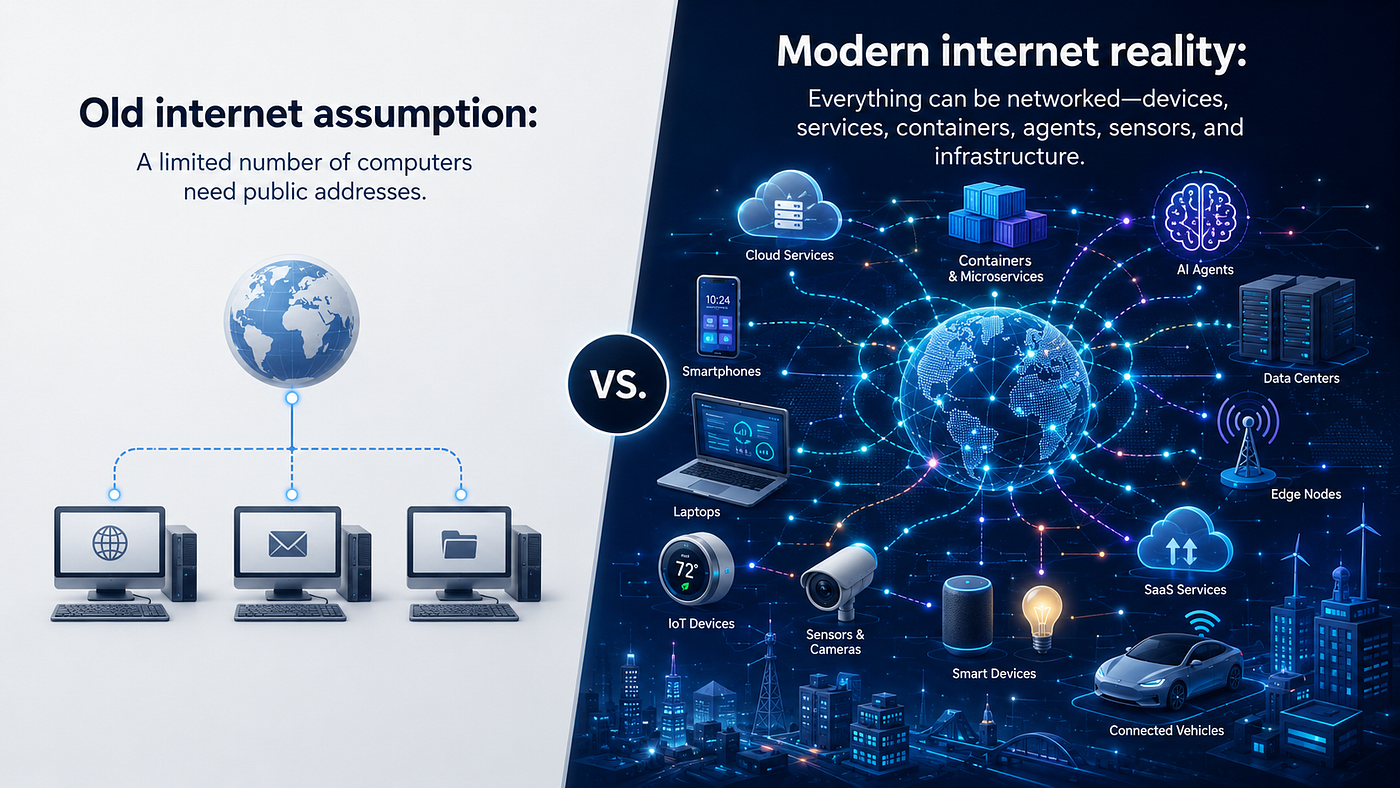
For decades, the internet mostly ran on IPv4. It worked well when the internet was smaller. But the world changed. We now have billions of people, devices, cloud systems, mobile networks, smart appliances, and edge environments online.
IPv4 was not designed for that scale.
That is why IPv6 exists.
IPv6 is not just “the newer IP.” It is the internet’s long-term answer to address exhaustion, large-scale device growth, cleaner network design, and future scalability.
What is IPv4?
IPv4, or Internet Protocol version 4, is the older and still widely used IP addressing system.
It uses a 32-bit address, usually written in dotted decimal format.
Example:
192.168.1.10An IPv4 address has four numbers separated by dots. Each number ranges from 0 to 255.
More examples:
8.8.8.8
142.250.72.14
10.0.0.5
192.168.0.1
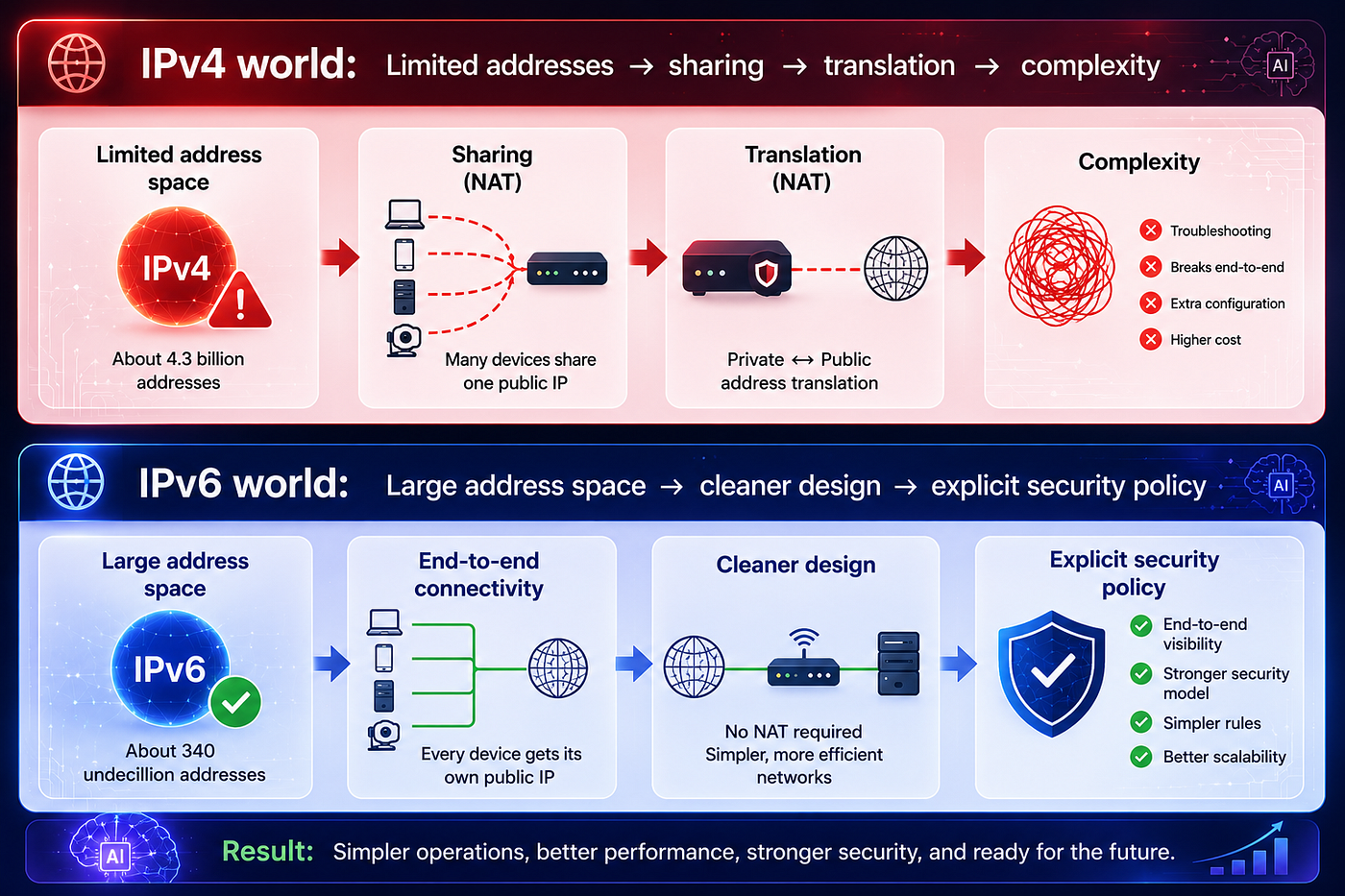
Because IPv4 uses 32 bits, it provides about 4.3 billion possible addresses.
That once sounded huge.
Then the internet became the operating layer for phones, cloud computing, streaming, mobile apps, enterprise SaaS, IoT, and now AI infrastructure.
The address space became too small.
That limitation is the root cause of IPv4 exhaustion.
What is IPv6?
IPv6, or Internet Protocol version 6, is the newer IP addressing system.
It uses a 128-bit address, written in hexadecimal format and separated by colons.
Example:
2001:4860:4860::8888IPv6 addresses look longer, but they provide an enormous address space: ²¹²⁸ possible addresses.
That is roughly 340 undecillion addresses — far beyond IPv4’s 4.3 billion limit.
Example IPv6 addresses:
2001:db8::1
2607:f8b0:4005:805::200e
fe80::1
::1
The double colon :: is shorthand. It compresses consecutive groups of zeros.
For example:
2001:0db8:0000:0000:0000:0000:0000:0001can be written as:
2001:db8::1The address looks different, but the purpose is the same: identify where traffic should go.
IPv4 vs. IPv6: the simple comparison
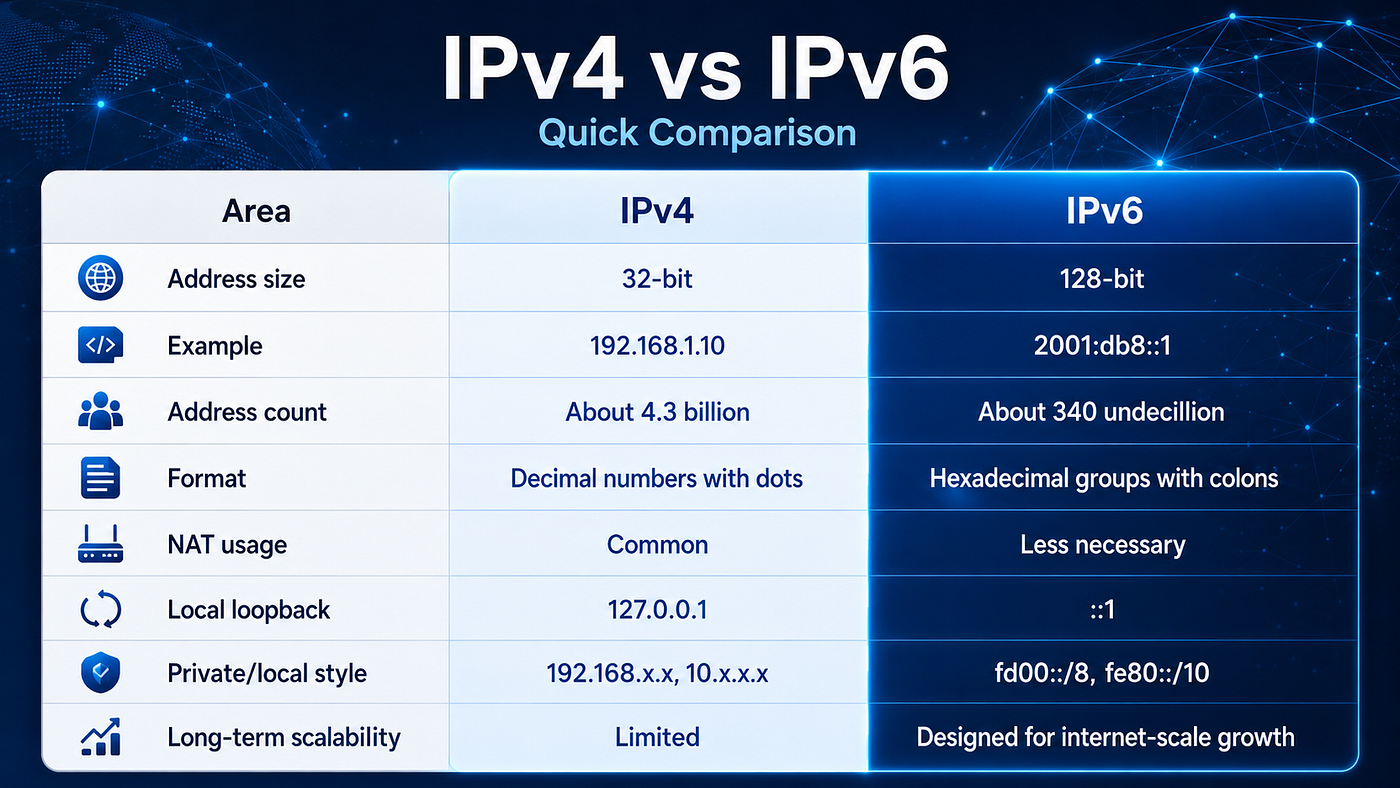
The most important difference is not cosmetic.
It is architectural.
IPv4 forced the internet to stretch a limited address system. IPv6 gives the internet room to grow more naturally.
Why IPv6 became necessary
1. IPv4 addresses ran out
IPv4 has about 4.3 billion possible addresses.
That was not enough once the internet expanded to phones, tablets, cloud servers, smart homes, streaming devices, IoT systems, mobile networks, and global business platforms.
In practical terms, new organizations can no longer assume they can easily get fresh IPv4 blocks. Many companies now buy, lease, reuse, or translate IPv4 addresses.
That creates cost and complexity.
IPv6 solves the address problem by giving the internet a much larger address space.
2. NAT became a workaround, not a clean design
Because IPv4 addresses were limited, networks widely adopted NAT, or Network Address Translation.
That is why home devices often use private IPv4 addresses like:
192.168.1.20
192.168.1.21
192.168.1.22
Your router then shares one public IPv4 address for all of them.
Laptop:      192.168.1.20
Phone:       192.168.1.21
Smart TV:    192.168.1.22
Router:      Public IPv4 address
Internet:    Sees the router, not each device directly
This works. It helped the internet scale for a long time.
But it also adds complexity.
NAT changes the original end-to-end model of the internet. It affects peer-to-peer connections, diagnostics, logs, port forwarding, service exposure, and some application designs.
IPv6 reduces the need for NAT because there are enough addresses for devices and services to have globally routable addresses when appropriate.
That does not mean every device should be exposed directly to the internet.
Firewalls still matter.
IPv6 gives cleaner addressing. Security policy still decides what is reachable.
3. The modern internet has too many devices
The internet is no longer just desktop computers and servers.
Now we have:
- phones
- laptops
- smart watches
- cars
- security cameras
- thermostats
- cloud containers
- Kubernetes nodes
- edge devices
- game consoles
- AI servers
- smart appliances
- industrial sensors
IPv4 was created for a much smaller world.
IPv6 was designed for a world where almost everything can be networked.
4. Cloud, mobile, and AI infrastructure need scale
Large cloud providers, telecom companies, and mobile carriers need massive address capacity.
A cloud provider may need addresses for:
- virtual machines
- containers
- load balancers
- databases
- private networks
- public services
- Kubernetes clusters
- regional deployments
- customer environments
- internal AI services
- model gateways and inference endpoints
AI makes this even more visible.
As organizations build AI platforms, they often add more internal services: orchestration layers, retrieval services, vector stores, model routers, browser automation servers, evaluation pipelines, observability systems, and agent tool servers.
Each service needs networking.
Each network needs addressing.
The bigger the system becomes, the more painful weak address planning becomes.
The AI-era reason this matters
It is tempting to think IPv4 and IPv6 are “networking topics,” separate from AI.
They are not.
AI systems are distributed systems.
A serious AI application may include:
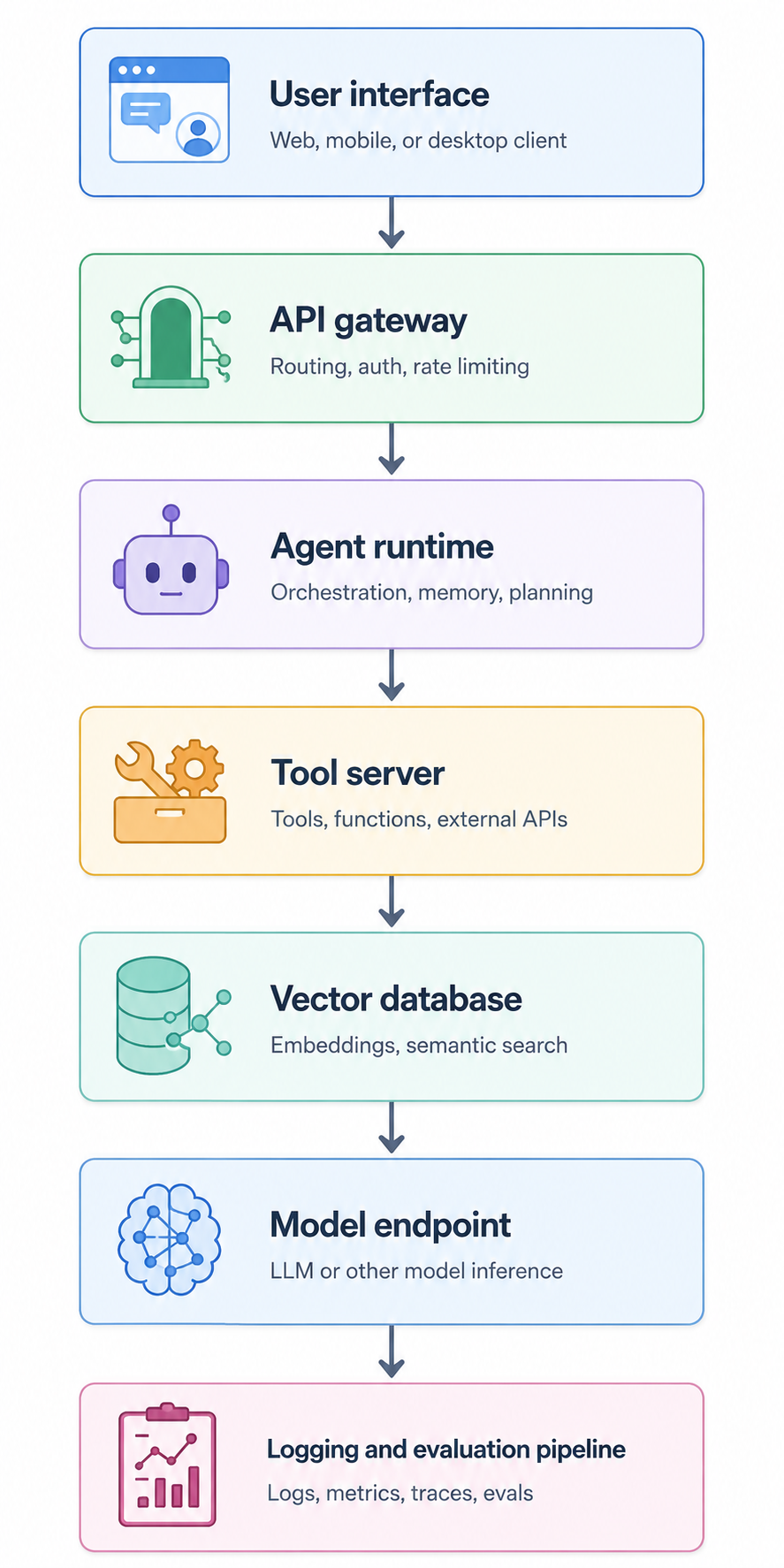
Each piece communicates over the network.
When the system is small, networking feels invisible. When the system grows, networking becomes one of the first places complexity appears.
Common symptoms include:
- a service works on localhost but fails in a container
- IPv4 works but IPv6 fails silently
- DNS has an
Arecord but noAAAArecord - firewall rules cover IPv4 but forget IPv6
- a load balancer supports dual stack but the backend does not
- logs show different client addresses than expected
- allowlists fail because traffic arrives over a different address family
- local development uses
127.0.0.1, while production resolves to IPv6
These are not “old internet” problems.
They are daily engineering problems inside modern AI systems.
Common IPv4 examples
Home network
Most home routers use IPv4 addresses like:
Router: 192.168.1.1
Laptop: 192.168.1.10
Phone: 192.168.1.11
Printer: 192.168.1.50
These are private IPv4 addresses. They work inside your home network but are not directly reachable from the public internet.
Localhost
For IPv4, localhost is:
127.0.0.1Developers often use it like this:
curl http://127.0.0.1:3000or run a development server:
npm run devThen open:
http://localhost:3000Private server in a LAN
Suppose you run a local development server:
Server IP: 192.168.1.100
Port: 8000
Another machine on the same network can access it with:
http://192.168.1.100:8000This is common for local AI servers, development APIs, dashboards, and internal tools.
Common IPv6 examples
IPv6 localhost
The IPv6 version of localhost is:
::1Example:
curl http://[::1]:3000Notice the brackets.
When using IPv6 addresses in URLs, wrap the address in square brackets.
Correct:
http://[::1]:3000Incorrect:
http://::1:3000The brackets separate the IPv6 address from the port number.
IPv6 documentation address
For examples and documentation, IPv6 often uses:
2001:db8::/32Example:
2001:db8::1
2001:db8:abcd::10
This range is reserved for documentation, so it is safe to use in articles, tutorials, and diagrams.
Link-local IPv6 address
Many devices automatically have link-local IPv6 addresses starting with:
fe80::Example:
fe80::a1b2:c3d4:e5f6:1234A link-local address works only on the local network segment. It is useful for local discovery and network-level communication.
Global IPv6 address
A real public IPv6 address may look like:
2607:f8b0:4005:805::200eThis type of address can be routed across the internet, depending on firewall and routing configuration.
Developer examples: binding servers correctly
1. Binding a local server to IPv4 only
app.listen(3000, "127.0.0.1", () => {
  console.log("Server running on IPv4 localhost");
});
This listens only on IPv4 localhost.
You can access it with:
http://127.0.0.1:30002. Binding a local server to IPv6 localhost
app.listen(3000, "::1", () => {
  console.log("Server running on IPv6 localhost");
});
Access it with:
http://[::1]:30003. Binding to all interfaces
In many server environments, you may bind to all interfaces.
For IPv4:
app.listen(3000, "0.0.0.0", () => {
  console.log("Server listening on all IPv4 interfaces");
});
For IPv6:
app.listen(3000, "::", () => {
  console.log("Server listening on all IPv6 interfaces");
});
Be careful with this.
Binding to all interfaces can expose the service beyond your local machine. Use firewall rules, network policy, authentication, and access control.
4. Testing DNS records
IPv4 uses an A record:
dig example.com AIPv6 uses an AAAA record:
dig example.com AAAAA domain can support both IPv4 and IPv6:
example.com A     -> IPv4 address
example.com AAAA  -> IPv6 address
This is called dual stack.
What is dual stack?
Most real-world migrations do not switch from IPv4 to IPv6 overnight.
Instead, networks often run both:
IPv4 + IPv6 = Dual StackA dual-stack server can have both:
IPv4: 203.0.113.10
IPv6: 2001:db8::10
A client chooses the best available path.
This is how many websites, cloud providers, and ISPs gradually support IPv6 without breaking IPv4 users.
The practical takeaway is simple:
IPv6 adoption is not usually a single migration day. It is a long transition where both protocols coexist.
Does IPv6 replace IPv4 completely?
Eventually, IPv6 is the long-term direction.
But IPv4 is still heavily used.
The reality looks more like this:
Now:        IPv4 + IPv6 together
Long term:  More IPv6-native networks
Legacy:     IPv4 remains for older systems
IPv4 and IPv6 are not directly interchangeable packet formats. That is why transition mechanisms such as dual stack, NAT64, DNS64, proxies, and gateways exist.
For example, NAT64 can help IPv6-only clients communicate with IPv4-only servers by translating between the two protocols.
This is another reason foundations matter: modern systems are often hybrid, and hybrid systems require clear mental models.
Is IPv6 more secure?
IPv6 is not automatically secure.
It gives us a cleaner and larger addressing model, but security still depends on:
- firewall rules
- router configuration
- access control
- DNS security
- application security
- monitoring
- logging
- patch management
One common mistake is assuming NAT equals security.
NAT may hide internal addresses, but real security comes from explicit firewall policy.
With IPv6, teams need to monitor and secure IPv6 traffic, not just IPv4 traffic. As IPv6 adoption grows, IPv6 visibility becomes part of normal network operations.
Addressing is not security.
Reachability is not permission.
Connectivity is not trust.
Practical example: home network
IPv4 home network
Router public IPv4: 73.x.x.x

Inside home:
Laptop: 192.168.1.10
Phone: 192.168.1.11
TV: 192.168.1.12
Printer: 192.168.1.20
The router uses NAT to let all devices share one public IPv4 address.
IPv6 home network
Router IPv6 prefix: 2601:abcd:1234:5678::/64

Inside home:
Laptop: 2601:abcd:1234:5678::10
Phone: 2601:abcd:1234:5678::11
TV: 2601:abcd:1234:5678::12
Printer: 2601:abcd:1234:5678::20
Each device can have its own IPv6 address.
The firewall still decides what is reachable from outside.
Practical example: cloud application
Imagine a cloud application:
Frontend
API service
Database
Redis
Queue
Monitoring service
Internal admin tool
With IPv4-only networking, address planning can become tight, especially across multiple environments:
dev
staging
production
regional clusters
customer-specific networks
Kubernetes pods
With IPv6, the organization has much more room to design clean network ranges.
Example:
Production VPC: 2001:db8:1000::/48
Staging VPC:    2001:db8:2000::/48
Dev VPC:        2001:db8:3000::/48
Then each environment can be subdivided cleanly:
Frontend subnet: 2001:db8:1000:1::/64
API subnet:      2001:db8:1000:2::/64
Database subnet: 2001:db8:1000:3::/64
This is much easier to scale than constantly fighting for small IPv4 ranges.
When should you care about IPv6?
You should care about IPv6 if you are:
- building cloud infrastructure
- running Kubernetes
- managing home or office networks
- working with IoT devices
- operating APIs
- configuring DNS
- running VPNs
- building edge systems
- managing security monitoring
- working with mobile networks
- deploying AI services across distributed environments
For a normal home user, IPv6 may just work automatically through the ISP and router.
For developers and infrastructure teams, IPv6 matters more directly because it affects:
- DNS records
- firewall rules
- server binding
- load balancers
- observability
- access logs
- IP allowlists
- VPN routing
- network troubleshooting
Common commands
Check IPv4 address:
curl -4 ifconfig.meCheck IPv6 address:
curl -6 ifconfig.mePing IPv4:
ping 8.8.8.8Ping IPv6:
ping6 2001:4860:4860::8888or on some systems:
ping -6 2001:4860:4860::8888Check DNS A record:
dig google.com ACheck DNS AAAA record:
dig google.com AAAATest local IPv4 server:
curl http://127.0.0.1:3000Test local IPv6 server:
curl http://[::1]:3000A simple mental model
IPv4 is like an old city with limited street addresses.
To handle growth, many buildings started sharing addresses, using front desks, mailrooms, and internal room numbers.
That is NAT.
IPv6 is like redesigning the address system so every building, room, device, and service can have a unique address.
But having an address does not mean everyone can walk in.
You still need locks, gates, policies, and monitoring.
That is the role of firewalls and security controls.
Key takeaways
IPv4 built the internet we know. IPv6 gives the internet room to keep growing.
- IPv4 uses 32-bit addresses and provides about 4.3 billion possible addresses.
- IPv6 uses 128-bit addresses and provides a vastly larger address space.
- NAT helped IPv4 scale, but it also introduced complexity.
- IPv6 reduces the need for NAT, but it does not remove the need for firewalls and security controls.
- Dual stack is the practical transition path for many real-world systems.
- AI systems still depend on networking fundamentals: DNS, routing, firewall rules, server binding, observability, and address planning.
Final takeaway
AI changes what software can do.
It does not erase the layers that software depends on.
IPv4 built the internet we know. IPv6 is needed for the internet we are still building: a world filled with phones, cloud systems, AI infrastructure, smart devices, containers, sensors, agents, and global connectivity.
The transition will remain gradual. IPv4 will not disappear quickly. But the direction is clear: the future internet becomes increasingly IPv6-first, while IPv4 becomes the compatibility layer for older systems.
In the AI era, maturity does not mean skipping foundations.
It means returning to them with sharper tools.
Before You Go
AI only gets real when you stop talking about it and start building with it. Used well, it unlocks what wasn’t possible before — and as it evolves, it keeps opening new paths and redefining how we do the old ones. That’s what I share here — what works, what breaks, and what’s worth understanding more deeply. **Follow along and subscribe** if you want to stay close to the edge.
메타데이터
- post_id
- 8a068fca779d
- slug
- ipv4-vs-ipv6-in-the-ai-era-why-internet-foundations-still-matter-8a068fca779d
- url
- https://medium.com/@dorangao/ipv4-vs-ipv6-in-the-ai-era-why-internet-foundations-still-matter-8a068fca779d
- canonical_url
- https://medium.com/@dorangao/ipv4-vs-ipv6-in-the-ai-era-why-internet-foundations-still-matter-8a068fca779d
- author_url
- https://medium.com/@dorangao
- status
- ok
- fetched_at
- 2026-06-17 12:58:54