Getting Started with GitOps and ArgoCD — 2 (ArgoCd Application Management)
Argo CD manages the lifecycle of Kubernetes applications. To achieve this, it uses a structure called an Application. An Argo CD…
Getting Started with GitOps and ArgoCD — 2 (ArgoCd Application Management)
Argo
Argo CD manages the lifecycle of Kubernetes applications. To achieve this, it uses a structure called an Application. An Argo CD Application is a special resource that represents a logical grouping of related Kubernetes resources (for example, a collection of YAML or JSON files). It is also the smallest unit of work in Argo CD, where Argo CD interacts with Kubernetes to deploy and manage Kubernetes objects.
In this section, we will cover the basic structure of an Argo CD Application, its different components (including an overview of the types of sources that Applications can connect to), and how to use Kubernetes templating tools that are natively supported by Argo CD. At the end of the section, we will examine the lifecycle of an Argo CD Application.
Application Overview
As mentioned earlier, an Argo CD Application is the atomic unit of work in Argo CD. It defines the desired state of a set of resources within a Kubernetes cluster; more specifically, it specifies which objects should be applied to a running Kubernetes cluster.
apiVersion: argoproject.io/v1alpha1
kind: Application
metadata:
  name: guestbook
  namespace: argo-cd
spec:
  project: default
  source:
    repoURL: https://github.com/argoproj/argocd-example-apps.git
    targetRevision: main
    path: guestbook
  destination:
    server: https://kubernetes.default.svc
    namespace: guestbook
For now, there are two main sections you should focus on: .spec.source and .spec.destination:
.spec.source
This defines the location of the resources that Argo CD should interact with. It includes important options such as repoURL, which specifies where the Git repository (containing manifests) or the Helm chart repository is located.
The targetRevision field defines which branch, tag, or commit should be used. In the case of a Helm chart, it can also specify the version of the chart you want to deploy.
Finally, the path field is used to locate the Kubernetes manifests within the repository defined by repoURL.
.spec.destination
This section defines the target Kubernetes cluster where the manifests defined in .spec.source will be applied. The server field specifies the Kubernetes API endpoint. For example, https://kubernetes.default.svc tells Argo CD to deploy the application to the same cluster where Argo CD is running.
The namespace field defines which namespace the resources should be deployed into within the target cluster. If this field is not specified, Argo CD will default to the default namespace during deployment.
Destinations
In Argo CD, the destination refers to the Kubernetes cluster where the application will be deployed. This target cluster can be either the same cluster where Argo CD is running or a different remote Kubernetes cluster. This setup can be thought of as a hub-and-spoke architecture, where a single central control plane manages multiple Kubernetes clusters.
The target cluster is specified in the Argo CD Application manifest under the .spec.destination field.
spec:
  destination:
    server: https://kubernetes.default.svc
    namespace: guestbook
In this example, the server field is set to https://kubernetes.default.svc. This address represents the Kubernetes cluster where Argo CD is running. Alternatively, instead of using the server field, you can also use the name field, which corresponds to the name field defined in the cluster configuration (cluster secret).
The namespace field defines which namespace the resources will be deployed into within the target cluster.
Deploying Your First Application
Now that you have learned what an Argo CD Application is and its core functions, it is time to deploy your first Argo CD Application! Yes, we already deployed an Application when we first installed Argo CD. However, you now have a much better understanding of the purpose of an Application and how it is used.
In the following sections, we will explore different ways of deploying an Application. In this example, we will use a Helm chart for deployment.
For this example, create a file named quarkus-app.yaml and add the following Argo CD Application manifest.
In this manifest, we define the name of the Argo CD Application resource as quarkus-app.We also deploy the application to the same Kubernetes cluster where Argo CD is running. This target cluster is specified using the value in-cluster in the .spec.destination.name field.
Finally, we set the namespace where the resources will be deployed in the target cluster to demo. In other words, all Kubernetes resources defined in the manifest files will be deployed into the demo namespace.
apiVersion: argoproj.io/v1alpha1
kind: Application
metadata:
  name: quarkus-app
  namespace: argo-cd
spec:
  project: default
  destination:
    namespace: demo
    server: https://kubernetes.default.svc
  source:
    repoURL: https://redhat-developer.github.io/redhat-helm-charts
    chart: quarkus
    targetRevision: 0.0.3
    helm:
      parameters:
        - name: build.enabled
          value: "false"
        - name: deploy.route.enabled
          value: "false"
        - name: image.name
          value: quay.io/ablock/gitops-helm-quarkus
  syncPolicy:
    automated:
      prune: true
      selfHeal: true
    syncOptions:
      - CreateNamespace=true
Let’s test it by applying the quarkus-app.yaml file we created using the following kubectl command. As a result of this command, you should be able to see in the Argo CD UI that the application has been successfully synchronized.
kubectl apply -f quarkus-app.yamlhttps://localhost:8082/applications
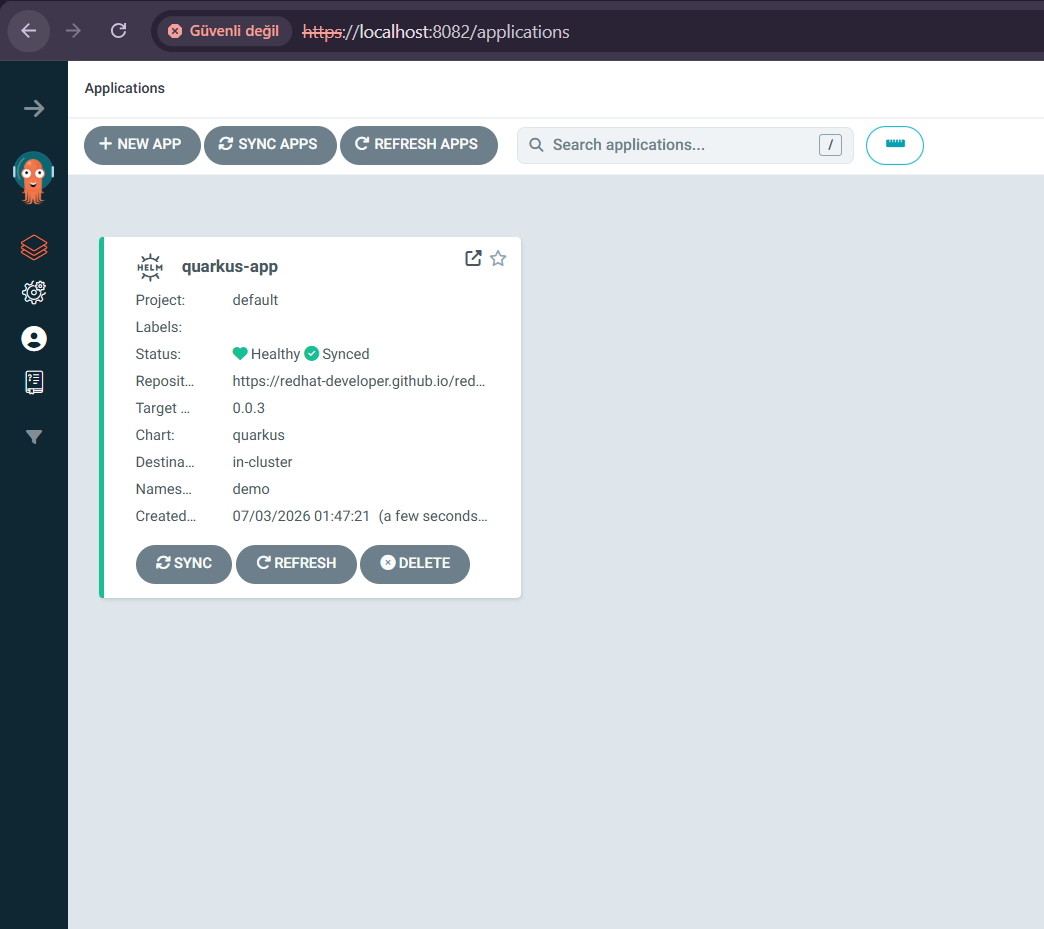
argocd application ui
https://localhost:8082/applications/argocd/quarkus-app?view=tree

quarkus-app sync
Finalizers
Finalizers are a Kubernetes feature related to garbage collection, used to control when a resource is actually deleted. When a resource is marked for deletion, the .metadata.deletionTimestamp field is set. This triggers controllers to clean up any dependent resources associated with the deleted object.
Once the cleanup process is completed, the controller removes the finalizer from the resource. The resource itself is only fully deleted after all finalizers have been removed.
When deleting dependent resources, Argo CD uses foreground cascading deletion by default. In this approach, dependent resources are deleted first, followed by the Application itself.
If you want to use background cascading deletion instead (where the Application is removed immediately while Kubernetes deletes related resources in the background), you can set the resources-finalizer.argocd.argoproj.io/background finalizer on the Application.
apiVersion: argoproj.io/v1alpha1
kind: Application
metadata:
  name: quarkus-app
  namespace: argocd
  finalizers:
    - resources-finalizer.argocd.argoproj.io
    - resources-finalizer.argocd.argoproj.io/background
We have reached the end of Part 2 of the Argo CD series. I hope this section has been useful for you and has helped strengthen your understanding of the topic.
In the next parts of the series, we will explore more advanced topics and practical examples in much greater detail. Don’t forget to like and follow to stay updated with new content!
Linkedln → www.linkedin.com/in/tuğrulhan-karslı-9683b7256
Sources
Website → https://argo-cd.readthedocs.io/
Book → Argo CD: Up and Running
메타데이터
- post_id
- 8a2cb45f2970
- slug
- getting-started-with-gitops-and-argocd-2-argocd-application-management-8a2cb45f2970
- url
- https://levelup.gitconnected.com/getting-started-with-gitops-and-argocd-2-argocd-application-management-8a2cb45f2970
- canonical_url
- https://levelup.gitconnected.com/getting-started-with-gitops-and-argocd-2-argocd-application-management-8a2cb45f2970
- author_url
- https://medium.com/@karslitugrulhan
- status
- ok
- fetched_at
- 2026-07-09 20:10:33