Building Real-Time Multimodal AI Agents with Snowflake Preview
OpenFlow, Cortex AI, Apache Iceberg, Snowflake, Data Agents, Gemini, Video Analytics
Building Real-Time Multimodal AI Agents with Snowflake Preview
OpenFlow, Cortex AI, Apache Iceberg, Snowflake, Data Agents, Gemini, Video Analytics

[embed]
Snowflake Summit 2026 — Tim is Speaking!
I’ll be speaking at Snowflake Summit 2026 on NiFi and Agents. The Summit is THREE WEEKS away — this is your chance to join 10,000+ data professionals in San Francisco for the biggest data and AI event of the year.
[embed]Snowflake | Summit 26 Snowflake | Summit 26reg.snowflake.com
For the simpler image processing, the code is here:
Much of this code, text and documentation was generated with the amazing ability of Snowflake Cortex Code CLI with Claude 4.x models. This builds amazing production code as long as you use skills, good prompts and a good AGENTS.md.
Here is the main Video Analytics SQL from inside a Stored Procedure:
 SELECT AI_COMPLETE(
        ''gemini-3.1-pro'',
        ''You are an expert traffic analyst reviewing live traffic camera video footage. '' ||
        ''Analyze this traffic video carefully and extract detailed traffic intelligence. '' ||
        ''Count vehicles precisely by type. Assess congestion levels, detect any incidents, '' ||
        ''note road conditions, weather visibility, and any safety concerns. '' ||
        ''Pay attention to: traffic flow direction, lane usage, pedestrian activity, '' ||
        ''traffic signal states, construction zones, and unusual events. '' ||
        ''Respond in JSON format with the required fields.'',
        TO_FILE(''@DEMO.DEMO.VIDEOS'', :P_VIDEO_FILENAME),
        {},
        {
            ''type'': ''json'',
            ''schema'': {
                ''type'': ''object'',
                ''properties'': {
                    ''traffic_density'':      {''type'': ''string'', ''enum'': [''empty'', ''light'', ''moderate'', ''heavy'', ''gridlock'']},
                    ''vehicle_count'':        {''type'': ''integer''},
                    ''vehicle_types'':        {''type'': ''array'', ''items'': {''type'': ''string''}},
                    ''pedestrian_count'':     {''type'': ''integer''},
                    ''congestion_level'':     {''type'': ''string'', ''enum'': [''free_flow'', ''light_congestion'', ''moderate_congestion'', ''heavy_congestion'', ''standstill'']},
                    ''speed_estimate'':       {''type'': ''string''},
                    ''road_conditions'':      {''type'': ''string''},
                    ''weather_visibility'':   {''type'': ''string'', ''enum'': [''clear'', ''hazy'', ''foggy'', ''rainy'', ''snowy'', ''night_clear'', ''night_limited'']},
                    ''weather_conditions'':   {''type'': ''string''},
                    ''time_of_day_detected'': {''type'': ''string'', ''enum'': [''dawn'', ''morning'', ''midday'', ''afternoon'', ''dusk'', ''night'']},
                    ''lighting_conditions'':  {''type'': ''string''},
                    ''incidents_detected'':   {''type'': ''boolean''},
                    ''incident_types'':       {''type'': ''array'', ''items'': {''type'': ''string''}},
                    ''incident_severity'':    {''type'': ''string'', ''enum'': [''none'', ''minor'', ''moderate'', ''severe'', ''critical'']},
                    ''lane_count'':           {''type'': ''integer''},
                    ''lane_usage'':           {''type'': ''string''},
                    ''notable_observations'': {''type'': ''array'', ''items'': {''type'': ''string''}},
                    ''signage_detected'':     {''type'': ''array'', ''items'': {''type'': ''string''}},
                    ''infrastructure_notes'': {''type'': ''string''},
                    ''summary'':             {''type'': ''string''}
                },
                ''required'': [''traffic_density'', ''vehicle_count'', ''vehicle_types'',
                            ''congestion_level'', ''road_conditions'', ''weather_visibility'',
                            ''incidents_detected'', ''incident_types'', ''notable_observations'', ''summary'']
            }
        }
    ) INTO :result;
Since it’s in a stored procedure I can call it from Cortex Code, a Cortex Agent, OpenFlow, REST, etc…
If the code looks AI generated, you are correct Cortex Code built this painful SQL for me. I validated and the results are decent.
Traffic Video AI
Real-time traffic video analysis powered by Snowflake Cortex AI and the gemini-3.1-pro multimodal model. Ingests live traffic camera video from the 511NY API, uploads to Snowflake internal stages, and performs AI-driven analysis extracting vehicle counts, congestion levels, incident detection, and road conditions.
Data sources:
511NY camera API (200+ cameras statewide)
DEMO.DEMO.NYCTRAFFICIMAGES (1,344 analyzed images from 371 NYC cameras)
Architecture

Pipeline Steps
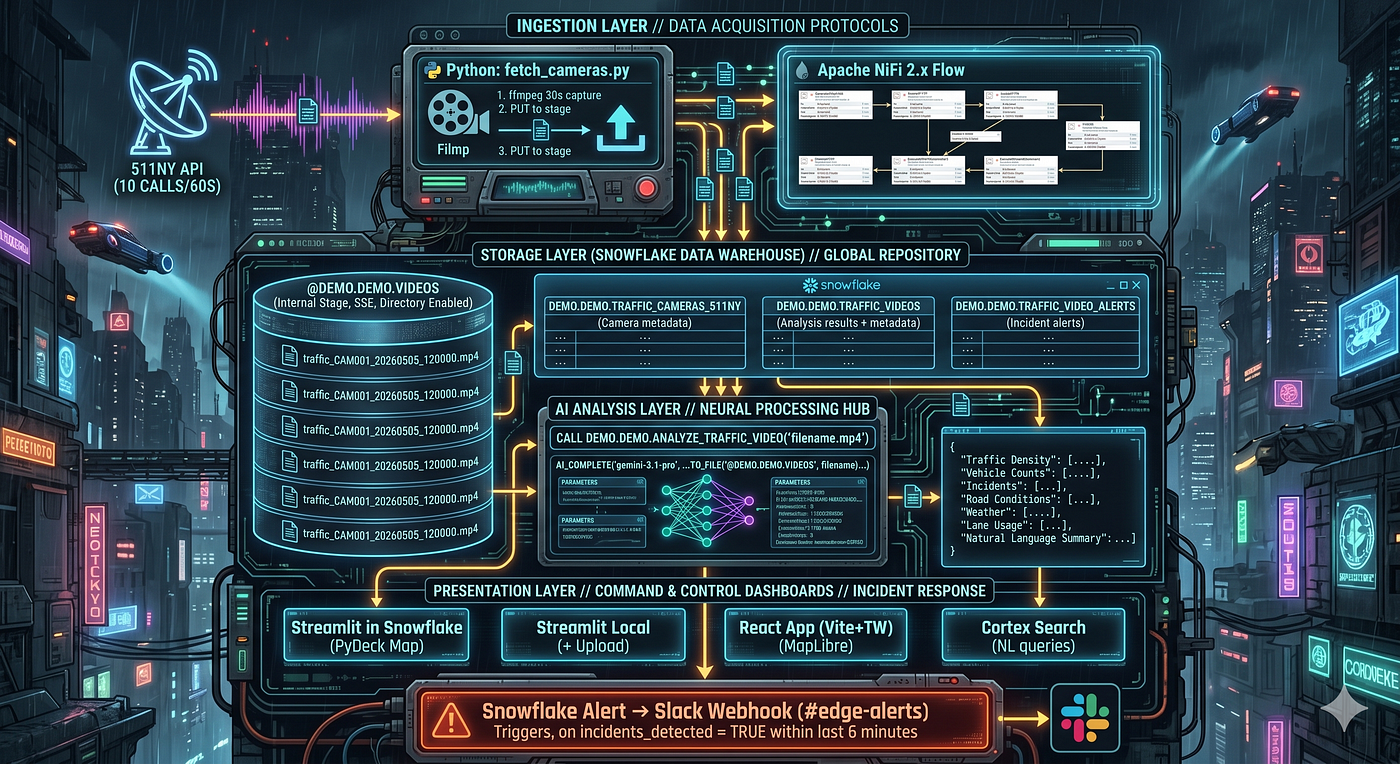

OpenFlow Pipeline Steps

Data Flow: React Dashboard
Snowflake (V_TRAFFIC_VIDEO_ANALYSIS)
│
▼
FastAPI Backend (api/server.py)
GET /api/analyses → Video analysis records (real-time from Snowflake)
GET /api/metrics → Aggregated dashboard KPIs
GET /api/cameras → Camera list from TRAFFIC_CAMERAS_511NY
GET /api/health → Connection health check
│
▼ (Vite proxy localhost:8000)
React App (react-app/src/App.tsx)
- Auto-refreshes every 60 seconds
- Loading/error/disconnected states
- Density filter passed as query param
Quick Start
# 1. Install dependencies
./manage.sh install
# 2. Configure environment
cp .env.example .env
# Edit .env with your API key and Snowflake credentials
# 3. Setup Snowflake objects
./manage.sh setup
# 4. Fetch and analyze traffic videos
./manage.sh fetch - limit 5 - analyze
# 5. Start dashboards
./manage.sh start
Project Structure
trafficvideo/
├── manage.sh # Management script (install, setup, start, build-nar)
├── api/
│ └── server.py # FastAPI backend (serves Snowflake data to React)
├── sql/
│ └── setup.sql # All Snowflake DDL (tables, procs, views, alerts)
├── scripts/
│ ├── fetch_cameras.py # Python pipeline (511NY API + OpenCV + upload)
│ ├── requirements.txt # Python dependencies
│ ├── deploy.sh # Snowflake deployment script
│ └── nifi/
│ ├── openflow/ # OpenFlow NAR processor (hatch-datavolo-nar)
│ │ ├── pyproject.toml
│ │ └── src/CaptureTrafficVideo/
│ ├── traffic_video_flow.json # NiFi 2.x flow definition
│ └── README.md # NiFi setup guide
├── dashboard/
│ └── dashboard.py # Streamlit in Snowflake dashboard
├── app/
│ └── app.py # Local Streamlit dashboard
├── react-app/ # React + Vite + Tailwind dashboard
├── docs/
│ ├── architecture.md # Architecture documentation
│ ├── PIPELINE_PROCESS.md # Step-by-step pipeline process
│ └── slides.md # Snowflake Summit slide content
├── tests/ # Test files
└── .env.example # Environment variable template
Technology Stack

Database Elements

AI Analysis Output
Each video produces a structured JSON analysis including:
- Traffic density: empty, light, moderate, heavy, gridlock
- Vehicle count: precise count by type (sedan, SUV, truck, bus, etc.)
- Congestion level: free_flow through standstill
- Incidents: boolean detection + type classification + severity
- Road conditions: surface state, weather visibility
- Infrastructure: lane count, signage, construction zones
- Summary: Natural language description of the scene
Commands
./manage.sh install # Install Python & Node dependencies
./manage.sh setup # Create Snowflake objects
./manage.sh start # Start all services (API + dashboards)
./manage.sh stop # Stop all services
./manage.sh run-api # Start FastAPI backend only
./manage.sh run-dashboard # Start Streamlit only
./manage.sh run-react # Start React dev server only
./manage.sh fetch [opts] # Fetch camera videos ( - limit N, - analyze, - dry-run)
./manage.sh analyze # Trigger AI analysis on pending videos
./manage.sh download # Export results to JSON
./manage.sh list # List videos in stage
./manage.sh backup # Backup analysis data
./manage.sh test # Run tests
./manage.sh build # Build project
./manage.sh build-nar # Build OpenFlow NAR processor
./manage.sh deploy # Deploy to Snowflake
./manage.sh status # Show system status
Prerequisites
- Python 3.11+
- Node.js 18+ (for React dashboard)
- Snowflake account with Cortex AI enabled
- 511NY developer API key
- Cross-region inference enabled (ALTER ACCOUNT SET CORTEX_MODELS_ALLOWLIST = ‘All’)
- hatch + hatch-datavolo-nar (for OpenFlow NAR builds)
Port Configuration
Dashboard ports are flexible. If the default port is busy, the system auto-finds the next available port.
API_PORT = 8000. FastAPI backend port
STREAMLIT_PORT = 8501. Streamlit dashboard port
REACT_PORT = 5173. React dev server port
Set in .env or pass as environment variables:
STREAMLIT_PORT=8510 ./manage.sh run-dashboard
Security
- No credentials stored in source control
- Keypair authentication (RSA) for Snowflake
- API keys via environment variables only
- .gitignore blocks .env, *.pem, AGENTS.md, and all credential files
- Rate limiting on 511NY API calls (10/60s)
Models

OpenFlow Custom Processor


React Dashboard

Streamlit Dashboard


Extending
- Add more camera sources: Extend fetch_cameras.py with additional APIs
- Custom prompts: Modify the prompt in ANALYZE_TRAFFIC_VIDEO procedure
- Additional AI fields: Add columns to TRAFFIC_VIDEOS and update JSON schema
- Cortex Agent: Build a conversational agent using Cortex Search service
- Scheduled ingestion: Use Snowflake Tasks or NiFi scheduler for continuous monitoring
Example of Python Edition

Shell script for management and operations

Alerting
CREATE OR REPLACE ALERT DEMO.DEMO.TRAFFIC_VIDEO_INCIDENT_ALERT
    WAREHOUSE = INGEST
    SCHEDULE = '5 MINUTE'
    IF (EXISTS (
        SELECT 1 FROM DEMO.DEMO.TRAFFIC_VIDEOS
        WHERE incidents_detected = TRUE
          AND capture_timestamp > DATEADD('minute', -6, CURRENT_TIMESTAMP())
    ))
    THEN CALL SYSTEM$SEND_SNOWFLAKE_NOTIFICATION(...);
References
메타데이터
- post_id
- 8a4dde8fbbb3
- slug
- building-real-time-multimodal-ai-agents-with-snowflake-preview-8a4dde8fbbb3
- url
- https://medium.com/@tspann/building-real-time-multimodal-ai-agents-with-snowflake-preview-8a4dde8fbbb3
- canonical_url
- https://medium.com/@tspann/building-real-time-multimodal-ai-agents-with-snowflake-preview-8a4dde8fbbb3
- author_url
- https://medium.com/@tspann
- status
- ok
- fetched_at
- 2026-06-12 07:40:50





