IPSG + DAI + DHCP Snooping Protection Lab Configuration
Cisco 2960 Switch | Layer 2 Security | Packet Tracer
IPSG + DAI + DHCP Snooping Protection Lab Configuration
Cisco 2960 Switch | Layer 2 Security | Packet Tracer
Overview
This lab demonstrates how to implement Layer 2 security mechanisms on a Cisco 2960 switch using the following features:
- DHCP Snooping
- Dynamic ARP Inspection (DAI)
- IP Source Guard (IPSG)
The objective is to protect the LAN environment from spoofing attacks such as ARP poisoning and rogue DHCP servers. The topology includes legitimate and fake DHCP servers to simulate real-world attacks and demonstrate how these features neutralize them.
Network Topology (Based on the Image)
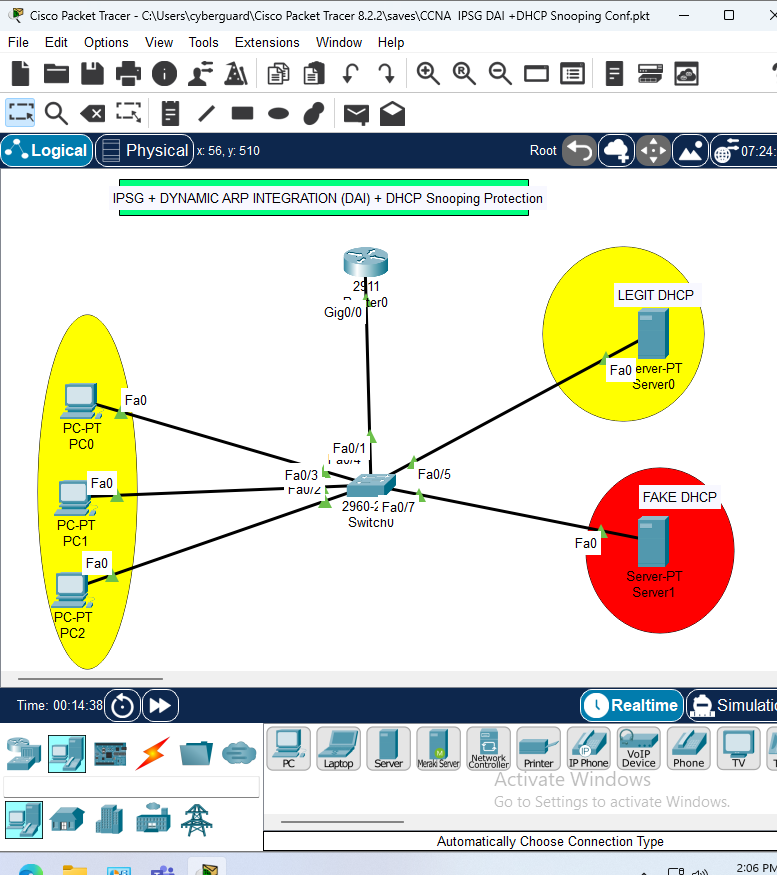
From the provided Packet Tracer setup:
- Switch: Cisco 2960
- Router0 (29xx) is connected to
Fa0/1on the switch. - Legitimate DHCP Server is connected to
Fa0/5(label: LEGIT DHCP). - Fake DHCP Server is connected to
Fa0/7(label: FAKE DHCP). - End Devices (PC0, PC1, PC2) are connected to ports
Fa0/2,Fa0/3, andFa0/4respectively.
Step-by-Step Configuration
1. Enable DHCP Snooping Globally and for VLAN 1
Switch(config)# ip dhcp snooping
Switch(config)# ip dhcp snooping vlan 1
2. Mark Trusted Interfaces (Uplinks and Legit DHCP Server)
Switch(config)# interface range fa0/1, fa0/5
Switch(config-if-range)# ip dhcp snooping trust
Ports Fa0/1 (uplink to router) and Fa0/5 (legit DHCP) are marked as trusted. This allows DHCP Offer/Ack messages from the router and legitimate DHCP server.
3. Enable Dynamic ARP Inspection for VLAN 1
Switch(config)# ip arp inspection vlan 1DAI uses the DHCP binding table to validate ARP packets.
4. Mark Same Trusted Interfaces for ARP Inspection
Switch(config)# interface range fa0/1, fa0/5
Switch(config-if-range)# ip arp inspection trust
This ensures only legitimate ARP responses are allowed from trusted sources.
5. Enable IP Source Guard on Access Ports
Switch(config)# interface range fa0/2 - 4
Switch(config-if-range)# ip verify source
This blocks all traffic on access ports unless the source IP and MAC match entries in the DHCP snooping binding table.
6. Save the Configuration
Switch# write memoryVerification Commands
Check DHCP Snooping Bindings:
Switch# show ip dhcp snooping bindingCheck Interface Trust State for ARP Inspection:
Switch# show ip arp inspection interfacesCheck ARP Inspection Statistics:
Switch# show ip arp inspection vlan 1Verify IP Source Guard Status:
Switch# show ip verify sourceSummary
This configuration ensures that:
- Only the authorized DHCP server can lease IP addresses.
- ARP replies are validated to prevent spoofing attacks.
- IP and MAC bindings are enforced on untrusted ports via IP Source Guard.
Conclusion:
Combining these three security features makes the network resistant to rogue DHCP servers, ARP poisoning, and IP address spoofing — all commonly used in Layer 2 attack scenarios.
Let me know if you’d like this exported as a formatted .docx file for download or submitted in Medium article format.
메타데이터
- post_id
- 8a56b673c40d
- slug
- ipsg-dai-dhcp-snooping-protection-lab-configuration-8a56b673c40d
- url
- https://medium.com/@enyel.salas84/ipsg-dai-dhcp-snooping-protection-lab-configuration-8a56b673c40d
- canonical_url
- https://medium.com/@enyel.salas84/ipsg-dai-dhcp-snooping-protection-lab-configuration-8a56b673c40d
- author_url
- https://medium.com/@enyel.salas84
- status
- ok
- fetched_at
- 2026-07-10 06:45:42