Packet Analysis with Wireshark: Following a Request from Browser to Server
Understanding what happens under the hood when your browser requests a webpage is key to grasping network communications. Wireshark, a…
Packet Analysis with Wireshark: Following a Request from Browser to Server
Understanding what happens under the hood when your browser requests a webpage is key to grasping network communications. Wireshark, a powerful packet analyzer, lets you capture and inspect these interactions in detail. This guide walks through each step — DNS Lookup, TCP Handshake, TLS negotiation, HTTP Request, and HTTP Response — using Wireshark captures to illustrate the process.
DNS Lookup
Before your browser can communicate with a web server, it must translate the human-readable domain name into an IP address. This is where the Domain Name System (DNS) comes into play.
- When you enter a URL, your browser first checks the local DNS cache.
- If no cached entry exists, it sends a DNS query to a configured DNS server.
- The DNS server responds with the IP address corresponding to the domain.
Packet Capture Insights
In Wireshark, you’ll see DNS queries typically use UDP port 53. Look for packets labeled as Standard query and the corresponding Standard query response.
Screenshot example: A DNS query from your machine asking for example.com and the reply containing the IP address.
Key fields to observe:
- Transaction ID: Matches request and response.
- Query Name: The domain being resolved.
- Answer Section: Contains the IP address.
TCP Handshake
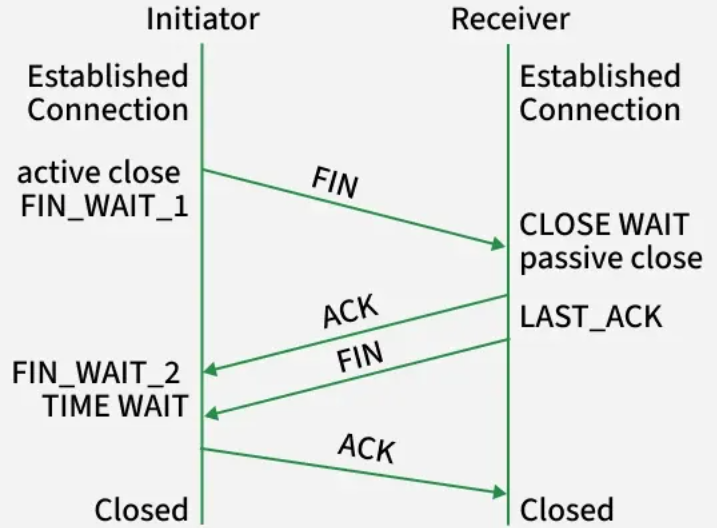
Once the IP is resolved, the browser initiates a TCP connection with the server using a three-way handshake to establish a reliable communication channel.
The three steps are:
- SYN: Client sends a synchronize packet to the server.
- SYN-ACK: Server acknowledges with a synchronize-acknowledge packet.
- ACK: Client sends an acknowledgment completing the handshake.
Packet Capture Insights
In Wireshark, filter TCP packets with flags:
- SYN (S)
- SYN, ACK (SYN, ACK)
- ACK (ACK)
You’ll see these in sequence, with increasing sequence numbers.
Screenshot example: The three packets of the handshake between client and server.
Key fields:
- Sequence Number: Initial sequence numbers are established here.
- Flags: Indicate SYN and ACK status.
- Source/Destination Ports: Typically client uses ephemeral port; server listens on port 80 (HTTP) or 443 (HTTPS).
TLS (Transport Layer Security)

For secure HTTPS connections, after the TCP handshake, the client and server perform a TLS handshake to negotiate encryption parameters.
Steps include:
- Client sends ClientHello with supported TLS versions and cipher suites.
- Server responds with ServerHello selecting TLS version and cipher.
- Server sends its certificate for authentication.
- Client verifies certificate and exchanges keys securely.
- Both parties derive shared keys for encrypted communication.
Packet Capture Insights
TLS packets appear under protocols like TLSv1.2 or TLSv1.3 in Wireshark.
Look for:
- ClientHello and ServerHello messages.
- Certificate packets.
- Encrypted handshake messages.
Screenshot example: TLS handshake sequence showing ClientHello, ServerHello, and Certificate exchange.
Key fields:
- Cipher Suites: Encryption algorithms proposed and selected.
- Server Certificate details: Issuer, validity period.
- TLS version: Negotiated version of TLS.
HTTP Request
After the secure connection is established, the browser sends an HTTP request to the server asking for the web page or resource.
Typical request components:
- Request line (e.g.,
GET /index.html HTTP/1.1) - Headers (Host, User-Agent, Accept, etc.)
- Optional body (for POST requests)
Packet Capture Insights
HTTP requests appear as packets with protocol HTTP in Wireshark when traffic is unencrypted (HTTP). For HTTPS, these are encrypted inside TLS packets and not easily readable.
You can still observe:
- TCP segments carrying HTTP data post-TLS handshake.
- Request headers and methods if unencrypted.
Screenshot example: An HTTP GET request packet showing method, host, and user-agent headers.
Key fields:
- Request Method: GET, POST, etc.
- Host header: The domain requested.
- User-Agent: Browser identification.
HTTP Response
The server replies with an HTTP response containing status code, headers, and the requested content.
Typical response parts:
- Status line (e.g.,
HTTP/1.1 200 OK) - Headers (Content-Type, Content-Length, Set-Cookie, etc.)
- Body (HTML, CSS, JavaScript, images)
Packet Capture Insights
In Wireshark, HTTP responses show as packets with protocol HTTP (unencrypted).
Key fields to observe:
- Status Code: 200 (OK), 404 (Not Found), 301 (Redirect), etc.
- Content-Type: Type of returned data.
- Content-Length: Size of the payload.
Screenshot example: HTTP 200 OK response with headers and partial HTML body.
Packet Captures and Analysis
Putting it all together, a full page load involves:
- DNS query and response.
- TCP handshake establishing connection.
- TLS handshake securing the session (for HTTPS).
- HTTP request sent.
- HTTP response received.
In Wireshark, filter by IP or domain to isolate relevant packets. Use filters like dns, tcp.port == 443, http, and tls to focus on each phase.
Tips for Effective Packet Analysis
- Use the Follow TCP Stream feature to view the entire conversation.
- Enable Name Resolution for easier IP to domain mapping.
- Highlight interesting packets with coloring rules.
- Export packet sections for reporting or sharing.
Conclusion
Wireshark provides a window into the detailed mechanics of web communication. By following the journey of a browser request to server response — from DNS lookup through TCP and TLS handshakes to HTTP messaging — you gain a deeper understanding of network protocols and security layers. Mastering packet analysis empowers troubleshooting, security auditing, and optimizing web interactions.
메타데이터
- post_id
- 8a6ee960071a
- slug
- packet-analysis-with-wireshark-following-a-request-from-browser-to-server-8a6ee960071a
- url
- https://medium.com/@nehamanoj1105/packet-analysis-with-wireshark-following-a-request-from-browser-to-server-8a6ee960071a
- canonical_url
- https://medium.com/@nehamanoj1105/packet-analysis-with-wireshark-following-a-request-from-browser-to-server-8a6ee960071a
- author_url
- https://medium.com/@nehamanoj1105
- status
- ok
- fetched_at
- 2026-07-22 12:16:40