How to Override Global Exchange Rates for Specific Entities in Oracle FCC
In a multi-currency consolidation environment, accurate currency translation is the backbone of reliable financial reporting. Oracle…
How to Override Global Exchange Rates for Specific Entities in Oracle FCC
In a multi-currency consolidation environment, accurate currency translation is the backbone of reliable financial reporting. Oracle Financial Consolidation and Close Cloud Service (FCC) provides powerful, flexible mechanisms to handle exchange rates — and one of the most nuanced yet practical features is the Local Rate account.
While most organizations rely on standard Global rates (Average Rate and Ending Rate) applied uniformly across all entities, real-world consolidation often demands something more granular. This is exactly where Local Rates and Translation Override Rules come into play — enabling entity-specific, account-level control over how financial data is translated.
What Are Local Rates
In addition to the Average Rate and Ending Rate system accounts created as part of the application, FCC allows you to create additional user-defined Rate accounts. These accounts are used in Translation Override Rules to perform special translations using a different set of rate data.
There are two types of user-defined Rate accounts in FCC:
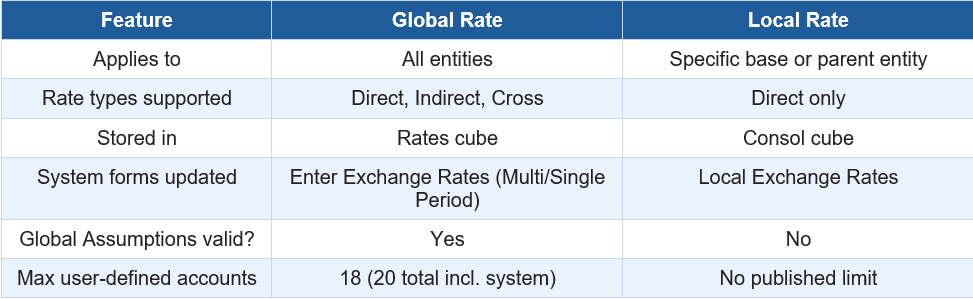
- Global Rate — Rate data is applied uniformly to all entities and stored in the Rates cube.
- Local Rate — Rate data is specific to an entity, stored in the Consol cube, and provides granular translation control.
🧠Why Do We Need Local Rates?
A common real-world scenario is the need to load static or different FX rates to a specific entity — for example, to keep a disposed entity’s FX rates static for the remaining periods of a year — rather than relying on the rates stored under FCCS_Global Assumptions.
Local Rates are the right solution when:
. A specific entity operates under regulatory or contractual FX rate obligations
- A disposed or divested entity needs frozen rates for historical comparisons
- Certain subsidiaries translate financials using a negotiated or budget rate
- Specific account balances for an entity need to be translated differently from the global rate
- Multi-GAAP reporting requires different translation bases for statutory vs. management reporting
Global Rate vs. Local Rate — Quick Comparison
How to Create a Local Rate Account
-
On the Home page, click Application and then click Consolidation.
-
From the Consolidation Process page, select the Translated tab.
-
From the list of rules, select Translation Overrides.
-
Click Manage Rate Accounts. The system opens a popup listing all existing user-defined Rate accounts.

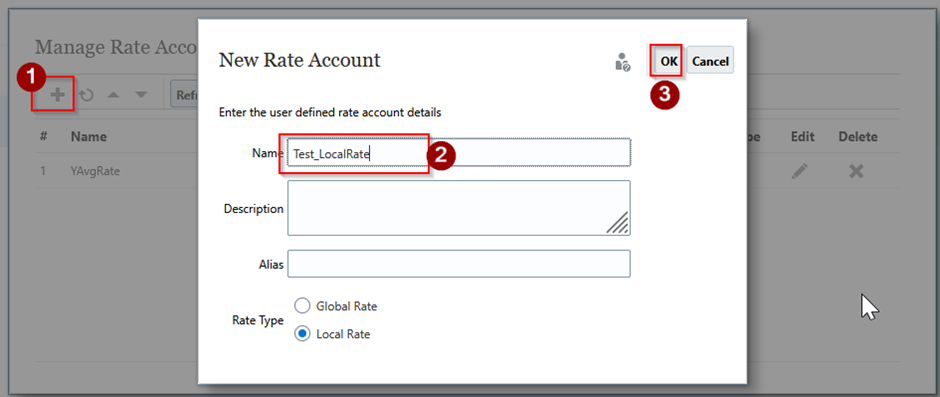
- Click (+) to create a new Rate account.
-
Enter a Name, Description, and Alias (the Alias is used in the Default Alias table).
-
For Rate Type, select Local Rate.
-
Click OK, then Close
After closing, if changes are detected, the system prompts:
“To apply Rate account changes to the application, you must refresh the database”
- Select Close and Refresh to apply changes immediately.
- If you skip the refresh, you must perform a Database Refresh manually before the Local Rate account becomes available.
Entering Local Rates on the Data Form
Once the Local Rate account is created and the database is refreshed, you can navigate to the Local Exchange Rates seeded data form to enter your rates
Key points when entering data:
• Select the base or parent entity in the Point of View (POV).
• Specify rates for each From Currency you need to translate.
• Rates are entered as direct rates only.
- In this example, entity B5 has a default currency of INR and a parent entity currency of USD. The Local Rate is entered at the USD level.

Reminder: After entering Local Rate data, a Translation Override Rule must be created and deployed to ensure these rates are actually used during the translation process. Local Rate data alone does not override Global Assumptions rates.
Creating Override Translation Rules
By default, FCC applies standard translation methods to all accounts based on their time balance property (Flow or Balance). Translation Override Rules allow you to override these defaults for specific accounts, entities, or dimension intersections — including directing the system to use your Local Rate account.
-
On the Home page, click Application and then click Consolidation.
-
From the Consolidation Process page, select the Translated tab.
-
From the list of rules, select Translation Overrides.
The Manage Translation Override Rules page opens. By default, the To Be Deployed view is shown. A new rule appears with a blue icon indicating it has not yet been deployed. A modified existing rule shows a yellow triangle.
-
Click the Add (+) icon to add a new translation rule.
-
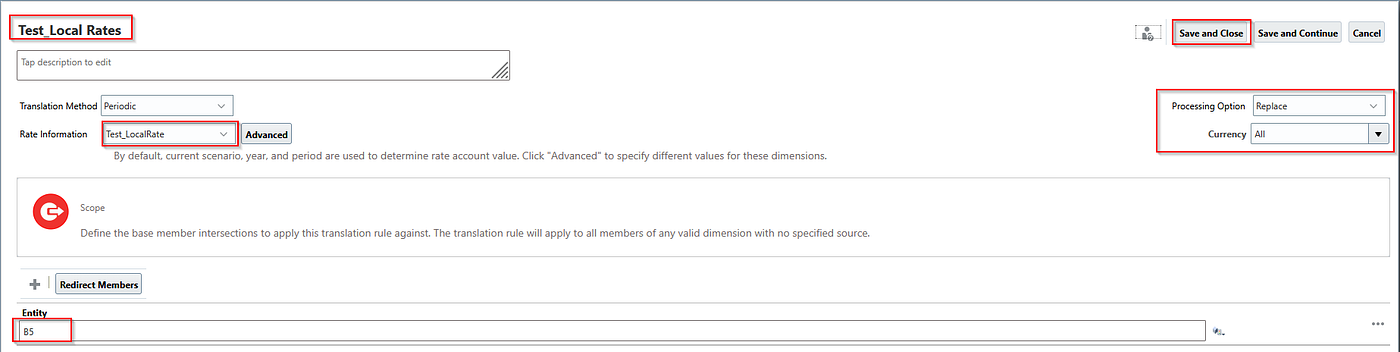
Enter a Name and Description for the rule.
-
From Translation Method, select Periodic or Year to Date.
-
From Rate Information, select your rate account:
• FX Rates — Average
• FX Rates — Ending
• Your user-defined Local Rate account (e.g., Test_LocalRate)
• From Processing Option, select Replace
- Click Save and Close or Save and Continue to save your rule.
Deploying Override Translation Rules
Creating a translation rule does not make it active. You must explicitly deploy rules to include them in the consolidation and translation process. This is a critical step that is often overlooked
-
On the Home page, click Application and then click Consolidation.
-
From the Consolidation Process page, select the Translated tab.
-
From the list of rules, select Translation Overrides.
-
Click Deploy to open the Deploy Rules window. All previously deployed rules are automatically pre-selected.
-
Select the rules you want to deploy. Unselect rules you no longer want active — unchecking a deployed rule and re-deploying will un-deploy it from the system.
-
Click Deploy in the Deploy Rules window to confirm deployment.
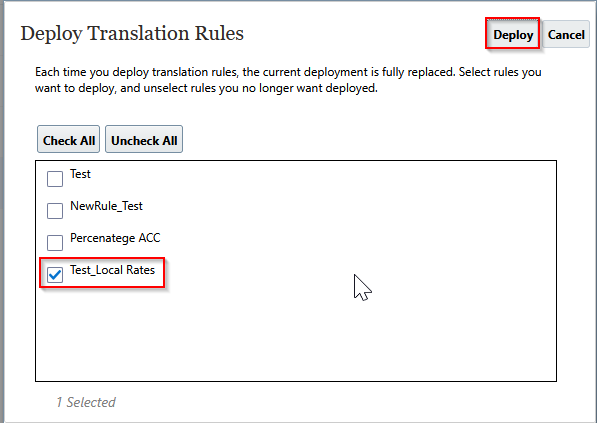
Post-Deployment: After deploying, run the consolidation rule for all affected entities to refresh translated data.
Review the Results
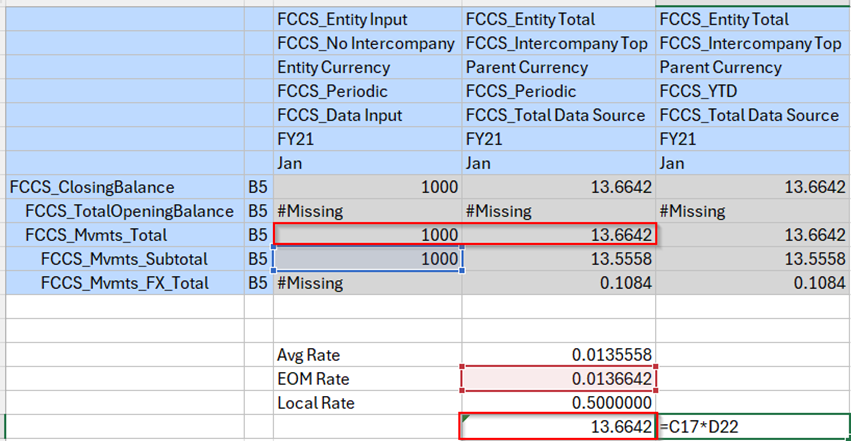
Before Local Rate:
Before local rate the system is translating using the default rates. Ex for Entity B5 EOM rate is 0.013664 and it is translating using these rate
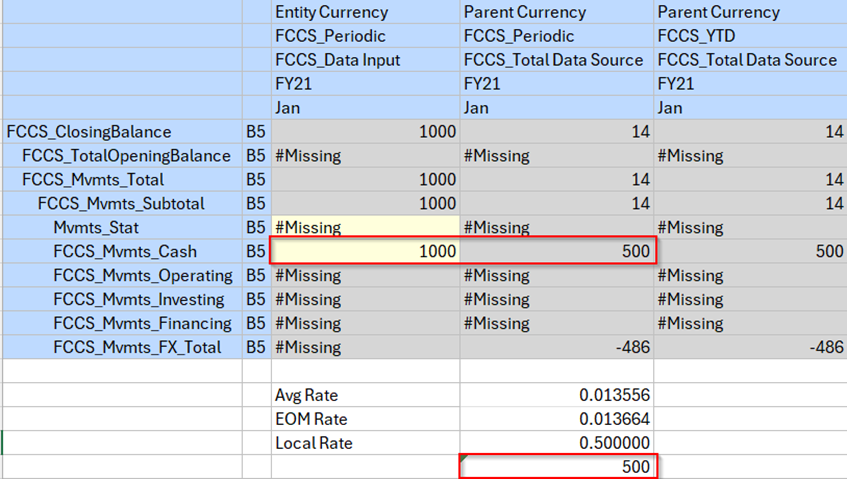
After Local Rate
As we entered the local rate for entity B5 as 0.50000 system is using that rate for translation for purpose only entity B5.
Compare the Before and After
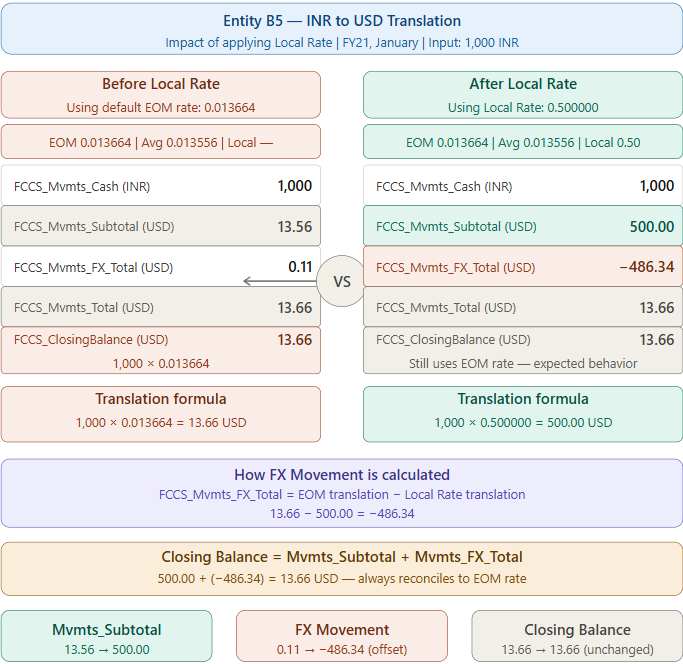
Expected Behavior: When you check data at FCCS_Mvmts_Total or FCCS_Closing Balance, it reflects the End-of-Month (EOM) rate, not the Local Rate. The Local Rate applies only to the movement subtotal. This is by design.
Important Considerations & Common Pitfalls
Pitfall 1: Local Rates Without a Translation Override Rule
Entering rate data in the Local Rate form alone is insufficient. FCC continues to use the FCCS_Global Assumptions rates for translation until a Translation Override Rule is explicitly created, scoped to the relevant entities and accounts, and deployed.
Pitfall 2: Skipping the Database Refresh
After creating or modifying a Local Rate account, a Database Refresh is mandatory. Without it, the account does not appear in the Local Exchange Rates form and cannot be referenced in translation rules.
Pitfall 3: Loading Data to the Wrong Cube
Local Rate data resides in the Consol cube — not the Rates cube. If rates are loaded via Data Integration or Data Management, the import format must target the Consol cube specifically.
Pitfall 4: Only Direct Rates Are Supported
There is no system-level computation of indirect or cross rates for Local Rate accounts. You must manually provide the direct rate for every currency pair required.
Pitfall 5: Forgetting to Re-Deploy After Editing a Rule
Modifying a translation rule marks it with a yellow triangle icon. The change is not active until the rule is re-deployed. Always re-deploy after any rule edits and run Translate again for the affected entities.
Pitfall 6: Using Global Assumptions as the Entity
The FCCS_Global Assumptions entity cannot be used in the Local Exchange Rates form. Local Rate data must always be entered at a real base or parent entity level
Conclusion
Local Rates in Oracle FCC offer a powerful way to introduce entity-level precision into your currency translation process. While Global Rates serve the standard use case well, any consolidation environment with diverse entities, complex ownership structures, or regulatory FX requirements will benefit significantly from Local Rate configurations paired with Translation Override Rules.
When implemented correctly — with the right rate account, a properly scoped and deployed Translation Override Rule, and data loaded to the Consol cube — Local Rates can significantly enhance flexibility in currency translation without compromising the integrity of the consolidation process.
메타데이터
- post_id
- 8a8cb45b7b78
- slug
- how-to-override-global-exchange-rates-for-specific-entities-in-oracle-fcc-8a8cb45b7b78
- url
- https://medium.com/@anandjoy8/how-to-override-global-exchange-rates-for-specific-entities-in-oracle-fcc-8a8cb45b7b78
- canonical_url
- https://medium.com/@anandjoy8/how-to-override-global-exchange-rates-for-specific-entities-in-oracle-fcc-8a8cb45b7b78
- author_url
- https://medium.com/@anandjoy8
- status
- ok
- fetched_at
- 2026-06-11 05:11:55