Skill-Based Routing in D365 Omnichannel: Lessons from the Field
Skill-Based Routing in D365 CRM Omnichannel: Lessons from the Field
Skill-Based Routing (SBR) in Dynamics 365 Omnichannel looks straightforward on paper. You create skills, assign them to agents, attach them to work items, and the routing engine does the rest. In practice, the gap between a working demo and a production-ready implementation is significant. This article shares the design decisions, pitfalls, and operational realities I've encountered across enterprise deployments.
The Architecture You’re Actually Building
Before touching any configuration, it helps to understand what you’re wiring together. SBR is not a standalone feature — it sits across three interconnected subsystems:
1. Unified Routing Engine — evaluates incoming work items against assignment rules and skill requirements before placing them in a queue.
2. Bookable Resource Characteristics (BRC) — the data model where skills are actually stored. Skills don’t live directly on agent records; they live as BRC records in the Universal Resource Scheduling (URS) layer, linked to Bookable Resources.
3. Skill Attachment Rules — determine which skills get tagged onto a work item at intake. They don’t assign agents. They describe what the work item needs.
The end-to-end flow:
Incoming work item → Triggers Work Stream → Skill Attachment Rules evaluated → skills tagged to work item → Unified Routing matches work item skills to agent BRC skills → Exact Match or Closest Match logic applied → Work item placed in queue / assigned to agent
Most configuration errors happen because people conflate skill tagging (step 3) with agent assignment (step 4). Keep them separate in your mental model — it will save you hours of troubleshooting.
Real-World Scenario: Global Certification Support
Throughout this article I’ll use a realistic enterprise scenario. The company operates globally and provides certification exams. Customers contact support via Chat and Voice with the following routing requirements:
- Technical exam issues → Technical Support agents with product-specific skill
- Registration issues → Operations agents
- Complaints and escalations → Senior agents with Escalation Handling + language match
- VIP customers → Priority queue regardless of topic
Let’s architect this properly, step by step.
Step 1: Skill Taxonomy Design — Do This Before Touching the System
The most skipped step. Before creating a single skill record, design your taxonomy offline.
Skills in Omnichannel fall into two implicit categories — the system doesn’t enforce this distinction, but your design should:
Functional skills (what the agent can do):
FUNC_Technical Support - Exam PlatformFUNC_Candidate RegistrationFUNC_Escalation HandlingFUNC_Billing and Payments
Language skills (what language the agent can serve):
LANG_EnglishLANG_GreekLANG_German
Using a prefix convention (FUNC_, LANG_) becomes essential once you have 30+ skills. Without it, skill lists become unmanageable and attachment rules become error-prone.
Why the separation matters: A work item from a German-speaking customer with a technical issue needs an agent with both FUNC_Technical Support AND LANG_German. If you treat these as a single combined skill, your taxonomy explodes. If you don't separate them at all, you'll route German customers to English-only agents.
Rating model design: The default rating model ships with five values: Poor (1), Fair (2), Good (3), Very Good (4), and Excellent (5). For functional skills, this granularity is useful — you may want only Good or above on standard cases, and Excellent reserved for complex escalations. For language skills, ratings are effectively binary — an agent either covers a language or they don't. A practical approach: default all language BRC assignments to Excellent and require Excellent in your language attachment rules, keeping the threshold unambiguous.
Rating model design: The default rating model includes values like Beginner, Proficient, and Expert. For functional skills, this is useful — you may want only Proficient or above on complex technical cases. For language skills, ratings are effectively binary. A practical approach: create a dedicated rating model for languages with a single value (Fluent), or default all language BRC assignments to Expert and require Expert in all language rules.
Step 2: Enabling Skill-Based Routing
Navigate to Customer(Copilot) Service admin center → Routing → Skill-based routing.
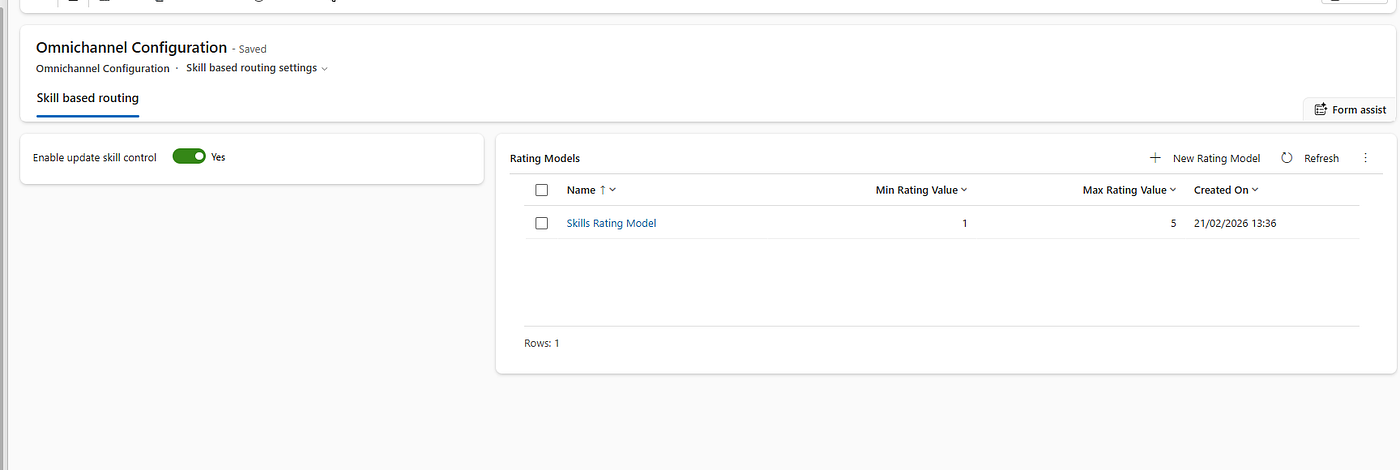
Toggle SBR on. Once enabled, the Rating Model section becomes active. Review the default model and decide whether to keep it or create custom models per your taxonomy design above.

Step 3: Creating Skills
Navigate to Customer(Copilot) Service admin center → User management → Skills.

Create each skill from your taxonomy. For each record, set:
- Name — follow your naming convention exactly
- Type —
SkillorCertification. UseCertificationonly for credentials that are time-bound or externally issued. UseSkillfor everything else.

Step 4: Assigning Skills to Agents via Bookable Resource Characteristics
This is where most implementations hit their first real problem.
Skills are assigned to agents by creating Bookable Resource Characteristic (BRC) records — not by editing the agent’s User record directly. Each BRC links a Bookable Resource (the agent) to a Characteristic (the skill) with a Rating Value.
From the Skill record, go to the Agents subgrid and add a new BRC:
Skill record with Agents subgrid open, showing the “Add Bookable Resource Characteristic” side panel with Bookable Resource lookup and Rating Value dropdown.
Saved BRC record showing agent name, skill name, and rating value (e.g., “Expert”).

Critical: Agents must have a Bookable Resource record to receive skill assignments. If an agent was provisioned via Entra ID sync but doesn’t have a corresponding Bookable Resource, they will never appear in skill-based routing assignment — silently. This is a common gap in greenfield implementations, especially with bulk user imports. Always audit Bookable Resources after user provisioning.

Step 5: Configuring Skill Attachment Rules in the Work Stream
Open your Work Stream in Customer (Copilot) Service admin center → Workstreams, then navigate to the Work classification section.
Under Work classification, create a ruleset and add rules inside it. Each rule evaluates conditions on the incoming Case record and attaches skills as output. We’re using out-of-the-box Case fields — no custom fields or context variables required.(If workstream is based on chat then you can use context variables)
I assume that you have already created a workstream for your implementation.

Rule: Technical Issue
- Condition:
Routed record (Case) → Case TypeequalsProblem - Output skill:
FUNC_Technical Support - Exam Platform, Rating:Expert
Rule: General Inquiry
- Condition:
Routed record (Case) → Case TypeequalsQuestion - Output skill:
FUNC_Escalation Handling, Rating:Good

Step 6: Exact Match vs. Closest Match — The Decision That Defines Your Queue Design
This is the most consequential configuration choice in any SBR implementation.
Set this in the Work Stream under Work classification → Matching logic:

Exact Match
The routing engine assigns a work item only to an agent who has all required skills at the required rating or above. If no such agent is available, the work item waits.
Use for: Compliance-sensitive scenarios, specialized technical skills where the wrong agent handling the case is not acceptable, escalation handling where only senior agents should be assigned.
Operational risk: Queue pile-up. If your skill supply is too narrow or agent availability drops, work items age indefinitely. This becomes a workforce management problem that SBR makes visible — which is actually useful, but needs to be managed proactively.
Closest Match
The engine scores available agents by how many required skills they match and at what rating. It prefers a full match but will assign a partial match if no exact match exists.
Use for: General support scenarios where any capable agent is better than waiting, transitional phases where skill coverage is still being built out.
Operational risk: Mismatches that are invisible in standard reporting. A work item assigned via closest match may have gone to an agent missing a key skill — and you won’t know unless you build explicit reporting on it.
Important architectural constraint: You can only set one matching mode per Work Stream. If you need Exact Match for language and Closest Match for functional skills on the same channel, you need separate Work Streams routed to separate queues. This has real implications for your queue architecture and reporting design.
Step 7: Testing Your Routing Logic
Never test SBR with real agents in a production environment and never rely on manual observation alone.
Use dedicated test agent accounts: Create users with specific, controlled skill sets. Testing with real agents whose availability you can’t control produces unreliable results.
Use Conversation Diagnostics: Within any conversation record, the Diagnostics panel shows which classification rules fired, which skills were attached, and the reason for the routing engine’s assignment decision. This is your primary debugging tool.

Timing gotcha: Skill changes are cached by the routing engine. After modifying a BRC record, allow a few minutes before retesting. In some cases, toggling the agent’s presence (offline → online) forces a cache refresh. Never assume a null result immediately after a config change means the configuration is wrong.
Step 8: Operational Governance — Keeping Skills in Sync
Once you go live, the hardest challenge is not the initial configuration — it’s keeping agent skills accurate as your workforce changes.
Skills Hub — Managing at Scale
Skills, skill types, proficiency scales, and intelligent skill finder models are all important parts of skill-based routing. The skills hub is the one-stop place to manage these attributes across your entire call center. It provides an overview of all configured skills and the number of agents associated with each one — making it easier to spot skills with no agents assigned, which directly causes routing failures.
Data Sharing Across Apps
One operational consideration that catches teams off guard: the data such as skills, rating model, and rating value that is created, updated, and used in Dynamics 365 Contact Center is shared with other model-driven apps (Field Service and Project Service Automation) installed in your environment. If your organization uses Field Service or PSA alongside Customer Service, skill records are shared — changes in one app affect the others. Coordinate with those teams before modifying shared rating models or skill definitions.
Source: Overview of skill-based routing — Microsoft Learn
Closing Thoughts
Skill-Based Routing is one of the most powerful capabilities in Dynamics 365 Omnichannel. The system will route something almost all of the time — the real question is whether it’s routing the right work to the right agent, and whether you have the observability to know when it isn’t.
Design the taxonomy before opening the admin center. Understand what Bookable Resources are and where they sit in the data model. Choose your matching mode deliberately. And build for operational maintainability from day one — because the people who will maintain this configuration after you leave are not architects.
Tags: Dynamics365, Omnichannel, CustomerService, MicrosoftDynamics, PowerPlatform, SolutionArchitect, UnifiedRouting
메타데이터
- post_id
- 8aa976fa108f
- slug
- skill-based-routing-in-d365-omnichannel-lessons-from-the-field-8aa976fa108f
- url
- https://medium.com/@polataydin/skill-based-routing-in-d365-omnichannel-lessons-from-the-field-8aa976fa108f
- canonical_url
- https://medium.com/@polataydin/skill-based-routing-in-d365-omnichannel-lessons-from-the-field-8aa976fa108f
- author_url
- https://medium.com/@polataydin
- status
- ok
- fetched_at
- 2026-06-09 15:37:30



