AWS Organization and Accounts
Amazon Organizations and accounts are the foundation of how companies structure, secure, and govern cloud environments in AWS. There are…
AWS Organization and Accounts
Amazon Organizations and accounts are the foundation of how companies structure, secure, and govern cloud environments in AWS. There are general patterns but usage is quite subjective to company usecase.
AWS Account
An AWS account is the basic isolation boundary in AWS. This what you get when you create an account normally . Think of it as a separate billing container , an isolated environment for resources. Each account has its own users/roles/permissions, separate billing(unless consolidated) , independent resources and credentials.
Typically, companies do not run everything in one account. Instead, they create multiple accounts for prod , dev , testing , security , different business units etc. This improves security isolation, blast-radius reduction, compliance and cost tracking
AWS Organizations
This is a service that lets us centrally manage multiple AWS accounts. It provides centralized policy management, governance , LCM for aws accounts, security controls and consolidated billing.
Core Concepts
Management/Master Account
This is the top-level account that creates the organization. It pays the consolidated bills and creates/adds member accounts. Best practice is to use this account only for administrative purposes and not for deploying workloads.
Member Accounts
Accounts that belong to the organization created by the management account. This is where you should run your workloads. You can also add an already existing account to the organization.
Organization Units (OUs)
OUs are account groupings. This facilitates policy enforcement on a group level instead of going account by account.
Example:
Root
├── Security OU
│   ├── audit-account
│   └── log-archive-account
├── Infrastructure OU
│   ├── networking-account
│   └── shared-services-account
├── Workloads OU
│   ├── production-account
│   ├── staging-account
│   └── development-account
Service Control Policies SCPs
SCPs define the maximum allowed permissions for accounts. SCPs do NOT grant permissions but they only limit permissions.
Example: Block all regions except Paris and Frankfurt:
{
  "Version": "2012-10-17",
  "Statement": [
    {
      "Effect": "Deny",
      "NotAction": [
        "iam:*",
        "route53:*",
        "cloudfront:*"
      ],
      "Resource": "*",
      "Condition": {
        "StringNotEquals": {
          "aws:RequestedRegion": [
            "eu-west-3",
            "eu-central-1"
          ]
        }
      }
    }
  ]
}
AWS Control Tower
AWS control tower is a service that is used for setting up your landing zone (as seen below). Note that after creating your organization and entities with control tower, you can still view and manage them with aws organization. Control Tower uses AWS Organizations underneath to manage multiple AWS accounts.
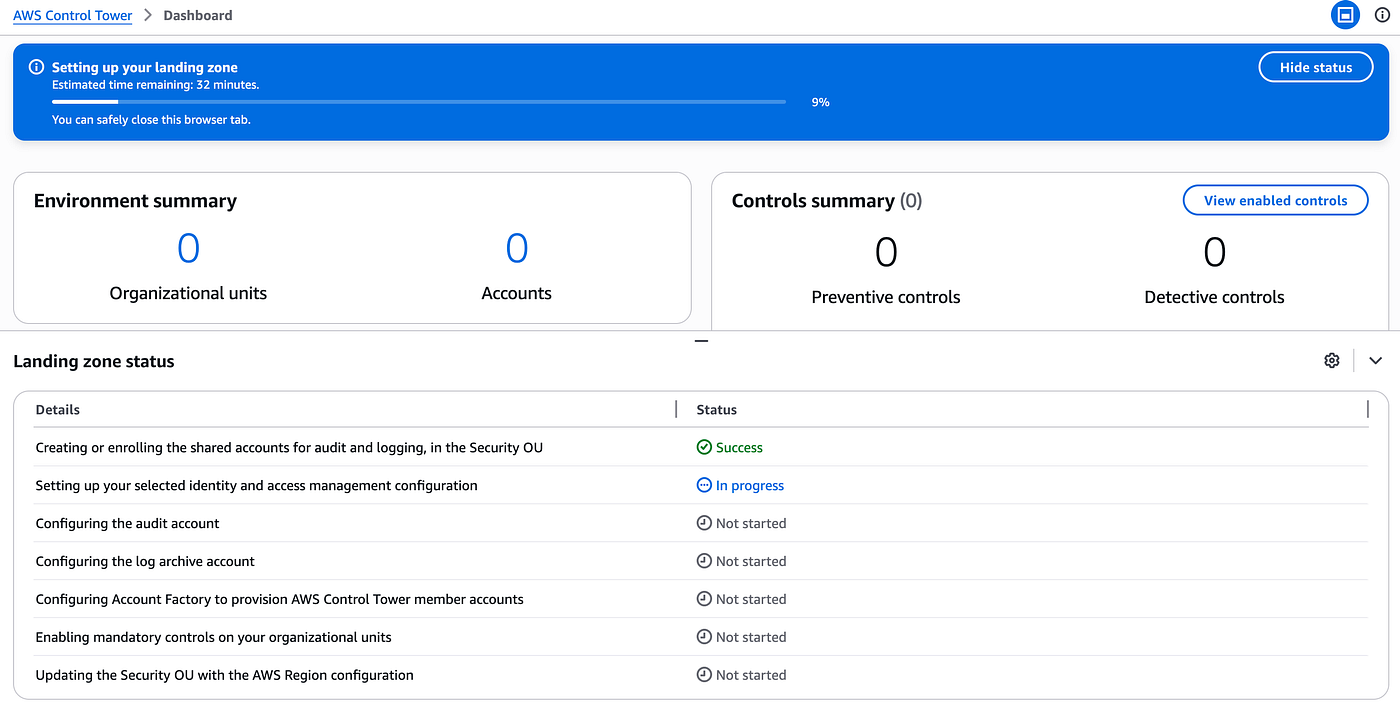
aws landing zone setup with control tower
A typical enterprise landing zone can look like
AWS Organization
│
├── Security OU
│   ├── Log Archive Account
│   └── Security Tooling Account
│
├── Infrastructure OU
│   └── Shared Services Account
│
├── Sandbox OU
│   └── Dev/Test Accounts
│
└── Production OU
    └── Production Accounts
Identity and Access Across Accounts
In multi-account AWS, users typically authenticate once and assume roles into accounts. common patterns are to use IAM identity center service (sso) and cross account IAM roles.
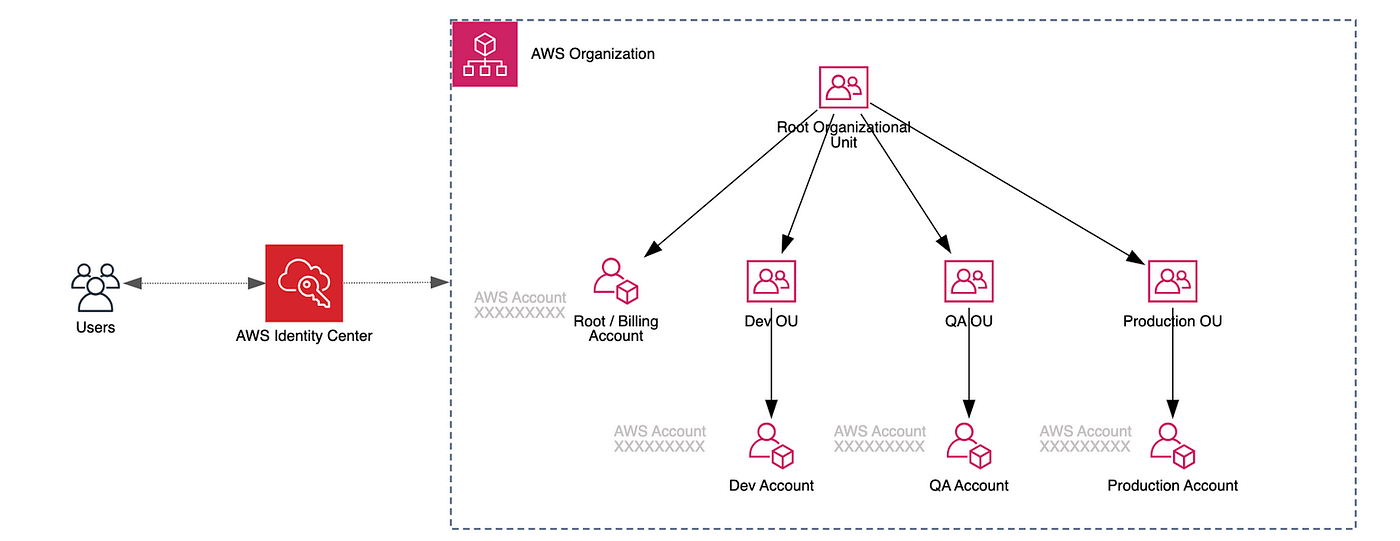
Setting up AWS Organization
When you sign in to your organization’s management account, you can create accounts in your organization, invite existing accounts to join your organization, create and apply policies, and enable supported AWS services to work across the accounts in your organization.
Create accounts or invite existing accounts
Created accounts automatically become members of your organization. Invited accounts become members when they accept the invitation by replying to an email or by calling the AcceptHandshake API. Member accounts are administered and managed by the organization. To easily access member accounts after creation, it is recommended you enable AWS IAM Identity Center (AWS Single Sign-On).
Organize your organization’s member accounts into OUs
Simplify management of your organization by grouping accounts into organizational units (OUs) and applying custom policies. This allows you to manage multiple accounts as a single unit and provide common permissions to groups of accounts within your organization. You can add nested OUs within each OU for more granular permissions, such as separating your production accounts from development accounts within each OU.
Policies enable you to apply controls to the accounts in your organization. There are several supported policy types you can use to manage your organization. For example, service control policies (SCPs) specify the actions that are available the users and roles in affected accounts. You can attach a policy to the entire organization, to OUs, or directly to an individual account.
Enable AWS services that support AWS Organizations
AWS has services that help you use AWS Organizations to secure, audit, and control the accounts in your environment. View the list of supported services.
메타데이터
- post_id
- 8aaecefa43f6
- slug
- aws-organization-and-accounts-8aaecefa43f6
- url
- https://medium.com/@litombeg/aws-organization-and-accounts-8aaecefa43f6
- canonical_url
- https://medium.com/@litombeg/aws-organization-and-accounts-8aaecefa43f6
- author_url
- https://medium.com/@litombeg
- status
- ok
- fetched_at
- 2026-06-22 17:31:34



