Stop Writing AI Prompts: This Open-Source “Loop Library” Teaches AI Agents to Improve Themselves
We’ve all done it. You open Claude Code, Codex, Cursor, or another AI coding assistant and type something like:
Stop Writing AI Prompts: This Open-Source “Loop Library” Teaches AI Agents to Improve Themselves
We’ve all done it. You open Claude Code, Codex, Cursor, or another AI coding assistant and type something like:
Optimize this website.The AI makes a few changes.
Maybe they’re good.
Maybe they’re terrible.
Maybe they improve one thing while accidentally breaking another.
Then what?
You write another prompt.
And another.
And another.
Eventually, you become the feedback loop.
The Real Problem With AI Coding
Today’s AI agents are incredibly capable.
But most prompts are one-shot instructions.
Fix this bug.Improve the documentation.Make the application faster.The agent performs the task once…
…and stops.
It doesn’t know whether the result was actually better.
It doesn’t measure success.
It doesn’t learn from the previous attempt.
It doesn’t know when another improvement is worth making.
That’s exactly the problem Loop Library is trying to solve.
What Is Loop Library?
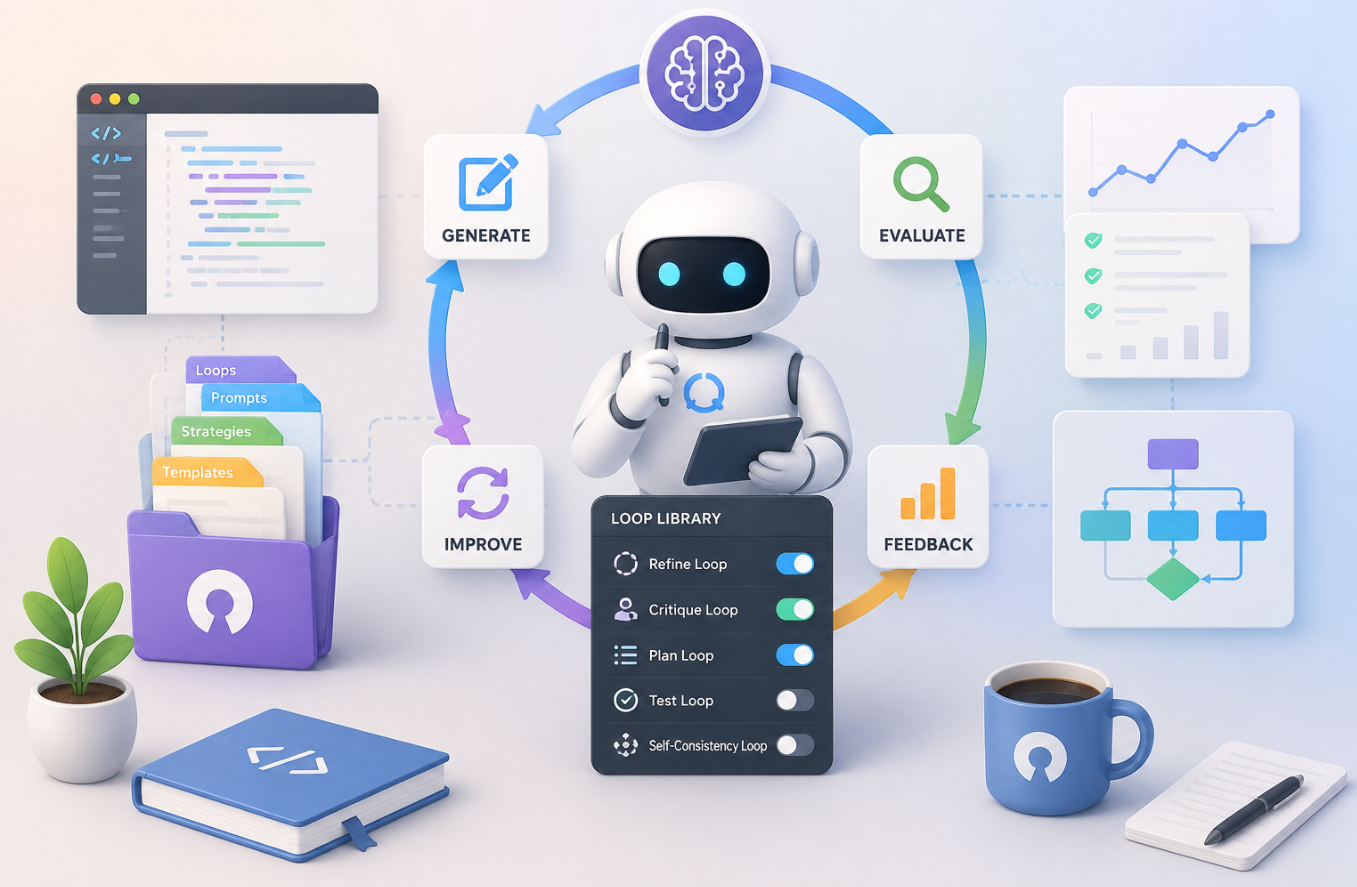
Loop Library is an open-source collection of reusable workflows for AI agents.
Instead of telling an AI what to do once…
you teach it how to improve repeatedly.
Think of it as giving an AI agent a playbook instead of a single instruction.
Instead of this:
Improve my website.You give it something like this:
Find the slowest page.
Improve only that page.
Measure the speed again.
If performance improved,
keep the change.
If not,
undo it.
Repeat until every page
meets the target
or no measurable improvement
can be made.
Notice the difference?
The second prompt contains feedback.
That’s what makes it a loop.
A Loop Is Just Four Questions
Every good loop answers four simple questions.
1. What are we trying to accomplish?
Example:
Reduce page load time
below 1 second.
2. How do we know it worked?
Example:
Run Lighthouse.
Performance Score ≥ 95.
Without verification…
the AI is simply guessing.
3. What should happen next?
If the result improved…
continue.
If it got worse…
revert the change.
If nothing changes…
try another optimization.
That’s real iteration.
4. When should the AI stop?
A loop must always have boundaries.
For example:
Stop when:
✓ Every page scores above 95
OR
✓ Three consecutive attempts
produce no measurable improvement
OR
✓ Human approval is required
Without a stopping condition…
an agent can wander forever.
Why This Is Better Than Normal Prompting
Imagine asking an intern:
“Keep improving the website.”
What does that actually mean?
Improve what?
When should they stop?
How do they know they’re succeeding?
A loop removes all the ambiguity.
It replaces vague instructions with measurable progress.
Instead of confidence…
the AI relies on evidence.
Think Like a Programmer
Developers already use loops every day.
For example:
while tests_are_failing():fix_bug()
    run_tests()
    if tests_pass():
        break
That’s a feedback loop.
Loop Library applies the exact same idea to AI prompting.
Instead of repeating code…
you’re repeating decision-making.
The Companion Skill: Loopy
Loop Library also includes an optional AI skill called Loopy.
The library is simply a website that stores published loops.
Loopy is what helps an AI agent use those loops effectively.
Think of it like this:
Loop Library
        ↓
Stores reusable loopsLoopy
        ↓
Finds
Creates
Repairs
Runs
Improves
Publishes
those loops
You don’t need Loopy to browse the library.
But installing it gives your AI assistant guided workflows for working with loops.
What Can Loopy Actually Do?
It can take several different paths depending on your goal.
For example…
1. Discover Repeated Work
Suppose your repository contains the same maintenance task repeated over and over.
Loopy can analyze your project and identify recurring work.
Example request:
Analyze this repository
for work we've done repeatedly.
Turn the best candidate
into a reusable loop.
Instead of copying prompts every week…
you create a workflow once.
2. Find Existing Loops
Maybe someone has already solved your problem.
Ask:
Find a loop
for improving test reliability.
Loopy searches the live catalog and recommends existing loops. No need to reinvent the wheel.
3. Repair Weak Loops
Suppose you already wrote this:
Keep improving
our documentation.
That’s vague.
Loopy can audit it and strengthen it.
It might transform it into something like:
Review one documentation page.
Run the documentation tests.
Fix broken examples.
Verify links.
Measure documentation coverage.
Repeat until all pages pass.
4. Adapt Existing Loops
Not every project works the same way.
Maybe your repository uses:
- GitHub Actions
- Jest
- Playwright
- Docker
- Kubernetes
Loopy can adapt a published loop to fit your tooling.
5. Create Brand-New Loops
If the library doesn’t have what you need…
Loopy interviews you.
One question at a time.
For example:
What are you trying to accomplish?
Then…
How do you define success?
Then…
What should the AI measure?
Eventually it builds a new loop tailored to your workflow.
6. Run the Loop
Once a loop exists…
Loopy can execute it.
It doesn’t simply keep making random changes.
Instead it follows a bounded cycle.
Observe
↓
Act
↓
Measure
↓
Learn
↓
Repeat
Every pass includes evidence. Every pass has limits.
7. Debrief
After execution finishes…
Loopy produces a receipt explaining:
- what changed
- why it changed
- whether it succeeded
- why it stopped
Then it suggests the smallest improvement backed by evidence.
That’s much more useful than:
“Looks better.”
8. Save Project Loops
Suppose you discover an excellent workflow.
You can save it into your project.
LOOPS.mdLater…
Your AI agent can automatically reuse that workflow.
Your project slowly builds its own library of proven workflows.
9. Publish New Loops
If you’ve created something generally useful…
Loopy can prepare it for publication.
Before publishing it checks:
- overlap with existing loops
- verification quality
- stopping conditions
- safety boundaries
Nothing gets published automatically. Human approval is always required.
Why This Matters
Most AI prompts are disposable.
You write them once.
Forget them.
Write another one tomorrow.
Loop Library encourages a completely different mindset.
Instead of writing prompts…
you build reusable systems.
Instead of asking:
Can AI solve this?
You ask:
Can AI reliably improve this until evidence says it’s finished?
That’s a much more powerful question.
Example
Traditional prompt:
Improve test coverage.Loop version:
Measure current test coverage.
Find the module
with the lowest coverage.
Add focused tests.
Run the test suite.
Measure coverage again.
Keep the change only
if coverage increases
without introducing failures.
Repeat until:
Coverage exceeds 90%
or
No measurable improvement
is possible.
This isn’t just a better prompt.
It’s a reusable engineering workflow.
Final Thoughts
As AI agents become more autonomous, simply giving them tasks won’t be enough.
They need structured ways to evaluate their own work, learn from each iteration, and know when to stop.
That’s the core idea behind Loop Library.
It’s not another prompt collection.
It’s a framework for turning one-off instructions into repeatable, evidence-driven workflows.
메타데이터
- post_id
- 8ac80ce59d71
- slug
- stop-writing-ai-prompts-this-open-source-loop-library-teaches-ai-agents-to-improve-themselves-8ac80ce59d71
- url
- https://medium.com/coding-nexus/stop-writing-ai-prompts-this-open-source-loop-library-teaches-ai-agents-to-improve-themselves-8ac80ce59d71
- canonical_url
- https://medium.com/coding-nexus/stop-writing-ai-prompts-this-open-source-loop-library-teaches-ai-agents-to-improve-themselves-8ac80ce59d71
- author_url
- https://medium.com/@codebun
- status
- ok
- fetched_at
- 2026-07-08 22:18:54