What a View! Benchling Custom Views
Better Benchling Insights SQL maintainability via Custom Views
What a View! Benchling Custom Views
Better Benchling Insights SQL maintainability via Custom Views

A moon with a view. Credit: NASA. Earthset from Artemis II
Benchling Insights Dashboards are a powerful way to expose our structured data that we’ve worked hard to capture. After all, if we don’t pull out our data for analysis and insights there was little point in capturing it in the first place. Insights Dashboards are handy since they are integrated and users don’t need to jump to a separate reporting tool to query their data for many reporting and dashboarding use cases. One of my favorite uses for Insights Dashboards (that I find is quite underutilized) is embedded dashboards where an Insights Dashboard can be attached to a schema and creates a schema level “Dashboard” tab in the entity viewer (parameterized by the entity being viewed).
Along with all this goodness there has been a critical historical challenge for maintaining the SQL that backs these dashboards. Consider a dashboard with 6 blocks where each is merely a variant of a primary query. A simple example is if I have a query that I want to view as a table in one block and a bar graph in another. Same data, different presentations. Similarly, I may want to have different blocks show different sorts or filters on the same core dataset.
In the past, this meant that I’d need to create a CTE (Common Table Expression) for my core query and paste that into each block. If I ever found a bug in the CTE (I may have had one or two in my lifetime) or if needs evolved (shockingly that happens too), I needed to manually edit each block or carefully replace a large block of SQL without disturbing the block-specific parts. This is of course anathema to a software engineer, but we had no other option. Without custom views we have no choice but to violate the DRY (Don’t Repeat Yourself) principle.
This is why I was so excited to see that Benchling recently delivered support for Custom Views within Insights Dashboards. Now I can create a custom view that contains a core CTE and just reference it in each block like a normal table or view. If I need to update or fix a view, I do it in one place, the way nature intended.
There are some nuances and tricks to get the most out of views. The rest of this post will walk through those details so you can quickly be effective and productive using views and become a View Master :-).

View-Master (Wikipedia, CCO)
Creating a view
In this first GA release, you create your view using an Insights Dashboard block. I recommend you use a dedicated block for your view and don’t try to also use the block for other purposes (i.e., presenting results). This is important for maintainability as will become evident as you see how view management works in this first release. (There will be improved view creation and management features in the future.)
Create the block that will represent your view and name it to make it clear that this is a view management block (e.g., “View definition: antibody_concepts_and_batches”). The “View definition:” prefix is a style choice, but it’s handy to have a consistent convention to identify these view-creation blocks.
Create your modularized query. This can be a direct SELECT query or you can create one or more CTEs. If you do use CTEs, make sure that the final output of the query is a single SELECT (e.g., SELECT * FROM my_cte). I like to use a CTE in all cases and then just tack on a SELECT statement at the end. This way, you can more easily test usage of your view and comment in/out the test code that makes use of the main CTE. Eventually this “test code” can be copied out to create the blocks that will use your view. Note that the entire contents of the block will be used to create the view; there is no way to select part of the block’s SQL or anything like that. Also, while you may have multiple CTEs, the block must resolve to a single output SELECT statement.
Referenced table (e.g., some_schema$raw) and built-in and custom views (e.g., some_schema) must have a namespace prefix even if you only have a single registry. Therefore, for my registry that has a ‘go2’ prefix I would need to use **go2.**some_schema$raw
Create the view. Select the block menu option “Save as a custom view”. Set the “Name” to be a valid PostgreSQL identifier (all lowercase, no spaces, etc.). You should also set a clear “Description” value for proper documentation and maintainability.
Using views
Now that you have a brand spanking new view, you can use it just like any other table or built-in view. For example, SELECT * FROM custom_views.my_view. Note that all custom views must use the custom_views namespace prefix.
AI use of views
I previously recommended that you create a good Description for your view and not just skip that. Another reason to create a good Description is that it’s likely that in the future (if not already) Benchling AI will inspect this value to decide if this view will be helpful for a query design.
A view can be a powerful way to help Benchling AI get more effective results faster. It’s a way to memorialize your knowledge of entity relationships and what users/analysts need to see. There’s no need to make the AI guess (and do this repeatedly) when you have some insights that you can codify as a view.
Once you have a some custom views, you’ll want to help Benchling AI know about these. Maybe Benchling does or will peek at the Description value, but here are some additional suggestions that are more deterministic.
- Add references to your custom views in your AI settings for chat “guidelines.”
- Add references in your custom “Skills” where applicable.
- Create a notebook entry that is your catalog of your custom views with declarative statements stating when to use each and what each does. Then add a chat guideline in the AI setting that let’s the AI know about the entry. For example: “When designing database queries, first read the notebook entry your_entry_reference to learn about the available custom views and prefer their use over direct queries when applicable.”
Managing views
You have some choices for how to manage the blocks that you use to create your views. This will vary by your use cases and convention. Ideally, you should pick a convention (possibly per use case) and stick to it so others that come after you can leverage and maintain what you’ve created.
- Keeping the view block in the consuming dashboard is likely what you’ll do as you first start exploring views since it’s the path of least resistance. This is fine, but consider if this will be confusing or noisy for users consuming your dashboard since the view block provides them no benefit.
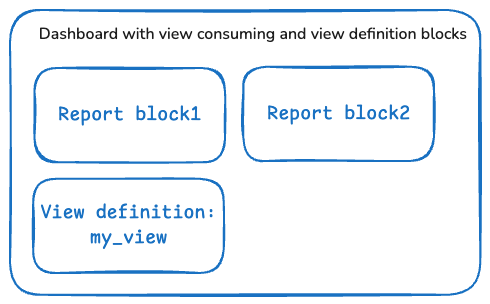
- You can delete the view definition block once the view is created. This cleans up the dashboard, but the interface to view existing views is limited. To see a view, you can copy it to your clipboard from the Schema browser. You can also peek into the Warehouse using a database tool, but resorting to a reverse engineering function is not ideal. Note that currently views are not editable. If you want to edit, you’ll need to know what was in the view and then recreate the view. This is another reason why deleting the block is not a good idea unless you record the SQL elsewhere (or are okay with copying to clipboard from Schema browser).
- My best practice and strong recommendation (whether or not views are used) is that all admin-managed dashboards should be maintained in git with metadata (I have a pattern for this that I’ll blog about when I get a chance). If you do this, then deleting the block is a reasonable practice since you have git as your source of truth. Another reason to maintain the source of truth in git is that Insights Dashboard SQL and now Custom Views are among the very few things in Benchling that are truly deletable (and unrecoverable).
- One final option to consider is to create one or more dashboards that are only used for creating views. These are not user facing and just give you a home where each block is a view that was created. These dashboards become your directory of views. If you don’t use git, this is probably a good idea. That said, just use git, pretty please.
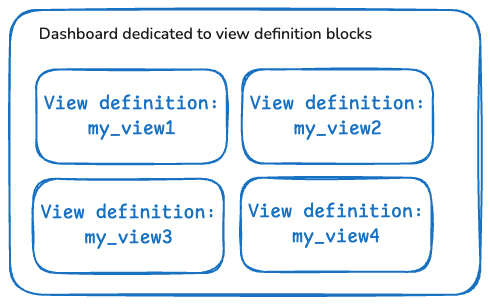
Directory of views (which in turn can optionally be manually backed by git)
Using Parameters with views
Parameter substitution is a critical component of creating Insights Dashboards. However, parameter substitution (e.g., {{My Parameter}}) cannot be used in views. This is a significant limitation if you are trying to convert an existing query that already has embedded parameters in inner and precursor SELECTs and CTEs. The fix requires rewriting your query so that the parameter-based filtering only occurs in the final SELECT statement and not inside the view at all. Keep this in mind if you decide to update your existing queries to use views. I have some complex queries that are begging to be carved into views, but I decided the effort and risk are not worth it given the fundamental changes that would be required to extract the parameters to be outside the views.
There can also be performance challenges due to the current lack of parameter support. If all filtering can only occur at the final output stage, you don’t have the opportunity to optimize by ensuring that your initial and intermediate result sets are reduced. If your row counts and JOIN complexity are modest, this won’t be an issue. For very large data sets, you’ll need to decide if the performance is acceptable. Sometimes you can accommodate this limitation by breaking apart a larger view into multiple composable smaller views that are assembled in the final reporting block.
In any event, as you design your queries, keep this limitation in mind from the start since it directly affects your architecture. Also, if you use an AI agent to help write your SQL, then your rules and prompts should highlight this limitation so you don’t get designed into a corner. This also means thinking ahead about what you might want to parameterize since retrofitting later may not be possible if it was not part of the core design.
It depends (views may be dropped)
Views of course depend on tables and other views. This means that if someone makes a schema change to an upstream dependency, your view will no longer be valid. In this case Benchling drops your view and will send you an email notification. You’ll then need to recreate your view and apply appropriate edits to account for the upstream changes. Here’s another key reason to think about how you want to manage your source of truth as discussed above (did I mentioned git already?).
There are times when there’s an upstream dependency change but in practice it won’t affect the function of the view. In these cases (I don’t have enough experience to say if always or just sometimes) Benchling may still drop your view and notify you. Here again, you’ll need to recreate the view. Benchling’s near-term roadmap includes a plan to automatically recreate these “safe to recreate” views that are still valid and need no human intervention.
Recreating views will not affect the consuming queries. They are just referencing the view name. When the view is recreated the consuming queries will begin to work again (assuming that the final SELECT output from your view does not change).
Additional tips & tricks
- Namespace prefixes. Since table and view references in your view definitions must use namespace prefixes, this means that you need to perform global search and replace when deploying to different tenants. I recommend creating a shell script or alias or Makefile to automate the replacement. If you maintain your SQL in git, then this takes two seconds. If not…
- View column names. The column names that are output from the final SELECT statement must be valid PostgreSQL identifiers. For example,
"Molecular Weight"is not valid (even if quoted) butmolecular_weightis. This only applies to the output of the view’s SELECT. The final consuming query can still use quoted strings for user-friendly display names. - Warehouse latency. A newly created view might take a minute or two to appear in the Warehouse.
- Finding new views. You need to refresh your page to get a newly created views to appear in the “Schema browser.” Or select the “Refresh custom view status” icon on any custom view in the Schema browser and that will refresh all views and bring in your new view.
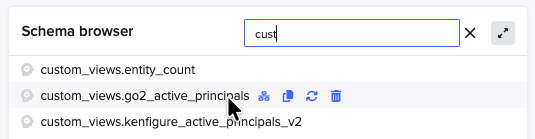
Schema browser in SQL editor is where you list your views
- Deleting views. To delete a view, find the view in the Schema browser and hover over the view. Click the trash can icon to delete the view (there is no undo — another reason you should be using git to manage your source code). Hint, type “cust” in the search panel for the Schema browser to quickly find custom views (useful if your registry namespace is lexicographically less than custom_views and they appear at the end of your listing).
- Direct Warehouse access. If you are using a database tool to view schemas in the Warehouse, you can find all your views under the
custom_viewsnamespace. Opening such views will show the records just like any other table or view. If your tool supports it, you can also see the DDL for the view this way (if the namespace is unambiguous, the prefixes might be stripped in the DDL even though Benchling seems to require them at definition time). - Nested views. Views may reference other views (but don’t create circular references or you might trigger a nuclear meltdown).
- Finding the view Description. To see the Description of the view, click on the view in the Schema browser to show the preview. Then hover over the info icon to see the description tooltip.
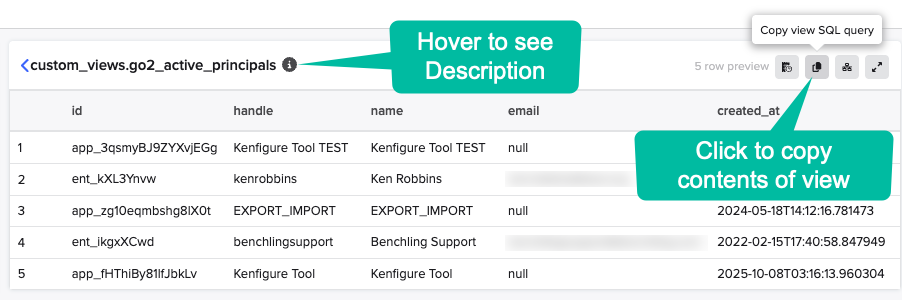
Click into a view to see the preview, see the Description, and to see the contents (albeit by copying to your clipboard)
- Views are available to all. All users can use your views and see their contents. Access to data output by views is still limited by their permissions just like any other query.
Enhancement requests
This of course a first release and for sure the team is hard at work anticipating our needs. That said, it’s good to shine the light on some early impressions for enhancement needs. I’ve shared these with Benchling and have added their roadmap comments where known.
- Parameter support would be a major functional improvement to keep the power of parameters, to keep queries performant, to keep queries simpler, and to support the needs of existing queries that have embedded parameters that are hard to extract without re-writing the queries from scratch. This is at least in part on the roadmap.
- View editing is really a table stakes feature, and we shouldn’t need to copy, delete, re-create just to make edits to views. I’m happy to have v1 without waiting for editing capability, but hopefully editing will be a fast follower. This is on the medium-term roadmap.
- Views as first class objects. For a v1, creating the views based on the contents of a block is a good start, but really, we want views to be first class objects that we can list, create, edit, and archive. It would also be ideal for views (and all SQL for that matter) to be backed by our own git repos. If views are first class objects, then they should be made available to Benchling AI to discover preferentially (obviating the need for my catalog hack above).
- Creating a view from a selection. It would be handy to create a view from a selection since it’s common to create a CTE and then decide that it’s done and really should be a view. This is on the near-term roadmap.
Summary
Custom Views is a powerful and long desired feature that will help you create more maintainable and consistent queries and spend less time doing so. They can also provide direct benefit to Benchling’s AI agents by following my guidance. While simple in concept there are plenty of nuances to working with Custom Views. The goal of this post was to be a comprehensive resource to take the guesswork out of using views and help you become a view master (yeah, that’s right, I’m calling back to that since I’m so proud of myself).
I hope you find this useful and that I’ve made it easy to reduce to practice! Please let me know what you want to hear about next. Be sure to “follow” to be notified of new articles.
메타데이터
- post_id
- 8b09ee40dfaf
- slug
- what-a-view-benchling-custom-views-8b09ee40dfaf
- url
- https://medium.com/benchling-bistro/what-a-view-benchling-custom-views-8b09ee40dfaf
- canonical_url
- https://medium.com/benchling-bistro/what-a-view-benchling-custom-views-8b09ee40dfaf
- author_url
- https://medium.com/@kenrobbins
- status
- ok
- fetched_at
- 2026-06-09 15:37:30