Chief of Staff Executive Briefing Agent: Enterprise-scale layered architecture for automated…
Executive teams can often find themselves consolidating CRM records, revenue metrics, product usage insights, and strategic positioning…
Chief of Staff Executive Briefing Agent: Enterprise-scale layered architecture for automated intelligence generation

Photo by Zach M on Unsplash.
Executive teams can often find themselves consolidating CRM records, revenue metrics, product usage insights, and strategic positioning into a unified narrative, which has typically required manual coordination across multiple systems. The Chief of Staff Executive Briefing Agent addresses this persistent enterprise challenge: transforming fragmented operational, financial, and AI adoption data into coherent executive intelligence for high-stakes engagements. This system replaces manual aggregation with contract-bound orchestration. Users request a briefing through natural language, and the platform generates an executive-ready document through governed data consolidation, deterministic SQL aggregation, stateless service orchestration, and controlled presentation workflows.
Rather than relying on probabilistic prompt-based generation, the architecture enforces explicit execution boundaries across four layers — foundation, data, service, and experience — ensuring reproducibility, auditability, and performance within enterprise-grade security constraints.
This article reflects the design, architecture, and implementation of a solution led by David Yao, Juhi Singh, Kiran Butti, Michael Davidson, Nisha Ramkumar, Amal Nair, Kunal Verma , Jason Yang as part of an AI incubation program driving AI-first innovations and Customer Zero solutions across the Microsoft ecosystem. It shares key learnings and practical insights from building and operationalizing enterprise-scale AI systems.
This article is designed for enterprise architects, AI engineers, and platform leaders responsible for designing, governing, and scaling deterministic AI systems within large organizations, and who want to know how to build deterministic, enterprise-scale AI systems using a layered architecture that separates data consolidation, SQL-based aggregation, stateless orchestration, and conversational workflows.
Solution design overview
The Chief of Staff Executive Briefing Agent implements a four-layer orchestration architecture that provides clear separation of concerns and enables deterministic execution at enterprise scale across multiple Azure services and security boundaries. The four layers include:
- Foundation layer: Microsoft Fabric Lakehouse for governed data consolidation.
- Data layer: Fabric SQL (Warehouse / SQL Endpoint) for operational stored procedures and aggregation.
- Service layer: FastAPI orchestration engine hosted in Azure Functions.
- Experience layer: Copilot Studio conversational workflow and intent mediation.
This architecture forms a directional intelligence pipeline: Data is curated and governed at the foundation, aggregated deterministically in SQL, orchestrated through domain logic in the service layer, and presented through natural language interaction at the experience layer. Each layer maintains explicit contracts to adjacent layers, ensuring that enterprise AI enhances rather than complicates decision-making processes.
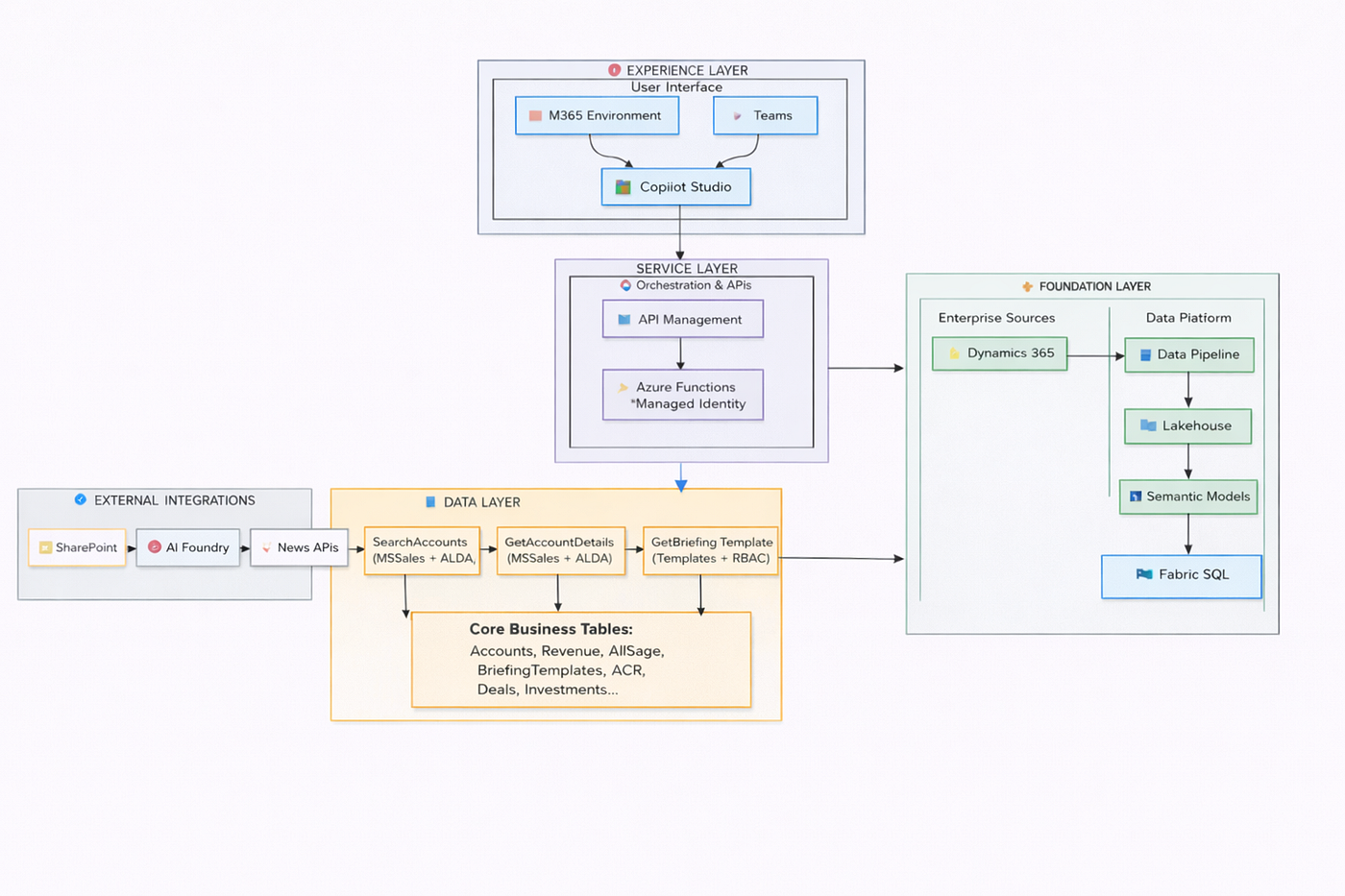
Solution flow diagram
Foundation layer: Governed enterprise data consolidation
The foundation layer uses Microsoft Fabric as a unified analytics platform and serves as the single source of truth for account-related information, financial data, usage metrics, and historical trend analysis. This layer follows a simple principle: Store data once and use it many times to avoid duplication across systems.
The data pipeline operates on a daily refresh schedule, systematically ingesting and consolidating enterprise data from Dynamics 365, financial systems, and external APIs. This scheduled approach provides predictable processing windows while ensuring all enterprise systems complete daily operations before consolidation begins.
The lakehouse architecture stores consolidated data in its native format while maintaining data lineage and governance standards. Refined datasets are then transferred to Fabric SQL, which serves as the high-performance operational query layer with optimized data structures designed for executive briefing generation patterns.
Data layer: The operational intelligence engine optimized for API consumption
The data layer transforms curated foundation data into deterministic, low-latency query contracts optimized for executive briefing generation, enforcing strict aggregation boundaries and performance guarantees essential for executive responsiveness.
Architectural design
Fabric SQL Warehouse operates as a high-performance relational interface that encapsulates all briefing-relevant data operations within stored procedures. The service layer does not query tables directly, ensuring that complex cross-table joins, aggregation semantics, and business logic execute within the database in the data layer rather than in application code. This approach enables predictable response times while supporting enterprise-scale data volumes.
The architecture prioritizes executive briefing performance through SQL structures optimized for operational queries rather than analytical exploration. This design supports deterministic joins for consistent results, query plan reuse for predictable performance, parameterized execution for security, and encapsulated business aggregation for maintainable logic.
Schema design philosophy: Query-first optimization
The schema is optimized for query patterns, not theoretical normalization purity. The core table design prioritizes the Account entity as the primary clustering structure, with supporting tables organized to enable efficient joins through the business identifier (TPID).
     --Accounts Table - Primary Business Entity

CREATE TABLE [aieo].[Accounts] (

    [Id] INT IDENTITY(1,1) PRIMARY KEY,

    [TPID] BIGINT NOT NULL,

    [AccountName] NVARCHAR(255) NOT NULL,

    [AccountNumber] NVARCHAR(50),

    [SearchTokens] NVARCHAR(500),

    [Segment] NVARCHAR(100),

    [Industry] NVARCHAR(100),

    [ACR_FY25] DECIMAL(15,2),

    [RevenueRank] INT,

    [CreatedDate] DATETIME2 DEFAULT GETUTCDATE(),

    [LastSync] DATETIME2,

    [IsActive] BIT DEFAULT 1

);


CREATE CLUSTERED INDEX IX_Accounts_TPID ON [aieo].[Accounts]([TPID]);

CREATE NONCLUSTERED INDEX IX_Accounts_Name ON [aieo].[Accounts](
The Accounts table serves as the central entity with TPID as the primary clustering key, enabling O(log n) retrieval patterns for the most frequent account-specific queries while supporting both direct TPID lookups and name-based searches.
Supporting tables
The following represents a subset of key supporting tables that operationalize financial metrics, AI usage insights, and cross-system enrichment patterns within the executive briefing architecture.
-- Revenue Table - Historical and Forecast Data

CREATE TABLE [aieo].[Revenue] (

    [TPID] BIGINT,

    [FiscalYear] NVARCHAR(10),

    [RevenueType] NVARCHAR(20),

    [Amount] DECIMAL(15,2),

    [LastUpdated] DATETIME2

);

CREATE INDEX IX_Revenue_TPID_FY ON [aieo].[Revenue]([TPID], [FiscalYear]);
The Revenue table stores multi-year financial data with composite indexes optimized for time-series analysis and trend calculations essential for executive financial intelligence.
-- AI Usage Table - Product Adoption Metrics

CREATE TABLE [aieo].[AIUsage] (

    [TPID] BIGINT,

    [ProductCategory] NVARCHAR(50),

    [UsageLevel] NVARCHAR(20),

    [SeatCount] INT,

    [AdoptionRate] DECIMAL(5,2),

    [LastUpdated] DATETIME2

);

CREATE INDEX IX_AIUsage_TPID_Product ON [aieo].[AIUsage]([TPID], [ProductCategory]);
The AI Usage table captures product adoption metrics across different categories, enabling analysis of AI engagement patterns and technology adoption insights critical for strategic account planning.
Stored procedure strategy: Business logic in database
The data layer implements three core stored procedures that encapsulate all business intelligence generation within the database layer. SearchAccounts provides intelligent account discovery with revenue-prioritized ranking, GetAccountDetails performs comprehensive multi-source data aggregation for complete executive context, and GetBriefingTemplate manages role-based template authorization ensuring appropriate access controls. All operational retrieval logic is encapsulated in these stored procedures — the service layer invokes procedures only, with no dynamic SQL construction permitted.
--Account Search Procedure - Revenue-Prioritized Discovery

CREATE OR ALTER PROCEDURE [aieo].[SearchAccounts]

    @searchTerm NVARCHAR(255),

    @top INT = 5

AS

BEGIN

    SET NOCOUNT ON;


    DECLARE @likeTerm NVARCHAR(257) = '%' + REPLACE(REPLACE(@searchTerm, '[', '[[]'), '%', '[%]') + '%'


    SELECT TOP (@top)

        a.TPID,

        a.AccountName,

        a.AccountNumber,

        ISNULL(acr.ACR_YTD, 0) as ACR_YTD

    FROM [aieo].[Accounts] a

    LEFT JOIN [aieo].[ACR] acr ON a.TPID = acr.TPID

    WHERE

        a.AccountName LIKE @likeTerm

        OR CAST(a.TPID AS NVARCHAR) = @searchTerm

        OR a.AccountNumber LIKE @likeTerm

    ORDER BY

        ISNULL(acr.ACR_YTD, 0) DESC,

        a.AccountName ASC

    FOR JSON PATH;

END;
--Account Details Retrieval Procedure - Comprehensive Intelligence Aggregation
CREATE PROCEDURE [aieo].[GetAccountDetails]
(@TPID int)
AS
BEGIN
SET NOCOUNT ON;
SET TRANSACTION ISOLATION LEVEL READ UNCOMMITTED;
SELECT TOP 1
JSON_QUERY(ap.[AccountProfile]) AS [Account],
JSON_QUERY(ai.[AIUsage]) AS [AI],
JSON_QUERY(acr.[Data]) AS [ACR],
deal.[Deals.AgreementValue],
deal.[Deals.DealType],
deal.[Deals.Term],
deal.[Deals.Remaining],
deal.[Deals.EndDate],
ecif.[ECIF.Committed],
aco.[ACO.IncrementalRevenue],
aco.[ACO.Discount],
aco.[ACO.ACO],
JSON_QUERY(bot.[Data]) AS [BoT],
JSON_QUERY(inv.[Data]) AS [Investments],
JSON_QUERY(rev.[Data]) AS [Revenue]
FROM [dbo].[vw_Customer] P
OUTER APPLY (
SELECT TOP 1
a.[TPID],
a.[CRMAccountName] AS [AccountName],
a.[Segment],
a.[Industry],
a.[EOU],
a.[OU],
LOWER(TRIM(c.[Value])) AS [ATU_Manager.Alias],
aau.[Mail] AS [ATU_Manager.Email],
[dbo].[RemoveJobTitle](aau.[DisplayName]) AS [ATU_Manager.DisplayName],
NULLIF(TRIM(aau.[BusinessPhone]), '') AS [ATU_Manager.PhoneNumber],
JSON_QUERY([am].[Data]) AS [AM],
JSON_QUERY([atum].[Data]) AS [ATUM]
FROM [dbo].[vw_Customer] A
OUTER APPLY STRING_SPLIT(a.[AM], ',', 1) C
LEFT JOIN [cm].[vw_AAD_User] AAU ON LOWER(TRIM(C.[Value])) = LOWER(AAU.[UserPrincipalName])
WHERE A.TPID = P.TPID
) ap
WHERE P.TPID = @TPID;
END; --Template Management Procedure - Role-Based Access Control
CREATE OR ALTER PROCEDURE [aieo].[GetBriefingTemplate]
(
@UserAlias NVARCHAR(200),
@BriefingType NVARCHAR(200)
)
AS
BEGIN
SET @UserAlias = IIF(CHARINDEX('@', @UserAlias) > 0,
LEFT(@UserAlias, CHARINDEX('@', @UserAlias) - 1),
@UserAlias)
SELECT DISTINCT
[BriefingTemplateId],[TemplateDescription],[BriefingType],
[UserAlias],FullName,[Filename],[FileType],[PreviewFilename]
FROM [hr].[DimPerson] p
INNER JOIN [aieo].[ExecutiveOfficeMember] eom ON eom.[PersonnelNumber] = p.[PersonnelNumber]
INNER JOIN [aieo].[ExecutiveOffice] o ON o.[ExecutiveOfficeId] = eom.[ExecutiveOfficeId]
INNER JOIN [aieo].[BriefingTemplate] bt ON bt.[ExecutiveOfficeId] = o.[ExecutiveOfficeId]
UNION
SELECT DISTINCT
[BriefingTemplateId],[TemplateDescription],[BriefingType],
p.EmailName As UserAlias,p.FullName,[Filename],[FileType],[PreviewFilename]
FROM [aieo].[BriefingTemplate] bt
CROSS JOIN [hr].[DimPerson] p
WHERE bt.[UserAlias] = 'ALL' AND p.EmailName = @UserAlias
AND bt.BriefingType = @BriefingType;
END; Performance and security architecture
Transaction management includes SET NOCOUNT ON for performance optimization and SET TRANSACTION ISOLATION LEVEL READ UNCOMMITTED for read operations to avoid blocking. The JSON handling strategy leverages SQL Server’s native JSON_QUERY and FOR JSON PATH functions for efficient processing and direct database serialization.
The security model enforces parameterized execution exclusively, granting application service identity execute permissions solely on stored procedures with no direct table access permitted.
GRANT EXECUTE ON SCHEMA::[aieo] TO [service_identity];
 - No direct table access permitted
Service layer: stateless orchestration and execution boundary
The service layer implements pure data orchestration and focuses exclusively on data retrieval and template rendering without applying business rules. Each service is designed for single responsibility and loose coupling, ensuring clean separation between the data and presentation layers.
API contract surface and request validation
The FastAPI application exposes explicit REST endpoints with strongly typed contracts using Pydantic models.
- POST /api/briefing/generate — Primary briefing generation with comprehensive input validation
- GET /api/health — System status verification
- GET /api/templates — User-specific template availability
from pydantic import BaseModel
from typing import Optional
class BriefingRequest(BaseModel):
account_name_or_tpid: str
meeting_datetime: Optional[str] = None
meeting_objective: Optional[str] = None
ms_attendees: Optional[str] = None
template_type: Optional[str] = None
This model enforces strict input validation, type safety, automatic API documentation via OpenAPI specification, and a deterministic request structure. No unstructured input flows past this validation boundary.
Service layer execution model
The service layer executes a deterministic five-step process:
- Request validation: Pydantic models ensure type safety and input compliance.
- Account resolution: The system analyzes the input format to perform direct TPID lookups or call the SearchAccounts stored procedure for name-based searches.
- Concurrent data retrieval: The system executes the GetAccountDetails and GetBriefingTemplate stored procedures simultaneously using asyncio.gather() for optimal performance.
- Context assembly: Stored procedure results map directly to template-ready objects without intermediate processing.
- Template rendering: The system uses Jinja2 to generate executive documents with deterministic formatting.
This orchestration pattern guarantees that identical inputs produce identical outputs through asynchronous execution and connection pooling via the DatabaseService abstraction layer.
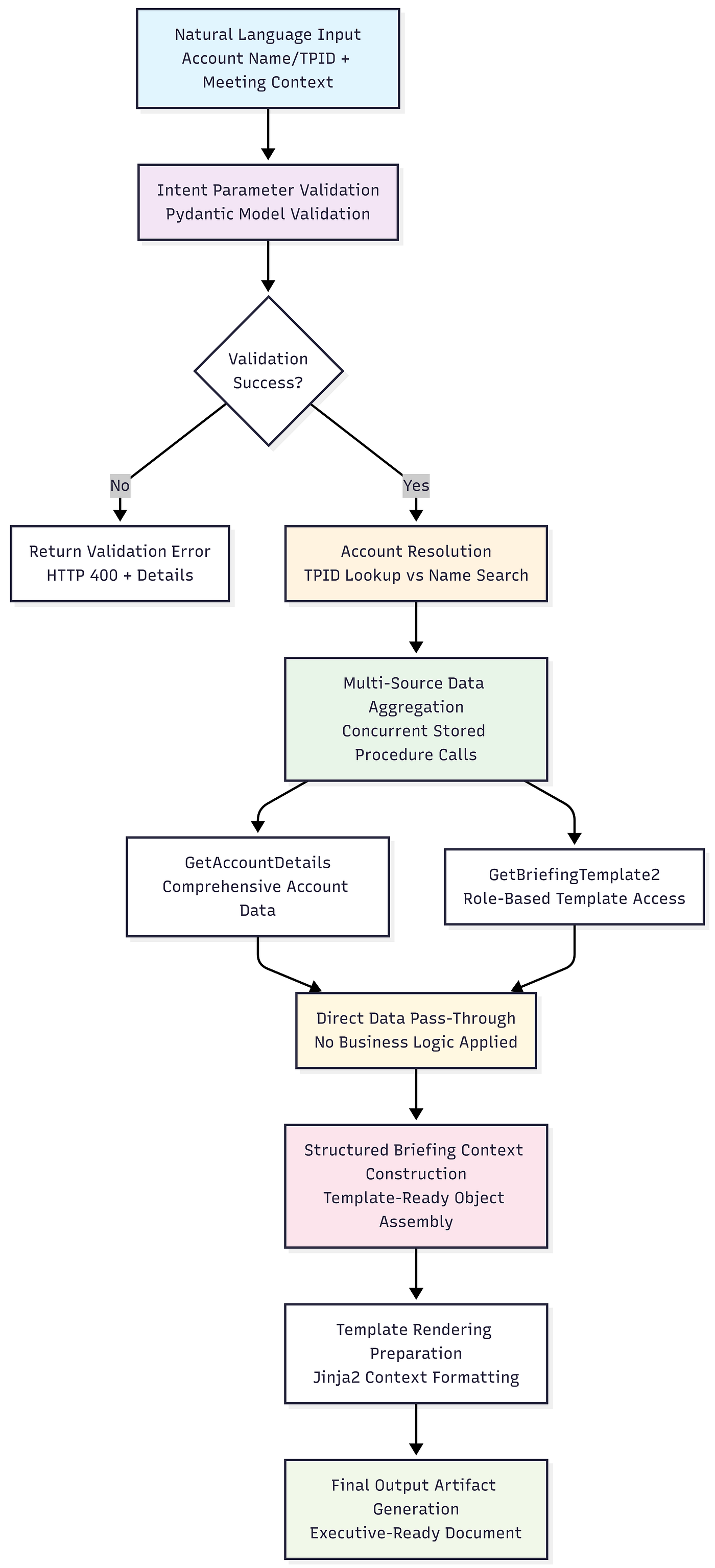
End-to-end deterministic pipeline for generating executive briefings, from input validation and data aggregation to template-driven document rendering.
Key architectural principles
The service layer architecture is governed by five principles that ensure maintainable, scalable, and predictable operations. No business logic in the service layer establishes that intelligence generation occurs exclusively within stored procedures, keeping the service layer free from business rules that complicate testing and maintenance. Pure data orchestration defines the service layer’s responsibility to coordinate data retrieval and template rendering without applying transformations or calculations. Direct context mapping requires stored procedure results to map directly to template context structures without intermediate processing, reducing the risk of semantic drift between the data and presentation layers. Deterministic processing guarantees that identical inputs produce identical outputs regardless of timing, infrastructure state, or external conditions. Finally, clean separation of concerns maintains strict boundaries: Data logic resides in SQL stored procedures, orchestration logic operates in Python FastAPI services, and presentation logic lives in Jinja2 templates.
Experience layer: Copilot Studio conversational intelligence engine
The experience layer transforms natural language executive requests into deterministic workflows using the AdaptiveDialog framework in Microsoft Copilot Studio, orchestrating account resolution, template authorization, external data integration, document generation, and multi-channel delivery.
The flow diagram below illustrates the complete conversational workflow from initial user request through final document delivery. It shows the sequential progression through account resolution, template authorization, external data integration, and multi-channel SharePoint delivery, with decision points and validation steps that ensure deterministic executive briefing generation across all conversation paths.
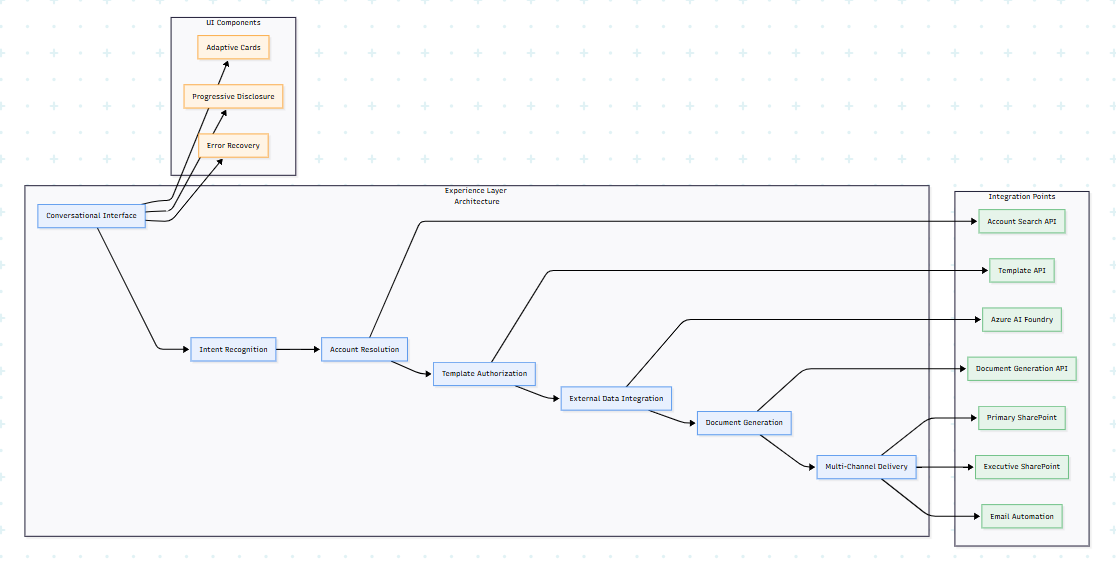
Experience layer flow for conversational executive briefing generation with UI components and integration services.
Core dialog configuration
This defines the conversational workflow with automatic input collection for account identification. It establishes trigger queries that initiate briefing generation and sets up the primary conversation entry point:
kind: AdaptiveDialog

inputs:

  - kind: AutomaticTaskInput

    propertyName: Account_Name_or_TPID

    name: Account Name or TPID

    description: The account/customer TPID (unique identifier) or name

    shouldPromptUser: true


modelDescription: Create briefing document to prepare for meeting with customer

beginDialog:

  kind: OnRecognizedIntent

  intent:

    displayName: Topic for creating briefing document to prepare for meeting with customer

    triggerQueries:

      - Generate a briefing document for account Accenture

      - I need a briefing for Amazon

      - Create briefing for Apple

      - I have a meeting with JPMorgan Chase at 4PM
Account resolution workflow
This uses IsNumeric() to intelligently classify input as direct TPID (numeric) or account name requiring search. This optimization reduces API calls and improves response time by bypassing search operations when possible:
- kind: SetVariable

  id: setVariable_IsNumeric

  variable: Topic.IsNumeric

  value: =IsNumeric(Topic.UserInput)


- kind: ConditionGroup

  id: conditionGroup_InputType

  conditions:

    - id: condition_IsTPID

      condition: =Topic.IsNumeric

      actions:

        - kind: SetVariable

          variable: Topic.Account_TPID

          value: =Topic.UserInput
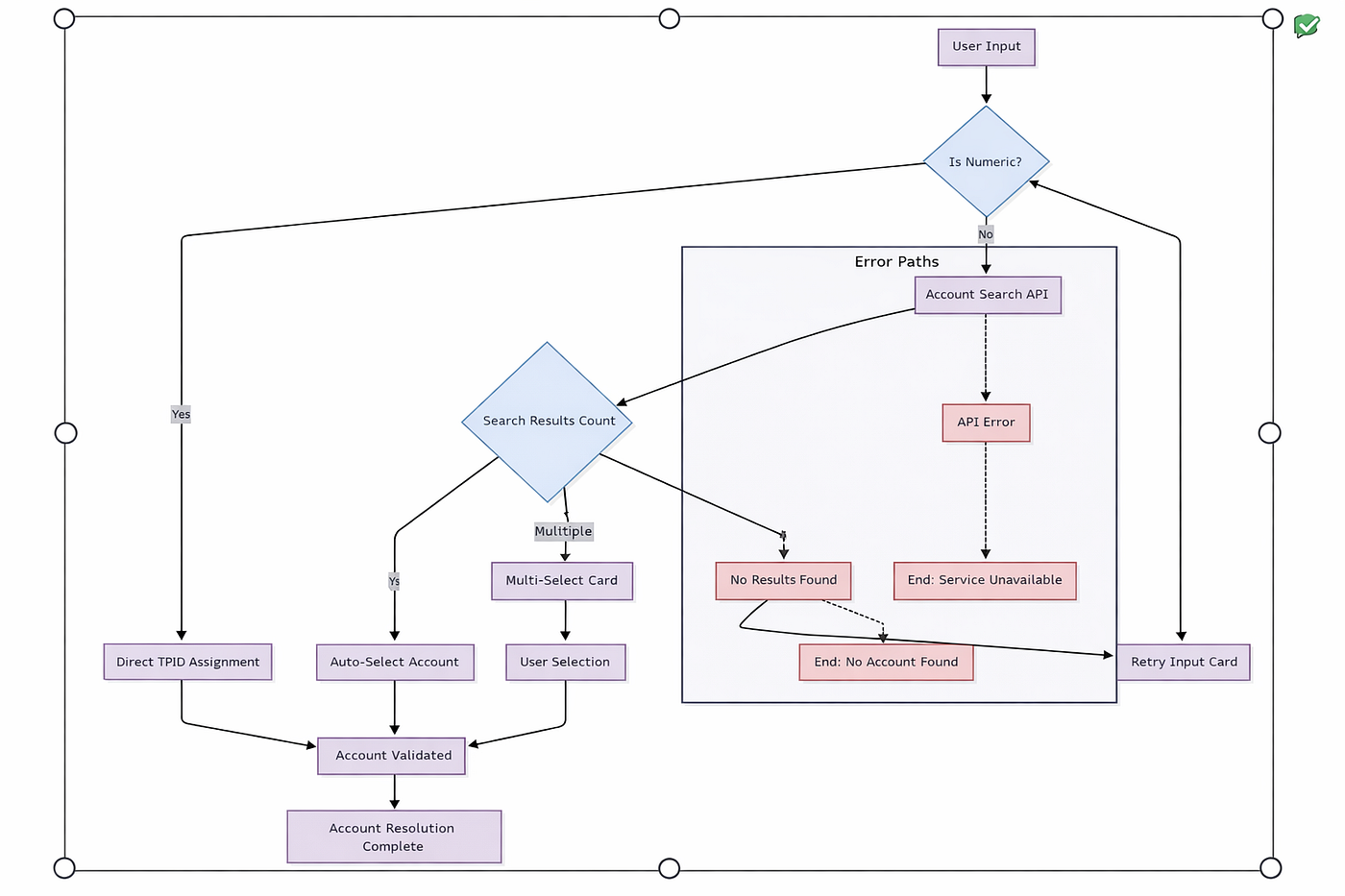
Account resolution logic with input validation, search disambiguation, and error handling.
Account search API integration
This calls the service layer’s SearchAccounts stored procedure through a REST endpoint for name-based lookup. It includes URL encoding for special characters, API authentication via subscription key, and response schema for automatic data validation:
- kind: HttpRequestAction

  id: httpRequest_SearchAccounts

  displayName: Search Accounts by Name

  url: =Global.ApiBaseUrl & "/api/mssales/search/" & EncodeUrl(Topic.UserInput)

  headers:

    Ocp-Apim-Subscription-Key: =Global.ApiKey

  response: Topic.SearchResults

  responseSchema:

    kind: Record

    properties:

      accounts:

        type:

          kind: Table

          properties:

            account_name: String

            tpid: String

      total_count: Number
Multi-account disambiguation card
This creates an interactive Adaptive Card with dynamic choice sets from search results using ForAll() function. It prevents conversations from stalling on ambiguous input while maintaining a smooth user experience through clear account identification with TPID display:
- kind: AdaptiveCardPrompt

  id: adaptiveCard_SelectAccount

  card: "=Concatenate('{

    \"$schema\":\"https://adaptivecards.io/schemas/adaptive-card.json\",

    \"type\":\"AdaptiveCard\",\"version\":\"1.5\",

    \"body\":[

      {\"type\":\"TextBlock\",\"text\":\"Multiple accounts found\",\"weight\":\"Bolder\"},

      {\"type\":\"Input.ChoiceSet\",\"id\":\"selectedAccount\",\"isRequired\":true,

       \"choices\":',

       JSON(ForAll(Topic.SearchResults.accounts,

         {title: Concatenate(account_name, \" (TPID: \", tpid, \")\"), value: tpid})),

       '}],

    \"actions\":[{\"type\":\"Action.Submit\",\"title\":\"Continue\"}]

  }')"
Template authorization and meeting details
This verifies user access to executive templates based on organizational role and executive office membership through the GetBriefingTemplate stored procedure. It uses principal name for identity verification, briefing type for filtering, and ensures security-first approach to template governance:
Template authorization API
- kind: HttpRequestAction

  id: httpRequest_GetUserTemplates

  url: =Global.ApiBaseUrl & "/api/briefings/templates?user_alias=" &

       EncodeUrl(System.User.PrincipalName) & "&briefing_type=Customer"

  headers:

    Ocp-Apim-Subscription-Key: =Global.ApiKey

  response: Topic.UserTemplates
Progressive disclosure meeting card
This implements progressive disclosure UI pattern with required fields visible and optional fields behind toggle actions. It reduces cognitive load while ensuring all necessary executive context is captured for briefing generation:
- kind: AdaptiveCardPrompt

  id: adaptiveCard_MeetingDetails

  card: "=Concatenate('{

    \"$schema\":\"https://adaptivecards.io/schemas/adaptive-card.json\",

    \"type\":\"AdaptiveCard\",\"version\":\"1.5\",

    \"body\":[

      {\"type\":\"TextBlock\",\"text\":\"Create Executive Briefing Document\",

       \"weight\":\"Bolder\",\"size\":\"Large\",\"color\":\"Accent\"},

      {\"type\":\"Input.Date\",\"id\":\"meetingDate\",\"isRequired\":true,

       \"label\":\"Meeting Date\"},

      {\"type\":\"Input.Time\",\"id\":\"meetingTime\",\"value\":\"09:00\"},

      {\"type\":\"Input.Text\",\"id\":\"msAttendees\",\"isVisible\":false,

       \"label\":\"Microsoft Attendees\"}

    ],

    \"actions\":[

      {\"type\":\"Action.ToggleVisibility\",\"title\":\"Additional Options ▼\",

       \"targetElements\":[\"msAttendees\"]},

      {\"type\":\"Action.Submit\",\"title\":\"Generate Briefing\"}

    ]

  }')"
External data integration and document generation
The flow diagram below illustrates the experience layer’s parallel data gathering workflow, where Copilot Studio simultaneously calls the Account Details API and Azure AI Foundry with 60-second timeouts to optimize performance. After collecting responses, the system assembles a structured JSON payload combining all data sources before calling the Document Generation API, demonstrating the self-contained validation and assembly operations that ensure deterministic briefing creation.
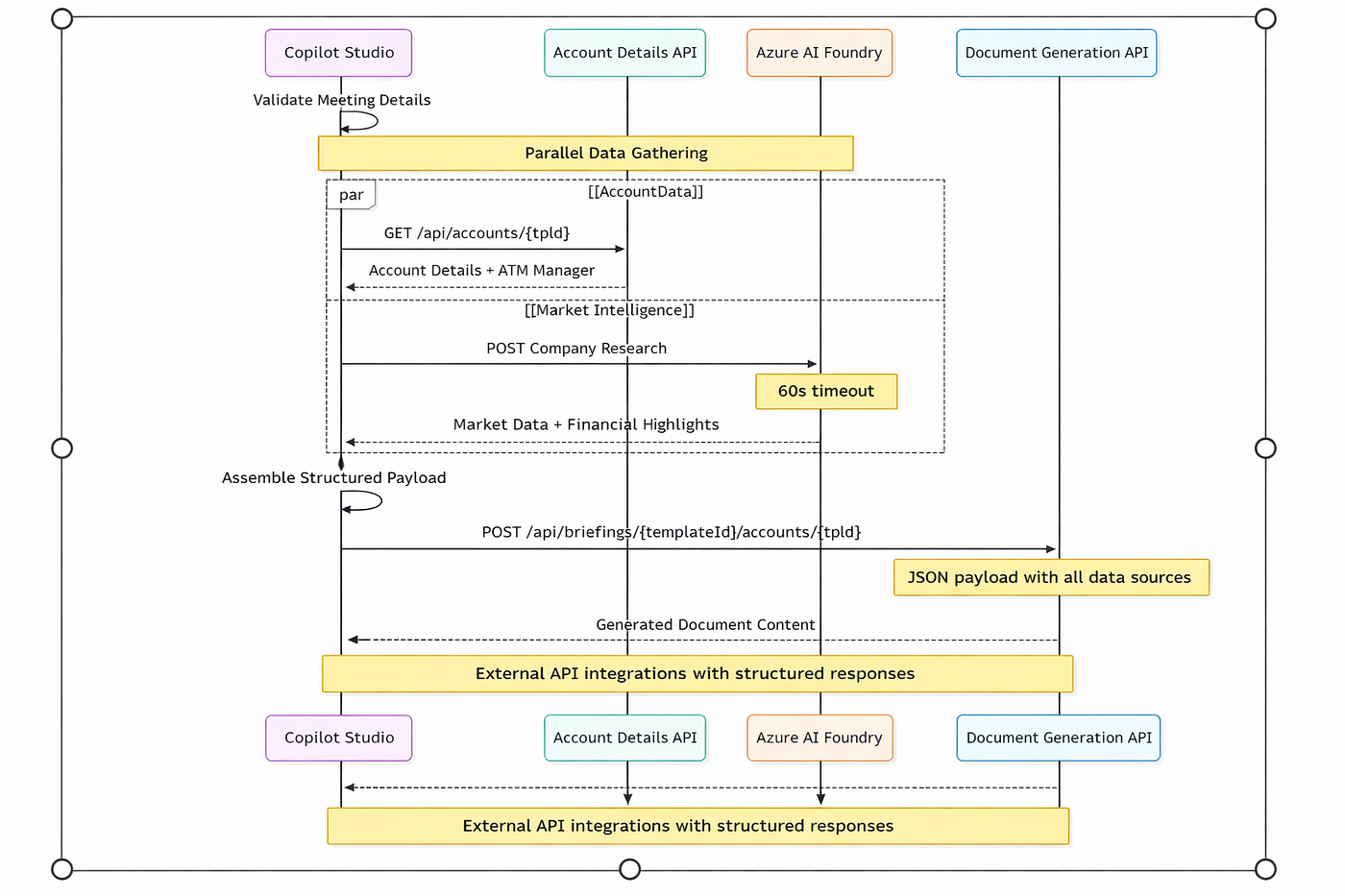
Parallel API orchestration for data aggregation and document generation.
Azure AI Foundry integration: Enterprise organizational intelligence
The Azure AI Foundry integration extends the briefing agent’s intelligence capabilities beyond external market data to include comprehensive organizational context through the M365 Researcher system. This component implements delegated Microsoft Graph API access patterns that search internal organizational knowledge across Outlook emails and Teams conversations while maintaining enterprise security boundaries and zero-trust architecture principles.

Backend service orchestration and API integration flow
M365 Researcher architecture: Delegated Graph access without secrets
The M365 Researcher implements a delegated authentication model that eliminates stored client secrets by leveraging Azure Logic App–managed connectors as first-party Microsoft applications with pre-consented delegated scopes. This architecture choice removes the complexity of app registration management while providing enterprise-grade security through Azure-managed token lifecycle and automatic refresh patterns.
The system operates through ephemeral Logic App creation that provides secure, time-limited access to user data through SAS-secured HTTP triggers. Each search operation creates a new Logic App instance, executes parallel data retrieval from Microsoft Graph, and immediately destroys the Logic App to prevent SAS URL replay attacks. This ephemeral pattern ensures that no persistent access tokens remain exposed while maintaining optimal performance through concurrent API calls.
// Ephemeral Logic App Security Pattern
const createSearchLogicApp = async (userAlias, searchQuery) => {
const logicAppName = `Researcher-${userAlias}`;
// Create Logic App with SAS trigger
const logicApp = await armClient.logicApps.createOrUpdate({
resourceGroupName: 'Azure_OpenAI',
workflowName: logicAppName,
definition: buildResearchWorkflow(userAlias)
});
// Execute search via SAS URL
const searchResults = await triggerLogicApp(logicApp.triggerUrl, searchQuery);
// Immediate cleanup for security
await armClient.logicApps.delete(logicAppName);
return searchResults;
};
Parallel data orchestration and Graph API optimization
The M365 Researcher implements sophisticated parallel data retrieval patterns optimized for Microsoft Graph API performance characteristics and rate limiting policies. The system executes email and Teams data gathering simultaneously while managing concurrency limits to prevent throttling across multiple user sessions.
Email data retrieval uses the Office 365 connector’s bulk fetch capability, retrieving the most recent 250 emails per user with client-side filtering to overcome Microsoft Graph API search limitations on message body content. Teams data collection implements a two-phase approach: Initial chat discovery through paginated API calls followed by concurrent message retrieval across individual chat threads with configurable concurrency limits.
# Logic App Parallel Execute Pattern

HTTP_Trigger_SAS_Secured:

  Email_Branch:

    - Get_Emails: Office365_Connector.Mail (top=250)


  Teams_Branch_Parallel:

    - Get_Teams_Chats_Page1: Teams_Connector.Chats (top=50)

    - Get_Teams_Chats_Page2: Teams_Connector.Chats (skip=50, top=50)

    - For_Each_Chat:

        concurrency: 10

        actions:

          - Get_Chat_Messages: Teams_Connector.Messages (top=50)

          - Append_Chat_Data: Variable_Accumulation


  Response_Assembly:

    - Combine: Email_Results + Teams_Results + Metadata

    - Return: JSON_Structured_Response
The typical execution pattern involves approximately 101 Microsoft Graph API calls per search operation: One email retrieval call, two Teams chat enumeration calls, and an average of 98 individual chat message retrieval calls. This approach maximizes data coverage while respecting Graph API concurrency limits and maintaining sub–60-second response times for executive briefing generation.
Per-user connection management and token lifecycle
The system implements per-user API connection resources that persist delegated OAuth tokens across multiple search sessions while maintaining strict security boundaries. Each user requires two managed connections: office365-{alias} for email access with Mail.ReadWrite scope and teams-{alias} for chat access with Chat.Read scope. These connections leverage Azure’s managed connector infrastructure for automatic token refresh and enterprise compliance.
Connection provisioning follows a consent-driven workflow where users authenticate once through Microsoft’s first-party OAuth experience, granting delegated permissions that persist until explicitly revoked. The Function App manages connection lifecycle through Azure Resource Manager APIs using managed identity authentication, eliminating any stored client credentials within the application layer.
// Per-User Connection Provisioning

const provisionUserConnections = async (userAlias) => {

    const connections = [

        {

            name: `office365-${userAlias}`,

            api: '/providers/Microsoft.PowerApps/apis/shared_office365',

            scopes: ['Mail.ReadWrite']

        },

        {

            name: `teams-${userAlias}`,

            api: '/providers/Microsoft.PowerApps/apis/shared_teams',

            scopes: ['Chat.Read']

        }

    ];


    for (const conn of connections) {

        await armClient.connections.createOrUpdate({

            resourceGroupName: 'Azure_OpenAI',

            connectionName: conn.name,

            properties: {

                displayName: conn.name,

                api: { id: conn.api },

                parameterValues: {}

            }

        });

    }


    return generateConsentUrls(connections);

};
Organizational intelligence synthesis through GPT-4.1
The M365 Researcher integrates the GPT-4.1 model from the Microsoft Azure OpenAI Service to synthesize raw communication data into executive-ready organizational intelligence. The AI processing pipeline transforms filtered email and Teams content into structured insights including stakeholder analysis, communication pattern recognition, and actionable intelligence relevant to executive briefing preparation.
The synthesis process implements prompt engineering patterns optimized for executive context, focusing on relationship mapping, project status identification, and strategic communication themes. The system generates structured JSON responses that integrate seamlessly with existing Jinja2 template rendering while maintaining consistent formatting standards across all briefing documents.
# Organizational Intelligence Synthesis

async def synthesize_organizational_context(filtered_data, account_context):

    synthesis_prompt = """

    Analyze the following organizational communications for executive briefing preparation:


    Account Context: {account_name}

    Email Communications: {email_count} relevant messages

    Teams Discussions: {chat_count} relevant conversations

    Generate executive intelligence focusing on:
    Financial performance, earnings trends, and capital allocation signals.
    Corporate strategy, market positioning, and competitive landscape.
    AI strategy, digital transformation initiatives, and cloud ecosystem alignment.
    Recent material developments (≤ 90 days) with actionable insights for executive engagement.

    Format as structured JSON with executive_summary, stakeholder_analysis, recent_activities, and recommended_actions.

    """


    response = await azure_openai_client.chat.completions.create(

        model="gpt-4-1106-preview",

        messages=[{

            "role": "system",

            "content": "You are an executive intelligence analyst."

        }, {

            "role": "user",

            "content": synthesis_prompt.format(**filtered_data, **account_context)

        }],

        temperature=0.1,

        max_tokens=2000

    )


    return parse_structured_intelligence(response.choices[0].message.content)
Enhanced experience layer integration
The M365 Researcher integrates into the existing Copilot Studio conversational workflow through parallel execution patterns that maintain optimal user experience while gathering comprehensive organizational context. The system executes organizational intelligence gathering simultaneously with standard account data retrieval and external market intelligence, ensuring that the additional organizational context does not have any impact on overall briefing generation performance.
# Enhanced Copilot Studio Parallel Execution

- kind: ParallelExecution

  id: parallelExecution_ComprehensiveIntelligence

  branches:

    - account_data:

        kind: HttpRequestAction

        url: =Global.ApiBaseUrl & "/api/accounts/" & Topic.Account_TPID

    - organizational_intelligence:

        kind: HttpRequestAction

        url: =Global.ApiBaseUrl & "/api/search?q=" & EncodeUrl(Topic.Account_Name) & "&alias=" & System.User.PrincipalName

        requestTimeoutInMilliseconds: 60000

        continueOnError: true

    - market_intelligence:

        kind: HttpRequestAction

        url: =Global.FoundryBaseUrl & "/bingnews/api/AgentFunction"


- kind: SetVariable

  id: setVariable_CombinedIntelligence

  variable: Topic.BriefingContext

  value: ={

    account_details: Topic.AccountData,

    organizational_context: Topic.OrganizationalIntelligence,

    market_insights: Topic.MarketIntelligence

  }
Enterprise governance and compliance architecture
The M365 Researcher implements comprehensive governance controls that align with enterprise compliance requirements while maintaining user privacy and data protection standards. The system enforces scoped data access where users can search only their own email and Teams communications through delegated permissions, preventing cross-user data access and maintaining strict data boundaries.
Audit and compliance features include comprehensive logging of all Microsoft Graph API calls with user context, search parameters, and result metadata. The system implements configurable data retention policies with automatic cleanup of stale user connections after configurable periods of inactivity, typically 80 days. All processing occurs within Azure tenant boundaries, with data residency controls ensuring compliance with organizational data governance policies.
// Enterprise Governance and Cleanup

const implementGovernanceControls = async () => {

    // Automated stale connection cleanup

    const staleThreshold = 80; // days

    const allConnections = await listManagedConnections();


    const staleConnections = allConnections.filter(connection => {

        const lastUsed = parseISO(connection.properties.lastConnection);

        const daysSinceUse = differenceInDays(new Date(), lastUsed);

        return daysSinceUse > staleThreshold;

    });


    // Compliance audit logging

    for (const connection of staleConnections) {

        await auditLogger.log({

            action: 'CONNECTION_CLEANUP',

            userAlias: connection.userAlias,

            reason: 'AUTOMATED_GOVERNANCE',

            retentionPolicy: `${staleThreshold}_DAYS_INACTIVE`,

            timestamp: new Date().toISOString()

        });


        await deleteUserResources(connection.userAlias);

    }

};
Performance optimization and fault tolerance
The M365 Researcher architecture implements sophisticated performance optimization patterns that balance comprehensive organizational intelligence gathering with executive briefing generation speed requirements. The system uses intelligent caching of user connection status and implements connection health verification before attempting expensive Graph API operations.
Fault tolerance patterns include graceful degradation when Microsoft Graph services experience throttling or temporary unavailability. The system implements exponential backoff retry logic for transient failures while maintaining hard timeout boundaries to prevent briefing generation delays. When organizational intelligence gathering fails or times out, the briefing generation continues with standard account data and external market intelligence, ensuring consistent executive experience regardless of M365 service availability.
// Fault-Tolerant Execution Pattern

const executeOrganizationalIntelligence = async (searchQuery, userAlias) => {

    const executionTimeout = 60000; // 60 second maximum

    const fallbackResponse = { summary: "Organizational context unavailable", status: "fallback" };


    try {

        // Health check before expensive operations

        const connectionsHealthy = await verifyConnectionHealth(userAlias);

        if (!connectionsHealthy) {

            return fallbackResponse;

        }


        // Execute with timeout boundary

        const intelligencePromise = gatherOrganizationalIntelligence(searchQuery, userAlias);

        const timeoutPromise = new Promise((_, reject) =>

            setTimeout(() => reject(new Error('TIMEOUT')), executionTimeout)

        );


        return await Promise.race([intelligencePromise, timeoutPromise]);


    } catch (error) {

        // Graceful degradation logging

        await logger.warn(`M365 Researcher fallback: ${error.message}`, {

            userAlias,

            searchQuery,

            fallbackMode: true

        });


        return fallbackResponse;

    }

};
The M365 Researcher integration transforms the Executive Briefing Agent from external market intelligence to comprehensive organizational intelligence synthesis, providing executives with both market context and internal stakeholder insights for more informed strategic decision-making while maintaining enterprise security, governance, and performance standards.
Document generation API call orchestrates final briefing creation by combining all collected conversational data into a structured payload for the service layer. It includes user context, meeting details, and optional external AI insights while maintaining a 60-second timeout for the complete document generation pipeline:
- kind: HttpRequestAction

  id: p4tceX

  method: Post

  url: =Global.ApiBaseUrl & "/api/briefings/" & Topic.templateId & "/accounts/" & Topic.Account_TPID

  body:

    kind: JsonRequestContent

    content: "={

      user_alias: Topic.SenderEmail,

      MeetingDateTime: Topic.MeetingDateTime,

      msAttendees: Topic.msAttendees,

      FoundryResponse: Topic.FoundryResponse

    }"

  requestTimeoutInMilliseconds: 60000

  response: Topic.BriefingDocument
SharePoint dual routing and delivery
Primary upload
This stores all generated documents in a central repository using Power Platform’s SharePoint connector with managed authentication. It ensures document preservation and accessibility regardless of secondary delivery mechanisms for enterprise governance compliance:
- kind: InvokeConnectorAction

  id: invokeConnectorAction_YKkMK4

  input:

    binding:

      dataset: https://microsoft.sharepoint.com/teams/MCAPSAIIncubationHub

      folderPath: /Shared Documents/General/AI Prototypes & Solutions/AI Executive Office Use Cases/Published Cust Template/

      name: =Topic.CustomFilename

      file: =Global.File
Dynamic filename generation
This creates human-readable filenames combining account name, executive identifier, and meeting date for easy organization. It uses Substitute() function for file system compatibility and maintains consistent naming conventions across executive workflows:
- kind: SetVariable

  id: setVariable_CustomFilename

  variable: Topic.CustomFilename

  value: =Concatenate(

    Substitute(Topic.Account_Name, " ", "_"), "_",

    Topic.ExecutiveName, "_Brief_",

    Text(Topic.meetingDate, "yyyy-MM-dd"), ".docx"

  )
Error handling and state management
Template access error handling provides contextual error guidance using visually distinct warning-styled Adaptive Cards rather than generic error messages. It checks specific error codes from the service layer API to deliver actionable feedback about authorization requirements without exposing sensitive system details:
- kind: ConditionGroup

  id: conditionGroup_CheckBriefingError

  conditions:

    - condition: =!IsBlank(Topic.BriefingDocument.error) && Topic.BriefingDocument.error.error_code = "TEMPLATE_ACCESS_DENIED"

      actions:

        - kind: AdaptiveCardPrompt

          card: ={

            "$schema":"https://adaptivecards.io/schemas/adaptive-card.json",

            "type":"AdaptiveCard","version":"1.5",

            "body":[{

              "type":"Container","style":"warning",

              "items":[{

                "type":"TextBlock","text":"Template Access Required",

                "weight":"Bolder","color":"Attention"

              },{

                "type":"TextBlock","wrap":true,

                "text": Topic.BriefingDocument.error.user_message

              }]

            }]

          }
Business logic validation implements client-side validation that prevents invalid inputs from reaching backend services, improving user experience and reducing unnecessary API calls. Meeting date validation ensures executives cannot schedule briefings for past dates, with immediate feedback and clear guidance for resolution:
- kind: ConditionGroup

  id: conditionGroup_ValidateInputs

  conditions:

    - condition: =Topic.meetingDate < Today()

      actions:

        - kind: SendActivity

          activity: The meeting date cannot be in the past. Please start over and enter a future date.

        - kind: EndConversation
Security-critical state cleanup systematically clears all variables containing sensitive account data, API responses, and user inputs at conversation completion. It addresses privacy requirements and prevents memory leaks in long-running conversation services handling sensitive business information:
- kind: SetVariable

  id: setVariable_ClearUserInput

  variable: Topic.UserInput

  value: =Blank()


- kind: SetVariable

  id: setVariable_ClearAccountDetails

  variable: Topic.AccountDetails

  value: =Blank()


- kind: SetVariable

  id: setVariable_ClearFoundryResponse

  variable: Topic.FoundryResponse

  value: =Blank()


- kind: SetVariable

  id: setVariable_ClearBriefingDocument

  variable: Topic.BriefingDocument

  value: =Blank()
This experience layer provides enterprise-grade conversational orchestration with deterministic workflows, comprehensive error handling, fault-tolerant external service integration, role-based authorization, and multi-channel delivery through the AdaptiveDialog framework of Microsoft Copilot Studio.
Security and implementation architecture
Federated identity credentials and authentication strategy
The system implements Azure Federated Identity Credentials, eliminating stored secrets while providing seamless authentication across all environments. Environment-aware credential selection automatically detects deployment context and selects appropriate authentication mechanisms:
# Environment-aware authentication pattern

def get_credential():

    if is_azure_environment():

        return ManagedIdentityCredential(client_id=os.getenv('AZURE_CLIENT_ID'))

    else:

        return AzureCliCredential()
Azure environments use Managed Identity credentials with automatic provisioning and rotation, while local development falls back to Azure CLI credentials. The authentication strategy implements intelligent token caching with thread-safe access patterns and automatic token expiration handling.
Service architecture and dependency management
The diagram below illustrates the service layer’s dependency injection architecture, showing how cross-cutting concerns (error handling, configuration management) are shared across all service components. Each service (SharePointService, DatabaseService, PowerBIService) maintains loose coupling while connecting to external APIs and Azure resources, enabling comprehensive testing through mock implementations and production reliability through proper abstraction patterns.
The service layer uses dependency injection patterns enabling comprehensive testing while providing production defaults. Each service component accepts optional dependencies through constructor injection, allowing test environments to provide mock implementations while production uses fully configured instances.
Service orchestration follows asynchronous patterns maximizing performance through parallel data gathering. When generating briefings, the system simultaneously queries multiple data sources using async/await patterns with sophisticated error handling enabling graceful degradation.
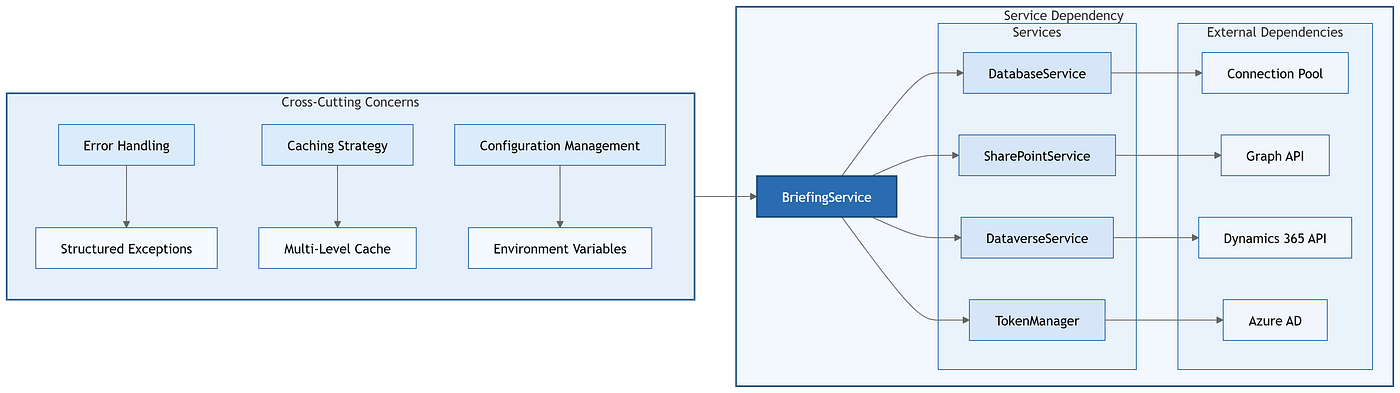
Service dependencies and cross-cutting concerns for the briefing system
Database connection management and performance optimization
The database architecture implements enterprise-grade connection pooling using SQLAlchemy’s engine management with singleton pattern for optimal resource utilization. Query optimization focuses on stored procedures that encapsulate business logic within the database layer, providing better performance through reduced network traffic and simplified application logic.
The system handles large result sets through intelligent JSON reconstruction addressing pyodbc limitations with large responses. This ensures reliable data processing regardless of result size while maintaining optimal memory utilization.
External service integration patterns
SharePoint and Microsoft Graph integration uses lazy-loaded property caching to reduce API calls while maintaining data freshness. Site and drive IDs are cached with intelligent invalidation strategies and dynamic library selection, ensuring document upload reliability.
Dynamics 365 search API integration handles complex response parsing for the Dynamics 365 Search v2.0 API with result processing that transforms raw responses into business-meaningful structures. It includes retry logic for Dynamics 365 rate limiting patterns and intelligent error handling.
Document generation and template processing
The document generation pipeline integrates Jinja2 template processing with intelligent context building transforming raw data into executive-ready insights. The system builds comprehensive template contexts including raw data, calculated metrics, formatting helpers, and business intelligence derived from cross-system analysis.
Template management includes syntax validation and error handling ensuring reliable document generation even when templates are modified. The system supports multi-format document generation with MIME type configuration to enable flexible delivery.
Error handling and exception management
The application implements a structured exception hierarchy providing detailed error information while maintaining security boundaries. Custom exception classes include contextual information enabling effective debugging without exposing sensitive system internals:
Structured exception hierarchy

class AIExecutiveOfficeError(Exception):

    def __init__(self, message: str, error_code: str = None, details: dict = None):

        self.message = message

        self.error_code = error_code or self.__class__.__name__

        self.details = details or {}

        self.timestamp = datetime.utcnow()
The global exception handler transforms technical errors into structured API responses providing actionable information while maintaining appropriate abstraction levels.
Evaluation framework and quality validation
The system undergoes evaluation through a structured testing framework that validates both technical performance and executive briefing quality across multiple enterprise accounts. The evaluation methodology combines quantitative performance metrics with qualitative content assessment through a multi-notebook evaluation pipeline that systematically tests each architectural component using batch processing capabilities.
Quantitative measurements focus on data accuracy validation by comparing metrics in the final populated executive briefing templates with source data from the foundation layer. The evaluation pipeline computes accuracy scores and Mean Absolute Percentage Error (MAPE) to measure how precisely the service layer orchestration preserves data integrity through the complete processing pipeline, from stored procedure results to final executive documents. The pipeline computes these quantitative metrics across multiple enterprise accounts through batch processing and publishes them in a consolidated performance metrics notebook. This provides statistical validation that the pure orchestration architecture maintains data fidelity without introducing calculation errors or semantic drift between the foundation and experience layers.
Qualitative measurements assess a single critical attribute: Company fluency, which evaluates how effectively the generated briefings demonstrate contextual understanding and appropriate communication about each target organization. The qualitative assessment employs LLM-based evaluation that judges generated briefings against five standardized criteria: relevancy (content appropriateness for executive decision-making), coherency (logical flow and narrative structure), accuracy (factual correctness and alignment with source data), clarity (executive-appropriate language and presentation), and completeness (comprehensive coverage of strategic intelligence areas). This LLM evaluation framework provides consistent, scalable assessment of briefing quality while maintaining objective scoring standards across diverse account types and industry contexts.
Next steps: Migration to Microsoft Agent Framework (MAF)
The current four-layer architecture provides an ideal foundation for migration to Microsoft Agent Framework, which would enhance the system’s AI orchestration capabilities while preserving the existing deterministic processing principles. MAF integration would occur primarily at the service layer, where the current FastAPI orchestration logic would be replaced with MAF agents that maintain the same pure data orchestration patterns. The experience layer would undergo a complete transformation, with Copilot Studio replaced by native Microsoft 365 integration that embeds executive workflows in Outlook, Teams, and SharePoint. This Microsoft 365-native experience would use MAF’s natural language understanding capabilities for more sophisticated intent recognition and multi-turn conversation management, while continuing to call the same stored procedures for business intelligence retrieval.
MAF’s built-in observability, prompt management, and agent lifecycle management would eliminate custom infrastructure components while providing enterprise-grade monitoring and deployment capabilities. The migration path preserves existing investments in stored procedures, Jinja2 templates, and SharePoint integration while adding advanced AI capabilities for complex executive scenarios such as multi-account briefings, competitive analysis synthesis, and dynamic template generation based on meeting context and participant roles. Microsoft 365 integration ensures that executive briefing generation becomes an embedded capability within existing productivity workflows, eliminating the need for separate conversational interfaces while maintaining the same deterministic processing architecture in the data and service layers.
Conclusion
The Chief of Staff Executive Briefing Agent transforms executive briefing preparation from manual coordination into automated intelligence generation through a four-layer architecture that separates data consolidation, operational aggregation, business orchestration, and natural language interaction. This deterministic design approach within Microsoft’s unified ecosystem delivers sub-second briefing generation while maintaining enterprise security, governance, and audit requirements that traditional prompt-based AI systems cannot guarantee.
The architecture shows that successful enterprise AI applications prioritize business problem solving over technical sophistication and deliver measurable value through intelligent data integration and process automation rather than advanced machine learning capabilities. By implementing layered separation of concerns, dependency injection patterns, and deterministic execution boundaries, the system provides a replicable blueprint for customer service automation, financial analysis workflows, and operational intelligence applications across the modern enterprise.
This implementation establishes enterprise AI as a strategic capability that enhances existing Microsoft investments while delivering quantifiable business outcomes, proving that architectural rigor and operational excellence create sustainable competitive advantage through systematic intelligence augmentation of critical business processes.
Juhi Singh is on LinkedIn.
메타데이터
- post_id
- 8b1aa812f08c
- slug
- chief-of-staff-executive-briefing-agent-enterprise-scale-layered-architecture-for-automated-8b1aa812f08c
- url
- https://medium.com/data-science-at-microsoft/chief-of-staff-executive-briefing-agent-enterprise-scale-layered-architecture-for-automated-8b1aa812f08c
- canonical_url
- https://medium.com/data-science-at-microsoft/chief-of-staff-executive-briefing-agent-enterprise-scale-layered-architecture-for-automated-8b1aa812f08c
- author_url
- https://medium.com/@jx2237.js90
- status
- ok
- fetched_at
- 2026-06-15 20:49:13





