VB: Business Object API Security
Business Object API Security in Visual Builder
VB: Business Object API Security
DISCLAIMER: The views expressed in this story are my own and do not necessarily reflect the views of Oracle.
Overview
This article describes business object security in Visual Builder. This includes the following:
- Roles: Authenticated User and Anonymous User
- Access Control: Assigning roles to business object API endpoints
- External Access: Accessing business object API outside of Visual Builder using Anonymous User
Depending on your use case, some business objects may require user authentication rather than anonymous access. Security for each business object in your VB application must be configured separately.
Roles
The roles associated with business objects include:
- Authenticated User (default): Requires Basic authentication (username/password) to access business object endpoints.
- Anonymous User: Requires Bearer authentication (access token) to access business object endpoints.
Access Control
CRUD Operations
Furthermore, the following CRUD operations can be assigned one or both of the above roles:
- View: Access to business object GET endpoints.
- Create: Access to business object POST endpoints.
- Update: Access to business object PATCH endpoints.
- Delete: Access to business object DELETE endpoints.
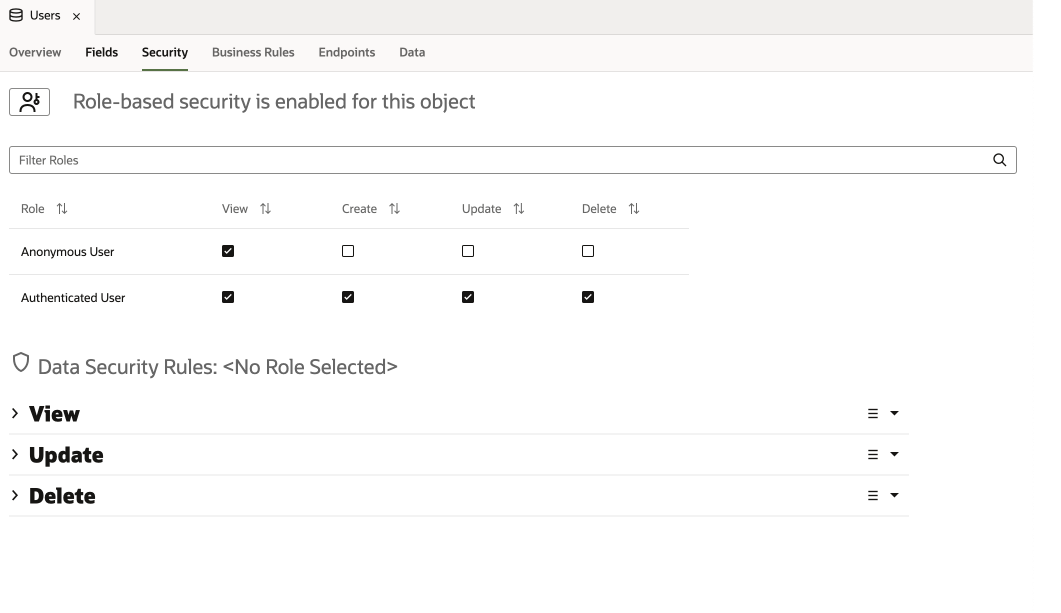
Business Object Security Example
Environments
- Development: Only Authenticated User can access business object API endpoints.
- Stage/Live: Authenticated User and/or Anonymous User can access business object API endpoints.
External Access
- To access business object(s) endpoints outside of Visual Builder using Anonymous User following the below configuration.
NOTE: Business Objects endpoints can be accessed outside of VB only for Staging and Live environments. Development environment CANNOT be accessed outside of VB.
Configuration
Business Objects
- For this example, we will create a business object called Users as shown below. Go to the Fields tab and add the following fields: name and email.

- Go to the Security tab and check View for Anonymous User as shown below.

- Go to Endpoints tab and copy the Data Staging URL under Resource APIs. Save URL for later step.

Settings
- Go to Settings (under top-right menu) then click on Business Objects tab. Under Security section, check the following: Allow anonymous access to business objects describe end point

- Click on ‘Get Access Token’ button and copy the Access Token Value as shown below. Save access token for later step.

- Stage the application.
Test
- Using the Data Staging URL and access token from above steps, we can now make REST calls from outside of VB. We can try this in Postman as shown below.

메타데이터
- post_id
- 8bcf099cb650
- slug
- vb-business-object-api-security-8bcf099cb650
- url
- https://medium.com/oracle-jet/vb-business-object-api-security-8bcf099cb650
- canonical_url
- https://medium.com/oracle-jet/vb-business-object-api-security-8bcf099cb650
- author_url
- https://medium.com/@mzebib
- status
- ok
- fetched_at
- 2026-06-11 15:16:29