CountryKit: the framework Apple forgot to build
We have been developing iOS apps for awhile. When the need to interact with a comprehensive list of countries arose for the third time, we…
CountryKit: the framework Apple forgot to build
We have been developing iOS apps for awhile. When the need to interact with a comprehensive list of countries arose for the third time, we decided to convert our code to a library and share with the iOS developer community to save others from the same pain. CountryKit is a plug-and-play library that includes a list of all countries and their meta data plus a highly configurable picker view. In this blog post, we will demonstrate the features of the CountryKit and how it can be used in your iOS or macCatalyst app.

What is included?
When you add the library to your app, you get 2 primary functionalities:
- Comprehensive list of Countries and their metadata
- Pre-built country picker view
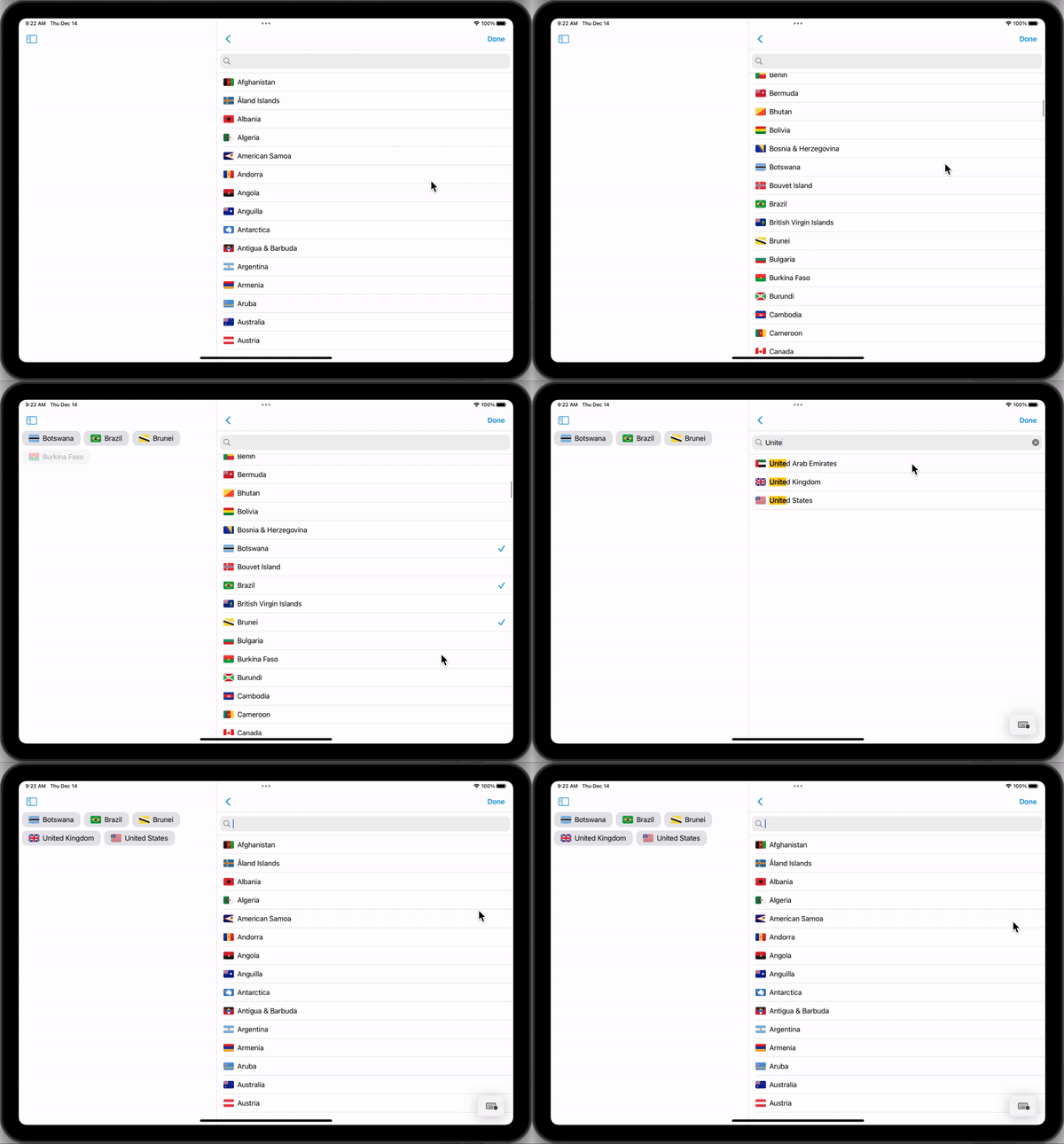
Built with CountryKit
Included meta-data
- Alpha2 & Alpha3 codes
- Localized country name
- Address fields
- National flag
- Locale (spoken languages, calendar information, currency, etc…)
- Top level internet domain (ccTLD)
- Capital city
- Official languages of the country (if any)
- Area
- Timezones
- International dialing code
- Commonwealth membership
- Sovereignty status
When to use CountryKit?
We anticipate that most developers will use it when they are building a form that requires a country selection perhaps for a shipping address or as a travel destination. Especially for these use cases, we built the picker view to make developers’ life dead simple. Here is how to integrate the picker view into your code:
[embed]Example PickerView integration
Highly Configurable UI
If you are using the built-in UI, you can configure it to match your app’s theme. Moreover you can supply your custom UIBarButtons to be presented on the navigation bar. You may also customize the behavior such as:
- Allow multi selection
- Provide your own country list
- Exclude certain countries from the picker
- Preselect countries upon launch
- Adjust search behavior
- and more…
Most functions in the Kit are overridable. This means if you don’t like the default behavior, you can subclass it to customize. Alternatively, you can open an issue on our Github repository and request a new feature or an enhancement.
Combine support
When you are using UICountryPicker, you have the option to receive callbacks via Combine APIs instead of the classic delegate pattern. Callbacks are delivered on the main Dispatch Queue. If you are not yet using Combine in your app, simply implement the protocols(delegates) to receive the same callbacks.
Localization
CountryKit was built with localization in mind. All the country names are automatically localized based on user’s preferred language. CountryKit can optionally present other tooltips, header or footer views to guide the user while interacting with it. In those cases, the host app simply provides the localized text.
Reference
The country list was compiled from Wikipedia. Only those countries or regions that have an alpha2 code assigned are included in this database.
Ability to exclude certain countries
CountryKit provides 3 mechanisms to create a curated list of countries depending on your needs.
1. Based on a criteria
var config = CountryPickerConfiguration.default()
//show only those countries/territories that have commonwealth membership
config.includeOption = [.commonwealthMember]
2. Country Roster
var config = CountryPickerConfiguration.default()
//show only Aruba, Finland and Japan
config.countryRoster = Set([Country.Aruba, Country.Finland, Country.Japan])
config.rosterJustification = ... //optional explanation
3. Manually Exclude Countries
var config = CountryPickerConfiguration.default()
//show everything except Antarctica and Aland Islands
config.excludedCountries = Set([.Antarctica, .Aland_Islands])
config.excludedCountriesJustification = ... //optional explanation
By default, all countries, regions and territories are shown in the Picker UI. If you provide a criteria, that criteria gets applied first. Then you can further filter the list by providing an excluded country list.
Extending CountryKit
Extending CountryKit is relatively straightforward. In order to expand the metadata for each country, all we need is a csv file with each country’s alpha2code and a corresponding new property we want to add. In order to demonstrate this idea, we appended the Locale metadata this way. If you have a request to expand the CountryKit, please open a ticket in our Github repo or open a Pull Request.
Demo and Final Words
Checkout our Github repository for the demo app. We are excited to share this library with the developer community and we hope that you find it useful for your apps.
메타데이터
- post_id
- 8bee2c87995c
- slug
- countrykit-the-framework-apple-forgot-to-build-8bee2c87995c
- url
- https://blog.eclypse.io/countrykit-the-framework-apple-forgot-to-build-8bee2c87995c
- canonical_url
- https://blog.eclypse.io/countrykit-the-framework-apple-forgot-to-build-8bee2c87995c
- author_url
- https://medium.com/@deniznessa
- status
- ok
- fetched_at
- 2026-07-21 17:34:17




