The One-Line Fix for AWS SAM’s Accidental Duplicate API Stages
Hey AWS SAM, I Asked for One API Stage, Not Two.
The One-Line Fix for AWS SAM’s Accidental Duplicate API Stages
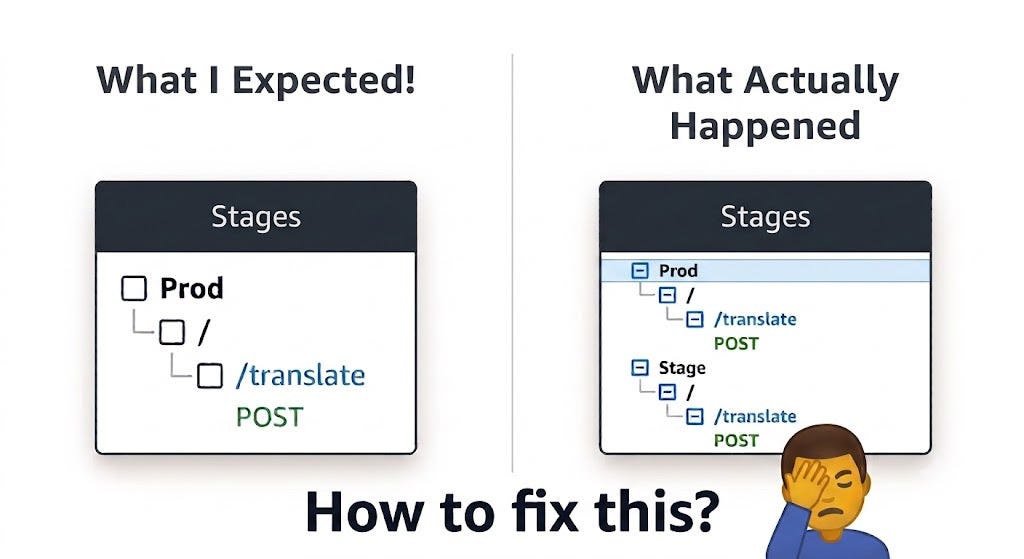
AWS SAM Unexpected behaviour
Hey AWS SAM, I Asked for One API Stage, Not Two.
We’ve all been there. You’re building a sleek, serverless REST API, keeping your infrastructure as code tight and clean. You define your API resource, set your stage to Prod, map your Lambda function to a POST route, and run sam deploy.
You open the AWS Console expecting to see a pristine, single-stage API Gateway setup. Instead, you’re greeted by an uninvited guest: two stages. Prod (the one you asked for) and a ghost environment named Stage.
If you look at the resources tab, everything looks right. But flip over to the stages tab, and there they are — twins you never planned for.
This exact behavior popped up on a serverless translator project I was spinning up recently. At first, it felt like an incredibly annoying bug. But as it turns out, this isn’t a glitch at all — it’s completely intentional. Here is why AWS SAM plays double-agent with your deployment stages, and how a single property cleanly resolves it.
The Reality: It’s Not a Bug, It’s Backward Compatibility
In my template, I had explicitly declared an AWS::Serverless::Api resource with StageName: Prod. I also had my Lambda function pointing right to it using RestApiId. On paper, everything was linked perfectly.
So why did SAM build a duplicate Stage environment?
It comes down to AWS’s golden rule: Never break existing customer deployments.
Years ago, the AWS SAM specification (Transform: AWS::Serverless-2016–10–31) was built to be incredibly hands-off. If a developer throws a Lambda function into a template with an Api event type, SAM is designed to automatically spin up a default, implicit API Gateway backend and deploy it to an environment named Stage.
Because thousands of legacy applications globally still depend on this automatic “mind-reading” behavior, AWS cannot simply remove or rewrite this parsing logic. Doing so could accidentally break or delete live production endpoints during a routine redeployment.
When you mix an explicit API resource with a standard Lambda event block, SAM’s legacy translation engine defaults to its safe zone. It assumes you still want that default, implicit fallback pipeline alongside your custom one, resulting in the duplicate stages you see in the console.
The Solution: One Line to End the Duplication
AWS solved this design conflict not by altering its legacy translation logic, but by giving us a feature toggle. To tell SAM to drop its old assumptions, you just need to add a single property to your API resource: OpenApiVersion: '3.0'.
Resources:
  TranslatorApi:
    Type: AWS::Serverless::Api
    Properties:
      Name: ServerlessTranslatorApi
      StageName: Prod
      OpenApiVersion: '3.0' # <-- The solution
Why this specific term?
OpenAPI (formerly Swagger) is the industry-standard specification for describing REST APIs. By explicitly declaring OpenApiVersion: '3.0', you aren't changing how your API behaves for your end-users. Your endpoints, payloads, and methods stay exactly the same.
Instead, you are altering the deployment blueprint behind the scenes.
Passing this parameter explicitly tells AWS SAM: “I am managing this API definition natively. Generate a strict, modern OpenAPI definition document.” This modern engine leaves zero ambiguity. It perfectly maps the Lambda routes straight into your Prod stage and completely shuts down the legacy fallback that creates the zombie Stage environment.
Clean Up and Continue
If you hit this issue, patch your template.yaml with OpenApiVersion: '3.0', run sam build && sam deploy, and the problem is solved.
Quick tip: To prevent accidental data loss, AWS SAM won’t automatically delete a stage that was already pushed to the cloud. Once your updated template is deployed, simply delete the old Stage environment manually from the AWS Console just this once. Thanks to your new configuration switch, SAM will never create the ghost Stage stage.
Happy Building!!
메타데이터
- post_id
- 8c0c23af12b0
- slug
- the-one-line-fix-for-aws-sams-accidental-duplicate-api-stages-8c0c23af12b0
- url
- https://aws.plainenglish.io/the-one-line-fix-for-aws-sams-accidental-duplicate-api-stages-8c0c23af12b0
- canonical_url
- https://aws.plainenglish.io/the-one-line-fix-for-aws-sams-accidental-duplicate-api-stages-8c0c23af12b0
- author_url
- https://medium.com/@rahul-hans
- status
- ok
- fetched_at
- 2026-07-08 02:40:31