Choosing Your Google AI Playground: AI Studio vs. Vertex AI Studio vs. Gemini Enterprise
Google’s rapid advancements in artificial intelligence have given creators, developers, and enterprises an incredible suite of tools to…
Choosing Your Google AI Playground: AI Studio vs. Vertex AI Studio vs. Gemini Enterprise
Google’s rapid advancements in artificial intelligence have given creators, developers, and enterprises an incredible suite of tools to build with. However, with powerful options like Google AI Studio, Vertex AI Studio, and Gemini Enterprise, it can be challenging to know where to start. Each platform offers access to Google’s state-of-the-art models, including the Gemini family, but they are tailored for vastly different needs and use cases.
If you think about making a meal, you could use a microwave, a home kitchen, or a professional restaurant kitchen. You’ll get a meal from each, but the process, control, scalability, and cost will vary dramatically.
Let’s take a look at these platforms, what are their strengths and weaknesses, so you know which one to pick for a specific context.
Rapid Prototyping with Google AI Studio
Who it’s for: Developers, hobbyists, students, and anyone who wants to quickly experiment with the capabilities of Google’s latest models.
What it is: Google AI Studio is a free, web-based tool designed for rapid prototyping and experimentation. It provides a straightforward and intuitive interface to access Google’s Gemini models. It’s the quickest way to go from an idea to a working prompt.
Best Use Cases & Examples:
- Learning and Exploration: If you’re new to generative AI, AI Studio is your perfect starting point. You can easily test different prompts, play with model parameters like temperature and top-K, and get a feel for what the models can do without writing a single line of code.
- Rapid Prototyping: Imagine you have an idea for a marketing copy generator. With AI Studio, you can create a new prompt, provide a few examples of your desired output (few-shot prompting), and instantly test if the model can generate compelling ad copy. You can iterate on your prompt in seconds.
- Simple Application Development: Once you’ve perfected your prompt, AI Studio allows you to generate an API key and provides code snippets (in Python, Node.js, and other languages) to integrate the functionality directly into your application. It’s a seamless transition from prototype to a simple build.
Key takeaway: AI Studio is your “microwave kitchen.” It’s fast, free, and incredibly easy to use for quick experiments and simple projects. It prioritizes speed and accessibility over deep customization and enterprise-grade features.
Vertex AI Studio: The Professional Kitchen for Building Production-Ready Apps
Who it’s for: AI/ML engineers, data science teams, and businesses building scalable, enterprise-grade AI applications.
What it is: Vertex AI Studio is a fully-managed AI platform built on Google Cloud. It’s a comprehensive workbench that provides all the tools needed to not only use generative AI models but also to customize, manage, and deploy them in a secure and scalable environment.
Best Use Cases & Examples:
- Model Customization and Fine-Tuning: Let’s say you’re building a customer service chatbot for your e-commerce brand. General-purpose models are good, but you need one that understands your specific product catalog and brand voice. In Vertex AI Studio, you can take a foundation model like Gemini and fine-tune it on your own dataset of customer interactions, creating a highly accurate, custom model.
- Grounding with Enterprise Data: A financial services company might want to build an internal tool that can answer employee questions about complex compliance documents. Using Vertex AI’s “grounding” features, they can connect a model to their own internal database or document repository. This ensures the model’s responses are based on the company’s private, up-to-date information, not just public web data.
- End-to-End MLOps: Vertex AI is a complete MLOps (Machine Learning Operations) platform. This means it provides tools for data ingestion, model evaluation, versioning, deployment, and monitoring. This is crucial for businesses that need to manage the entire lifecycle of their AI models in a reliable and repeatable way.
Key takeaway: Vertex AI Studio is your “professional kitchen.” It offers maximum control, customization, and the robust infrastructure needed to build, deploy, and manage sophisticated AI applications at scale.
Gemini Enterprise (pka Agentspace): A platform for agentic workflow creation for Business
Who it’s for: Large organizations and enterprises looking to securely integrate generative AI into their daily workflows and internal processes.
What it is: Gemini Enterprise is not a developer platform in the same way as the others. Instead, it’s a packaged enterprise-grade service that brings Google’s most capable Gemini models into the tools your business already uses, primarily through Google Workspace (Docs, Sheets, Gmail) and a standalone conversational AI experience.
The key differentiator is its focus on enterprise-grade security, data privacy, and administration. The data your company uses with Gemini Enterprise is not used to train Google’s models, ensuring your sensitive information remains confidential.
Best Use Cases & Examples:
- Enhancing Employee Productivity: A marketing team could use Gemini in Google Docs to brainstorm campaign ideas, draft blog posts, and summarize long research reports. A sales team could use it in Gmail to compose professional outreach emails or in Sheets to analyze sales data and generate insights.
- Internal Knowledge Discovery: An employee could ask the standalone Gemini Enterprise chat interface complex questions about company policy or project histories, and because it can be grounded on internal company data, it can provide accurate, relevant answers sourced from internal documents.
- Secure, Governed AI Access: An IT administrator can manage user access, set policies, and monitor usage across the entire organization. This level of control is essential for large companies that need to deploy AI responsibly and securely.
Key takeaway: Gemini Enterprise is a “premium, fully-catered service.” It delivers the power of AI directly to your workforce within a secure, managed, and easy-to-use package, focusing on productivity and data security rather than custom model development.
At a Glance: Key Differences
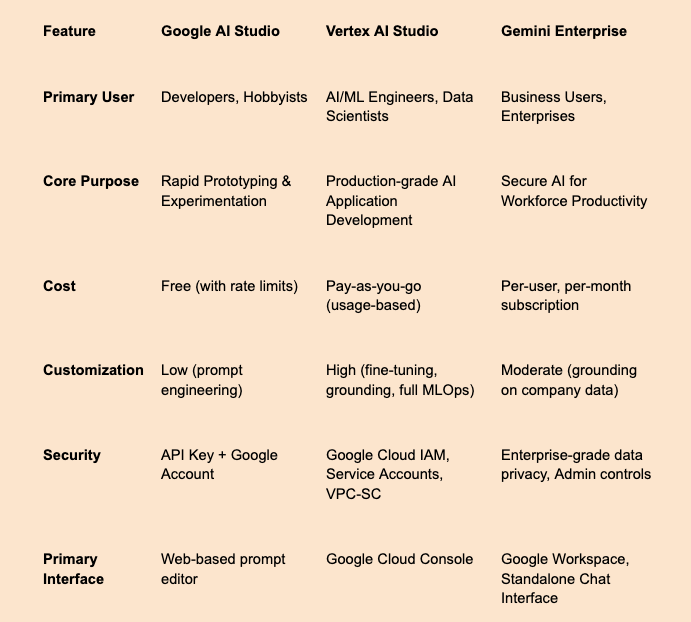
At-a-glance comparison of the three platforms
Deep Dive: Cost Models and Security Posture
Choosing the right platform also means understanding its cost implications and security guarantees.
Comparing the Costs
- Google AI Studio: Is free to use, but subject to rate limits (e.g., a certain number of requests per minute). This generous free tier is designed for learning and prototyping, not for high-traffic production applications.
- Vertex AI Studio: Operates on a pay-as-you-go model. You are billed for what you use, typically based on the number of characters or “tokens” (pieces of words) in your input and output. Pricing varies depending on the model used (e.g., the powerful Gemini 1.5 Pro costs more per token than the faster Gemini 1.5 Flash). Additional services like model fine-tuning and hosting also have their own usage-based costs.
- Gemini Enterprise: Is a subscription-based service, typically billed on a per-user, per-month basis. It is often bundled as an add-on to Google Workspace Enterprise plans. This predictable pricing model is designed for organizations deploying AI capabilities across their workforce.
Handling Security and Authentication
Security is paramount, especially when dealing with potentially sensitive data. Each platform handles it differently.
Google AI Studio: API Key Security
Authentication for the Gemini API generated from AI Studio relies on an API key. This key is a secret token that grants access to the service. Securing it is critical.
Step-by-Step: How to Secure Your AI Studio API Key
- Never Expose the Key on the Client-Side: Do not embed your API key directly in your web page’s HTML, JavaScript, or a mobile app that you ship to users. If you do, anyone can find it and use your quota.
- Store it as an Environment Variable: On your server, store the API key in an environment variable (e.g.,
GOOGLE_API_KEY). This prevents it from being hardcoded into your source code and accidentally committed to a public repository like GitHub. - Create a Backend Proxy: The most secure method is to create a simple backend service (e.g., using Node.js/Express, Python/Flask, or Cloud Functions). Your front-end application calls your backend service without the API key. Your backend service then receives the request, securely appends the API key from its environment variables, and forwards the request to the Google AI API. This acts as a secure proxy, completely hiding the key from the end-user.
Vertex AI: Enterprise-Grade Authentication
Vertex AI is built on Google Cloud and leverages its robust security framework. While you can use API keys, the standard and recommended methods are far more secure.
- Service Accounts: This is the primary method for server-to-server authentication. A service account is a special type of Google account that represents a non-human user (your application). You create a service account, grant it a specific IAM (Identity and Access Management) role (e.g., “Vertex AI User”), and download a JSON key file. Your application uses this key file to authenticate securely without needing a long-lived API key. Access can be easily revoked by changing IAM policies.
- Application Default Credentials (ADC): This is a strategy used by Google Cloud client libraries. When you make a request, the library automatically looks for credentials in a specific order: first checking for environment variables, then for service account credentials (on Google Cloud infrastructure), and finally for credentials from your logged-in Google Cloud CLI. This makes authentication seamless across local development and cloud deployment.
- OAuth 2.0: For applications that need to access APIs on behalf of an end-user (for example, analyzing a user’s own Google Drive files), OAuth 2.0 is the correct protocol. The user grants your application permission through a consent screen, and your app receives a short-lived token to act on their behalf.
Gemini Enterprise: A Walled Garden for Your Data
Security is the core value proposition of Gemini Enterprise.
- Data Privacy Guarantee: Your company’s data and prompts are not used to train Google’s models and are not accessible by Google.
- Robust Access Controls: It integrates with your existing Google Workspace administration, allowing IT to manage user permissions, enforce policies, and audit usage.
- Compliance: The platform is built to meet rigorous enterprise compliance standards, such as ISO/IEC 27001 and SOC 2.
Which One Should You Choose?
- Start with Google AI Studio if: You are learning, exploring a new idea, or building a simple application and want to move fast without any initial cost.
- Move to Vertex AI Studio when: You need to build a production-ready application, require deep model customization, need to connect to your own data sources, or need the security and management of Google Cloud IAM and service accounts.
- Adopt Gemini Enterprise when: Your primary goal is to securely empower your entire organization with generative AI inside the tools they use every day, with a strong focus on data privacy and administrative control.
The beauty of Google’s ecosystem is that these tools are not mutually exclusive. A journey that begins with a quick prototype in AI Studio can easily evolve into a full-fledged, custom-tuned model on Vertex AI, ultimately creating a powerful internal tool that is then accessed securely by your team through Gemini Enterprise. The key is to start with the right tool for the job.
메타데이터
- post_id
- 8c61890dca33
- slug
- choosing-your-google-ai-playground-ai-studio-vs-vertex-ai-studio-vs-gemini-enterprise-8c61890dca33
- url
- https://medium.com/the-savvy-canary/choosing-your-google-ai-playground-ai-studio-vs-vertex-ai-studio-vs-gemini-enterprise-8c61890dca33
- canonical_url
- https://medium.com/the-savvy-canary/choosing-your-google-ai-playground-ai-studio-vs-vertex-ai-studio-vs-gemini-enterprise-8c61890dca33
- author_url
- https://medium.com/@schank.gene
- status
- ok
- fetched_at
- 2026-06-15 20:49:13



