Implementing Face Extension Kit using CLOVA Face Recognition (CFR) API in NAVER Cloud
Introducing the method for implementing your own face extension kit by linking NAVER Cloud Platform’s CFR (CLOVA Face Recognition) API.
Implementing Face Extension Kit using CLOVA Face Recognition (CFR) API in NAVER Cloud
Introducing the method for implementing your own face extension kit (face recognition kit) by linking NAVER Cloud Platform’s CFR (CLOVA Face Recognition) and CLOVA Face Recognition service API.
Learn more about NAVER Cloud Platform’s CFR API
NAVER Cloud Platform’s CFR (link) is a face recognition API that provides various information on faces. This API service is useful when recognizing faces with input vision data or when creating applications using face detection. You can find the celebrity who looks most similar to the face in the image, or get information on the contour, position of the eyes, nose, and mouth, and expression of the face.

Summary of NAVER Cloud Platform’s CFR service
CLOVA Face Recognition API (referred to as the CFR API below) receives input image data and returns facial recognition results in JSON format. CFR API consists of the following two APIs: the face API, which recognizes faces in an image and provides analysis information, and the celebrity API, which finds celebrities who look similar to the recognized faces. In addition to being an HTTP-based REST API, CFR API is a non-login open API that does not require user authentication (login).

NAVER Cloud Platform’s CFR API
1. Celebrity API
This REST API detects faces in the input image, finds look-alike celebrities, and returns the result. The following information is analyzed from the input image.
✔ The number of faces detected ✔ Analysis information of each face detected — Name of the look-alike celebrity — Degree of similarity to the celebrity

NAVER Cloud Platform’s CFR celebrity API request
2) Face API
This REST API detects faces in the input image and returns how many faces have been recognized, where and how big each face is, and what it looks like. The following information is analyzed from the input image:
✔ The number of faces detected ✔ Analysis information of each face detected — Coordinates and size — Coordinates of eyes, nose, and mouth — Presumed gender — Presumed age — Emotion analyzed from face — Direction of face

NAVER Cloud Platform’s CFR face API request
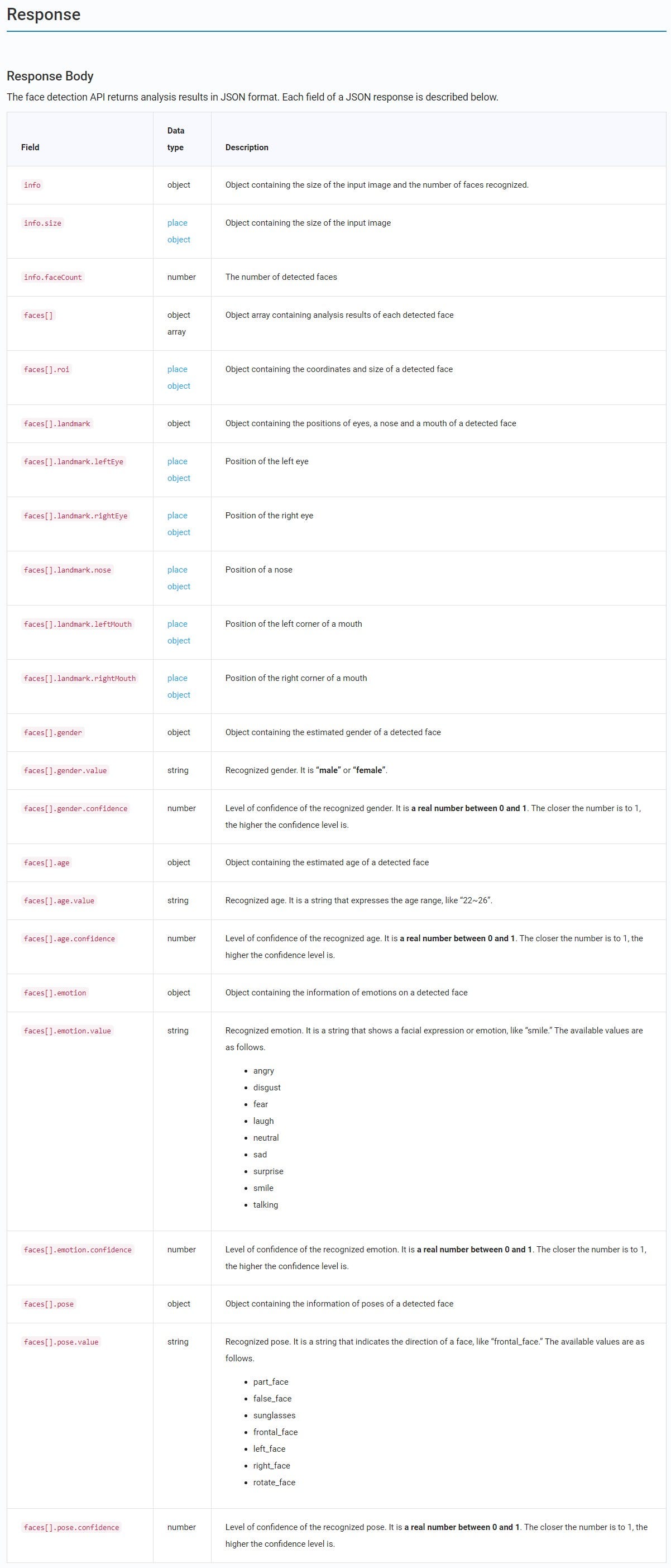
NAVER Cloud Platform’s CFR face API response

NAVER Cloud Platform’s CFR face API object response
Register NAVER Cloud Platform applications
You must complete the application registration as shown below in order to use NAVER Cloud Platform’s AI/Application service. You can use the client ID and secret key information when implementing the service by using the corresponding authentication information.

NAVER Cloud Platform application server registration
You can check the authentication information and service limits of registered services as below.

NAVER Cloud Platform’s CFR application registration information

NAVER Cloud Platform’s CFR application limits and settings
Implementing your own face extension kit
Let’s find out how you can implement your own face extension kit by using the CFR API in 6 steps.
▲Implement CFR server ▲Run CFR server ▲Run mosaic conversion ▲Results of running mosaic conversion ▲Merge original image files ▲Results of merged image files
1. Implement CFR server
Analyze the position of faces in the original image file and extract analysis information in a JSON file.
① Enter client ID and secret key ② Use the face recognition API ③ Start express server

CFR server implementation
2) Run CFR server
Obtain coordinate information for faces from the original image through the CFR API.
① Full image information ② Face position information ③ Full face information

Results of CFR server execution
3) Run mosaic conversion
Use the position information of faces extracted from the CFR server to turn the face area into a mosaic.
① Original image file ② Image area to be converted into a mosaic ③ Run mosaic conversion

Face position mosaic conversion method
4) Results of running mosaic conversion
Check the results of running mosaic conversion by using the face information extracted from the CFR server.
① Original image file ② Image file converted into a mosaic

Results of face position mosaic conversion
5) Merge original image files
Create a final image file by merging the original image file and the image file for which only the face has been converted into a mosaic.
① Original image file ② Converted mosaic image file ③ Merge the two image files ④ Load the final merged image file

The merger of original and mosaic files
6) Results of merged image files
After merging images in Step 5, you can check the merged image file through the web server.

Results of merging original and mosaic files
Lastly, attached below is the source code of the mini project.
👉Source code: https://github.com/NaverCloudPlatformDeveloper/Simple-AI-Service-DEVEW2020/tree/main/Simple-CFR

cfr_service.js

convert.html

merge.html
So far, we’ve examined the method of implementing your own face extension kit by using NAVER Cloud Platform’s CFR (CLOVA Face Recognition) API. You can implement various high-quality services related to the face if you use NAVER Cloud Platform’s CFR which has a precise recognition rate.
We will share more methods of utilizing NAVER Cloud Platform’s various AI server APIs in the future. We appreciate your interest and thank you for taking the time to read this post!

NAVER CLOVA Face Recognition API

Various CLOVA AI services including Speech Recognition, Speech Synthesis, Chatbot, and OCR

180 cloud/AI services essential for business
This post has been written by Changhwan Jang, a NAVER Cloud software engineer. Thank you Changhwan~!
메타데이터
- post_id
- 8cfb28cccb2a
- slug
- implementing-face-extension-kit-using-clova-face-recognition-cfr-api-in-naver-cloud-8cfb28cccb2a
- url
- https://medium.com/naver-cloud/implementing-face-extension-kit-using-clova-face-recognition-cfr-api-in-naver-cloud-8cfb28cccb2a
- canonical_url
- https://medium.com/naver-cloud/implementing-face-extension-kit-using-clova-face-recognition-cfr-api-in-naver-cloud-8cfb28cccb2a
- author_url
- https://medium.com/@navercloud
- status
- ok
- fetched_at
- 2026-07-28 10:13:36

