UGREEN 100W Nexode Pro GaN Charger 2023 REVIEW — MacSources
Charger with power enough for a Mac, petite enough for a pocket.
UGREEN 100W Nexode Pro GaN Charger 2023 REVIEW — MacSources
Charger with power enough for a Mac, petite enough for a pocket.
According to TechCrunch.com, online consumers spent ~$9.8 billion during the 2023 Black Friday season, representing an estimated 8% increase from the prior year’s spending. If you ponder the $38 billion spent by 200.4 million shoppers between Thanksgiving and Cyber Monday ( cnbc.com), it may not be much of a shock to realize that the tech sector dominated a large portion of the sales. Interestingly, as of 2021, the average U.S. household had 22 connected devices, according to a Deloitte survey. With so many tech devices requiring power, wall charging space becomes a limiting factor to expansion. If you want that perfect gift or stocking stuffer this Christmas, think of a multiport GaN charger to solve the little quandary.
Packaging:
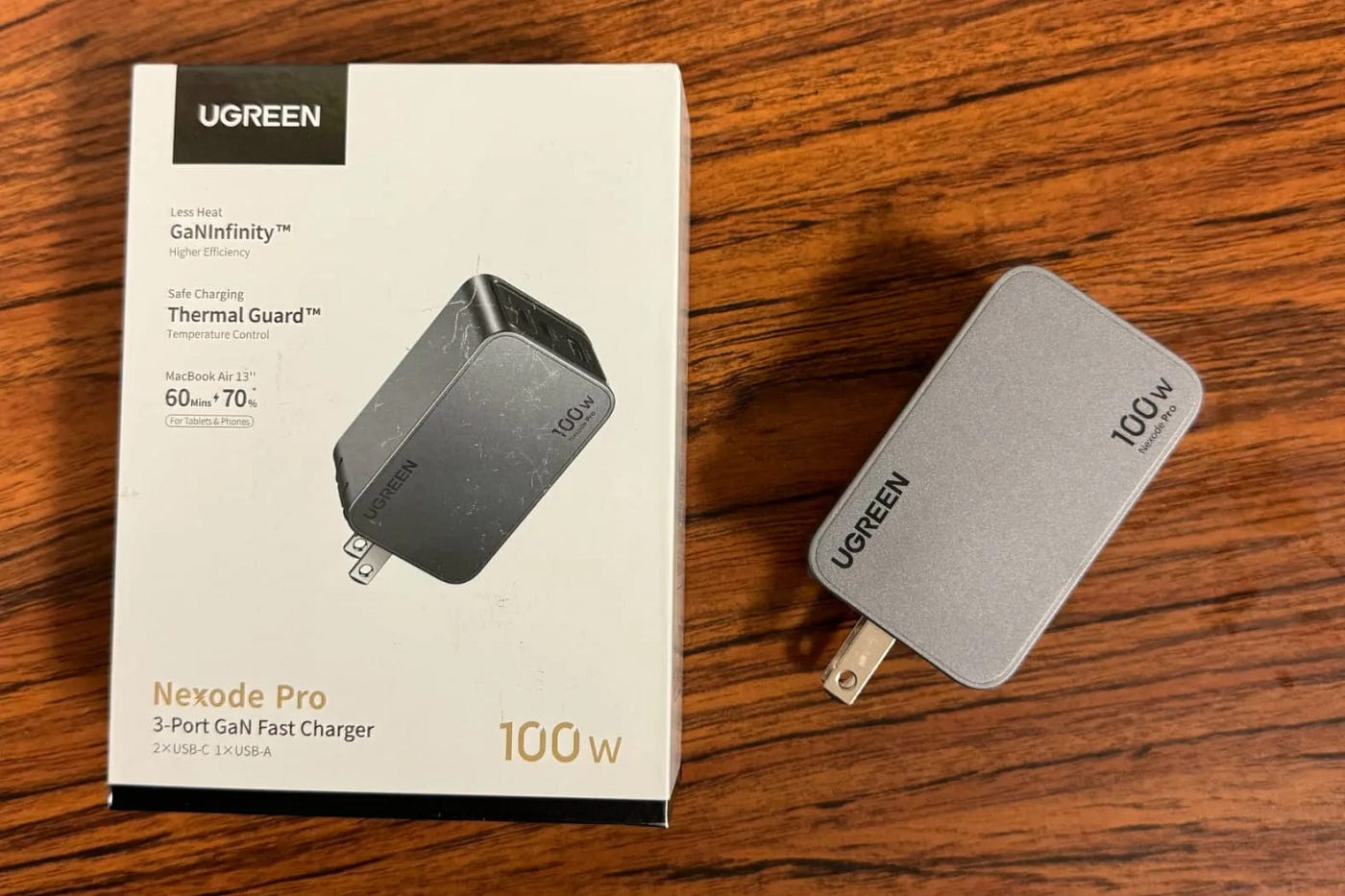
One solution to expand charging capabilities is to use a multi-port charger adapter/hub. The UGREEN Nexode Pro 3-Port GaN 100W Fast charger arrived in a clean white retail package (3 15/16 inches wide by 5 5/16 inches tall by 1 5/8 inches thick). The UGREEN name was displayed within a black rectangle along the top left of the cover panel. You will find three product feature icons along the left of the panel and the product name/100-watt power output along the bottom. The icons detailed the decreased heat/improved efficiency of the GaN technology, improved safety and temperature control, and the ability to charge a MacBook Air 13" up to 70% in 60 minutes. The main focal point of the cover was the obliquely angled image of the three-port charger and the retractable type A wall prong.

The left side panel provided a helpful specifications table which detailed the 100–240V 50–60Hz 1.8A Max input, USB C1 5V/3A 9V/3A 12V/3A 15V/3A 20V/3A 100W max, USB C2 5V/3A 9V/3A 12V/2.5A 30W Max, USBA 5V/3A 9V/2A 12V/1.5A 10V/2.25A 22.5W Max. The rear panel showed a generic image of a GaN circuit, listed four product features (fast charging/compact size, less heat produced/lost with higher efficiency, and intelligent power delivery), company contact information, and product manufacturing labels. The lower black-colored panel provided a product UPC barcode. I was pleased with the presentation but would have preferred another angle of the charger over the generic GaN circuit image on the back panel. The image on the cover showed a rectangular shape, retractable Type A wall prong, rounded edges, and showcased the three USB ports.
Testing:
I removed the top cover panel, the cardboard package with FCC/IC statement manual/Model X757 User manual, and then the 5.85-ounce charger from the box. The device measured 2 3/4 inches long by 1 11/16 inches tall by 1 1/4 inches thick and had three stacked USB ports, USB-C1, USB-C2, and a bottom USB-A1. I loved that the front 1 1/8 inches wide by 1 3/8 inches tall black panel contrasted against the silver side, top, and bottom panels. Both side panels displayed the UGREEN name along the top left corner and the 100W Nexode Pro name along the bottom right corner. The bottom panel listed the product specifications and manufacturing labels. The rear panel provided a centered retractable type-A wall prong. The overall design felt robust and was visually appealing.
I plugged the device into a standard wall outlet and found that I could use either the top or bottom outlet without obstruction. I plugged Klein Tools Multimeters into the USB-C1 and USB-C2 ports and a Drok USB-A multimeter into USB-A1 starting at 8:44 PM. I plugged my MacBook Pro 15" 2018 into the USB-C1 multimeter, my iPad Pro 12.9" Generation 5 into the USB-C2 multimeter, and my son’s iPad mini 5th generation into the Drok USB-A multimeter. At 8:44 PM, my Mabook Pro was at 23% power (20.03V/2.87A). By 9:00 PM, my MacBook increased to 29% (20.04V/2.87A); by 9:35 PM, the device increased to 58% (20.04V/2.15A). By 10:23 PM, the MacBook was at 89% power (20.02V/2.88A), and by 10:46 PM, it was at 99% power. It was fully charged by 10:48 PM.

My iPad Pro 12.9" Generation 5 started at 3% power at 8:44 PM (5.09V/1.43A). By 9:00 PM, the iPad Pro increased to 6% (5.09V/1.43A), by 9:35 PM to 14% (5.10V/1.43A), by 10:23 26% (5.09V/1.43A). The IPad Mini 5th Generation started at 4% at 8:44 PM (5.08V/2.01A) and increased to 17% by 9:00 PM (5.07V/2.01A). By 9:35 PM, the iPad Mini increased to 40% (5.07V/2.01A) and was at 76% by 10:23 PM. At that time my son wanted to use his iPad for a few minutes before bed, so I removed it from power. I noticed that the iPad was charging a bit slower than expected and was happy to see a significant boost in power when I removed the USB-A charging device. Once removed, the USB-C2 output increased to 12.07V/2.43A. My iPad Pro increased from 26% at 10:23 PM to 46% power by 10:46 PM (12.10V/2.38A). When my MacBook charged to full at 10:48 PM, I removed the device from the charger and moved the iPad Pro to USB-C1 (15.02V/2.39A). When I moved it to USB-C2, the Multimeter displayed 12.08V/2.43A. By 11:13 PM, the iPad Pro increased to 70%. By 11:55 PM, the iPad had increased to 93% (12.12V/0.62A). By 12:13 AM, the iPad increased to 96% (12.14V/0.35A). It was fully charged by 12:30 AM.
For a subsequent test, I used the charger to recharge my iPhone 15 Pro Max. I evaluated both USB-C charging ports starting at 12:20 AM at 16% phone power. USB-C2 registered 9.06V/2.94A, whereas USB-C 1 showed 9.01V/2.94A. From 12:20 AM to 12:36 AM, the iPhone increased to 44% (9.02/2.45A). By 12:54 AM, my iPhone increased to 76% (9.04V/1.56). By 1:10 AM, the iPhone entered into optimized charging mode and noted it would be done by 06:15 AM. I repeated the test several times and found very little difference between USB-C1 and USB-C2 for single charging mode. There was a difference in dual mode and even more noticeable changes with tripe charging. The instruction manual provided a helpful guide to charging distribution on pages four and five. For single-device charging, USB-C1 can output up to 100W, USB-C2 up to 30W, and USB-A1 up to 22.5W. For dual charging USB-C1/2, you can expect 65W/30W capabilities. For USB-C1/A1 65W/22.5W and for USB-C2/USB-A1, you can get aa amax of 5V/3A output. When using all three ports, you can expect 65W output from USB-C1, and a combo of 5V/3A from the USB-C2/USB-A ports.
During the testing phase, the outer surface became quite hot to the touch. Using a Nubee Infrared thermometer, I tested the side panel/top panel of the GaN charger. I found both the side and top panels reached 169.1 degrees Fahrenheit while charging three devices. The device produced noticeably less heat while charging just my MacBook Pro via USB-C1 or USB-C2. When I plugged multiple devices into the charger, the surface temperatures increased. Luckily, GaN technology can allow the device to reach/function at more optimal temperatures. Once my devices were fully charged, I removed the device from power, retracted the Type A wall prong, and put the device into an admin pocket on my daypack.

Summary:
I was pleased with the size, weight, design, stacked USB ports, and dual USB-C and single USB-A ports. I was initially concerned about the length of the device and that it may sag once cables were installed. However, I was pleased that the device remained firmly affixed once plugged into an outlet. The device worked better as a dual USB-C charger and produced a good amount of power to both my MacBook Pro 15″ and iPad Pro 12.9″. I liked that the USB-C1 maintained at least 65W of power, but I would have preferred the USB-C2 to have a dedicated output instead of sharing with USB-A1 (5V/3A). The design almost felt like a single USB-C with an original design for dual USB-A ports. If I were designing a future device, I would make the USB-A port 5V/1A and, dedicate the USB-C1 to 65W, USB-C2 to 30W, and allow the USB-A1 to trickle. Overall, I appreciated the color scheme, the instruction manual, and the secure, retractable wall prong.
Learn more about the UGREEN Nexode line of chargers. Follow UGREEN on Facebook and Twitter.
Originally published at https://macsources.com on December 19, 2023.
메타데이터
- post_id
- 8d2171a3dd3d
- slug
- ugreen-100w-nexode-pro-gan-charger-2023-review-macsources-8d2171a3dd3d
- url
- https://medium.com/@macsources/ugreen-100w-nexode-pro-gan-charger-2023-review-macsources-8d2171a3dd3d
- canonical_url
- https://medium.com/@macsources/ugreen-100w-nexode-pro-gan-charger-2023-review-macsources-8d2171a3dd3d
- author_url
- https://medium.com/@macsources
- status
- ok
- fetched_at
- 2026-07-24 17:51:13