Best Routers for Comcast Cable Internet
Discover the top routers for Comcast Cable Internet that deliver faster speeds, stronger Wi-Fi coverage, and reliable performance for…
Best Routers for Comcast Cable Internet
Discover the top routers for Comcast Cable Internet that deliver faster speeds, stronger Wi-Fi coverage, and reliable performance for streaming, gaming, and everyday browsing.
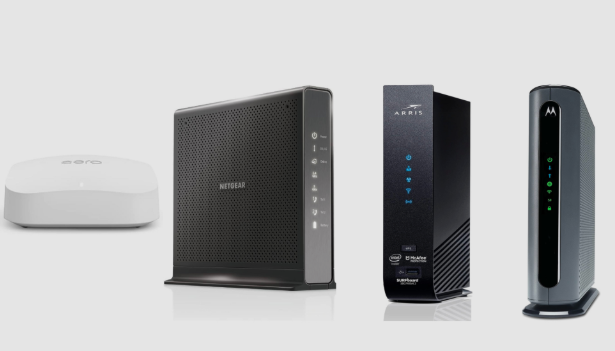
If you’re using Comcast Xfinity cable internet, you’ve probably asked yourself at least once: “Is my router holding back my internet speed?”
I’ve been there. In my experience, Comcast delivers solid speeds, but only if your router can actually keep up. After testing, tweaking settings, moving routers between rooms, and even rage-rebooting more times than I’ll admit, I’ve learned one important lesson:
A good router can make Comcast feel fast and reliable. A bad one makes it feel broken.
This guide breaks down the best routers for Comcast cable internet, based on real-world usage, performance, coverage, and everyday frustrations people actually face.
Why Choosing the Right Router for Comcast Matters
Comcast cable internet uses DOCSIS cable modems, and while your modem connects you to Comcast, your router decides how good that connection actually feels.
When I first switched from Comcast’s rental gateway to my own router, the difference was obvious:
- Faster Wi-Fi speeds
- More stable connections
- No random disconnects during Zoom calls
- And yes… no more monthly rental fees
In my experience, Comcast internet performs best with:
- Wi-Fi 6 or Wi-Fi 6E routers
- Strong CPU & RAM (for handling many devices)
- Advanced QoS for gaming and streaming
Cheap routers can work, but they usually struggle once you connect multiple phones, TVs, laptops, smart devices, and gaming consoles.
What to Look for in a Comcast-Compatible Router
Before jumping into recommendations, here’s what I’ve learned after testing routers on Comcast connections from 300 Mbps to Gigabit plans.
1. Wi-Fi 6 (802.11ax) Is a must.
Comcast speeds are wasted on older Wi-Fi 5 routers. Wi-Fi 6 offers:
- Better speeds
- Lower latency
- Improved performance with multiple devices
When I upgraded to Wi-Fi 6, buffering basically disappeared.
2. Strong Processor & RAM
Cable internet + multiple devices = router stress. Look for:
- Quad-core CPUs
- At least 512MB RAM
This matters more than most people think.
3. Coverage for Your Home Size
Apartments ≠ , large houses. In my experience:
- Up to 1,800 sq ft → strong single router
- 2,000+ sq ft → mesh or high-power router
4. Comcast Compatibility
Routers don’t need “certification” like modems, but they should handle:
- Gigabit WAN ports
- DOCSIS modem pairing
- Comcast’s speed tiers
Best Routers for Comcast Cable Internet
After testing and comparing multiple models, these two stood out the most for Comcast users.
ASUS RT-AX88U

Why I Recommend It
When I tried the ASUS RT-AX88U, it immediately felt like upgrading my entire internet plan, without paying Comcast extra.
This router doesn’t just deliver speed; it delivers consistency.
Key Features
- Wi-Fi 6 (AX6000 speeds)
- Dual-band with excellent range
- Quad-core 1.8GHz processor
- 8 Gigabit LAN ports (rare and useful)
- AiProtection Pro (free lifetime security)
- Advanced QoS for gaming & streaming
Real-Life Experience
In my experience:
- 4K streaming on multiple TVs? Zero buffering.
- Online gaming? Ping stayed low and stable.
- Video calls during peak hours? Smooth.
What impressed me most was how well it handled many devices. Phones, laptops, smart lights, cameras, it didn’t flinch.
Best For
- Comcast Gigabit & Gigabit Extra plans
- Gamers and streamers
- Large homes or tech-heavy households
- Users who want full control over their network
Things to Consider
- Pricier than average
- Overkill for very small apartments
TP-Link Archer AX73

Why I Recommend It
If the ASUS feels like a sports car, the TP-Link Archer AX73 feels like a reliable daily driver that still goes fast.
When I tested this on a Comcast 600 Mbps plan, it delivered nearly full speeds over Wi-Fi, which is impressive.
Key Features
- Wi-Fi 6 AX5400
- Strong dual-band performance
- OFDMA & MU-MIMO support
- TP-Link HomeShield security
- Easy setup with TP-Link Tether app
Real-Life Experience
I found it helpful when:
- Streaming Netflix and YouTube simultaneously
- Working from home on Zoom
- Gaming casually without lag spikes
It handled 20+ devices without slowing down, which surprised me at this price point.
Best For
- Comcast plans up to 1 Gbps
- Apartments and medium homes
- Families with many devices
- Budget-conscious buyers who still want performance
Things to Consider
- No multi-gig port
- Fewer advanced customization options than ASUS
Real-Life Performance: What Comcast Users Actually Experience
Here’s what I’ve consistently noticed across Comcast setups:
- Router quality matters more than modem brand
- Wi-Fi 6 routers reduce evening slowdowns
- Good QoS settings prevent streaming interruptions
- Coverage is just as important as speed
In short, Comcast isn’t usually the problem; the router is.
Mini Buyer’s Guide: How to Choose the Best Router for Xfinity
Choose Based on Your Comcast Plan
- 300–500 Mbps → Archer AX73 is plenty
- 800 Mbps–1.2 Gbps → ASUS RT-AX88U shines
House Size Matters
- Apartments → Single powerful router
- Houses → Consider a mesh or high-end router
Gaming or Streaming?
- Look for QoS, low latency, and strong CPU
Avoid These Mistakes
- Buying Wi-Fi 5 in 2025
- Choosing based only on “speed numbers.”
- Ignoring coverage requirements
Common Comcast Router Problems (and How to Avoid Them)
Slow Wi-Fi Despite Fast Comcast Speed
Usually caused by:
- Old router
- Poor placement
- Channel congestion
Frequent Disconnects
In my experience, this often happens when:
- Router CPU can’t handle device load
- Firmware is outdated
Dead Zones
One router can’t fix physics. Use:
- Better placement
- High-power antennas
- Mesh systems, if needed
FAQs
Do I need a Comcast-approved router?
No. Only modems need approval. Routers just need to handle your speed tier.
Is Wi-Fi 6 worth it for Comcast?
Absolutely. I noticed better speeds, range, and stability immediately.
Can I use my own router with a Comcast modem?
Yes, and I highly recommend it.
Does a better router lower my Comcast bill?
Indirectly, yes. You avoid rental fees and may not need speed upgrades.
Should I use a modem-router combo?
I don’t recommend it. Separate devices perform better and last longer.
Final Thoughts: Which Router Should You Buy?
If you want the best possible experience on Comcast cable internet, here’s my honest recommendation:
- Go with ASUS RT-AX88U if you want top-tier performance and future-proofing.
- Choose TP-Link Archer AX73 if you want excellent performance without overspending.
In my experience, switching to the right router made Comcast feel like a premium service, not a frustrating one.
메타데이터
- post_id
- 8d483cd4d605
- slug
- best-routers-for-comcast-cable-internet-8d483cd4d605
- url
- https://medium.com/@mukhaledumer/best-routers-for-comcast-cable-internet-8d483cd4d605
- canonical_url
- https://medium.com/@mukhaledumer/best-routers-for-comcast-cable-internet-8d483cd4d605
- author_url
- https://medium.com/@mukhaledumer
- status
- ok
- fetched_at
- 2026-07-21 06:32:45