Building a Simple RAG Pipeline Using Local LLMs (Ollama + ChromaDB)
In the era of AI-powered applications, Retrieval-Augmented Generation (RAG) has emerged as a powerful pattern to build intelligent systems…
Building a Simple RAG Pipeline Using Local LLMs (Ollama + ChromaDB)
In the era of AI-powered applications, Retrieval-Augmented Generation (RAG) has emerged as a powerful pattern to build intelligent systems that can answer questions using your own data.
In this article, we’ll walk through a simple yet effective RAG pipeline using:
- Ollama (for local LLM inference)
- ChromaDB (for semantic search)
- LangChain
- Python
This setup is ideal for enterprise use cases where data privacy matters, since everything runs locally.
What is RAG?
RAG (Retrieval-Augmented Generation) is a technique where:
- You store your data as embeddings
- Retrieve relevant chunks based on a query
- Pass them to an LLM to generate accurate answers
This avoids hallucination and makes AI responses grounded in your data.
Architecture Overview
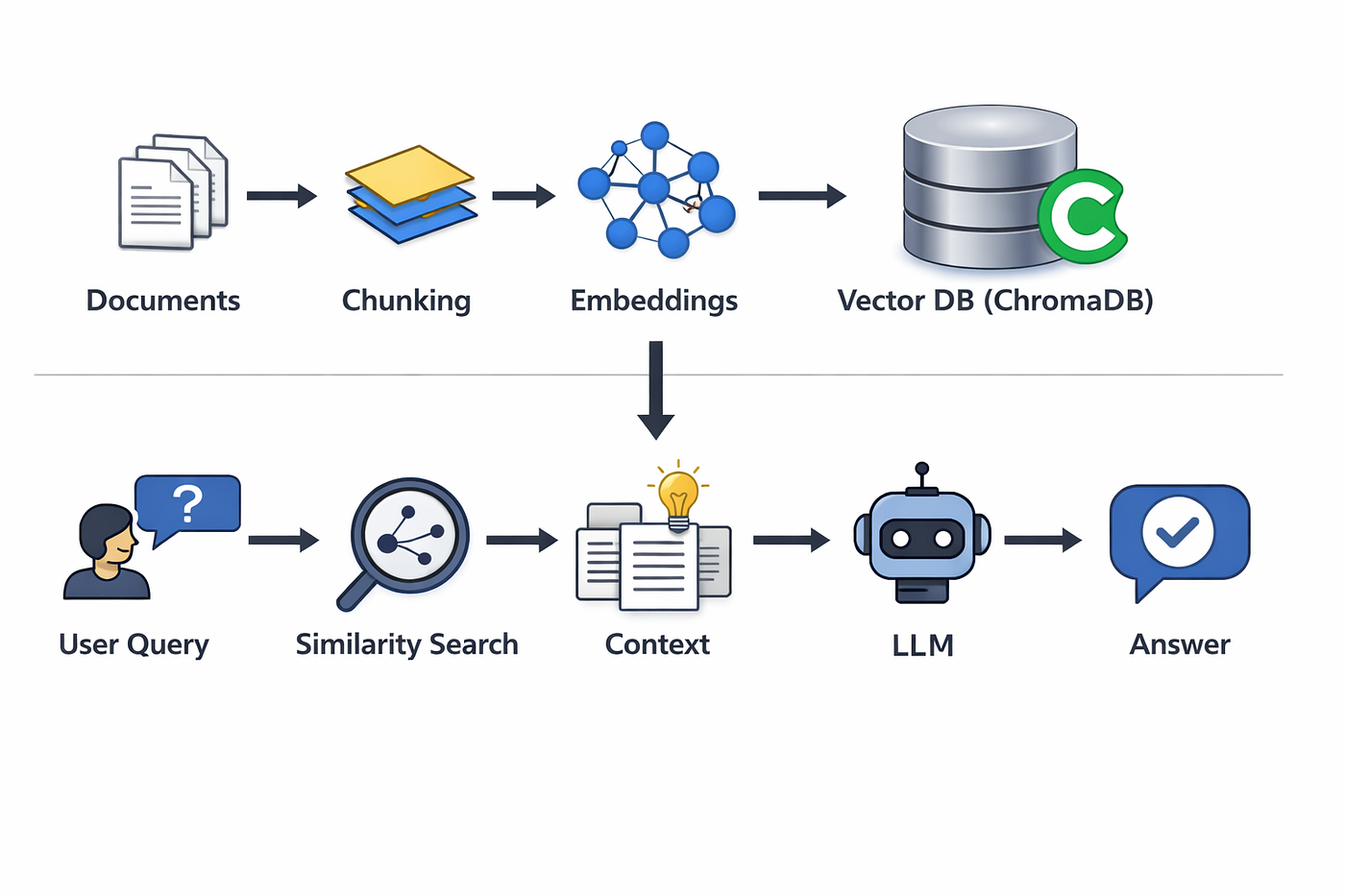
Tech Stack
- LLM: Ollama (Llama3)
- Vector DB: ChromaDB
- Orchestration: LangChain
- Language: Python
Setup Instructions
1. Install Ollama
2. Pull the model
ollama pull llama3Install dependencies
py -m pip install -r requirements.txtStep 1: Document Ingestion
The ingestion pipeline reads .txt files, splits them, and stores embeddings.
Key responsibilities:
- Load documents
- Split into chunks
- Generate embeddings
- Store in vector DB
Core logic:
documents = load_documents()
split_docs = splitter.split_documents(documents)
vectorstore = Chroma.from_documents(
    documents=split_docs,
    embedding=embedding,
    persist_directory=CHROMA_DB_DIR
Highlights:
- Uses
RecursiveCharacterTextSplitter - Adds metadata (source file)
- Stores embeddings locally
Run it:
py src/ingest.pyStep 2: Query Pipeline
Once data is indexed, we can query it using semantic search.
Flow:
- Load vector DB
- Retrieve top-K similar chunks
- Send context to LLM
- Generate answer
RAG Chain:
rag_chain = (
    {
        "context": retriever | format_docs,
        "question": RunnablePassthrough()
    }
    | prompt
    | llm
    | StrOutputParser()
)
Prompt Design
Answer the question based only on the context below.This ensures:
- No hallucination
- Context-aware answers
Run query:
py src/query.pyFull Pipeline Flow
- Load documents
- Split into chunks
- Generate embeddings
- Store in ChromaDB
- User asks question
- Retrieve relevant chunks
- Send context to LLM
- Generate response
Features
- Load and process documents
- Smart chunking
- Local embeddings via Ollama
- Semantic search using ChromaDB
- Context-aware LLM responses
- Fully local (privacy-friendly)
Why This Matters for Enterprise
This architecture is powerful because:
Data Privacy
No external API calls — everything runs locally.
Cost Efficient
No token-based billing.
Extensible
Can scale to:
- Multiple data sources
- APIs
- Databases
Foundation for Advanced Systems
This is the base for:
- Chatbots
- Knowledge assistants
- Document intelligence systems
Limitations
- Local models are slower than cloud LLMs
- Limited context window
- Requires optimization for large datasets
Future Enhancements
- Add support for PDFs & APIs
- Introduce hybrid search (keyword + vector)
- Add UI (React-based chatbot)
- Integrate better LLMs (cloud or fine-tuned)
Final Thoughts
This project demonstrates how you can build a complete RAG system locally using modern tools.
It’s a great starting point for building:
- Enterprise AI assistants
- Internal knowledge systems
- Secure AI applications
메타데이터
- post_id
- 8d6f2ffe4bb4
- slug
- building-a-simple-rag-pipeline-using-local-llms-ollama-chromadb-8d6f2ffe4bb4
- url
- https://medium.com/@tecanil/building-a-simple-rag-pipeline-using-local-llms-ollama-chromadb-8d6f2ffe4bb4
- canonical_url
- https://medium.com/@tecanil/building-a-simple-rag-pipeline-using-local-llms-ollama-chromadb-8d6f2ffe4bb4
- author_url
- https://medium.com/@tecanil
- status
- ok
- fetched_at
- 2026-06-09 15:37:30